skip to content

Mobile applications at WEDOWEBAPPS

Transform Your Business with Custom Mobile Applications by WedoWebApps

In the present scenario in the world of digital services, companies across the globe like to include applications as part of their marketing campaigns; having a website isn’t enough for products in business anymore as there is an increment of usages of smartphones in daily based. Companies need to think about some effective solutions so that companies can easily connect with clients whether they are searching for products and services using internet-connected smartphones or tablets.

Why Mobile Applications Are Essential in Today’s Digital Era

A mobile application brings a massive change in business to manage tasks easily and gives agility in the industry. Besides this, it helps to gain several commercials as many people access your mobile application. As there is a craze for mobile apps, many companies are using it to order cyberspace and reach out to their clients directly. No doubt your website is mobile responsive and mobile compatible, but a much better approach to expand your customer base requires building a personalized app for your app. As it helps customers quickly access and WEDOWEBAPPS LLC like to bring revolutionary changes in your business.

Travel-Related Mobile Applications

Google Maps driving directions integrate seamlessly with modern mobile apps to provide optimized travel routes. If you’re planning a road trip, explore how Google Maps Trip Planner can enhance your navigation experience.

WedoWebApps: Your Partner for Custom Mobile App Development

With the help of WEDOWEBAPPS LLC, the process can be simple and robust. We will provide you with high quality, cost-effective, efficient services that can change the way of your business and bring revolution to your business. We have professionals who convert your website into a mobile application development or build your dream application according to your expectation. Your specific needs relating to your lack of mobile app can be addressed with great care at WEDOWEBAPPS LLC. We give shapes to your dream applications and make them successful.

So what are you waiting for?? Just drop us your needs at sales@WeDoWebApps.com

Explore the mobile applications at WedoWebApps and ensure you’re equipped with all the necessities for Android app development to create robust and successful apps.

Check out the mobile applications at WedoWebApps, and discover how hiring cheap app developers can help you achieve high-quality results without breaking the bank.

As smartphones continue to dominate, adopting efficient strategies like building a single page app can enhance user engagement and streamline navigation.

Understanding Android Application Components (With Examples)

Introduction: Why Understanding Android App Components Matters

Have you ever wondered why some Android apps perform flawlessly while others struggle with speed, crashes, or inconsistent performance?

For many businesses, the issue is not just with the coding, it is with how the app was structured from the start. Without understanding the core Android application components, it is easy to end up with an app that looks great on the surface but fails to deliver long-term results.

At WEDOWEBAPPS, we often meet clients who come to us with apps that underperform, have slow loading times, poor navigation, or scalability issues. The root cause almost always traces back to weak Android app fundamentals, missing lifecycle management, poor architecture, or misconfigured Android Manifest Files.

That is why understanding how Android apps are structured, from Activities and Services to Content Providers and Broadcast Receivers, is critical for any business investing in mobile technology. A strong foundation ensures your app not only functions seamlessly but also grows with your business.

In this blog, we will break down the components of an Android Application with examples, explore the Android Activity Lifecycle, understand how to use Android Content Provider, and uncover the role of the Android Manifest File in maintaining your app’s stability and performance.

Whether you are planning to build a new app or revamp an existing one, this guide will help you see why a solid app structure, designed by the experts at WEDOWEBAPPS, an expert-led Android App Development Company can make all the difference.

WEDOWEBAPPS turn your vision into a powerful, scalable Android app

The Core Android Application Components

five core Android Application Components include Activities, Services

Every Android app, no matter how complex or simple, is powered by five essential building blocks. These components of android application with example determine how the app behaves, interacts with users, handles data, and communicates with the system. Understanding them not only helps businesses plan better app features but also ensures the final product is stable, scalable, and future-ready.

At WEDOWEBAPPS, our Android developers leverage these components strategically, designing each layer with performance, maintainability, and seamless user experience in mind. Let’s take a closer look at each component and how it shapes your Android Application.

2.1 Activities

Activities represent the screens users interact with. Every time you open an app, the visible page, whether it is a login screen, product catalog, or payment gateway, is managed by an Activity.

Each Activity follows an Android Activity Lifecycle, moving through various stages like onCreate(), onStart(), onResume(), onPause(), and onDestroy(). Managing this lifecycle efficiently ensures the app responds smoothly to user interactions without freezing or crashing.

Example: In an eCommerce app, your Home Screen is one Activity, and the Checkout Page is another. The transition between them must be seamless, something our team ensures through lifecycle-aware architecture and optimized memory handling.

At WEDOWEBAPPS, we design activities that don’t just look visually appealing; they are optimized for speed, responsiveness, and consistency across Android devices.

2.2 Services

While Activities handle the interface, Services handle background tasks that do not require user interaction. These are essential for apps that perform continuous functions like playing music, syncing data, or tracking user location.

Example: A food delivery app continues to update your order status even when you switch to another app; that is the Service component at work.

Our Android app development team builds services optimized for performance, ensuring your app remains energy-efficient and responsive even under heavy use.

2.3 Broadcast Receivers

Broadcast Receivers allow your app to react to system-wide events, such as low battery, network changes, or notifications. They act as the app’s “listeners,” ensuring it can respond intelligently to changes in the device environment.

Example: When your phone connects to WiFi and your email app instantly starts syncing, that’s a Broadcast Receiver in action.

At WEDOWEBAPPS, we implement broadcast receivers with precision, ensuring your app stays adaptive, content-aware, and power-efficient.

2.4 Content Providers

One of the most powerful Android features is data sharing between apps, made possible by Content Providers. They manage access to structured data and enable secure communication between applications.

If you have ever wondered how to use an Android Content Provider, here is the simple idea: it acts as a bridge, allowing apps to read or modify shared data without exposing their entire database.

Example: When your messaging app accesses your contacts list, it does so using a Content Provider.

Our developers at WEDOWEBAPPS know exactly how to configure and protect data flow through Content Providers, ensuring security, performance, and compliance with modern Android standards.

2.5 Intents and Intent Filters

Intents and Intent Filters allow different Android components to communicate with each other or with external apps. Intents can start new activities, trigger broadcasts, or even call system apps like the camera or dialer.

Example: When you click “Share” in an app, and a list of options (WhatsApp, Gmail, etc.) appears, that is Intents at work.

We design Intent-based flows that make navigation intuitive and enhance the overall user experience, ensuring your app feels cohesive and intelligent.

In essence, these five core components, Activities, Services, Broadcast Receivers, Content Providers, and Intents, work together to form the skeleton of your Android App. When structured and coded correctly, they ensure smooth interactions, reliable data flow, and strong performance across devices.

At WEDOWEBAPPS, we go beyond standard app development; we engineer Android apps that are optimized from the core component level to deliver consistent, high-quality performance.

The Role of the Android Manifest File

If the Android app were a building, the Android Manifest File would be its blueprint, defining how everything fits together and operates. It is one of the most critical files in every Android project, and yet, it is often underestimated.

The AndroidManifest.xml file acts as the centrak configuration document for your app. It tells the Android system exactly how your application should run, from which components exist to what permissions they require. Without this file, the Android operating system would not even know your app exists.

What Does the Android Mainfest File Contain?

The Manifest file provides essential metadata about your app and declares every key component you build. Here is a quick breakdown of what it includes:

  • App Package Name: The unique identifier for your Android App.
  • Declared Components: Lists all Activities, Services, Broadcast Receivers, and Content Providers your app uses.
  • Permissions: Specifies what your app is allowed to access (e.g., internet, camera, location).
  • App Features & Hardware Requirements: Defines the features or device capabilities your app depends on.
  • Intent Filters: Guides how your app responds to user or system actions.

Example Manifest System:

Android Manifest File code snippet with Android robot illustration explaining

This code snippet shows how an app declares its main Activity, the entry point users see when the app launcjes, and specifies how it should appear in the launcher.

Why the Manifest File Matters?

For businesses investing in Android development, understanding the manifest file ensures better project management and clearer communication with developers. A poorly structured or incomplete manifest can lead to permission issues, security vulnerabilities, or even app crashes.

At WEDOWEBAPPS, we treat the manifest as a strategic layer, not just a technical requirement. Our developers meticulously configure each element to ensure your app remains compliant with Play Store standards, performs efficiently, and scales without configuration conflicts.

The WEDOWEBAPPS Edge

What sets up apart is how we align technical precision with business needs. Whether it is defining permissions to protect sensitive user data or structuring your app for modular updates, our approach ensures your Android Manifest File supports both your short-term performance goals and long-term scalability.

Our Android Development experts ensure:

  • Proper declaration of all app components
  • Optimized permission handling for user trust
  • Seamless integration with third-party libraries and SDKs
  • Compliance with Google Play Store guidelines

The Android Manifest File might seem like a small piece of code, but it plays a crucial rolr in keeping your application secure, functional, and user-ready. When configured correctly, it acts as the foundation for every other Android component that follows.

With WEDOWEBAPPS, you get more than code, you get the confidence of working with a team that understands how every configuration impacts your app’s real-world performance.

Android App Structure Explained

A well-organized project structure keeps your code modular and scalable.

An Android App’s structure, as seen within an Android Studio project, is organized to facilitate development and resource management. The main components of this structure include:

1. Project Root

Contains the overall project settings and Gradle configuration files.

2. App Module

This is the core module for your Android application. It typically contains:

  • manifest folder: Houses the AndroidManifest.xml file, which declares essential information about the app, its components (activities, services, broadcast receivers, content providers), required permissions, and hardware/software features.
  • java folder: Contains your application’s source code files, written in Kotlin or Java, organized into packages. This also includes any JUnit test code.
  • res folder (resources): Stores all non-code resources used by your app, organized into specific subdirectories:
    • drawable: Images and other drawable resources.
    • layout: XML files defining the user interface layouts for your activities and fragments.
    • mipmap: Launcher icones for your app.
    • values: XML files for defining various values like colors (colors.xml), string resources (strings.xml), and dimensions (dimens.xml).
    • raw: Raw asset files.

3. Gradle Scripts

  • This folder contains the build.gradle files for your project and individual modules. These files define dependencies, build configurations, and other project-specific settings for the Gradle build system.

Key Files and Their Roles

  • AndroidManifest.xml: The central configuration file for your app, declaring its components, permissions, and features to the Android system.
  • build.gradle (module-level): Configures the build process for your specific app module, including dependencies and build variants.
  • Source Code Files (e.g., .java or .kt files): Contain the logic and functionality of your app, defining activities, fragments, services, and other components.
  • Layout XML files: Define the visual structure and elements of your app’s user interface.
  • Resource XML files (strings, colors, dimensions): Provide centralized locations for managing various resources, enabling easy localization and theming.

Understanding Android App Architecture Patterns

Understanding Android App Architecture Patterns MVC,MVP,MVVM

Android App Architecture Patterns are important for building scalable, maintainable, and testable applications. They provide a structured approach to organizing code, separating concerns, and managing complexity.

There are several architectural patterns employed in the development of Android Applications:

1. MVC (Model-View-Controller)

The MVC pattern, short for Model–View–Controller, is one of the most time-tested and beginner-friendly architectural designs in software development. It divides an application into three interconnected parts to separate internal data handling from the user interface.

  • Model: Represents the data and business logic of the application.
  • View: Manages what users see on the screen and how they interact with it.
  • Controller: Acts as a bridge between the Model and View, interpreting user input and ensuring both layers stay in sync.

Pros:

  • Fast and simple setup: Perfect for projects that need quick development without heavy complexity.

Cons:

  • Tight coupling: The View and Controller often become interdependent, reducing modularity.
  • Maintenance challenges: As the application scales, the intertwined logic between View and Controller makes updates and testing more difficult.

Best suited for: Small-scale applications with straightforward UI and minimal logic.

2. MVP (Model-View-Presenter)

Building upon the MVC structure, the MVP pattern introduces a Presenter as the central component that mediates between the Model and the View. This approach ensures a cleaner separation between the business logic and the user interface, resulting in better organization and easier maintenance.

  • Model: Handles all data operations and core business logic.
  • View: Focuses on displaying information and capturing user interactions.
  • Presenter: Acts as the communication layer, processing inputs, managing the logic, and updating the View as needed.

Pros

  • Better separation of concerns: The Presenter takes over UI logic, making the View simpler and easier to manage.
  • Enhanced testability: Since the business logic is isolated from the interface, unit testing becomes more straightforward.

Cons

  • Slightly more complex: The additional Presenter layer adds some overhead in terms of setup and maintenance compared to MVC.

Best suited for: Medium-scale applications that require a balance between simplicity and maintainability, particularly those involving moderate UI logic.

3. MVVM (Model-View-ViewModel)

The MVVM pattern, short for Model-View-ViewModel, is a more modern architectural approach, especially popular in Android development. It’s designed to improve state management, enhance modularity, and clearly separate UI elements from business logic.

  • Model: Manages the application’s data and business logic.
  • ViewModel: Acts as the link between the Model and the View. It handles all UI-related data and logic, ensuring that the View only focuses on presentation.
  • View: Observes the ViewModel for changes and updates the UI automatically whenever the underlying data changes.

Pros

  • Robust UI state management: The ViewModel retains UI data even during configuration changes like screen rotations.
  • Improved testability: Since the ViewModel is decoupled from the UI, writing and running unit tests becomes simpler and more reliable.

Cons

  • Steeper learning curve: Developers must understand components like ViewModel, LiveData, and data binding, making initial implementation more complex.

Best suited for: Scalable, data-driven applications that rely on real-time updates and dynamic user interfaces.

4. MVI (Model-View-Intent)

The MVI pattern, short for Model-View-Intent, introduces a unidirectional data flow that enhances scalability, consistency, and reliability in complex applications. By enforcing a single direction for data movement, it simplifies debugging and reduces unpredictable UI behavior.

  • Model: Holds the complete application state and encapsulates the business logic.
  • View: Observes the Model for any state changes and redraws the user interface accordingly.
  • Intent: Represents user actions or events captured by the View. These intents are processed to update the Model, which then triggers corresponding changes in the View.

Pros

  • Predictable one-way data flow: Simplifies debugging and prevents inconsistent UI states by ensuring data moves in a clear, single direction.
  • Centralized state management: Improves readability, reliability, and overall state handling efficiency.

Cons

  • Higher learning curve: Implementing MVI effectively demands strong knowledge of reactive programming tools such as RxJava, Kotlin Coroutines, and event-driven design principles.

Best suited for: Large-scale applications with complex or real-time interfaces, like streaming platforms, dashboards, or apps with high user interaction.

Choosing the Right Architecture for Your Business

The right Android app architecture pattern depends on:

  • The complexity of your app
  • The team size and collaboration requirements
  • The long-term maintenance and feature roadmap

At WEDOWEBAPPS, we design every Android app with scalability at its core. Our developers follow best practices, from modular codebases to clean MVVM structures, ensuring your app remains efficient, adaptable, and aligned with your business goals.

Why Architecture Matters Beyond Code

  • Faster Development: Clear separation of logic reduces dependencies and speeds up development cycles.
  • Easier Maintenance: Changes can be made to one layer without breaking another.
  • Improved Collaboration: Frontend and backend developers can work simultaneously.
  • Future-Ready: Your app can easily integrate new technologies like AI, IoT, or AR down the line.

In short, choosing the right architecture isn’t a technical choice, it’s a business investment in your app’s long-term success.

Our developers at WEDOWEBAPPS build future-ready apps using scalable architecture

Tying It All Together: Android App Fundamentals in Action

When building a great Android application, every element plays a specific role ,  much like the parts of a machine working together in sync. Understanding these Android app fundamentals is essential for developing high-performing, reliable apps that users love.

Let’s look at how the main components of an Android application come together in real-world scenarios.

The Core Components at Work

Here’s how each fundamental component contributes to the app’s overall functionality:

  • Android Manifest File: The Manifest acts as your app’s blueprint. It declares all the essential components: Activities, Services, Broadcast Receivers, and Content Providers, while defining permissions and configurations. Without it, Android wouldn’t even know your app exists.
  • Activities: These manage what users see and interact with. Each screen in your app, login page, home screen, or settings, is an Activity that controls layout, UI elements, and user navigation.
  • Services: Not everything your app does happens on-screen. Services handle background operations like downloading files, fetching data from an API, or syncing information without interrupting the user’s flow.
  • Content Providers: These manage data access and sharing between apps. Whether your app stores data locally or accesses shared system data (like contacts), Content Providers ensure secure, structured data handling.
  • Broadcast Receivers: Think of them as your app’s ears, listening for system-wide events like incoming messages, low battery, or connectivity changes and responding appropriately.

Example: A Simple To-Do App

Let’s put these components of an Android application into action with a simple example, a To-Do List app.

  1. The Android Manifest File declares all Activities, permissions (like internet access), and app-level configurations.
  2. The Main Activity displays a list of tasks and manages user input through buttons or text fields.
  3. A Service runs in the background to send reminders or sync tasks to the cloud.
  4. A Content Provider manages and organizes stored tasks, allowing them to be shared with other productivity apps.
  5. A Broadcast Receiver listens for alarms or time-based triggers to notify the user when a task is due.

This seamless collaboration of components ensures the app runs smoothly, responsive on the front end, efficient in the background, and always in sync with the user’s needs.

Why This Matters for Businesses

Understanding these Android app fundamentals helps businesses make informed development decisions. At WEDOWEBAPPS, we structure Android applications for scalability, ensuring every component, from the Manifest to Services, works cohesively to deliver superior performance, minimal crashes, and a flawless user experience.

So whether you’re developing a weather app, a booking platform, or an enterprise solution, our expert developers build Android apps that perform optimally, from the architecture to the smallest interaction.

Best Practices for Building Robust Android Apps

Building a successful Android app goes beyond just writing functional code,  it’s about ensuring performance, scalability, and long-term reliability. Following Android app fundamentals and architecture best practices is what separates a good app from a great one.

At WEDOWEBAPPS, our Android developers follow a proven set of best practices designed to deliver robust, secure, and high-performing mobile solutions.

Embrace Modular Design

A modular app structure divides your code into independent modules, UI, data, and business logic ,  allowing your development team to work efficiently without stepping on each other’s toes. This approach:

  • Simplifies debugging and testing
  • Enables faster updates
  • Makes it easier to reuse components across multiple projects

Modular Android app structure = better scalability, faster iterations, and smoother teamwork.

Follow a Clean Architecture

A clean architecture ensures your app remains adaptable as it grows. Patterns like MVVM (Model-View-ViewModel) or MVI (Model-View-Intent) separate concerns between UI, logic, and data handling.

This approach helps you:

  • Maintain consistent app behavior
  • Reduce code complexity
  • Support easier upgrades and refactoring

Use Lifecycle-Aware Components

Understanding the Android Activity Lifecycle is vital to prevent memory leaks and crashes. Lifecycle-aware components like ViewModel, LiveData, and LifecycleOwner automatically respond to UI state changes, improving performance and stability.

Well-managed lifecycles mean fewer bugs, smoother transitions, and better battery efficiency.

Optimize for Performance

Performance optimization is key to user satisfaction. Keep your app lightweight and responsive by:

  • Reducing overdraw and optimizing layouts
  • Using background threads for heavy operations
  • Caching frequently accessed data
  • Leveraging tools like Android Profiler to monitor performance

Implement Secure Permissions

Security isn’t optional. Always declare permissions clearly in the Android Manifest File and request them only when needed.

Ensure you:

  • Encrypt sensitive data
  • Use secure APIs
  • Regularly update dependencies to patch vulnerabilities

At WEDOWEBAPPS, every Android project undergoes rigorous security checks, because protecting user trust is non-negotiable.

Test, Monitor, and Iterate

Testing is at the heart of robust app development. Use unit testing, UI testing, and integration testing to ensure stability across devices and Android versions.

Post-launch, continuous monitoring with analytics tools helps fine-tune performance and user experience.

A well-tested app performs better, retains users longer, and enhances brand credibility.

our Android app development team ensures quality, security


Conclusion: Turning Android App Fundamentals into Business Brilliance

The best Android apps aren’t built overnight, they’re engineered with precision, powered by innovation, and structured on strong Android fundamentals. From the Manifest File that defines your app’s identity to Activities, Services, and Content Providers that keep everything running smoothly, each component plays a vital role in your success story.

But here’s the real truth: flawless android app development isn’t just about knowing the components, it’s about how you connect them.

At WEDOWEBAPPS, that’s exactly where our expertise shines. We go beyond development to architect digital ecosystems, apps that are fast, secure, visually captivating, and ready to scale.

Whether it’s an enterprise solution or a customer-facing mobile app, we make sure your Android app not only functions but performs, beautifully, reliably, and with purpose.

Because in the end, great apps don’t just live on the Play Store. They live in the hands – and hearts – of users.

Start your Android app development journey with WEDOWEBAPPS

What Is Cross-Platform App Development, and Why Is It Important?

So, you have that million-dollar idea for your next mobile app.  Everything’s ready. But…you don’t have a budget for creating two different apps for Android or iOS?  What should be your next plan? How can you ensure that all platforms work the same?  One answer: cross-platform app development!  And where did you get that? Simple answer: Cross Platform App Development Company or an app development company that provides Cross Platform App Development Services. But before that lets understand, What’s a cross platform app?  cross platform application development, or cross platform app development for short, is a process of creating a single app for multiple platforms.  If you are confused, don’t be. This article will help you understand the following: 

  • What is the cross platform app? And top 3 examples of cross platform apps
  • What are its benefits over native applications like Android or iOS?
  • How does it compare with other app development methods like a hybrid, PWA, native, etc.? 

Let’s understand more in detail.

What is cross-platform mobile App Development? 

Cross-platform app development is an approach that most of Cross Platform App Development company  uses technologies to aid in the creation of apps for both the iOS and Android platforms at the same time.  Building a high-end application using only one type of technology (such as iOS or Android) isn’t enough to create applications that require entering multiple data types. But why would businesses want to run one app on several platforms? Here’s why:

Benefits of Cross-Platform Development
Benefits
Speed Cross-platform solutions provide reusable code, plugins, and UI components, which speed up development and help launch apps faster.
Convenience You don’t need separate development teams for Android and iOS, reducing management complexity.
Reach Cross-platform apps support multiple operating systems and devices, offering broader reach than native apps.
Cost Businesses can reduce risk by building a single MVP and launching faster, making cross-platform development more cost-effective.
Maintenance A single codebase simplifies maintenance, enabling easier bug fixes and faster updates.
Uniformity Cross-platform apps ensure consistent user experience across all devices and platforms.

Top Three Examples Of Cross-Platform Apps Going Strong

#1. Google Ads with Flutter

Cross Platform App Development Company Google Ads App Google Ads is one of the most popular cross-platform mobile apps created with Flutter. This mobile app allows you to create and manage Google Ads directly from your smartphone. Essentially, it is similar to the desktop application, except users can track ad output anywhere – which means no need to be in front of a desktop or laptop to track ads. Users can view campaign statistics, update bids and budgets in real-time, get live alerts, edit keywords, and get in touch with Google experts. 

#2. Instagram with React Native

Cross Platform App Development Services Instagram Mobile App  Instagram is one of the hottest social media sites today, with over a billion users worldwide. However, before going cross-platform, Instagram was a native app.  But seeing the benefits of React Native, the app makers slowly shifted each function, like push notifications and profiles, to React Native to see whether it made any difference. To their surprise, Instagram fared well on React Native, and today it used hire dedicated React Native developers as its framework.  How did Instagram benefit from shifting to cross-platform:

  • Both Android and iOS platforms benefited greatly from React Native’s ease of maintenance.  
  • Faster performance due to lightweight interface. 
  • Quick new feature shipping of React Native helped it gain an edge over other social media platforms.

Best Cross Platform Framework Technologies To Develop Your App

Below are the top preferred frameworks that most Cross Platform App Development companies use.

#1. React Native

Facebook (now Metaverse) created React Native, an open-source UI software platform, in 2015 (a little sooner than Flutter). It is based on the JavaScript React from Facebook and allows developers to create natively rendered cross-platform mobile apps. Skype, Bloomberg, Shopify, and many tiny modules of Facebook and Instagram all have mobile apps.  Why is React Native a top cross-platform app development framework?

  • With Fast Refresh functionality, developers may view their changes in their React components immediately. 
  • One of React Native’s benefits is its emphasis on the user interface. React primitives are rendered to native platform UI components, allowing you to create a unique and responsive user experience. 
  • As one of the most popular cross platform app development frameworks, React Native has a huge and active developer community that shares technical information.

Read also: A Quick Guide To Top Cross Mobile App Development Tools

#2. Flutter

It was released by Google in 2017 and is a popular framework for developing mobile, web, and desktop apps from a single codebase. To create applications using Flutter, you’ll need to utilize Dart, a programming language developed by Google. Example apps for mobile: eBay, Alibaba, Google Pay, and ByteDance. What So Unique About Flutter? 

  • The hot reload functionality in Flutter lets you see how your application changes as soon as you alter the code without having to recompile it. 
  • Flutter is compatible with Google’s Material Design, a design system that assists developers in creating digital experiences. When developing your app, you may use a variety of visual and behavioral widgets. 
  • It is not dependent on web browser technologies and instead uses its own rendering engine to draw widgets. 
  • Flutter has a relatively active user community all around the world. Many developers make extensive use of it.

#3. IONIC 

Ionic is a 2013 open-source user interface toolkit. It enables developers to create hybrid mobile and desktop apps by combining native and web technologies such as HTML, CSS, and JavaScript, as well as integrations for the Angular, React, and Vue frameworks. T-Mobile, BBC (Children’s and Education applications), and EA Games provide mobile apps. What Is So Unique About IONIC? 

  • The Ionic framework makes use of the Cordova and Capacitor plugins to provide users access to built-in smartphone functions such as the camera, flashlight, GPS, and voice recorder. 
  • Ionic features its own integrated development environment (IDE) called Ionic Studio, which was created for developing and prototyping apps with minimum code. 
  • The Ionic Forum is buzzing with activity as community members share information and assist one another in overcoming development obstacles.

These are the top three cross-platform app development frameworks.  However, it’s also important to look for the right Cross Platform App Development Services, so you can make an app that your audience truly loves.  Doesn’t matter how good a framework is, the quality of code, and architecture play a huge role. Thus, a professional Cross Platform App Development Company ensures that the app maximizes the framework’s potential to create a chart-topping cross-platform mobile app.

How Does cross-platform App Development Compare With Native, Hybrid, and PWA development? 

Comparison of App Development Approaches
Differences Cross Platform App Development Native App Development Hybrid App Development PWA App Development
Cost Cross-platform apps are cost-effective
Native app development
is costly
Hybrid apps are cost-effective PWA apps are low-cost
Development Time Time-saving due to code reusability Time-consuming as separate apps need to be developed Time-saving due to code reusability Takes less development time
Multi-platform Availability Supports multiple platforms Requires separate apps for each platform One codebase works on several platforms One version works across multiple platforms
Offline Functionality Supports offline functionality Fully supports offline functionality Can work offline Limited to cached data when previously connected to the network

Conclusion

We hope that the above article provided you with all the answers that you had regarding cross-platform mobile applications and their development.  You significantly limit your potential user base when you develop for only one platform. That’s where cross-platform apps fill the gap. As you can see, the most appealing aspect of the cross-platform app is its ability to work on multiple operating systems with a single codebase! However, it’s also important to hire the right Cross Platform App Development Services to ensure wide reach. So, are you ready to develop your own cross-platform mobile app? WeDoWebapps can help you. We are a US-based mobile app development company with a record of creating chart-topping cross-platform apps. We have built apps for clients in multiple industry verticals such as SaaS, medical, education, etc. Contact us today.  FAQs

  • What is the difference between native app development and cross platform app development?

The native app development for Android and iOS requires two standalone apps, which takes time. In contrast, cross platform applications will have lower costs since they provide code reusability features. By using the same codebase for Android and iOS apps, development costs and time can get reduced.

  • How does hybrid development differ from cross platform development?

Hybrid development and cross platform development can look similar, but they are not the same. However, they only have one thing in common: ”code reusability.” Creating cross platform mobile applications allows developers to reuse code across platforms once they have written it.

  • How are cross platform apps different from native apps?

Native and cross-platform application development differ significantly. During native app development, it’s mandatory to develop separate apps for iOS and Android. While in cross platform development one app works on both devices.

Common WooCommerce Myths That Stop Businesses from Scaling

Introduction – Why WooCommerce Myths Exist

Are the common WooCommerce myths actually true, or are they based on outdated assumptions?

In most cases, they are misconceptions, not accurate reflections of what WooCommerce can do today.

When researching WooCommerce, many business owners come across claims that WooCommerce is not scalable, not secure, only suitable for small stores, or too hard to customize. These statements create hesitation, especially for businesses comparing platforms and trying to decide if WooCommerce is a reliable long-term choice.

The reality is that most myths about WooCommerce originate from poorly implemented websites, low-quality plugins, weak hosting setups, or experiences that are several years old. As WooCommerce has evolved, its capabilities have grown significantly, but many online discussions still rely on legacy perceptions rather than current platform performance.

This article addresses the most common WooCommerce myths and WooCommerce misconceptions using a fact-based approach. We will compare myth vs reality, explain what is actually true, and highlight where WooCommerce performs well, where it has limitations, and how to evaluate whether it fits your business goals. By the end, you should have a clearer, more confident understanding of what WooCommerce can and cannot realistically offer.

Why These Myths Persist

Most WooCommerce misconceptions do not come from limitations of the platform itself. They are usually the result of how WooCommerce websites are built, configured, and discussed online.

Several recurring factors contribute to the spread of common WooCommerce myths:

1. Outdated Information Still Ranking

WooCommerce has evolved significantly in recent years, but older content continues to appear in search results.

  • Many articles reference WooCommerce from years ago
  • Platform performance, security, and scalability have improved since then
  • Readers often assume old experiences reflect current reality

This disconnect causes outdated opinions to shape modern purchasing decisions.

2. Poor Implementation Experiences

WooCommerce is flexible, which means quality varies.

  • Bloated themes slow down websites
  • Excessive or poorly coded plugins create conflicts
  • Lack of optimization leads to performance issues

When these problems occur, users often conclude that WooCommerce itself is the issue. In reality, the problem is usually poor implementation, not the platform.

3. Inadequate Hosting Environments

Hosting plays a major role in WooCommerce performance.

  • Cheap shared hosting limits resources
  • Server misconfigurations affect stability
  • No caching or CDN increases load times

When WooCommerce runs on weak infrastructure, it reinforces myths such as “WooCommerce is slow” or “WooCommerce cannot scale.”

4. Confusion Between Platform and Responsibility

WooCommerce is open-source and self-hosted.

This means:

  • You control hosting
  • You choose security layers
  • You manage updates

Some users interpret this responsibility as a disadvantage. Others compare WooCommerce to SaaS platforms that hide technical complexity behind a monthly fee. This difference in ownership model often gets mistaken for platform weakness.

5. Second-Hand Opinions Spread Faster Than Facts

Many myths about WooCommerce are repeated rather than verified.

  • Blog posts quote other blogs
  • Forum answers get reused without context
  • Individual bad experiences become “general truths”

Over time, repetition creates the illusion of consensus, even when the claims lack technical foundation.

Bottom line: WooCommerce myths persist because of outdated sources, poor builds, weak hosting, and a misunderstanding of how open-source platforms work, not because WooCommerce is fundamentally incapable.

Common WooCommerce Myths vs Reality

Myth 1: WooCommerce Is Not Scalable

One of the most common WooCommerce myths is that the platform cannot handle growth. Many people assume WooCommerce is only suitable for small stores and will eventually break when traffic, products, or orders increase.

Reality: WooCommerce scalability depends on infrastructure, architecture, and optimization, not on a fixed platform limitation.

WooCommerce itself does not impose a hard ceiling on store size. Instead, scalability is shaped by how the store is built and maintained.

Why This Myth Exists

  • Stores running on cheap shared hosting struggle under load
  • Poorly coded plugins slow down performance
  • No caching or optimization leads to bottlenecks

When these issues occur, WooCommerce gets blamed, even though the root cause is the setup.

What Actually Determines WooCommerce Scalability

Several technical and structural factors control how well a WooCommerce store scales:

  • Hosting quality and server resources
  • Database optimization
  • Caching and CDN implementation
  • Clean, efficient theme code
  • Selective plugin usage

When these are handled correctly, WooCommerce can support:

  • Large product catalogs
  • High daily order volumes
  • Concurrent users during peak traffic

WooCommerce Can Scale With the Right Architecture

WooCommerce is built on WordPress, which supports:

  • Object caching
  • Page caching
  • Scalable database configurations
  • Cloud-based hosting environments

This allows store owners to gradually increase capacity as their business grows rather than rebuilding on a new platform.

A More Accurate Way to Think About Scalability

Instead of asking:

“Is WooCommerce scalable?”

A better question is:

Is WooCommerce implemented in a scalable way?

Because scalability is not a switch you turn on. It is an outcome of good technical decisions.

Bottom line: WooCommerce is not inherently unscalable. The platform can support growth from small stores to large operations when hosting, optimization, and architecture are handled properly.


WooCommerce scalability planning for online stores

Myth 2: WooCommerce Is Not Secure

Another widespread WooCommerce misconception is that the platform is inherently insecure. This belief often stems from hearing about hacked WordPress sites or compromised online stores, leading to the assumption that WooCommerce itself is unsafe for handling customer data and payments.

Reality: WooCommerce security depends on how the store is configured and maintained, not on an inherent weakness in the platform.

WooCommerce is built with security best practices in mind and is actively maintained by a large development community. Like any open-source platform, its safety is shaped by the quality of updates, plugins, hosting, and ongoing maintenance.

Why This Myth Exists

  • Outdated WordPress or WooCommerce versions
  • Vulnerable or pirated plugins and themes
  • Weak admin passwords or no two-factor authentication
  • Poor hosting security measures

When stores ignore these fundamentals, they become easy targets. The resulting incidents then get attributed to WooCommerce rather than to neglected security practices.

What Actually Makes a WooCommerce Store Secure

Security is a layered process. A well-protected WooCommerce store typically includes:

  • Regular core, plugin, and theme updates
  • Reputable plugins from trusted sources
  • SSL certificates for encrypted data transfer
  • Secure hosting with firewalls and malware scanning
  • Strong authentication policies

Together, these measures significantly reduce risk.

Payments and Customer Data Safety

WooCommerce does not store raw credit card data by default.

Instead, payments are processed through trusted gateways that handle sensitive information externally. This design reduces exposure and aligns with industry-standard security requirements.

A More Realistic Security Perspective

No eCommerce platform is “automatically secure.”

Security is ongoing.

WooCommerce provides the foundation, but store owners must apply best practices consistently.

Bottom line: WooCommerce is not insecure. A properly maintained WooCommerce store can be highly secure. Most security problems come from outdated software, poor plugins, or weak configurations, not from WooCommerce itself.

Myth 3: WooCommerce Is Only for Small Stores

A common belief is that WooCommerce is fine for startups or small shops, but unsuitable once a business begins to grow. This misconception often overlaps with scalability concerns and creates the impression that WooCommerce must eventually be replaced.

A common question behind this myth is: Is WooCommerce good for large stores? In practice, store size alone does not determine whether WooCommerce is a suitable platform.

Reality: WooCommerce is used by businesses of many sizes, including growing and large stores. Store size alone does not determine platform suitability.

WooCommerce does not impose limits on the number of products, orders, or customers you can have. Growth challenges typically arise from infrastructure and optimization choices, not from WooCommerce itself.

Why This Myth Exists

  • Many beginners start with WooCommerce, creating an association with “small stores”
  • Entry-level hosting plans are often used for early-stage sites
  • Poor performance on low-budget setups gets mistaken for platform limitations

These patterns create the illusion that WooCommerce is only meant for small operations.

What WooCommerce Can Support

With proper configuration, WooCommerce can handle:

  • Thousands of products
  • High daily transaction volumes
  • Multiple payment and shipping integrations
  • Complex tax and pricing rules

As a business grows, its WooCommerce store can grow with it through better hosting, caching, and database optimization.

Growth Does Not Automatically Require Platform Migration

Many businesses assume that reaching a certain size means they must move to a different platform.

In reality:

  • Scaling infrastructure is often enough
  • Optimizing the existing architecture solves many bottlenecks
  • Rebuilding on a new platform is usually more expensive

Platform migration should be a strategic decision, not a default reaction to growth.

Bottom line: WooCommerce is not limited to small stores. It can support growing and large businesses when implemented and maintained correctly.

Myth 4: WooCommerce Is Hard to Customise

Many people believe that customizing WooCommerce requires deep technical expertise or that changes are difficult, risky, and expensive. This WooCommerce myth often comes from experiences with rigid themes, plugin conflicts, or limited page builders.

Reality: WooCommerce is highly customizable. The ease of customization depends on how the store is built and who builds it.

WooCommerce is open-source and built to be extended. It supports thousands of themes, plugins, and custom development options that allow businesses to shape their stores around specific workflows and design requirements.

Why This Myth Exists

  • Heavy themes that restrict layout flexibility
  • Overreliance on plugins for simple features
  • Lack of clean code structure
  • Poor development practices

When customization is attempted on top of an unstable foundation, changes become difficult and unpredictable.

What Makes WooCommerce Flexible

WooCommerce allows customization at multiple levels:

  • Design (themes and child themes)
  • Functionality (plugins and extensions)
  • Custom code (hooks, filters, templates)
  • API integrations with external systems

This layered flexibility makes WooCommerce suitable for both simple stores and complex setups.

Customization Should Be Intentional

Not all customization is beneficial.

A better approach is:

  • Identify real business needs
  • Choose lightweight, reputable plugins
  • Use custom development for core workflows
  • Avoid stacking unnecessary features

This keeps the store maintainable and easier to evolve.

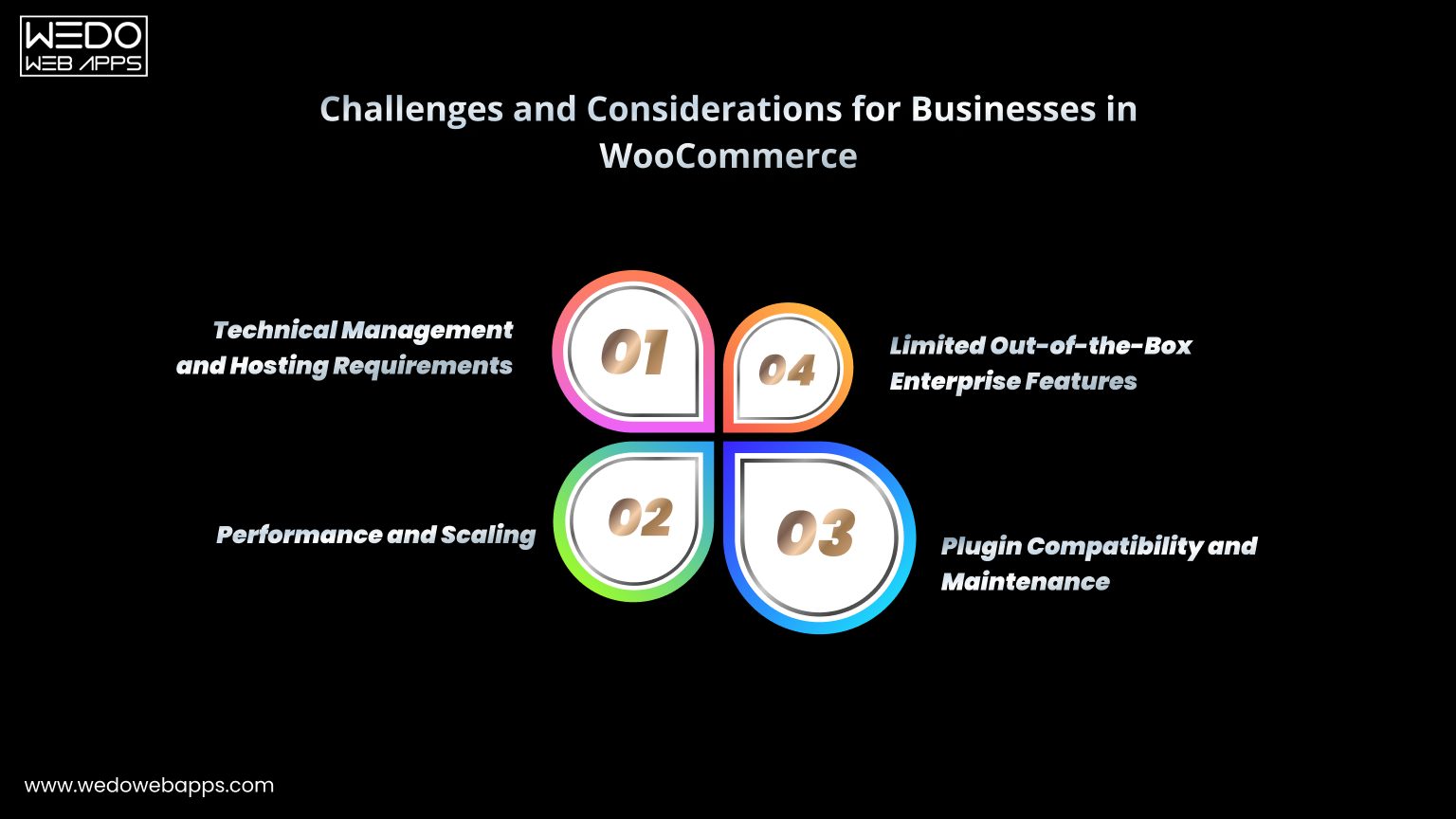
Bottom line: WooCommerce is not hard to customise by nature. Customization becomes difficult only when the store is built without a clear architecture or long-term plan. Complex customization becomes manageable when you work with experienced teams or hire WooCommerce developers who follow clean development practices.

Real Limitations of WooCommerce (Honest Perspective)

While many myths about WooCommerce are exaggerated or inaccurate, it is important to acknowledge that WooCommerce is not a perfect solution for every situation. Being aware of its real limitations helps set realistic expectations and leads to better platform decisions.

Below are some genuine constraints to consider.

1. WooCommerce Requires Quality Hosting

WooCommerce is self-hosted, which means performance is tied directly to your hosting environment.

  • Cheap hosting plans often struggle with eCommerce workloads
  • Resource limitations affect speed and stability
  • Scaling requires upgrading the store over time

WooCommerce performs best on optimized hosting built for WordPress and eCommerce.

2. Ongoing Maintenance Is Necessary

WooCommerce stores are not “set and forget.”

  • Core updates must be applied
  • Plugins and themes need monitoring
  • Compatibility issues can occasionally occur

Regular maintenance is part of owning a WooCommerce store.

3. Plugin Conflicts Can Happen

WooCommerce’s ecosystem is large.

  • Not all plugins follow the same coding standards
  • Conflicts may arise between extensions
  • Testing is important before deploying changes

Using fewer, higher-quality plugins reduces risk.

4. Performance Optimization Is Your Responsibility

WooCommerce does not automatically optimize itself.

  • Caching setup
  • Image optimization
  • Database cleanup
  • CDN integration

These require intentional configuration.

Bottom line: WooCommerce is powerful, but it assumes a level of technical responsibility. Businesses that prefer a fully managed, hands-off platform may find this model less appealing.


Clean WooCommerce customization for scalable stores

When WooCommerce May NOT Be the Right Choice

WooCommerce is flexible and capable, but it is not universally ideal. Certain business scenarios may be better served by other types of platforms.

WooCommerce may not be the right choice if:

You Want a Completely Hands-Off Platform

WooCommerce requires:

  • Hosting management
  • Updates and maintenance
  • Occasional troubleshooting

If you prefer a system where everything is handled for you with minimal involvement, a fully managed SaaS platform may feel more suitable.

You Only Need a Very Simple Website

For businesses that only require:

  • A few static pages
  • Basic product listings
  • No advanced eCommerce features

WooCommerce may be more than necessary. A simpler website builder could be sufficient.

You Require Highly Specialized Enterprise Systems

Some enterprises need:

  • Deeply integrated ERP systems
  • Custom backend infrastructures
  • Complex multi-region architectures

While WooCommerce can integrate with many tools, certain enterprise environments may be better supported by platforms designed specifically for large-scale enterprise ecosystems.

Bottom line: WooCommerce is best suited for businesses that value flexibility, ownership, and scalability. If your priority is absolute simplicity or fully managed infrastructure, other options may align better.

How to Decide If WooCommerce Fits Your Business

Choosing an eCommerce platform is less about finding the “best” option and more about finding the right fit for your specific goals, resources, and growth plans.

Use the following factors to guide your evaluation.

1. Your Business Size and Growth Plans

Ask yourself:

  • Are you starting small but planning to scale?
  • Do you expect product volume to increase?
  • Will traffic grow significantly over time?

WooCommerce works well for businesses that want a platform capable of growing alongside them.

2. Your Customization Requirements

Consider:

  • Do you need unique workflows?
  • Custom product configurations?
  • Integrations with third-party tools?

WooCommerce is a strong choice when flexibility is important.

3. Your Budget Structure

WooCommerce has:

  • Lower entry cost
  • Variable ongoing costs

You control where money is spent: hosting, plugins, development, and optimization. This appeals to businesses that prefer cost control rather than fixed platform fees.

4. Your Preference for Ownership

With WooCommerce:

  • You own your store
  • You control your data
  • You choose your infrastructure

If ownership matters, WooCommerce aligns well.

Bottom line: WooCommerce is a good fit for businesses that want flexibility, scalability, and long-term control, and are comfortable managing or outsourcing the technical side. If you’re planning a serious WooCommerce build or customization, speaking with a custom WooCommerce solutions provider can help you avoid common implementation mistakes.


WooCommerce platform guidance for business growth

Conclusion

Most WooCommerce myths exist because of outdated information, poor implementations, and misunderstandings about how open-source platforms work. When evaluated objectively, WooCommerce is neither inherently unscalable, insecure, limited to small stores, nor difficult to customise.

The reality is simpler:

WooCommerce’s performance, security, scalability, and flexibility are determined primarily by how the store is built, hosted, and maintained.

For businesses that value ownership, customization freedom, and the ability to scale gradually, WooCommerce remains a strong and reliable eCommerce platform. At the same time, it is honest to acknowledge that WooCommerce requires responsible management and is not intended to be a fully hands-off solution.

If you approach WooCommerce with realistic expectations and a clear technical strategy, many of the commonly cited limitations disappear. What remains is a flexible platform capable of supporting both early-stage stores and growing eCommerce businesses.

Understanding the difference between myths, realities, and real limitations puts you in a much better position to decide whether WooCommerce is the right foundation for your online store.


WooCommerce specialists helping businesses

Is WordPress Better Than Custom Web Development?

Considering creating a website for your new business? 

But do you need clarification about whether to use WordPress or go with custom web development? 

If yes, then you are in the right place. Many business owners feel overwhelmed and confused due to the extensive planning and preparation that typically goes into creating websites. 

There are already many website builders available, but the vast majority offer only a few hosting, design, and functionality options and can hardly take into account your custom development needs! 

The only alternative is to use the WordPress content management system, develop a custom website, or choose a WordPress development company USA for your development needs. 

There are various examples of web development using the two platforms. Although each option has particular advantages, it is safe to say that none is the best platform for web development.

Let’s get into details one by one. 

What Is WordPress? Is WordPress Losing Popularity?

inside_img1

Source

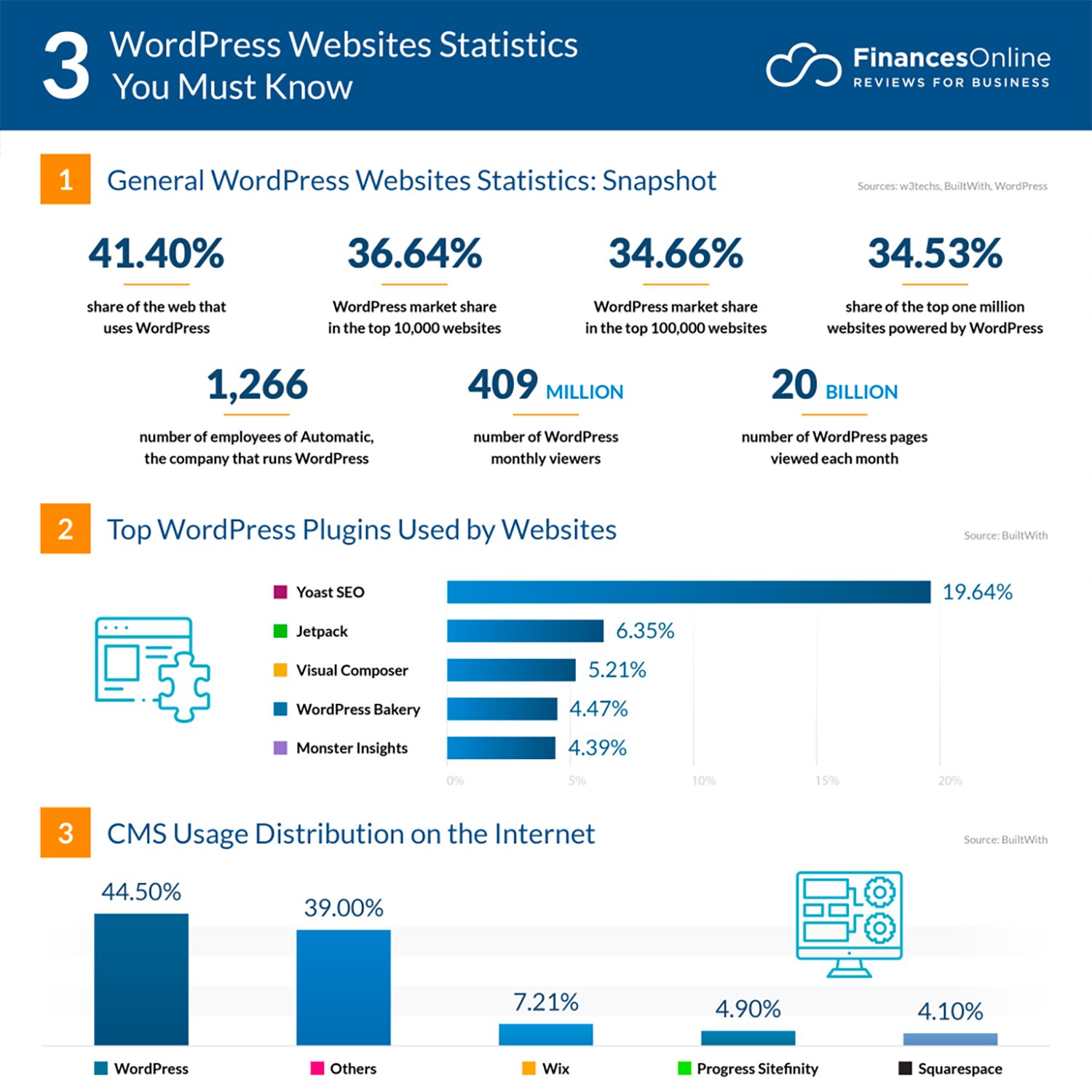
WordPress is an open-source content management system that powers over 42.4% of websites on the internet. 

You can host and create websites using WordPress. Thanks to WordPress’s template system and plugin architecture, you can alter any website to meet your company, blog, portfolio, or online store.

WordPress users can select from various pre-built templates per their needs. Since it is an open-source platform, you may discover free and commercial templates too.

However, not every business may be a good fit for adopting a pre-made WordPress theme. You might choose a theme, but it might not meet your needs. And then you will use several plugins for every need, and in the end:

  • Your website speed will get affected
  • You won’t be able to get what you desire off
  • And you will feel stuck with the given layout options.

And, the vicious cycle will continue. 

Instead, businesses can develop a custom theme rather than starting from scratch. Several WordPress development company the USA provide these services for business owners. A unique theme offers these advantages.

  • Gives full functioning and aesthetic appeal.
  • Remove the theme’s optional features that you won’t require.
  • Maintaining quality across all phases of development

Not all businesses have a separate development staff. In these circumstances, working with a development company that hires WordPress developers is advised. 

This allows a business to focus on the data it needs while its outsourced development team takes care of the functionality and adjusts the visual effects as needed.

The foundation of your WordPress website is its plugins

Whether you need to add contact forms, enhance SEO, speed up your website, build an online store, or enable email opt-ins, they offer crucial functionality. 

With the help of a plugin, your website can perform all the tasks you require of it.

The most well-known WordPress plugins include WooCommerce, WPForms, HubSpot, and Yoast SEO. 

And to answer the question, no, WordPress is not losing its popularity, and it’s here to stay.  

Another arising question is whether WordPress is the right choice for Startups? And the answer is: Yes, it is.

Read More: A complete guide to WordPress Web Development

List of Advantages And Disadvantages Of Using WordPress:

Let’s Start With Advantages:

  1. Significantly less expensive: Using a theme is the best option financially. Most paid themes are under $100, making them an excellent fit for companies on tight budgets.
  2. Custom designs: Although it may seem like these are one-size-fits-all solutions, they are remarkably adjustable. Custom WordPress development services enable business owners to have what they require in a more customized way. Compared to custom website design, you’ll probably have more freedom to customize your website to your needs by changing the font, text size, layout, colours, and more.
  3. No expertise required: Alternating WordPress themes don’t require coding or design expertise; anyone can do it with the help of WP plugins. So, once you get a WordPress site developed by an expert WordPress development company, you can constantly update your site in the future. 
  4. More rapid: A few clicks are all it takes to install a WordPress theme. You can get started right away after customizing your theme.
  5. Scalability: Because WordPress themes are designed to work quickly and with a variety of websites, scaling them is easy. You may easily add more pages and information without worrying about creating new designs.
  6. SEO-friendly: Most WordPress themes have integrated SEO elements. Even if the theme you choose isn’t fully optimized for SEO, there are many great SEO plugins for WordPress.

Disadvantages of WordPress Site

  1. Not custom: You are primarily constrained by the elements and design of the theme, even though there are many modification options. Any customization or sophisticated functionality that you desire must be implemented.
  2. Early support: Since these are DIY solutions, you’ll need to hire someone to install and customize the theme or ensure you’re comfortable doing it yourself.

What is Custom Web Development?

inside_img2

Source

A custom website is the sole alternative to a pre-built template.

You’ll need specialized people for this decision, such as a website designer and a web developer. The downsides of WordPress may prompt you to think about creating a bespoke website, but this choice is not without its pitfalls.

If wordpress is so good that it powers 46% of the website, why do businesses go for custom web development?

One answer could be Full control over the look, speed, and functions. 

Although WordPress is an extensive website builder in itself, it can slow down your site significantly as you need to keep adding plugins to add new features. 

With custom website development, you get complete control over vital functions like speed, aesthetics and functions. 

As is evident, prominent companies and manufacturers frequently use customized websites.

Although both of these approaches can result in beautiful websites, they have some significant differences. Because each of them caters to different types of people’s wants, your pick might have a big impact on how successful your digital marketing strategy is.

Read also: A complete guide to WordPress Web Development

Technologies Used For Custom Web Development

Making the greatest server-side technology choice is a key choice that programmers must make to provide the best custom web application development company providing these services. 

Depending on the technology they employ, businesses can improve key custom web and mobile app development aspects like scalability, security, maintainability, project cost, etc. 

inside-img3

Source

Node.js, ASP.NET, Django, and Ruby on Rails, according to Stackoverflow, dominate the market.

These technologies are widely used in web projects and are quite popular among programmers. We have gathered some essential details regarding each of these technologies as a result. 

Advantages And Disadvantages Of Using Custom-Made Websites 

Advantages:

  1. Security purposes: Custom web application development company ensures that the custom websites adhere to more significant security requirements than open-source options. Working with a company or designer on a custom website lowers your risk of being a victim of a more Significant breach because you are operating within a closed-source network.
  2. Maintenance: It’s not always a good idea to do your repairs. A competent website designer should handle routine maintenance to ensure that enhancements are well planned, performance is not harmed by changes, and the website has a professional appearance.
  3. Being innovative: in business is crucial to success, not just attractiveness. By switching to custom websites, businesses can avoid using templated designs that have been used on several other websites.
  4. Content: A bespoke website construction package typically includes additional support services. To maximise the effectiveness of websites, for instance, high-quality content is necessary; working with a website design company’s content developer guarantees the content is effective.

Disadvantages

  1. Costs: Since website design is often more expensive than the WordPress alternative, small businesses might not be prepared to cover the expenses.
  2. Timing: Creating the site and any anticipated updates will require a long time. Hence, custom website development is not the right option if you lack time. 
  3. Complexity: To ensure a coordinated approach to the design and development process, a customized website design requires formulation, negotiation, and adherence to a contract. However, this lengthens the process, making it a drawback to carrying out this action.

 Comparison: Custom Vs WordPress

inside_img4 
Source

WordPress Custom Development
Pricing Lower side. Since developers are not building the site from scratch, and WordPress sites can be wrapped up within budget.  Higher Side. A custom website can start at $10,000 for a simple five to a 10-pager site.
Time Needed Less time-consuming.  Depends on the complexity of the design, and features.
Maintenance Can be maintained by updating plugins and themes.  Requires professional support to maintain the code.

The two options previously mentioned are great for anyone who needs a website or webpage. 

Nevertheless, WordPress websites are less expensive than those that are custom-built. They are also modular, which makes it easy to alter, update, and improve them. 

Due to the shared basis used to construct them, they have an inherent vulnerability.

WordPress websites aren’t as secure as ones made from scratch. 

Due to their significant adaptability, they can be adapted to any system, function, or design, but doing so requires a high level of technical expertise.

In contrast to custom-built websites, which businesses upgrade to when they have the necessary funds, WordPress websites are entry-level online publications for those on a tight budget.

Keep in mind that creating the website is only the first step of whatever choice you make. 

You’ll additionally need to pay for hosting and a domain. To put it another way, running a WordPress website itself may cost a lot of money if you choose a costly domain name.

WordPress Vs Custom Website: Who Wins? 

WordPress is a fantastic platform for both people and businesses. People can avoid spending their time on programming by adopting WordPress Themes.

However, if you’re in the business sphere, you will need a WordPress development company USA  that provides custom WordPress services and custom WordPress plugins.

However, the contradiction is brought into play if you are a business and come across a website-building company that uses third-party WordPress Themes.

If a web development company doesn’t create websites, why would you engage them? 

Need a business site within a tight timeline? We can help! Contact us to get custom WordPress development services, a place within a set timeline and budget, and touch new revenue quickly. 

Best Practices in Developing from PSD to Content Management System

As one of the best practices in developing a Content Management System (CMS) from scratch, it is constructive to prepare a strategic road-map prior. In case, the CMS is intended to be developed from a PSD file (.psd extension), then the first step involves slicing of the images in a PSD to a Joomla file. Slicing means cutting out and dividing an image design file and integrating many such designs to create an overall design that that could be used as the layout of the web page.

The slicing of the images that are required to be integrated into the layout of a web page is done in an image editing software, which is Adobe Photoshop or any other comparable that most of the developers use. As per the designing requirements, a high-resolution design is achieved at the end of a plan, that could be edited through any of the image editing software such as Microsoft paint. It is a valid point to consider that none of the other software provides an efficient design in terms of quality as well as time.

Many designers creatively design by utilizing software to create layered images and thus, overall, a multi-layered model. It helps in developing the front-end section of the website by using multi-layered images, designed pictures or files. It is to be observed that Adobe photoshop files are already divided into many components aiding in developing the front-end. PSD to CMS conversion is one of the best practices followed by many web development organizations and slicing images with the utmost efficiency collectively of the developer.

The main feature of consideration here relates to the elements required to be sliced wholly as they can not be created dynamically. Similarly, features that are created dynamically are not required to be cut in full. Thus to deal with it the designers, as well as developers, decide the design and code according to their requirements of the sections they need to create effective plans and the parts they do not want to keep dynamic. Due to the robustness in functionalities, PSD to CMS conversion relates to one of the major domains of a content management system.

Also Read more about PSD to Drupal and Magento Conversion

Thus in PSD to CMS conversion, there are two critical considerations of the user interface. First is in terms of attractive layout and being user friendly, and the second is about efficient coding making the website code functional.

Significant Benefits of Custom PHP Development

These days, it is essential for businesses to have their website. Websites are developed using various programming languages, and PHP is one of them. This article will tell you about the benefits of custom PHP development. Technology has gained significant importance in the lives of people, and it is upgrading very fast. In this world of technology, the internet is playing an essential role in making human life easy by availing the required information easily and quickly. With the increased usage of the internet and people’s desire to perform every task online, it has become necessary for the businesses to have their website which will not only provide the information about your product and services but also allow customers to make the purchases and make an online payment. Websites are developed using various programming languages, but you can develop a customized website with the help of PHP, and such sites are capable of driving online traffic towards them. So, let’s have a look at the benefits of custom PHP development.

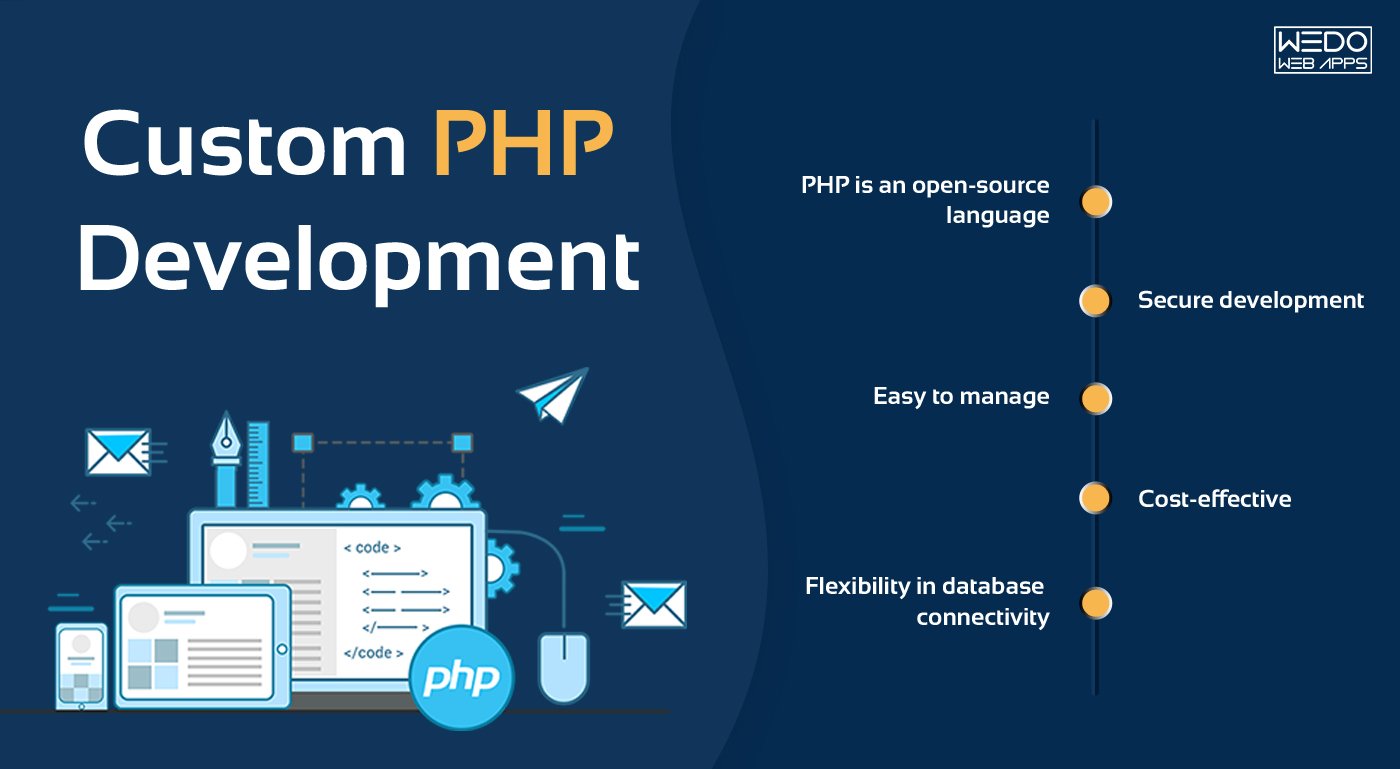
  • PHP is an open-source language – PHP is an open-source language that is implemented on the server-side. Being an open-source programming language, it allows you to access the required scripting code from the pages of the website. This code can be used as a reference for website development in the future.
  • Secure development- Custom PHP development allows integration with many tools, content management systems, and few other scripting languages like Magento, Joomla, Drupal, Javascript, Tank CMS, and many others. Therefore, it becomes easy for a developer to develop dynamic websites, and users can also change the content of the site through Admin Panel easily. Additionally, PHP is compatible with various operating systems including UNIX, Windows, Linux, and Mac OS; which is also an advantage.
  • Easy to manage- The customized websites developed by using PHP as a programming language can be managed efficiently by the users. They can handle the management effortlessly and even enhance the level of development by taking the assistance of few of the famous PHP structures and frameworks like Symfony, Code Igniter, Flight, Zend, Kohana and many others.
  • Cost-effective- Custom PHP development is less expensive when compared to the development done with the help of some other programming languages. As mentioned earlier, PHP is an open-source programming language, and hence, construction of the website is done without any cost using this language. You also don’t need to purchase any license to implement PHP on the server. Therefore, PHP development proves to be a cost-effective option.
  • Flexibility in database connectivity- When it comes to database connectivity, PHP website development is an excellent option as it offers flexibility. You can select to synchronize one of the databases from MySQL, Oracle, DB2 and SQLite as backend. Most used among them for the development of e-commerce platforms is MySQL. MySQL-PHP is considered as an excellent combination for an event for applications like Content Management System and Customer Relationship Management.

These are the benefits you can gain if you make use of PHP for custom website development. So, if you are planning to develop a website for your business in near future, insist on making use of PHP and if you are going to create an e-commerce website, then try and stick to PHP-MySQL combination. You will surely have the best performing website.

Delivering High-Quality Solutions for United States Businesses

Introduction:

In today’s rapidly evolving business landscape, having a strong online presence is essential for companies of all sizes. Whether a business is looking to build a new website or enhance an existing one, custom PHP web development services can help achieve the desired results. By leveragin cutting-edge technologies and experienced web developers, businesses can build high performing websites and applications that help drive their digital strategy forward.

Problem:

Businesses across the United States face unique challenges in their quest to expand their online footprint. For example, companies need to create websites and applications that can adapt to changing market needs, scale according to user demand, and accommodate new technological advancements. Additionally, businesses need to ensure their web presence is secure, fast, and accessible to all users, regardless of location or device.

Solution:

Custom PHP web development services can help businesses solve these problems by providing a wide range of benefits. Firstly, custom PHP development ensures that websites and applications are built specifically for the needs of the business. This means that businesses can get precisely the features and functionality they require, without any restrictions or limitations. Additionally, custom PHP development services enable businesses to create more efficient, streamlined, and cost-effective websites and applications that cater to the ever-changing requirements of their customers.

Benefits:

Custom PHP web development services provide several benefits to businesses, including:

1. Scalability: Businesses can scale their websites and applications as their operations grow, ensuring that they always have the ability to meet the evolving needs of their customers.

2. Security: Custom PHP development services help businesses keep their online presence secure by providing robust security features that protect against cyber threats.

3. High Performance: Businesses can expect high-performance websites and applications that are fast, reliable, and able to handle heavy user loads.

4. Flexibility: With custom PHP development, businesses can design and build websites and applications that meet their individual requirements and can quickly adapt to changing market conditions.

5. Cost-effectiveness: Custom PHP development enhances the operational efficiency of businesses by automating processes and reducing manual intervention, resulting in cost savings.

Conclusion:

Custom PHP web development services offer immense value to businesses seeking to improve their online presence. By leveraging technologies such as PHP, businesses can build performant, scalable, and secure websites that cater precisely to their needs. With flexible pricing, cutting – edge tools, and experienced developers, custom PHP development services provide an ideal solution for United States businesses looking to expand their online reach.

Call to Action:

If you are a business looking for quality custom PHP development services, then contact us today to discuss how we can help you. With our technology expertise and unparalleled customer service, we can help you take your business to new heights by delivering high-quality web solutions that meet your needs. Get in touch for a custom PHP development quote

Empowering Businesses

Introduction:

Technological advancements have opened up a world of opportunities for businesses in the United States of America (USA). Today, companies need to have their presence on the internet to compete with other businesses in the industry, custom PHP Application Development is becoming a popular choice among businesses in the USA who want to develop innovative, interactive and easy-to-use web applications that meet their business needs.

What is Custom PHP Application Development?

Custom PHP Application Development is the process of creating web applications that are designed specifically to meet the requirements of your business.

PHP is an open source server side scripting language that powers millions of web applications worldwide. PHP is a widely used and versatile language that can be used for developing e-commerce portals, content management systems, online booking systems and many other applications.

How Can Custom PHP Application Development Benefit Businesses in the USA?

1. Customization: Custom PHP Application Development allows businesses in the USA to design web applications that are tailored to their unique business requirements. This ensures that businesses can offer their customers a seamless experience that is tailored to their specific needs, leading to increased customer retention and satisfaction.

2. Cost-Effective: Custom PHP Application Development is a cost effective approach for businesses in the USA as they can develop applications that are specific to their needs without incurring the high costs associated with pre-built applications. Also, businesses do not have to pay for unwanted features and functionalities that are not required.

3. Scalability: Custom PHP Application Development allows businesses in the USA to scale their applications as their business grows. From adding new features to improving performance, businesses can modify their web applications to meet their changing business needs.

4. Security: Custom PHP Application Development ensures that the developed applications are secure and protected against cyber threats. Businesses in the USA can integrate security features into their web applications to provide a safe and secure environment for their customers.

5. Integration: Custom PHP Application Development allows businesses in the USA to integrate their web applications with other systems such as customer relationship management (CRM), accounting software and other third-party applications.

Case Studies:

1. Chic Couture Online was facing difficulty in managing their customer relationships. They approached a PHP Application Development Company wedowebapps LLC to develop a customized CRM system that could capture customer data and provide them insights for designing targeted marketing plans. The new CRM system increased their sales by 35%.

2. Fraser Hart had an outdated e-commerce portal that was not user-friendly. They hired a PHP Application Development Company wedowebapps LLC to design a new e-commerce portal that was fast, reliable, and intuitive. The new e-commerce portal increased their online sales by 55%.

Conclusion:

Custom PHP Application Development is an important tool for businesses in the USA that are looking to create a web application that meets their unique business requirements. The benefits of custom PHP Application Development, including customization, cost-effectiveness, scalability, security and integration make it a popular choice among businesses in the USA.

If you are looking for a service that can deliver customized, reliable and secure web applications, then you should consider hiring a PHP Application Development Company WEDOWEBAPPS LLC, it is time to take a step forward and design web applications that empower your business and take it to new heights.

WooCommerce Ecommerce Platform: Evolution, Trends, and Future Outlook

Introduction

WooCommerce has become one of the most widely used platforms for running online stores. From small businesses to growing brands, many merchants rely on it to manage products, payments, and day-to-day operations without depending on complex or costly systems. What began as a simple WordPress extension now supports a significant share of eCommerce websites worldwide.

The steady rise of the WooCommerce eCommerce platform reflects a larger shift in how online stores are built. Businesses today prefer flexible tools, ownership of their data, and the freedom to customise their store as needs change. WooCommerce has grown alongside these expectations, expanding its capabilities and eCommerce platform ecosystem year after year.

Looking at its evolution, core features, and current trends helps build clarity on why it remains an effective part of eCommerce conversions. By the end of this blog, you will understand how it compares with other platforms available to online stores today.

The Growth of WooCommerce: From Plugin to Platform

WooCommerce started as a simple WordPress plugin created to add basic selling functionality to existing websites. At that time, launching an online store often required custom software development. WooCommerce offered a practical alternative by allowing businesses to turn a regular WordPress site into a store with minimal setup.

Its growth was closely tied to WordPress itself. As WordPress became one of the most widely used content management systems, WooCommerce benefited from the same user base. Installation was straightforward, updates were easy to manage, and store owners could build on a familiar environment instead of learning an entirely new system. This strong connection helped WooCommerce spread quickly among website owners.

Early adoption increased as developers and agencies began creating themes, plugins, and integrations around the platform. Payment gateways, shipping tools, marketing extensions, and design templates expanded its capabilities. This growing community played a major role in the WooCommerce evolution, transforming it from a basic add-on into a complete WooCommerce eCommerce platform suitable for different types of WooCommerce for online stores.

Several milestones marked this progress. eCommerce feature updates improved scalability, the ecosystem of extensions expanded, and ongoing support from the WordPress community strengthened reliability. Over time, WooCommerce moved beyond small stores and became capable of supporting more complex eCommerce operations.

Today, it stands not just as a plugin but as a mature platform that many businesses consider when evaluating eCommerce solutions.


WooCommerce Store Development Consultation

Key Features That Drove Adoption of WooCommerce

Key WooCommerce features

WooCommerce gained consistent traction because it addressed practical business needs. Instead of limiting how stores operate, the platform gives merchants flexibility and control over their setup. These capabilities made it easier for businesses to launch, manage, and expand their online stores without depending on complex systems with the WooCommerce development services.

Below are the core WooCommerce features that supported this steady adoption.

Flexible Store Customisation

One of the main reasons businesses prefer WooCommerce is the ability to shape the store according to their specific requirements. The platform does not restrict design or functionality, which allows teams to create a shopping experience that matches their brand.

  • Modify layouts, themes, and checkout flows.
  • Add or remove features based on business needs.
  • Avoid fixed templates or rigid structures.

Wide Extension and Plugin Ecosystem

As the platform grew, developers began contributing tools and integrations that extended its capabilities. This ecosystem allows store owners to add features without heavy development work.

  • Payment gateways for multiple regions.
  • Shipping and tax management tools.
  • Marketing, analytics, and automation plugins.
  • Thousands of third-party integrations.

This expanding ecosystem played a direct role in the WooCommerce evolution, helping it move beyond basic selling functionality.

Open Source Control and Ownership

WooCommerce operates as open source software, which gives businesses full ownership of their store environment. This control is often important for brands that want long-term flexibility.

  • Host the store on preferred servers.
  • Access and manage store data freely.
  • Customise the code when advanced changes are required.
  • Avoid dependency on a single provider.

Seamless Integration with WordPress

Because WooCommerce works inside WordPress, many teams can manage both content and eCommerce from one place. This setup simplifies daily operations and reduces the learning curve.

  • Manage products and pages in the same dashboard.
  • Combine blogging, SEO, and selling easily.
  • Use existing WordPress themes and tools.

This integration makes the WooCommerce eCommerce platform practical for businesses that rely heavily on content marketing.

Scalability for Growing Online Stores

Businesses often start small and expand gradually. WooCommerce supports this growth by allowing stores to add functionality over time instead of migrating to a new system.

  • Launch quickly with basic features.
  • Add tools as traffic and orders increase.
  • Support different types of WooCommerce for online stores, from small catalogs to larger inventories.

Together, these features explain why WooCommerce moved from a simple plugin to a widely adopted ecommerce solution. Its focus on flexibility and control continues to shape current WooCommerce trends across the market.

Trends Shaping WooCommerce in Modern Ecommerce

Ecommerce Trends 2026

Online selling is growing quickly, and businesses now expect more from their ecommerce platform. They want speed, flexibility, easier integrations, and the freedom to adapt as their store expands. These expectations directly influence how the WooCommerce eCommerce platform evolves and why more brands continue adopting it.

Recent WooCommerce trends show steady improvements that help store owners manage operations better and deliver smoother buying experiences.

Market Trends Influencing Adoption

The eCommerce market has shifted toward platforms that offer ownership and flexibility instead of fixed structures. Businesses prefer systems they can customise without ongoing platform restrictions.

WooCommerce fits this need because it runs on WordPress and gives complete control over store setup.

  • Full access to code and customisation.
  • No mandatory monthly platform fees.
  • Wide plugin ecosystem.
  • Freedom to choose hosting and tools.

These factors explain why the WooCommerce eCommerce platform remains a strong choice for many online sellers.

Growing Use Among Small and Mid-Sized Online Stores

Startups and growing businesses often need an affordable solution that can scale step by step. WooCommerce supports this approach by allowing stores to start simple and expand features as needed.

Instead of paying for advanced capabilities upfront, businesses can add them gradually.

  • Low initial setup costs.
  • Easy product and catalog management.
  • Scales from small shops to large inventories.
  • Suitable for niche and local brands.

This flexibility has increased adoption among small and mid-sized WooCommerce for online stores use cases.

Headless, AI, and Mobile First Strategies

Modern commerce now goes beyond basic storefronts. Brands expect faster interfaces, smarter tools, and better mobile performance. WooCommerce has adapted to support these technical needs.

It integrates easily with modern architectures and intelligent systems.

  • Headless commerce using APIs for custom frontends.
  • AI-powered product recommendations and search.
  • Marketing automation tools.
  • Mobile-friendly checkout experiences.
  • Responsive themes for all devices.

These capabilities align with current WooCommerce trends focused on performance and personalisation.

Changing Ecommerce Expectations Driving Platform Updates

Customer behaviour has changed. Shoppers expect fast pages, simple navigation, secure payments, and smooth experiences across devices. Platforms must evolve regularly to meet these standards.

WooCommerce benefits from an active open source community that releases updates based on real store requirements.

  • Frequent feature improvements.
  • Security updates.
  • New extensions and integrations.
  • Better compatibility with modern tools.

This continuous improvement shapes the future of WooCommerce and keeps it relevant as eCommerce demands grow.


We design, develop WooCommerce

Comparing WooCommerce With Other Platforms

Comparing WooCommerce With Other Platforms

Businesses evaluating eCommerce options often compare WooCommerce with other widely used platforms such as Shopify, Magento, and BigCommerce. Understanding differences in adoption trends, flexibility, and ecosystem size helps decision makers select the right platform for their store’s needs.

Below is a neutral breakdown of key aspects.

Adoption Trends

WooCommerce has grown steadily due to its open source model and WordPress integration. Other platforms have different adoption patterns based on business type and size.

  • WooCommerce: Widely adopted by small and mid-sized stores, with over 5 million active websites.
  • Shopify: Strong adoption among small to medium merchants, especially for ease of setup.
  • Magento: Popular with large enterprises and high-volume stores.
  • BigCommerce: Used by mid-market businesses with multi-channel selling needs.

Flexibility and Customisation

Platform flexibility affects store design, workflow, and long-term growth options.

  • WooCommerce: High customisation through plugins, themes, and open source code.
  • Shopify: Limited backend access. Flexibility mostly appears through apps and themes.
  • Magento: Very flexible, but requires technical expertise to implement.
  • BigCommerce: Offers configurable features, less open than WooCommerce, more managed solution.

Ecosystem and Extensions

A strong ecosystem supports features, integrations, and ongoing platform development.

Platform Plugin or Extension Availability Community Support Third-Party Integration
WooCommerce 5000+ plugins Large global developer community. Payment gateways, shipping, marketing, and analytics.
Shopify 4500+ apps Active community forums. Multi-channel, POS, and marketing tools.
Magento 3000+ extensions Developer-heavy. Enterprise integrations and B2B features.
BigCommerce 1000+ apps Growing community. Payment and marketing tools.

The comparison shows that each platform has a specific niche.

  • WooCommerce excels in flexibility and ecosystem size for small to mid-sized stores.
  • Shopify prioritises simplicity and quick setup.
  • Magento suits enterprise stores requiring full technical control.
  • BigCommerce fits mid-market businesses needing managed solutions.

This neutral comparison highlights WooCommerce vs other platforms from an adoption, flexibility, and ecosystem perspective without any service promotion.

Challenges and Considerations for Businesses

Key challenges in WooCommerce

While WooCommerce provides flexibility and a widely adopted eCommerce solution, businesses should be aware of certain challenges before implementing it. Understanding these considerations helps store owners plan technical resources, growth strategies, and maintenance requirements effectively.

Technical Management and Hosting Requirements

WooCommerce is self-hosted, which means businesses must manage hosting, updates, and security. While this gives control, it also requires planning and technical knowledge.

  • Choosing reliable hosting for speed and uptime.
  • Regularly updating WordPress, WooCommerce, and plugins.
  • Managing backups and security internally.
  • Troubleshooting custom code or plugin conflicts.

Performance and Scaling

The platform’s performance depends heavily on hosting, plugins, and site optimisation. Businesses with large inventories or high traffic need additional technical planning.

  • Optimising themes and plugins for speed.
  • Using caching and performance tools.
  • Ensuring server resources match traffic and product catalog size.
  • Seeking support from WooCommerce developers for complex scaling needs.

Plugin Compatibility and Maintenance

WooCommerce relies on third-party extensions for advanced features. While this adds flexibility, it introduces potential maintenance challenges.

  • Ensuring plugins remain compatible after updates.
  • Monitoring for conflicts that could disrupt functionality.
  • Some advanced plugins require a paid license.
  • Ongoing management is required to maintain smooth operations.

Limited Out-of-the-Box Enterprise Features

WooCommerce is ideal for small and mid-sized stores but lacks some enterprise functionality by default. Businesses requiring complex operations may need additional tools or development.

  • Multi-currency and advanced tax handling often need plugins.
  • B2B or wholesale features may require customisation.
  • Advanced reporting or analytics is usually done through third-party tools.
  • Some enterprise-grade tools are natively available in platforms like Magento.

Understanding these challenges and considerations ensures businesses can use WooCommerce effectively. The platform remains a highly flexible WooCommerce eCommerce platform suitable for a variety of WooCommerce for online stores, but proper planning for technical management, scaling, and maintenance is key to long-term success.


choose right eCommerce platform

The Future of WooCommerce

WooCommerce continues to evolve alongside changing business and customer expectations. Understanding emerging trends and the platform’s future direction helps businesses plan long-term strategies and anticipate new opportunities.

Expansion of the Ecosystem

The WooCommerce ecosystem is expected to grow further, driven by developers, agencies, and third-party service providers. This expansion will provide more tools, integrations, and specialised solutions.

  • Increasing number of extensions for marketing, shipping, and analytics.
  • New themes and design options for diverse industries.
  • Developer contributions that improve performance and security.
  • Stronger support for multi-channel and omnichannel selling.

Emphasis on Performance and Scalability

Future updates will continue addressing performance and scalability needs as online stores grow in size and traffic.

  • Better optimisation tools for speed and reliability.
  • Support for larger product catalogs and high-traffic volume.
  • Cloud hosting and managed performance solutions.
  • Enhanced caching, image optimisation, and mobile responsiveness.

Adoption of Modern Technologies

Emerging technologies like AI, headless commerce, and automation are becoming increasingly relevant for online stores. WooCommerce is adapting to these trends.

  • AI-powered product recommendations and search.
  • Automated marketing workflows and analytics insights.
  • Headless setups for custom frontend experiences.
  • Integration with emerging eCommerce tools and platforms.

Growing Role Among Small and Mid-Sized Stores

WooCommerce is expected to maintain its popularity among SMBs due to its flexibility and cost efficiency. Businesses will continue to choose it for stores that need scalability without high initial costs.

  • Affordable setup with control over features and hosting.
  • Ability to customise stores to specific business needs.
  • Gradual scalability for growing catalogs and customer base.
  • Strong community support for guidance and troubleshooting.

The future of WooCommerce looks focused on ecosystem growth, performance improvements, and adoption of modern ecommerce technologies. It remains a flexible and reliable WooCommerce eCommerce platform for a wide variety of WooCommerce for online stores, supporting both small businesses and growing brands.

Conclusion

Choosing an ecommerce platform is one of the first major decisions any online business makes. The right system should match current needs while leaving room to grow over time.

WooCommerce has steadily moved from a simple WordPress plugin to a widely adopted WooCommerce eCommerce platform used by millions of WooCommerce for online stores. Its open architecture, growing ecosystem, and expanding WooCommerce features continue to attract businesses that value flexibility and control. At the same time, comparisons like WooCommerce vs other platforms show that every solution serves different operational needs.

From its early WooCommerce evolution to the latest WooCommerce trends, the platform has adapted to performance demands, integrations, and modern shopping behaviour. This steady progress shapes the future of WooCommerce and keeps it relevant for startups, mid-sized brands, and growing online stores alike.

Explore our eCommerce development services to see how we help businesses launch and scale online stores with clarity and confidence.


Upgrade eCommerce Store

Playing with WordPress Codex and Resources

The reason that WordPress is getting popular among a web designer, developer and a WordPress development company is the accessibility of resources available online and the fact that anyone can rely on the funds. The resources are beneficial and should be bookmarked irrespective of the size of the developer.

In this article, we look at Codex.

Codex is online documentation, or it can be regarded as the online wiki and is located on WordPress.org. WordPress describes it as an “encyclopedia of WordPress knowledge” for a WordPress development company. It can be visited through the below link.

https://codex.wordpress.org

As it is a wiki-based website, therefore, anyone can edit, make changes and add original content to it. Serving as a base for many articles and tutorials at the WordPress.org, Codex has been extremely useful at a collective level and, is available in many languages for providing better support. If the desired style is not readily available, then it can be translated into the one on visiting the below link.

https://codex.wordpress.org/Multilingual_Codex

While using the Codex, the most common method is to search the Codex by using the search box in the header. It works on the same criteria of keyword, and thus, the relevant article can be found using the Codex. One can also navigate through the quick index for an easy reference and go through the lesson of the desired need. Additionally, the glossary terms are another useful tool for a WordPress development company employee.

Reference of functions

The Codex has all the WordPress functions described, and this is what makes it most popular. With each Codex article or tutorial, a reference page is linked and helps in services. One of the biggest challenges of providing different services for different APIs is also taken care of by Codex, as with each Functional Reference page, the corresponding WordPress API function is also available. It makes it easy for a WordPress development company. Also, since it is an ongoing project and Codex is still in the phase of development, there might be some of the topics, where function reference is not available. While all the official function reference can be browsed through the below link.

https://codex.wordpress.org/Function_Reference

It seems perfect to develop a WordPress website using the Codex, but it has been into a controversy over the accuracy level of the articles. The articles were reported to plague the freshness of the Codex articles. It is a community project and depends not on a particular individual or a WordPress development company. Still, it needs an approach to widen the scope of the Codex and WordPress, and this is how WEDOWEBAPPS LLC is a significant contributor to the Codex.