skip to content

Best Tool For Android Development That Even Enterprises Count On

The count of live Android applications on the Google Play Store as of March 2023 is 2.67 Million !

Did you know this was the score when they deprecated 1 million apps in July 2013?

Yes, indeed! With over 70% of Android device holders worldwide, Android app development is the go-to for on-demand app development. Now, you can imagine the popularity of Android app development over other mobile app development services. As more businesses get online in the post-COVID era, this inclination towards mobile apps gradually increases. 

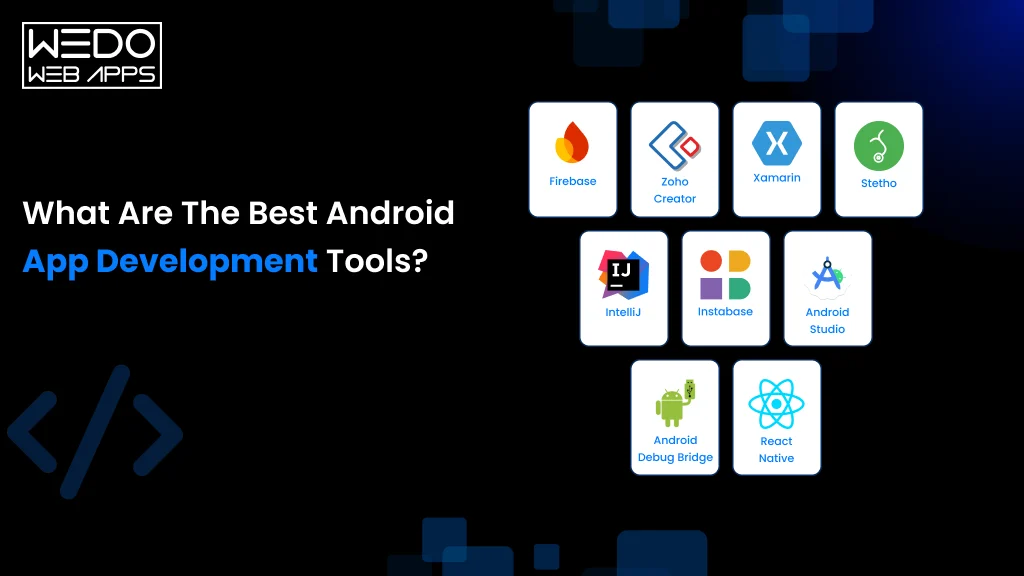
Hence, comes the need for cutting-edge tools for Android development. These tech-driven tools simplify app development operations and help Android mobile apps developer deliver the finest apps within promising timelines. You ask for the name of the Android development tool, and Android Studio will be the first name coming from any Android mobile apps developer. Let me tell you more about it. 

Android Studio: 

Android Studio is a tool for Android development that has stood out among the developer community since 2013. Developed by Google with enriching UI, it is an official Integrated Development Environment (IDE) that helps developers with end-to-end app development stages. Android Studio has everything from design tools to intelligent code editors and flexible build systems to emulators to make your app ready to launch. It supports variable languages like Kotlin, Java, and C++, proving its support for a wide range of Android apps. Since Google backs it, the tool’s updates are readily available in compliance with the policies of the Google Play Store. 

The tool is power packed with features like AVD – an emulator to run Android apps on a computer, making testing responsiveness and performance easier for multiple screen configs. Some of its features and tools are also available to be used distinctly. Also, it supports tools like Android Debug Bridge (ADB) – a CLI tool to bridge communication between computers and Android devices. It aids to QA process and powers Android mobile apps developers to make app modifications and check in real-time. Android’s app bundle enables the comparison of two APK versions and helps in app optimization. 

android app development agency

What are the supporting tools for Android Development?

Though Android Studio covers everything, there are a handful of supporting Android app development tools across the web. Moving on, we will discuss the supporting tools for Android app development. 

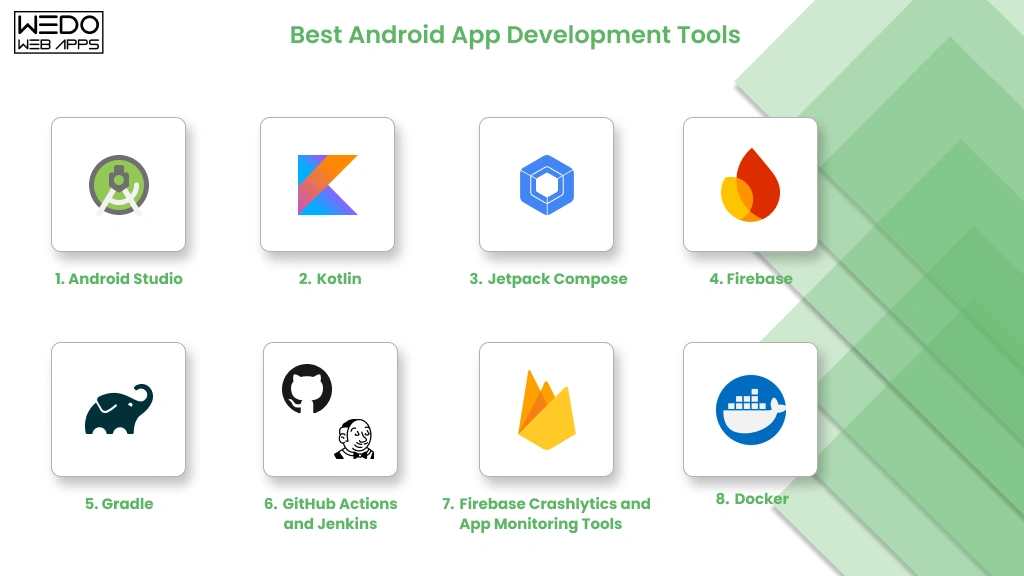
  • Gradle: Endorsed by Google, Gradle offers a build system for developers to create different variants for the app within the same project. It simplifies the addition of external libraries using a single line of code, making it highly apt for developing large-scale JAVA applications. 
  • Firebase: Another tool powered by Google is a cloud-based service and app-development platform that hosts databases, manages backend infrastructure, and monitors the app performance post-launch. It enables easy integration with several partner tools to keep the process sleek.  
  • GameMaker Studio: By the third quarter of 2022, approximately 490 thousand mobile gaming apps were live in the Google Play Store, representing a 2.57% increase compared to that of the previous quarter. The gaming industry is in a rage, and that’s where tools like GameMaker Studio simplify the development of 2D games for gaming app developers. 
  • Unity 3D: Taking the experience of 2D games to the next level with AR/VR technology, Unity 3D helps Android app developers create interactive 3D gaming applications for businesses. If you want to jump into the gaming industry, you can count on WeDoWebApps – an Android app development agency, to develop thrilling gaming apps. 
  • Eclipse: It has been the most popular IDE until 2016, before Google’s Android Studio. Since Google has already deprecated its support for Eclipse, you will not find many using it. Majorly Java developers count on it for Android app development. 

custom android app development

Wrapping Up

Though Android grabs the major market share, we also have iOS apps and other OS users. That’s where clients look upon the native app development services. Other tools for Android Development are the ones that support native apps. These include Titanium SDK, Adobe AIR, Unity, Xamarin, Ionic, etc. Are you looking for a custom android app development for your business app? If so, you can count on us for the same. 

At WeDoWebApps, we can help you with Android app development services to shape your ideas into an app. Whether you want us to handle end-to-end development projects or like to opt for android developer services on an ad-hoc basis, we can serve you in both cases. Learn about choosing the right development tools for your Android projects. Explore how selecting the best tools can enhance your application’s performance and development process.

Cost of Hiring Dedicated Developers What You Need to Know

In today’s fast-paced digital age, having a team of dedicated developers can be the difference between success and failure for your business.

But, how much does it cost to hire dedicated developers?

In this article, we will explore the various factors that influence the cost of hiring dedicated developers and provide you with insights that can help you make an informed decision. 

Now here’s the twist:

In this blog you will get to know the cost to hire programmers some of the top developers having different skills:

  1. Hire iOS Developer
  2. Hire Android Developer
  3. Hire REACT NATIVE Developer
  4. Hire Flutter Developer
  5. Hire IONIC Developer
  6. Hire E-Commmerce Developer
  7. Hire Woocommerce Developer
  8. Hire Magento Developer
  9. Hire WordPress Developer
  10. Hire Shopify Developer
  11. Hire BigCommerce Developer
  12. Hire Front-End Developers
  13. Hire Back-end Developers
  14. Hire Laravel Developer
  15. Hire Code Igniter Developer
  16. Hire ReactJS Developer
  17. Hire AngularJS Developer
  18. Hire VueJS Developer
  19. Hire NodeJS Developer
  20. Hire Progressive Web Application Developer
  21. Hire PHP Developers
  22. Hire Kotlin Developer
  23. Hire Dedicated Native Mobile App Developers
  24. Hire Swift Developer
  25. Hire Dedicated HTML5 App Developers

So, whether you are a startup or an established business, read on to discover the costs associated with hiring dedicated developers and their skills to consider getting the most value for your investment. Along with this you also get answers to some of the most asked questions which people have: 

  • How To Hire Developers For A Startup?
  • How To Hire A Software Developer?
  • How To Hire A Programmer with 3-5 years of experience?
  • How To Hire A Developer for front end and back end developer?
  • How Much Does It Cost To Hire A Programmer? [For different skills]

So let’s get started

Hire Dedicated Developers? Look At The Top Skills To Evaluate And Average Cost

1. Hire An iOS Developer: Check Out Right Skills And Cost

With 1.36 billion iPhone users worldwide, iOS app development has become a lucrative industry. However, finding a competent iOS developer who can turn your app idea into a high-quality product is easier said than done.

iPhone’s users are known to spend a significant amount of money on apps and premium features, and that’s why it’s crucial that your apps offer them a flawless experience. 

But, how do you ensure that the iOS developer you hire got considerable skills to make feature-rich iOS apps, and how much does it cost to develop iOS apps? Find out everything below:

Right Skills To Hire An iOS Developer

  • Swift is the Boss for iOS Developers

Any iOS developer worth their salt should be a Swift pro. It’s the main language for iOS app development, and a good developer should know its ins and outs like the back of their hand.

  • Xcode is their BFF

If a developer isn’t tight with Xcode, then they’re not a true iOS developer. It’s the tool they use to build their iOS apps, and they need to know it inside and out to create quality apps.

  • Frameworks are their friends

iOS has loads of built-in frameworks that developers can use to build their apps. An experienced iOS developer should know which ones to use to achieve the functionality they want.

  • They know what looks good

An iOS developer should have an eye for design and know how to create an interface that users will love. They should make sure their apps are easy to use and provide an awesome user experience.

  • Version control is key

Any good iOS developer should know how to use Git or other version control tools. It’s essential to keep track of changes to the codebase and ensure that everything is organized and in check.

How Much Does It Cost To Hire A Programmer for iOS app development?

Cost Of Hiring An iOS Developer In Different Regions or the approximate hourly rates for iOS developers based on different regions are:

  • North America: $80 – $250 per hour
  • Europe: $60 – $200 per hour
  • Australia: $75 – $150 per hour
  • Asia: $30 – $100 per hour

2. Hire An Android Developer: Check Out Right Skills And Cost

So, you’ve got an idea for an Android app, and you need to hire a rock star Android developer to make it happen. But where do you start?

With Android being the most popular mobile operating system with 3.3 billion globally, it’s important to create an app that stands out from the crowd. 

Therefore, with that many Android developers out there, finding the right one can feel like a needle in a haystack. Don’t worry, we’ve got your back!

Right Skills To Look For While Hiring An Android Developer

  • Java and Kotlin Skills

A great Android developer should have mad skills in both Java and Kotlin. These are the main programming languages used in Android app development.

  • Know-How of Android Architecture Components

A pro Android developer should know their way around the Android Architecture Components. Stuff like LiveData, ViewModel, Room, and Navigation should be second nature to them.

  • Familiarity with Android SDK

A kick-ass Android developer should be well-versed in the Android SDK. They should know how to use it like a pro to create awesome apps.

  • Experience with REST APIs

REST APIs are an essential part of Android app development. A top-notch Android developer should have experience working with REST APIs to get data from servers.

  • Understanding of Material Design

A great Android developer should know all about Google’s Material Design guidelines. They should be able to create user interfaces that follow these guidelines and look slick as hell.

  • Android Studio Savvy

Android Studio is where the magic happens in Android app development. An amazing Android developer should be able to whip up apps in no time using this environment.

Cost Of Hiring An Android Developer In Different Regions

The approximate hourly rates for Android developers based on different regions:

  • North America: $80 – $200 per hour
  • Europe: $60 – $150 per hour
  • Australia: $70 – $160 per hour
  • Asia: $15 – $50 per hour

3. Hire A ReactJS Developer: Check Out Right Skills And Cost

If you are looking to build a website or web application on ReactJS, a popular JavaScript library used for building user interfaces, and it’s used by developers worldwide.

You have to have a killer ReactJS developer for it. But let’s be real, finding the perfect ReactJS developer for your project can be tough, especially if you’re not a tech wizard.

Right Skills To Look For While Hiring A ReactJS Developer

  • JavaScript Wizardry

A top-notch ReactJS developer needs to be a JavaScript pro. After all, React JS is a JavaScript library, so they know their stuff.

  • ReactJS Framework Mastery

A ReactJS developer should be a master of the ReactJS framework. That means they should know all about React Components, JSX, Virtual DOM, and React Router.

  • State Management Library Know-How

Redux and MobX are the bee’s knees when it comes to state management libraries in ReactJS development. A ReactJS developer should be experienced with these libraries.

  • Front-End Tech Savvy

A ReactJS developer should be familiar with front-end technologies like HTML, CSS, and JavaScript frameworks such as Angular and Vue. They should be able to work magic with these tools.

  • REST API Knowledge

REST APIs are a must for ReactJS app development. A ReactJS developer should have experience working with REST APIs to get data from servers.

  • Build Tool Familiarity

A ReactJS developer should be familiar with build tools like Webpack, Babel, and NPM. They should be able to work their way around these tools like a pro.

Cost Of Hiring An ReactJS Developer In Different Regions

The approximate hourly rates for ReactJS developers based on different regions:

  • North America: $80 – $200 per hour
  • Europe: $60 – $150 per hour
  • Australia: $70 – $160 per hour
  • Asia: $15 – $50 per hour

4. Hire An AngularJS Developer: Check Out Right Skills And Cost

Finding the right AngularJS developer for your project can be a challenging task, especially if you’re looking to build a dynamic and robust web application.

Let’s take you through the essential skills and qualities you need to look for when hiring an AngularJS developer.

Right Skills To Look For While Hiring An AngularJS Developer

  • JavaScript Pro

A Skilled AngularJS developer, also must be a JavaScript wizard. Because AngularJS is also a JavaScript framework, they need to be able to work their magic with the language.

  • AngularJS Framework Ninja

An AngularJS developer should be a master of the AngularJS framework, including Angular Components, Directives, Services, and Dependency Injection. They should be able to use these tools to build great apps.

  • State Management Library Jedi

NgRx and Redux are the top state management libraries used in AngularJS development. An AngularJS developer should have experience working with these libraries to make sure their apps run smoothly.

  • Front-End Tech Savvy

An AngularJS developer should be familiar with front-end technologies like HTML, CSS, and JavaScript frameworks such as React and Vue. They should be able to work with these tools like a pro.

  • REST API Knowledge

REST APIs are crucial for AngularJS app development. An AngularJS developer should have experience working with REST APIs to get data from servers.

  • Build Tool Master

An AngularJS developer should be familiar with build tools like Webpack, Babel, and NPM. They should be able to use these tools to streamline their development process and make their apps even better.

Cost Of Hiring An AngularJS Developer In Different Regions

The approximate hourly rates for AngularJS developers based on different regions:

  • North America: $80 – $200 per hour
  • Europe: $60 – $150 per hour
  • Australia: $70 – $160 per hour
  • Asia: $15 – $50 per hour

5. Hire A VueJS Developer: Check Out Right Skills And Cost

VueJS has become increasingly popular in recent years due to its simplicity, flexibility, and high-performance capabilities. It is similar to React, and Angular we discussed earlier.So let’s take you through the essential skills and qualities you need to look for when hiring a VueJS developer.

Right Skills To Look For While Hiring A VueJS Developer

  • Proficiency in JavaScript

VueJS is a JavaScript framework, so a strong command of JavaScript is essential for any VueJS developer.

  • Knowledge of VueJS Framework

A VueJS developer should have a good understanding of the VueJS framework, including Vue Components, Vue Directives, Vue Router, and Vuex.

  • Familiarity with State Management Libraries

Vuex is the most popular state management library used in VueJS development. A VueJS developer should have experience working with this library.

  • Experience with Front-end Technologies

A VueJS developer should have experience working with front-end technologies such as HTML, CSS, and JavaScript frameworks such as React and Angular.

  • Understanding of REST APIs

REST APIs are essential for VueJS app development. A VueJS developer should have experience in working with REST APIs to fetch data from a server.

  • Knowledge of Build Tools

A VueJS developer should be familiar with build tools such as Webpack, Babel, and NPM.

Cost Of Hiring A VueJS Developer In Different Regions

The approximate hourly rates for VueJS developers based on different regions:

  • North America: $80 – $200 per hour
  • Europe: $60 – $150 per hour
  • Australia: $70 – $160 per hour
  • Asia: $15 – $50 per hour

6. Hire A NodeJS Developer: Check Out Right Skills And Cost

You’re not alone in looking to hire a NodeJS developer.

But with the rising demand for NodeJS web applications, finding a skilled developer who can deliver high-quality results can be a challenge.

If you’re not sure where to start? Here are:

Right Skills To Look For While Hiring A NodeJS Developer

  • Proficiency in JavaScript

NodeJS is also a JavaScript-based runtime environment, so a strong command of JavaScript is a must for any NodeJS developer.

  • Knowledge of NodeJS Framework

A NodeJS developer should have a good understanding of the NodeJS framework, including Node Modules, Express, and Socket.IO.

  • Understanding of Asynchronous Programming

NodeJS is asynchronous, so a NodeJS developer should have experience in working with asynchronous programming.

  • Familiarity with Databases

A NodeJS developer should have experience working with databases such as MySQL, MongoDB, and PostgreSQL.

  • Experience with Front-end Technologies

A NodeJS developer should have experience working with front-end technologies such as HTML, CSS, and JavaScript frameworks such as React and Angular.

  • Knowledge of Build Tools

A NodeJS developer should be familiar with build tools such as Grunt, Gulp, and NPM.

Cost Of Hiring A NodeJS Developer In Different Regions

The approximate hourly rates for NodeJS developers based on different regions:

  • North America: $80 – $200 per hour
  • Europe: $60 – $150 per hour
  • Australia: $70 – $160 per hour
  • Asia: $15 – $50 per hour

7. Hire A REACT NATIVE Developer: Check Out Right Skills And Cost

React Native apps are in high demand because of its cross-platform functionality. But choosing the right React Native app developer for your application is very important and confusing for React Native also.
So Below are:

Right Skills To Look For While Hiring A React Native Developer

  • Proficiency in JavaScript

A React Native developer should possess strong proficiency in JavaScript since React Native is based on JavaScript.

  • Knowledge of React Native Framework

Understanding the React Native framework, including React Native Components, React Native APIs, and React Navigation, is vital for any React Native developer.

  • Familiarity with Mobile Development

Familiarity with mobile development, specifically iOS and Android platforms, is essential for a React Native developer.

  • Understanding of Native Modules

Experience working with Native Modules is a must-have skill for a React Native developer as React Native allows for the integration of Native Modules.

  • Experience with Front-end Technologies

A React Native developer should have experience with front-end technologies like HTML, CSS, and JavaScript frameworks like React and Angular.

  • Knowledge of Build Tools

Knowing how to use build tools like Xcode, Android Studio, and NPM is crucial for a React Native developer.

Cost Of Hiring A React Native Developer In Different Regions

The approximate hourly rates for React Native developers based on different regions:

  • North America: $80 – $200 per hour
  • Europe: $60 – $150 per hour
  • Australia: $70 – $160 per hour
  • Asia: $15 – $50 per hour

8. Hire A PHP Developer: Check Out Right Skills And Cost

If you’re planning to build a web application using PHP, a server side programming language, it’s essential to hire a skilled PHP developer who can deliver high-quality results.

Here Is The List Of Skills To Look For While Hiring A PHP Developer

  • PHP and PHP Frameworks Pro

PHP developers who are masters of the PHP language must have experience in popular PHP frameworks such as Laravel, Symfony, and CodeIgniter.

  • Database Dabbler

It’s important for a PHP developer to have worked with databases like MySQL, PostgreSQL, and MongoDB.

  • OOP Expertise

Object-Oriented Programming is fundamental in PHP development. A PHP developer should be experienced in working with OOP principles.

hiring dedicated developers

  • Front-End Fun

A PHP developer should have experience working with front-end technologies like HTML, CSS, and JavaScript.

Cost Of Hiring A PHP Developer In Different Regions

The approximate hourly rates for PHP developers based on different regions:

  • North America: $80 – $200 per hour
  • Europe: $60 – $150 per hour
  • Australia: $70 – $160 per hour
  • Asia: $15 – $50 per hour

9. Hire A Flutter Developer: Check Out Right Skills And Cost

Flutter Developers are high in demand for natively compiled mobile applications for both iOS and Android platforms using a single codebase.

Here is a comprehensive list of what to look for in a Flutter developer:

Right Skills To Look For While Hiring A Flutter Developer

  • Proficiency in Dart

If you’re looking for a Flutter developer, make sure they have a solid grasp of Dart since Flutter is a Dart-based framework.

  • Knowledge of Flutter Framework

Also, they should be familiar with the Flutter framework, including the Flutter Widgets, Animations, and Navigation.

  • Familiarity with Mobile Development

Since Flutter is a mobile development platform, experience with iOS and Android is a must-have.

  • Understanding of Native Modules

Native Modules are an important part of Flutter, so a Flutter developer should have experience working with them.

  • Experience with Front-end Technologies

Lastly, a Flutter developer should have experience working with front-end technologies like HTML, CSS, and JavaScript frameworks such as React and Angular.

Cost Of Hiring A Flutter Developer In Different Regions

The approximate hourly rates for Flutter developers based on different regions:

  • North America: $80 – $200 per hour
  • Europe: $60 – $150 per hour
  • Australia: $70 – $160 per hour
  • Asia: $15 – $50 per hour

10. Hire A Kotlin Developer: Check Out Right Skills And Cost

Kotlin’s concise syntax, null safety, and interoperability with Java make it an ideal choice for building robust and scalable Android applications.
But choosing a professional Kotlin developer is not that easy, look for the right skills before hiring one.

Right Skills To Look For While Hiring A Kotlin Developer

  • Solid Kotlin skills

Obviously, a Kotlin developer needs to be fluent in Kotlin. Make sure they can code in Kotlin without any issues.

  • Knowledge of Android Development

Kotlin is becoming increasingly popular for Android app development, so your Kotlin developer should have experience working with Android development platforms like Android Studio.

  • Object-Oriented Programming (OOP) Skills

OOP is a fundamental concept in Kotlin development, so a Kotlin developer should be comfortable working with OOP principles.

  • Familiarity with Java

Kotlin and Java can work together, so a Kotlin developer should have experience working with Java.

  • Front-end technologies

A Kotlin developer should have experience working with front-end technologies like HTML, CSS, and JavaScript.

  • Build Tools

A Kotlin developer should be familiar with build tools like Gradle and Maven

Cost Of Hiring A Kotlin Developer In Different Regions

The approximate hourly rates for Kotlin developers based on different regions:

  • North America: $80 – $200 per hour
  • Europe: $60 – $150 per hour
  • Australia: $70 – $160 per hour
  • Asia: $15 – $50 per hour

11. Hire A Magento Developer: Check Out Right Skills And Cost

Magento is one of the most popular e-commerce platforms, and with its increasing demand if you’re planning to build or migrate an online store using Magento, it’s essential to hire a skilled Magento developer who can bring your vision to life.

Right Skills To Look For While Hiring A Magento Developer

  • PHP Mastery

Magento is built on PHP, so any Magento developer worth their salt needs to have a strong command of PHP.

  • Knowledge of Magento Framework

Your developer should have a good understanding of the Magento framework, including the layout, blocks, and templates.

  • Understanding of Object-Oriented Programming (OOP)

OPP is an important concept in Magento development, so your developer should be experienced with OOP principles.

  • Familiarity with MySQL

Magento uses MySQL for data storage, so your developer should know their way around MySQL.

  • Experience with Front-end Technologies

Your developer should have experience working with front-end technologies such as HTML, CSS, and JavaScript.

  • Knowledge of Magento Extensions

Magento has a massive extension ecosystem, so your developer should have experience working with Magento extensions.

Cost Of Hiring A Magento Developer In Different Regions

The approximate hourly rates for Magento developers based on different regions:

  • North America: $80 – $200 per hour
  • Europe: $60 – $150 per hour
  • Australia: $70 – $160 per hour
  • Asia: $15 – $50 per hour

12. Hire A Shopify Developer: Check Out Right Skills And Cost

Shopify powers over a million online e-commerces stores worldwide.
You’ll need a skilled developer who can create a user-friendly and visually appealing website and skyrocket your e-commerce.Here are the right skills to consider before going for one:

Right Skills To Look For While Hiring A Shopify Developer

  • Proficiency in Shopify

A Shopify developer should have a deep understanding of the Shopify platform, including its features, functionalities, and limitations.

  • Knowledge of Liquid

Liquid is the templating language used by Shopify, so a Shopify developer should have experience working with Liquid.

  • Proficiency in HTML/CSS/JavaScript

A Shopify developer should have experience working with front-end technologies such as HTML, CSS, and JavaScript.

  • Understanding of APIs

Shopify has a robust API that allows developers to build custom integrations, so a Shopify developer should have experience working with APIs.

  • Knowledge of E-commerce Best Practices

A Shopify developer should have a good understanding of e-commerce best practices, including conversion rate optimization, user experience design, and payment gateway integration.

  • Familiarity with Shopify Themes and Apps

Shopify has a vast ecosystem of themes and apps, so a Shopify developer should have experience working with Shopify themes and apps.

Cost Of Hiring A Shopify Developer In Different Regions

The approximate hourly rates for Shopify developers based on different regions:

  • North America: $80 – $200 per hour
  • Europe: $60 – $150 per hour
  • Australia: $70 – $160 per hour
  • Asia: $15 – $50 per hour

13. Hire A WordPress Developer: Check Out Right Skills And Cost

WordPress is the most popular content management system (CMS) on the internet, powering over 40% of all websites.

If you’re looking to build a website or a blog using WordPress, you’ll need a skilled developer who can help you create a visually appealing and user-friendly website.

Right Skills To Look For While Hiring A WordPress Developer

  • Deep Understanding of WordPress

A WordPress developer should be a walking encyclopedia when it comes to WordPress, including all the latest features, functionalities, and limitations.

  • Expertise in PHP

PHP is the backbone of WordPress, so a WordPress developer should be well-versed in PHP and its syntax.

  • Knowledge of WordPress APIs

WordPress has some killer APIs that help developers to create custom integrations, so a WordPress developer should know their way around APIs.

  • Mad Skills in HTML/CSS/JavaScript

A WordPress developer should have top-notch front-end development skills such as HTML, CSS, and JavaScript.

  • Familiarity with WordPress Themes and Plugins

WordPress has an extensive collection of themes and plugins, so a WordPress developer should have experience working with them.

  • Security is a Must

As a popular platform, WordPress is always under attack from hackers. Therefore, a WordPress developer should know security best practices and keep the site safe and secure.

Cost Of Hiring A WordPress Developer In Different Regions

The approximate hourly rates for WordPress developers based on different regions:

  • North America: $80 – $200 per hour
  • Europe: $60 – $150 per hour
  • Australia: $70 – $160 per hour
  • Asia: $15 – $50 per hour

14. Hire A E-commerce Developer: Check Out Right Skills And Cost

In today’s world, having an online store is essential for any business looking to expand its reach and increase revenue. 

To build a successful e-commerce website, you’ll require an E-commerce developer who understands the complexities of online shopping and can create a platform that provides a seamless user experience.

Right Skills To Look For While Hiring A  E-commerce Developer

  • Pro at E-commerce Platforms

Your e-commerce developer should have experience working with popular platforms like Shopify, WooCommerce, Magento, or whatever platform you’re using.

  • Web Development

An e-commerce developer should be knowledgeable about web development technologies such as HTML, CSS, and JavaScript.

  • Payment Gateway Experience

Your developer should be able to integrate payment gateways like PayPal and Stripe without breaking a sweat.

  • SEO

E-commerce sites require optimization for search engines, so your developer should know a thing or two about SEO.

  • Security Guru

E-commerce sites often deal with sensitive customer data, so your developer should be familiar with security best practices.

Cost Of Hiring A  E-commerce Developer In Different Regions

The approximate hourly rates for E-commerce developers based on different regions:

  • North America: $80 – $200 per hour
  • Europe: $60 – $150 per hour
  • Australia: $70 – $160 per hour
  • Asia: $15 – $50 per hour

15. Hire A Woocommerce Developer: Check Out Right Skills And Cost

Woocommerce made creating an online store quick and easy. Being the most important ecommerce plugin for WordPress, hiring a knowledgeable developer is not that easy.

Right Skills To Look For While Hiring A Woocommerce Developer

  • WooCommerce Skills

A WooCommerce developer should be a pro at working with the WooCommerce platform and know all the ins and outs.

  • WordPress

Since WooCommerce is a WordPress plugin, a WooCommerce developer should have a solid understanding of WordPress development.

  • Front-end

A WooCommerce developer should be skilled in the front-end development techs, like HTML, CSS, and JavaScript.

  • Back-end

A WooCommerce developer should know PHP like the back of their hand and have experience working with databases such as MySQL.

  • Payment Gateway

A WooCommerce developer should be experienced in integrating payment gateways, like PayPal, Stripe, and more.

  • SEO

To get WooCommerce sites ranking on search engines, a WooCommerce developer should know their way around SEO principles.

  • Security

WooCommerce sites deal with sensitive customer data, so a WooCommerce developer should have a strong understanding of security best practices

Cost Of Hiring A Woocommerce Developer In Different Regions

The approximate hourly rates for Woocommerce developers based on different regions:

  • North America: $80 – $200 per hour
  • Europe: $60 – $150 per hour
  • Australia: $70 – $160 per hour
  • Asia: $15 – $50 per hour

16. Hire A BigCommerce Developer: Check Out Right Skills And Cost

With its intuitive interface, powerful features, and flexibility, BigCommerce is an excellent choice for businesses of all sizes.This excellency is also important when choosing the right BigCommerce Developer.

Right Skills To Look For While Hiring A BigCommerce Developer

  • Proficiency in BigCommerce

A BigCommerce developer should have experience working with the BigCommerce platform and be familiar with its features and capabilities.

  • Front-end Development

A BigCommerce developer should be skilled in front-end development technologies such as HTML, CSS, and JavaScript.

  • Back-end Development

A BigCommerce developer should be proficient in PHP and have experience working with databases such as MySQL.

  • Experience with Payment Gateways

A BigCommerce developer should have experience integrating payment gateways such as PayPal, Stripe, etc.

  • Understanding of SEO

BigCommerce sites require optimization for search engines, so a BigCommerce developer should have an understanding of SEO principles.

  • Understanding of Security Best Practices

BigCommerce sites often deal with sensitive customer data, so a BigCommerce developer should have an understanding of security best practices.

  • Knowledge of Theme Development

A BigCommerce developer should have experience with customizing and developing BigCommerce themes.

Cost Of Hiring A BigCommerce Developer In Different Regions

The approximate hourly rates for BigCommerce developers based on different regions:

  • North America: $80 – $200 per hour
  • Europe: $60 – $150 per hour
  • Australia: $70 – $160 per hour
  • Asia: $15 – $50 per hour

17. Hire A Front-End Developer: Check Out Right Skills And Cost

A front-end developer will be responsible for creating the user interface, design, and functionality of your client-side web applications.
So unless you don’t care for the user experience of your website, here are some tips to finding the right Front-End Developer.

Right Skills To Look For While Hiring A Front-End Developer

  • HTML, CSS, and JavaScript Mastery

A front-end developer should be a master at these three technologies.

  • Responsive Design

A front-end developer should know how to make designs that work on different devices and screen sizes.

  • Understanding of CSS Preprocessor

A front-end developer should have experience with CSS preprocessors such as Sass or Less.

  • Front-End Framework Familiarity

A front-end developer should be comfortable using popular frameworks like React, Angular, or Vue.

  • UX Design Knowledge

A front-end developer should know how to create interfaces that are easy to use and intuitive.

  • API Integration Skills

A front-end developer should know how to work with APIs to get and use data in websites or apps.”

Cost Of Hiring A Front-End Developer In Different Regions

The approximate hourly rates for Front-End developers based on different regions:

  • North America: $80 – $200 per hour
  • Europe: $60 – $150 per hour
  • Australia: $70 – $160 per hour
  • Asia: $15 – $50 per hour

18. Hire A Back-End Developer: Check Out Right Skills And Cost

Back-End developers are similarly responsible for the functionality of your server-side web applications.

So again, unless you don’t want smooth backend functionality for your website, here are some tips to finding the right Back-End Developer.

Right Skills To Look For While Hiring A Back-End Developer

  • Proficiency in a Back-End Language

A back-end developer should have expertise in at least one programming language such as PHP, Python, Ruby, Java, or Node.js.

  • Knowledge of Databases

A back-end developer should have experience working with databases such as MySQL, MongoDB, or PostgreSQL.

  • Experience with Server-Side Frameworks

A back-end developer should have experience working with popular server-side frameworks such as Ruby on Rails, Django, or Laravel.

  • Understanding of API Design and Development

A back-end developer should have experience creating and working with APIs to facilitate communication between different systems and services.

  • Knowledge of Security Best Practices

A back-end developer should have an understanding of security best practices and be able to implement security measures to protect user data.

  • Ability to Work with Front-End Technologies

A back-end developer should have a basic understanding of front-end technologies such as HTML, CSS, and JavaScript to effectively collaborate with front-end developers.

dedicated developers

Cost Of Hiring A Back-End Developer In Different Regions

The approximate hourly rates for Back-End developers based on different regions:

  • North America: $80 – $200 per hour
  • Europe: $60 – $150 per hour
  • Australia: $70 – $160 per hour
  • Asia: $15 – $50 per hour

19. Hire A IONIC Developer: Check Out Right Skills And Cost

As Ionic is built on top of one of the top frameworks AngularJS and Apache Cordova. It is equally important to look for an IONIC developer wisely.

Right Skills To Look For While Hiring A IONIC Developer

  • Mad Ionic Framework Skills

If you’re looking for an Ionic developer, make sure they’re a pro at using the Ionic Framework, which is like the superstar of open-source frameworks for building mobile apps.

  • Angular Expertise

Since Ionic is built on top of Angular, a top-notch Ionic developer should have Expertise in Angular.

  • HTML, CSS, and JavaScript Wizardry

An Ionic developer should also have a super-strong grip on HTML, CSS, and JavaScript since these bad boys are essential for mobile app development.

  • Experience with Cordova and Capacitor

Cordova and Capacitor are like the Batman and Robin of plugins that allow access to native device features when building hybrid mobile apps. So a skilled Ionic developer should have experience working with these two sidekicks.

  • Mobile Design 

An Ionic developer should have a sharp eye for mobile design principles and be able to create beautiful, engaging user interfaces.

  • Mobile App Development

A professional Ionic developer should have a deep understanding of mobile app development best practices, including performance optimization, testing, and debugging.

Cost Of Hiring A IONIC Developer In Different Regions

The approximate hourly rates for IONIC developers based on different regions:

  • North America: $80 – $200 per hour
  • Europe: $60 – $150 per hour
  • Australia: $70 – $160 per hour
  • Asia: $15 – $50 per hour

20. Hire A Laravel Developer: Check Out Right Skills And Cost

If you’re planning to build a web application using Laravel, a PHP framework used for developing web applications. , then hiring a Laravel developer is a crucial step.

Right Skills To Look For While Hiring A Laravel Developer

  • Laravel Framework

A skilled Laravel developer should be proficient in using the Laravel Framework, which is a popular PHP framework for building web applications.

  • PHP

Since Laravel is built on top of PHP, a skilled Laravel developer should have strong proficiency in PHP.

  • Knowledge of HTML, CSS, and JavaScript

A skilled Laravel developer should also have a strong grasp of HTML, CSS, and JavaScript since these technologies are used heavily in the development of web applications.

  • Understanding of Relational Databases

Laravel uses the Eloquent ORM to interact with relational databases such as MySQL and PostgreSQL. A skilled Laravel developer should have a strong understanding of how to work with these databases.

  • Knowledge of RESTful API Development

A skilled Laravel developer should have experience building RESTful APIs using Laravel’s built-in functionality.

  • Understanding of Web Development Best Practices

A skilled Laravel developer should have an understanding of web development best practices, including security, performance optimization, testing, and debugging.

Cost Of Hiring A Laravel Developer In Different Regions

The approximate hourly rates for Laravel developers based on different regions:

  • North America: $80 – $200 per hour
  • Europe: $60 – $150 per hour
  • Australia: $70 – $160 per hour
  • Asia: $15 – $50 per hour

21. Hire A Code Igniter Developer: Check Out Right Skills And Cost

CodeIgniter is a popular choice for building scalable and secure web applications quickly.

If you’re looking to build a web application using the CodeIgniter framework, you’ll need to hire a competent developer.

Right Skills To Look For While Hiring A Codeigniter Developer

  • CodeIgniter Framework

Your CodeIgniter developer should know their way around the CodeIgniter Framework, which is a super popular PHP framework for building web applications.

  • PHP Skills

Since CodeIgniter is built on top of PHP, a skilled CodeIgniter developer should be a PHP master.

  • HTML, CSS, and JavaScript Knowledge

A CodeIgniter developer should also be a pro at HTML, CSS, and JavaScript since these technologies are used a ton in web application development.

  • Relational Databases Understanding

CodeIgniter uses the Active Record pattern to interact with relational databases like MySQL and PostgreSQL. A skilled CodeIgniter developer should know how to work with these databases like a boss.

  • RESTful API Development Knowledge

A skilled CodeIgniter developer should be experienced in building RESTful APIs using CodeIgniter’s built-in functionality.

  • Web Development Best Practices Understanding

A skilled CodeIgniter developer should know the best practices for web development, including security, performance optimization, testing, and debugging.

Cost Of Hiring A Codeigniter Developer In Different Regions

The approximate hourly rates for CodeIgniter developers based on different regions:

  • North America: $80 – $200 per hour
  • Europe: $60 – $150 per hour
  • Australia: $70 – $160 per hour
  • Asia: $15 – $50 per hour

22. Hire A Progressive Web Application Developer: Check Out Right Skills And Cost

With the increasing usage of mobile devices and the internet, businesses are now focusing on delivering a seamless user experience across different platforms.
Hiring a skilled Progressive Web Application developer can help you create an engaging and responsive web application that performs seamlessly across different devices and platforms.

Right Skills To Look For While Hiring A Progressive Web Application Developer

  • Proficiency in JavaScript

A skilled PWA developer should have strong proficiency in JavaScript, which is the primary language used in PWA development.

  • Understanding of Service Workers

Service workers are a key component of PWA development. A skilled PWA developer should have a strong understanding of how to use service workers to implement features such as offline functionality and push notifications.

  • Knowledge of Progressive Enhancement

Progressive enhancement is a design philosophy that emphasizes providing a basic, functional experience for all users while also providing enhanced features for users with more capable devices. A skilled PWA developer should have an understanding of how to use progressive enhancement in PWA development.

  • Familiarity with Web APIs:

PWAs often rely on web APIs such as the Geolocation API and the Notification API. A skilled PWA developer should be familiar with these and other web APIs.

  • Knowledge of Web Development Best Practices

A skilled PWA developer should have an understanding of web development best practices, including security, performance optimization, testing, and debugging.

Cost Of Hiring A Progressive Web Application Developer In Different Regions

The approximate hourly rates for Progressive Web Application developers based on different regions:

  • North America: $80 – $200 per hour
  • Europe: $60 – $150 per hour
  • Australia: $70 – $160 per hour
  • Asia: $15 – $50 per hour

23. Hire A Dedicated Native Mobile App Developer: Check Out Right Skills And Cost

Developing a high-quality mobile app requires a dedicated and experienced native mobile app developer who understands the intricacies of app development and has the necessary skills to build a robust and reliable app.

Right Skills To Look For While Hiring A Dedicated Native Mobile App Developer

  • Expertise in Programming Languages

A skilled native mobile app developer should have high Expertise in programming languages such as Java, Kotlin (for Android) or Objective-C, Swift (for iOS).

  • Knowledge of Mobile App Frameworks

He also should have knowledge of popular mobile app frameworks such as React Native or Xamarin.

  • Experience with Mobile App Development Tools

And experience with mobile app development tools such as Android Studio, Xcode, or Visual Studio.

  • Understanding of Mobile App Design Principles

Additionally, must have an understanding of mobile app design principles, such as user interface (UI) and user experience (UX) design.

  • Knowledge of App Store Guidelines

Finally, He should be familiar with the guidelines of app stores such as Google Play and the App Store.

Cost Of Hiring A Dedicated Native Mobile App Developer In Different Regions

The approximate hourly rates for Dedicated Mobile App developers based on different regions:

  • North America: $80 – $200 per hour
  • Europe: $60 – $150 per hour
  • Australia: $70 – $160 per hour
  • Asia: $15 – $50 per hour

24. Hire A Dedicated HTML5 App Developer: Check Out Right Skills And Cost

HTML5 is popular due to its cross-platform compatibility and accessibility. However, finding a skilled HTML5 app developer can be a challenging task.

Right Skills To Look For While Hiring A Dedicated HTML5 Developer

  • Proficiency in HTML, CSS, and JavaScript

A skilled HTML5 app developer should be a pro in these core web technologies.

  • Knowledge of HTML5 APIs

A skilled HTML5 app developer should have knowledge of HTML5 APIs such as Canvas, WebSockets, and Web Workers.

  • Understanding of Responsive Design

Understanding of responsive design principles and frameworks like Bootstrap to ensure that their app works well on different screen sizes.

  • Experience with Cross-Browser Compatibility

He should have experience with cross-browser compatibility testing and debugging to make sure that their app works on different browsers.

  • Understanding of Web Performance Optimization

Finally, A skilled HTML5 app developer should have an understanding of web performance optimization techniques to improve app performance and user experience.

Cost Of Hiring A Dedicated HTML5 Developer In Different Regions

The approximate hourly rates for Dedicated HTML5 developers based on different regions:

  • North America: $80 – $200 per hour
  • Europe: $60 – $150 per hour
  • Australia: $70 – $160 per hour
  • Asia: $15 – $50 per hour

How To Hire Developers For A Startup – Quick Tips

If you are planning to launch your own app or website and for that you want to know how To Hire A Software Developer, well you should try WEDOWEBAPPS. 

Why Hire Dedicated Development Team From WeDoWebApps?

WeDoWebApps USA is one of the best website and mobile app development companies in USA.

We have a dedicated team of web and app developers who are highly skilled and experienced in different technology so if you want a basic app or a feature-rich complicated app, we can help you. 

Choose WeDoWebApps’ dedicated team of developers to build your brilliant project because we:

  • Are a team of dedicated programmers with experience in a wide range of programming languages.
  • Offer flexible engagement models, including dedicated teams, time and material, and fixed-price projects.
  • Hold expertise in developing custom software solutions, from web applications and mobile apps to enterprise software and more.
  • Follow a collaborative approach to software development by working closely with clients.
  • Masters in deploying agile development methodologies.
  • Have an excellent track record of meeting your expectations with high-quality software solutions.
  • Keeping abreast of the most recent developments in software development trends and technology.
  • Full transparency and regular communication with our clients throughout the development process.
  • Culture of innovation and creativity, constantly pushing the boundaries of what’s possible in software development.

Wrapping Up

Hiring a dedicated developer can be a significant investment for your business, but it can also bring substantial benefits. The key is to carefully assess your needs and consider the skills, experience, and cost of different developers. 

Whether you choose to hire an offshore developer or a local developer, make sure to look for someone with the necessary technical expertise, communication skills, and problem-solving abilities to help you achieve your goals. 

If you want to hire dedicated developer right now, connect with WEDOWEBAPPS LLC.

While the cost of hiring a dedicated developer may vary based on a range of factors, it is important to remember that investing in the right person or software development company can pay off in the long run by improving the quality of your software, reducing development time, and enhancing the overall success of your business.

How To Make The Switch From PrestaShop To Magento 2

As your online business grows, your current eCommerce platform may become insufficient. 

Magento 2 is a fantastic choice if you’re already running the PrestaShop site but looking to upgrade to a more robust and scalable platform. The reason is clear, Magento 2 is an excellent eCommerce solution for businesses of all sizes, thanks to its powerful features and flexibility. 

However, while migration can be daunting, it can also result in data loss and downtime. 

This article will guide you step by step through the data transfer process from PrestaShop to Magento 2, so you can confidently make the switch.

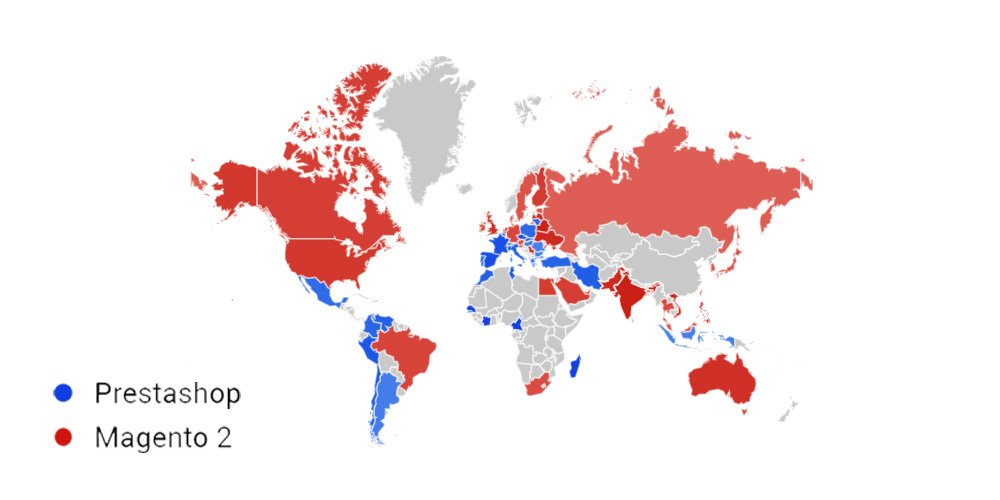
Prestashop and Magento 2 Usage Worldwide

Reasons to Choose Magneto 2 Over PrestaShop for Migration 

The release of Magento 2 has led to a migration trend across the web towards it.  As for the overarching platform, PrestaShop has been surpassed by Magento 2 in several areas, making it the number-one platform for online retailers. 

The following is a list of 3 noteworthy features that make Magento a more attractive eCommerce platform than PrestaShop, causing a trend of Magento migration from PrestaShop.

Features Due To Which You Should Move To Magento 2 From PrestaShop

1. Empowering Admin Experiences

PrestaShop and Magento will provide unique features to launch and manage your online store, regardless of your chosen platform. 

It is important to note that both platforms support your business by providing simple built-in features like import and export capabilities, payment processing, order management, essential analytic/statistical tools, etc. 

They help you run your business smoothly. A unique feature of this platform is that it allows you to create bulk products (a grouping of several products) and combinations (products with variants of colors and sizes).

Magento offers the same basic features as PrestaShop for launching and managing your store. Nevertheless, its modern and fully functional user interface can enhance your productivity. 

Some features available in the Magento admin site, such as automatic email marketing reminders, private sales, reward points, gifting options, etc., are available by default. 

However, using PrestaShop requires finding and installing modules from the Addons section to use some of the above-mentioned functions.

2. Agile And Increased Scalability

As part of the Magento Commerce (a.k.a. adobe commerce) version, you can access many out-of-the-box and advanced features, enhanced security, and customer support. Magento 2.0 offers comprehensive performance and scalability improvements:

  • Increasing order processing rate by a remarkable margin on the same hardware 
  • The server responds almost instantly when browsing a catalog
  • Reduce response times for the cart and checkout pages by more than double 
  • An improved process for handling extra-large records and large customer lists 
  • Support administrative users on the backend with more professional assistance 

Additionally, Magento supports touch-friendly and easy-to-customize mobile responsive themes. Moreover, Prestashop does not have mobile-friendly themes by default, but you can add them from the Addons section.

There is also one significant difference between Magento and PrestaShop: Magento allows you to choose from two different versions of eCommerce solutions, namely Magento Open Source (aimed at small and mid-size stores) and Magento Commerce (aimed at medium and large stores). Therefore, merchants have an excellent opportunity to scale up their businesses.

3. State-Of-The-Art SEO Features

Despite being very different yet similar, PrestaShop and Magento have some basic SEO options, such as page titles, meta descriptions, or personalized URLs. 

However, PrestaShop requires the installation of additional modules if it is to meet SEO criteria, whereas Magento provides a wide range of built-in SEO features.

The Rich Snippets feature is one of the most significant improvements that Magento 2 SEO offers. The rich snippets can now be added to the default Magento 2 functionality, rather than requiring an extension to use them. 

In addition, you can improve your product pages’ SERP (Search Engine Result Page) visibility by implementing structured data. 

Aside from that, Magento makes it easy to add Product Labels and create Schema.org (A structured data markup schema that helps search engines understand information on web pages and provide richer results) without any additional extensions.


Magento commerce

The PrestaShop to Magento 2 Migration Process

Switching from PrestaShop to Magento is worthwhile because of its powerful features, wider community, enterprise-level options, and many other factors. 

Unfortunately, Magento 2’s standard automated migration tool doesn’t support all entities associated with e-commerce sites. 

Nevertheless, some solutions fix the missing import process, automate data migration (if you want to migrate slowly), and resolve the issue with different attribute standards in just a few clicks. Furthermore, it integrates with ERPs, CRMs, marketplaces, databases, and more.

1. Migrate from PrestaShop to Magento 2 Using Data Files

  • Download and install the extension

You will need to install an extension on your PrestaShop website so that you will have access to XML, CSV, and JSON files so that you can import and export all your data, such as products, orders, customers, catalogs, and other entities, via official PrestaShop Store. 

The installed extension will allow you to choose any file format you wish to export your data. 

  • Create an import job in Magento 2 admin

The next step would be to go to your Magento 2 admin area once your PrestaShop store has been transferred to data files. Then, create a new job under System -> Improved Import / Export -> Import Jobs.

  • Configure Settings and Apply Mapping

Configure the General Settings, Import Settings, Import Behavior, and Import Source according to your business requirements. 

  1. The General Settings feature allows you to set up a schedule of updates and specify a job title;
  2. Click Import Settings on the PrestaShop menu and select one of the following entities to migrate: Products, Categories, Customers, Advanced Pricing, Orders, Attributes, Cart Price Rules, CMS Pages and Blocks. Each entity has its own characteristics. As an example, you can remove product associations like product data, tier price for products but not orders;
  3. Select the appropriate import behavior, validation strategy, and separators in Import Behavior;
  4. Choose the type of import file and its source in Import Source. Ensure all other parameters are configured, then upload and validate the file.
  5. You can now map PrestaShop attributes to Magento 2 attributes.
  • Create entity-wise import jobs.

Set up a separate import job for each entity in the system and configure it accordingly.

  • Run the import processes.

With the assistance of the data files, run multiple import processes to migrate from PrestaShop to Magento 2.

2. Migrate from PrestaShop to Magento 2 Using API

  • To import data into Magento 2, go to the admin area and create a new job. Firstly, go to your Magento 2 admin, and under System -> Import / Export -> Import Jobs, you will find the option to create a new job.
  • Configure General Settings according to business needs and use API.

Depending on your business needs and requirements, configure General Settings, Import Settings, Import Behavior, and Import Source;

  1. To migrate PrestaShop entities to Magento 2, set ‘Use API’ to ‘Yes’ in Import Settings and select Product, Category, Customer, Advanced Pricing, Orders, Attributes, Cart Price Rules, CMS Pages and Blocks. Each entity has its unique features. For instance, you can remove product associations or old categories; 
  2. Pick an import behavior option and validate the import strategy along with all the separators needed in Import Behavior;
  3. Configure other parameters and validate your import file in Import Source, then select the import file type (XML or JSON).
  4. You can now map PrestaShop attributes to Magento 2 attributes using mapping.
  • Specify Import Source

Set up a separate import job for each entity in the system and configure it accordingly.

  • Run Process.

Using an API connection, you can run multiple import processes to migrate from PrestaShop to Magento 2.

What Are The Most Important Post-migration Activities To Perform?

Once you have successfully migrated from PrestaShop to Magento 2, there are a few things you should consider to make your new online store run smoothly. 

You must perform these activities to optimize your store’s performance and maximize online sales. You should complete the following vital post-migration tasks to ensure successful Magento 2 migration and launch.

1. Install New Themes

You cannot migrate themes from PrestaShop to Magento, so you must use a third party or design it yourself to give your store a visual presentation.

Magento provides users with only 10 free and paid themes in Marketplace (paid versions cost from $30.00 to $499.00), limiting users’ options. As a result, you need to be well-versed in the technical side of Magento or have a good team of developers to design and add the code. 

Magenest’s store offers some professional themes that experienced web designers design for the best front-end selection.

Prestashop to Magento

2. Add New Extensions

Magento Marketplace has nearly 3,000 extensions that can help you enhance your store in every way. In addition, installing some extensions can help you enhance your store’s performance.

3. Change DNS And Switch Domains

After completing your shopping cart migration, the first thing you should do is change the domain of your PrestaShop to a Magento domain name. 

4. Set Up Shipping And Payment Gateways.

The Magento Marketplace has 394 apps available for you to choose from if you want to opt for third-party payment methods. 

5. Testing

After completing the entire migration process, you must now test your store to see if it works as expected. Placing a test order will help you better understand your customers’ purchasing journey. As a result, you can make some changes to make the journey more enjoyable and easier.

Test orders can be run for the following types of transactions:

  • Performing successful and unsuccessful transactions with billing address
  • Canceling and refunding an order with shipping address
  • Order fulfillment or partial fulfillment
  • Creating a successful order and saving it

Conclusion

Migrating from PrestaShop to Magento 2 can be intimidating, but it’s well worth it for businesses wanting to grow their online stores. Through Magento 2’s advanced features and customization options, you can enhance your store’s performance, streamline your operations, and provide a better customer experience. 

In addition, you can ensure a smooth migration by following the steps outlined in this guide and planning it carefully. Then, you can successfully migrate to Magento 2 with patience and attention to detail.

Are you looking for a service provider that can help you migrate from Magento 1 to Magento 2? Wedowebapps is an ideal choice for this. Whether you want to migrate your business to Magento or make it a smooth and hassle-free process, WeDoWebApps has the expertise to help you. Learn more about Zen Cart to Magento 2 migration and gain insights into understanding Magento data migration for a comprehensive understanding of the process.

Android App Development: History Tools, Benefits and Future Trends

Android software development has brought revolutionary changes in users’ lives in the last decade, and there is more to come. As an Android OS user, you must be using many social media, health, lifestyle, shopping, and other relevant apps. It is beneficial for app providers to expand their business and engage users in a broader perspective; it is equally convenient for users to access certain services, purchase products, and avail advantages of online payment, discount offers, and quality shopping experience. Android application development services have been highly in demand for such fruitful usage and results.From the beginning of launching Android to the date, it has gone through a myriad of changes that made it better than ever before. With technology advancement, new APIs, plug-ins, designs, features, security, and comfort, Android has come so far that one might wonder how it all got started? What has been the process of progress, and how has it become an integral part of peoples’ everyday life? History to future, here you will get to know almost everything about Android app development. Let’s start with a brief history of Android mobile application development. You are very aware of the race between Android and iOS app development, but you might not know that the war of Android vs. iOS developmenthas been waged quite earlier. Perhaps, that was one of the reasons Android came into existence independently.

History

It all started in 2003 when Andy Rubin, Rich Miner, Chris White, and Nick Sears founded a company and called it Android Inc. Andy Rubin was passionate about Android robots. Android was his nickname while he was working in Apple (Yes, you read it right!) and, thus, Andy became Android. The following two years were difficult to establish the company name and be recognized in the smartphone industry; until 2005, when Google bought the company. One of the critical decisions made during those times was the acquisition to utilize Linux as the base of the Android operating system. Needless to say that Andy and the whole team of co-founders remained there with full access to the entire lineup of Google products.

– Launching Android and declaring it as Open Source

The iPhone announcement was made in Jan 2007 and was available in stores from June in the same year. Google was right behind with similar and ambitious plans as the Google CEO and chairperson Eric Schmidt announced about the new Google phone and open-source OS in November 2007. After joining Open Handset Alliance with T-mobile, Motorola, Texas instruments, HTC, and Qualcomm, Android of Google became the ultimate OS for smartphone manufacturing for mega enterprises like Samsung, HTC, and Motorola.The first Android phone was launched in September 2008. Initially, Android phones were not as pleasing as iPhones aesthetically but, the QWERTY keyboard and touchscreen enticed many users. It used some of Google’s own products/apps such as Google maps, Gmails, YouTube, and Google search. It was when the Google play store was not even launched yet, and developers showed their apps in ‘Android Marketplace.’

– Versions of Android

Google has launched approximately eight different versions of its OS, installed on more than 24,000 various devices. It was also released to major smartphone models, Pixel and Pixel 2, which did not do well even after vigorous marketing campaigns. Nougat, Marshmallow, and Lollipop are the most used Android OS versions, among some other versions, which also comprise KitKat and Jelly Bean.

Android tools, usage, and features

Android tools, usage, and featuresThere is always a little room for improvement when it is about technology, and this urge to make and get better generates the best Android application ideas. It is such a vast platform that the popularity and demand will keep increasing in the coming years. In this blog section, you will learn about top android tools that help you craft scalable, future-ready, robust, and rewarding mobile applications. Android software development is the most fertile field of app development. According to Statista, more than six billion people are using Android phones, and the numbers are rapidly growing as this is being written. A recent survey by Statista also says that Google Play had over three billion active apps in the first quarter of 2021, whereas at the same time, the Apple store had over 2 million apps.There are a myriad of tools to use in developing Android apps to meet various business needs. It is obvious to get confused and determine which and when to use a particular tool with so many options. Therefore, we have divided tools into seven different categories that would make it easier to choose the right one.

1. Open Source

Open source is generally distributed with a license which makes the source code accessible to end-users legally. Furthermore, the original code can be re-used in new software, which means anyone can use the fundamental coding structure to modify it for better features and usage. Some of such open-source Android tools are as below:

> GitHub

A Git repository hosting service that is free and known as GitHub. This online platform helps share projects and keep track of different versions of the project while working in a group. It has been in developers’ favor as one can back up the work, find code tutorials and examples, and collaborate with others. Beginners may have lesser exposure to it but, if you have been a developer for a long time, working on significant large apps in groups, you must get familiar with GitHub. The features include Enterprise security, project and team management, Collaborative programming, and Automation.

> MLKit

Quickly becoming an integral part of mobile application development, ML, aka Machine Learning, is a challenging task when it comes to adding it to an app. Nevertheless, with a deep understanding of data analysis, neural networks, and training and optimizing models to run effectively, you can use the ML kit whenever you need. This android app development tool assists you in ad the ML functionality from Google to your app. It saves a huge chunk of money and heaps of data while letting you add things like computer vision and OCR. In addition, it has features like Landmark recognition, language and face detection, smart response, barcode scanning, image labeling, etc.

> Firebase

For those who need a set of tools for multiple purposes, Firebase is a package for Android app development, and it is free. Provided by Google, this is an entire suite of cloud services for web or mobile app developers. It consists of everything from Machine Learning Kit to AdMob monetization, analytics, and secure authentication. Firebase also offers many free and premium services such as crash reporting, cloud messaging, analytics, user authentication, file hosting, static website hosting, real-time NoSQL databases. The ‘Spark’ subscription is free and has a wide range of features, including real-time database and performance monitoring, so it is worth trying. Some of the other popular features are unlimited reporting, integration with other apps and services, audience segmentation; and below-given are main categories of Firebase products:

* Quality – Performance, crash reporting, testing, etc.
* Develop – Hosting, database, storage, authentication, etc.
* Grow – A/B testing, prediction, cloud and in-app messaging, etc.
* Analytics – Audience, conversion, funnels, etc.

> IntellijIDEA

IntellijIDEA is a java based IDE – Integrated Development Environment that helps developers to amplify productivity. A developer can refrain from doing repetitive and mundane tasks as IntellijIDEA provides static code analysis and intelligent code completion that focuses on other imperative facets of software development. Being a cross-platform Android mobile app development tool, IntellijIDEA offers consistent experience on Linux, Windows, and macOS. It has three editions, out of which IntellijIDEA CommunityEdition and IntellijIDEA Edu are free versions, whereas IntellijIDEA Ultimate is paid. Some of the known features are chain code completion, detecting duplicates, static member completion, editor-centric environment, inspection and quick fix, and inline debugger.

2. Cross-platform frameworks

Cross-platform or hybrid frameworks are those that let you create native-like mobile apps to run them on multiple platforms. Android app development frameworks contain open-source programming languages to craft robust, highly functional, fast-paced, and future-ready mobile applications. More people are inclined to build a hybrid app because it reaches a diverse audience at the most cost-effective price, so let’s have a look at some of the widely used frameworks for Android mobile app development.

> Flutter

Although not as popular as other frameworks, Flutter is carving its own path of success in today’s competitive market. A software development kit – SDK, Flutter lets you build incredible mobile apps for Android, iOS, and web with just a single code. It was released in 2017 first and used Dart language that makes it easier to support almost all the object-oriented concepts. In addition, it is known for providing widgets and the best user experience. With an amazing appearance, native-like performance, and impressive scrolling, fonts, navigation, icons, Flutter also has some other remarkable features. In Flutter, all platforms have similar business logic and UI, reduced programming time, easy to create rendering engine, improved time-to-market efficacy.

> React native

React native is built with React, which is an outstanding JavaScript toolkit to develop a user interface. The best thing about React Native is it allows developers to construct hybrid app solutions using JavaScript language along with platform-specific languages like C, Java, and Swift. As a result, this framework helps to use the source code in creating native parts, and a developer can build a new app without learning new skills for development. In addition, it is UI-focused, has a vast community, supports third-party libraries, and has mobile environment performance.

> Ionic

Ionic was released by Adam Bradly, Ben Sperry, and Max Lynch in 2013. It is a leading cross-platform framework and is widely used to create complex Android mobile applications. It uses technologies like CSS, JavaScript, and HTML, which also support other JavaScript frameworks like Vue, Angular, and React. A mobile app created using an Ionic framework is a hybrid HTML application due to Apache Cordova. It offers pre-designed elements, flexible and expressive UI, typography, and a base theme adaptable to each platform. In addition, this framework uses APIs such as Virtual DOM, async, TypeScript, and JSX, which are perfect for PWA – progressive web apps. Ionic is simple and easy to understand and use; it consists of eye-pleasing designs, Cordova plug-in, Web and JavaScript components, and framework compatibility.

> Kotlin

Modern yet mature, Kotlin is concise, compatible, safe, and cooperative with other programming languages like Java. Google sponsored Kotlin and being an object-oriented language, and it is reusable, open-source, and immensely readable. In addition, it offers features like null safety, JavaScript transpilation, native conversion, expressing programming, etc.

3. Testing tools

If you are using tools for intellectual development, why not use tools for testing? Testing tools are time and energy savers and make the testing process as smooth as it can be. So it is better to avail benefits of innovative technology and try testing tools with significant facets. So have a look at the following prominent testing tools to ease your Android app testing procedure.

> Apptim

Apptix has both free and paid versions, and you can make a choice as per your requirements. It enables testers to test and monitor client-side performance, which helps in avoiding quality issues going live. In addition, Apptix helps in trucking crashes, power consumption, app render times, resource usage, and much more. Its features include Android – iOS compatibility, JIRA integration, troubleshooting, performance report, etc.

> Selendroid

A test automation framework, Selendroid is useful for native, hybrid, or web applications when it comes to testing. It can be used as a node to parallelize and scale testing in Selenium Grid. Features are excellent compatibility with JSON Wire Protocol, various API support, built-in inspector, zero modification of an app under testing, etc.

> Test Project

Being the world’s first and free cloud-based, community powered test automation platform, Test Project allows users to test web, iOS, and Android applications easily and quickly across all the operating systems. You can use Appium and Selenium with this testing tool in order to cooperate with team members to assure improved quality and speed. You can use TestProject’s sophisticated software development kit – SDK to design programmed tests, craft and use add-ons, or you can use progressive built-in recording traits; everything is free. It has features like easy Configuration and setups, shared and reusable add-ons, detailed Dashboards, and seamless integration. 
> Appium 

Appium is known for being an open-source and cross-platform testing tool for Android (for 2.3 onwards). It works as a server, just like selenium in the background. It supports plenty of languages like Java, C#, and Ruby, along with some WebDriver libraries. Appium uses WebDriver to test running and automate Android using the UI Automator library. It can be synchronized with TestNG, which provides an informative and in-depth report. Features say it doesn’t need to modify and recompile the app, supports various languages, WebDriver language compatibility, can use any testing framework, uses JSON wire protocol, and is easy to integrate with other tools with the help of JAVA.

 4. Debugging tools

Debugging is necessary after testing. Debugging can be automated in mobile apps with the help of Android debugging tools. These tools are platform-specific, and you can use them for error removal while developing native or hybrid apps. Developers use bugging tools to check crashes, bugs, interface malfunctions, and many other errors in the targeted app operation. You can purchase these tools alone or as part of a whole package. Let’s have a look at some of the excellent debugging tools.

> DebugDrawer

DebugDrawer offers easy access to data and settings of a device and the ability to simulate location and connection state along with the same. The testing process is much easier with this Android debugging tool as it allows you to check information about gadgets rapidly. By adding extra modules to your project, you can customize the debug navigation. Its features include device information, Configuration of various settings and networks, and building adequate information.

> Stetho 

Facebook developed Stetho, a debugging tool or, say, a bridge for Android. It is a free, open-source, and efficient Android application development platform that gives you access to Chrome development tools, a feature that’s native to the desktop browser. Stetho does a network inspection for images, HAR exporting of traces, and JSON response assistance. Its features are JavaScript console, database inspection, network inspection, viewing hierarchy, dump app, and ChromeDevTools.

> App Spector 

Coming with both free and premium versions, App Spector is an Android mobile app debugging service. It allows developers to inspect your software remotely, even if the development team members are scattered. With a simple online interface, AppSpector helps you in real-time access to your app’s internals. It tracks app location, database, network traffic, as well as performance indicators that go beyond mainstream log collectors. It consists of all of the essential Android development tools for introspection. Its useful features are real-time access, remote control, history replay, core data, performance, custom events, and commands.

5. Performance tools

The performance of an app is the most imperative part of development. If your application is running slow, users are more likely to avoid using it. The better the app performs, the higher the probability of succeeding in the market. In today’s world, where people are glued to their phones all the time, it’s necessary to deliver people’s anticipated results. Approx 70% of users will abandon an app if it takes longer to load, and approx 25% of customers delete apps after using only once due to its poor performance, resulting in a bad rating on the Google Play store. 

> Flow Up 

FlowUp helps in keeping track of all of the production apps’ performance. Utilizing this Android development tool, you are capable of keeping records of your analytics and metrics, such as disc and CPU consumption, memory usage, bandwidth, frames per second, and much more, with the help of dashboards. Flow Up is a SaaS service that you can have with a monthly subscription based on the number of people using it. Some features are Frame-Per-Second frame time, CPU usage, memory consumption, disk allocated bytes, and allocated TCP/UDP Traffic, etc.

> The Android Profiler

Also introduced in Android 3.0, The Android Profiler provides real-time data to monitor the CPU, memory metrics, and network of an application while it is running on a device or emulator. It’s an amazing tool for discovering performance in apps, keeping track of memory usage, and ensuring network bandwidth limits are not exceeded. The valuable features are the usage of CPU Profiler to monitor CPU activity, and Memory Profiler lets you examine the memory allocations and Java heap; Network Profiler is for scrutinizing network traffic and such action, whereas Energy Profiler helps in tracking your energy usage.

> Apache JMeter (Free)

JMeter is one of the most extensively used Android performance measuring tools for mobile phones. It’s a free, open-source program with expansive capability (because of plug-in support) and a user-friendly interface. A myriad of testing options is available, including several load generators as well as controllers. It’s also possible to use the software to test volume and availability. JMeter supports HTML-rich reporting and data visualization tools and provides in-detail documentation to users to make it smooth for grasping the program. Some facets include intuitiveness and simplicity; GUI supports servers such as HTTP, LDAP, HTTPS, POP3, etc., provides support for swing and lightweight components. It is a Multithreading framework with highly extensible features.

6. Android UI/UX Tools

> Sketch

Sketch is a simplified and facile vector design tool that solves and streamlines user interface design. It facilitates the UI/UX included in Illustrator and Photoshop. To get the best out of design, this tool helps you in getting rid of the bloated functionality and concentrating on UX – user experience. The best thing about Sketch is its ability to install plug-ins. Nevertheless, Sketch’s support in real-time Android preview is not that effective, so better to have a trial first. Some fundamental features include toolsets, code export libraries, instant preview, and vector editing plug-ins. 

> MockPlus

Mockplus is a rapid prototyping tool based on cloud, it can be used for building interactive prototypes and wireframes. It allows users to finish a screen design quickly with its pre-build components. It is a straightforward tool that requires a low learning curve which will enable users, even with limited experience in order to build prototypes effortlessly. You can avail of it on an annual subscription. Some of the known features are design prototype project task management, real-time editing, design feedback, and commenting code snippet generation.

> Figma (Freemium)

Figma is the right tool for creating UI – user interfaces. You can design and prototype your digital experience at once and in real-time. It’s a UI development tool that works well on Chrome, Firefox, Safari, and Edge. It costs only $12 per month for professionals and approx $45 per month for organizations. Also, you can test it for free with your individual plan. It’s a one-of-a-kind application-based browser, so you don’t have to worry about outdated software or any compatibility difficulties. It lets you adjust the size of your design which helps to fit any screen. Features include prototyping, built-in commenting, version control, live sharing, multiplayer, a collaboration of team libraries.

7. Security tools

We can say that security is one of the most underappreciated and underrated parts of android app development. A lot of time is spent crafting and designing android apps, but a tiny amount of time is spent on the security element. Often programs store critical information, yet they lack the most basic levels of protection. Many popular apps in the Google Play Store are known for major flaws and vulnerabilities, and any motivated hacker with sufficient skills can simply exploit in a matter of minutes. Secure Android apps with the following security tools to make them more reliable for your customers.

> QUARK 

LinkedIn has developed it, and QARK stands for “Quick Android Review Kit.” The name itself implies how useful it is for the Android platform to detect security flaws in the source code and APK of mobile applications. QUARK is a static code quality tool which offers information about app security, vulnerabilities and a clear and concise description of issues. In addition, QUARK generates Android Debug Bridge – ADB commands which will help in validating the vulnerability that QARK detects. Features: open-source tool, in-depth information about security vulnerabilities, report potential exposure and fixing them, highlighting version-related issues, and misconfiguration and security threat scan.

> OWASP Zed Proxy (Free)

The Zed Attack Proxy (ZAP) is specifically designed to be simple to use and operate. Earlier, it was used mainly to detect vulnerabilities in web applications; however, it is now widely used by all testers for security testing of mobile applications. ZAP allows a user to send fraudulent messages, making it easier for testers to assess the security level of mobile apps. This form of testing is carried out by delivering a request or file through a malicious message and deciding whether or not the mobile app is vulnerable to it. Features: Most popular open-Source security testing tool, ZAP, is maintained by volunteers, easy to install, the broad international community, great for manual security testing.

Benefits of Android app development

Benefits of Android app developmentAs Google keeps coming with newer versions with enterprise-friendly features and enhanced security, entrepreneurs also seem ready to have a cherry on the cake with the help of customized Android app development. Today, Google Play has approximately over 3.3 million apps, and the number is steadily growing. In other words, the Android app development world is thriving at a tremendous pace. Here, you will know some top benefits that compel businesses to opt for future-ready and feature-rich Android app development.

> Easy Customization

Android app development is known for being a resourceful platform with commendable flexibility and easy customization options. You get an innovative, exciting and impeccable enterprise app with a diverse range of functionalities. Android is a robust operating system that can be integrated with all types of modifications, whether it is simple to complex. Your business requirements can always be addressed effectively and immediately with this platform.

> Better security and easy marketing

Google has released ample business-friendly features in the latest updates of Android, starting from Lollipop. In today’s competitive market, this platform stands still against its Apple counterpart when it comes to data security. It is difficult for malware to locate the data structure and spoil it. Plus, an automated system can send timely notifications to the users to keep them updated. Furthermore, you can promote your Android app thanks to the platform’s easy access and prevalence. In that way, Android OS has given you both safety as well as promotional advantages.

> Higher RoI

Promptly available to programmers, this open-source platform and Android’sAndroid’s SDK – Software Development Kit is cost-effective, and so is the entire development cycle. Furthermore, Android app coders can efficiently execute the material design. As a result, you can have an engaging, attractive, and interactive Android app at a reasonable cost to address a vast audience worldwide. In short, a personalized Android app offers a higher Return of Investment – RoI compared to its Apple counterpart. We can classify the development cycle into three phases- App Design, Development, App testing, and App Deployment.

> Reduced Time To Market

It is essential for you to come up with a business app idea as soon as possible to have a competitive edge over your rivals. Android app development tools can provide quicker development facilities with desired integration of required features. Experienced Android developers can create an app for your business in a shorter time, and you can avail benefits of reduced TTM. That’s not all! If you want to improvise the app with changing requirements, you can do so swiftly.

> Room for Innovation

The biggest strength of the Android platform is its worldwide presence. If you want to nurture business for your audience with some novel features, the Android apps can help you by using cutting-edge tools and technology. You can have high-end app solutions by integrating ultra-modern technologies like AR and VR at affordable rates. In that way, Android offers sufficient scope for innovation and unlocks the doors to new business opportunities.

> All things Google

This one is the most significant advantage you can get with Android app development. Although several Google services are available in iOS, deep integration is still lacking. You can give the benefits of Google’s apps and features to your users with a customized Android app for your business. Also, whenever Google launches a new service or app, it can effortlessly work on your Android app with ease.

> Evolving Platform

Are you aware that Android is constantly evolving? Android smartphones have been built by some renowned companies such as Samsung. They keep on producing new facets to stay strong amid increasing competition, and the efficient Android developers’ community immediately gets adapted to them. Read more about New Trends In Mobile App Development

Future of Android App development

There is no limit when it comes to ideas for Android app development. Android devices embrace almost 85% of the global mobile market. This empowers businesses to reach a broader targeted audience and expand their brand awareness. In addition, Android operating platform fame isn’t determined only by its extensive availability and app variety found on the Google Play Store. It allows combining the most cutting-edge technologies into Android mobile apps. Furthermore, android tools are here to make the development procedure faster and extra effective. All these features make Android apps the right option for many businesses.

> AI and Machine Learning

AI – Artificial Intelligence and ML – Machine Learning technologies are popularly used for Android app development. They attach such digital solutions as chatbots and voice assistants, analytics, automation, Big Data processing, and many others. Execution of AI and ML in Android apps aids businesses in enhancing their customers’ experience. They can– automate usual tasks like organizing tickets by topic, addressing messages and reminders;– update user recommendations, arranging them based on customer likings;– intensify filter configuration on various e-Commerce sites;– Personalize mobile apps in line with shoppers’ preferences and their more thorough connection with the users like suggestions configuring customization of app layout or procurement of exclusive discounts or prices for frequent customers.

> Blockchain Technology

Blockchain is a fast-developing technology that can transform the idea of how the financial service sector works. It is predicted to change well-established commercial institutions, lead the operational costs down, stimulate and better secure money transactions and raw data exchange. Many finance-related and banks companies are already executing blockchain in their practices. For instance, PayPal experiments with blockchain. The company aspires to promote money transactions and cryptocurrency exchange. In addition, Facebook is starting a blockchain platform called Crypto, creating its currency for its customers. Soon, more companies would like to try cryptocurrency platforms or to build mobile apps with magnified security. They will connect to professional blockchain development organizations to create digital solutions customized particularly for their business demands.

> IoT

The primary two mobile app development trends are 5G and the Internet of Things (IoT) in 2021. 5G is expected to dramatically rise to IoT, promoting its spread from Smart Houses to Smart Cities. Besides the future with a bright prospect, several companies are already harvesting substantial profits from installing IoT technology in their mobile apps. Now IoT solutions are used in intelligent fitness trackers authorized by GPS, gyroscope devices for healthier movements, accelerometer, and location, and workout tracking; smart gadgets to connect a microwave, a lighting system, a fridge, and other things into one network that can be run in a mobile app manually or by the aid of voice assistants. Industrial IoT for tracing production course and preventive maintenance, when all the stats, statuses, and analytics can be checked simply in one mobile app; 

> M-Commerce

M-Commerce is a short form of mobile commerce and involves many fiscal transactions consumers can carry out by using their smartphones. They cover mobile money transferring, E-tickets, Electronic boarding passes, E-coupons, electronic loyalty cards; mobile banking; E-commerce; contactless payments and payments in mobile apps, etc.The M-Commerce services are capable of making payment systems agile and convenient; hence, many industries incorporate mobile payments in their applications. Above all, they can be quickly built-in in any mobile app. For example, Google provided its payment platform Google Pay app for Android and iOS app developers, making M-Commerce services even more secure and easy to use. As a result, more businesses will opt for seamless mobile payments in their business apps in the coming years. As a result, business Insider predicts that M-Commerce volume will rise from 25.5% in 2019 to 44% in 2024.

> AR and VR Technology

Augmented Reality – AR and Virtual Reality – VR aren’t some brand new technologies in Android development. For instance, the Google platform ARCore has built augmented reality experiences for various Android app platforms since March 2018. While executing AR/VR technologies in mobile apps, corporations take customers’ experiences to the next level. For example, Google Maps has an AR upgrade that helps better navigate a city by placing a virtual map over real street views.In 2021, more companies will experiment with VR/AR technologies and successfully implement them in their apps. As a result, they will become more spread around various niches and industries such as education, tourism and travel, real estate, entertainment, E-commerce, and retail.

> On-demand Apps

On-demand apps were top-rated in the Coronavirus epoch in 2020 and will continue to be frequently used in 2021. These are the apps that provide quick services like Uber or pizza delivery services.On-demand apps are used in various niches such as retail, food delivery, health tech, grocery, and many others. They assisted many companies in keeping their consumer flow high during the pandemic, and some even increased their revenues by reaching every customer. These apps will retain their popularity in 2021 as they help users perform daily tasks quickly and conveniently.

> Android Instant Apps

Android instant apps are a time-saving technology that allows quickly checking an app without explicit installation on a device. It preserves end-users time and encourages them to use the app much quicker. Moreover, these Android instant apps consume less space on gadgets, which prevents system interruptions due to full memory. E-commerce stores and game developers substantially benefit from prompt apps. The technology makes it much easier for companies to advertise their products and attract potential customers. Users can run into these apps in Google search results and instantly open them to check. However, in order to install the full version of an app, they will need to visit the app store.Wrapping up: If you are unaware of any Android mobile app development information, this blog must have been quite insightful for you. We have opened an ocean of information right in front of you by covering almost every essential aspect of Android app development. Remember that Android is here to stay for a long time or, say, forever, and there is nothing Android cannot provide you. So please close your eyes and wish for it; Android apps can do wonders for you.

How to Develop an Android App

Following the recent trends, it has become essential to avail of Android app development services. Developing an Android app demands a lot of expertise, talent, as well as innovation. There are plenty of benefits one will get after creating an application for their organization. To effectively carry out the application development procedure, a business owner needs to consider some essential points. The present blog is a compilation of such important points.

Android app development – Essential Considerations

Below is a list of essential points to consider for creating an Android app. Go through them and know about them in brief.

  1. Area of Application: It is essential to know about the field of application of an Android app. There are plenty of areas where one can use them, such as gaming, mobile commerce, health care, enterprising, social media, support, maintenance, testing, and so on. Firstly, the owner has to determine his need from an app and then work accordingly.
  2. Easy Accessibility: The Android application must be easily accessible. It should be easy to navigate through different tabs and sections of the application. Apart from that, the app must be compatible with other types of screen resolutions to deliver better viewing on all smartphones.
  3. Google Playstore: Without getting a place on Google Playstore, an application is of no worth. Thus, it is essential to develop an Android app within the parameters as set from the prior. Letting the users easily find and download the application from the store.
  4. Appearance: While creating an application, it is essential to consider this point. The app must appear well, with attractive graphics and easy to navigate tabs. In this manner, it can enhance the user interface. It will surely benefit the business owner to increase the engagement of users with the application.
  5. Features: Features relates to the facilities the business owner is going to offer to his clients within an application. 

Significance of Android app development

Owning an Android app benefit a business owner in many ways. Such as:

  • It becomes hugely more comfortable to notify the stakeholders of business about the day to day activities of the organization. This keeps them updated with the happenings, and they remain in touch with the company.
  •  A business can maintain its online presence with the help of an Android app. It will provide them with a notable platform for advertising themselves.
  •  An Android app will also facilitate enhancement in the number of clients, which in return will increase the Rate of revenue of the business.

In the present article on How to develop an Android app, we have briefed out some of the notable points to be kept in mind while Android app development for your business.

Know Why Android Is Preferable Platform for On-Demand App Development

Applications, or say, mobile applications, to be specific, have a significant role to play in our daily lives. It wasn’t long ago that mobile applications made their way into the technology industry. But, it is evident that these undoubtedly have become the most sought-after thing in a person’s daily routine. The first thing in the morning- talking about most of the folks- we rely on the alarm application that sits in our mobile phones. And further, it’s a chain being followed. One thing leads to another, and there! You’re trapped. In the current scenario, android app development has become secure and a significant task. The evolution of the technology industry led to the intervention of mobile applications into our lives. After smartphones and tablets entered our lives, it was mobile applications that sneaked in and gradually became the most valuable thing today. In fact, you won’t deny that it was for these mobile applications that these smartphones got the popular response they got. Had these applications not been in line, operating a smartphone would have been a tiresome task.Taking mobile applications, mobile app development is an important aspect. This industry has many aspirants as it is mainly used for developing and growing businesses or startup ideas or simply taking forward an initiative. Sometimes, even the government requires mobile app developers for the developments that could serve the entire nation.When we discuss mobile app development or on-demand app development, for that matter, we shouldn’t turn a blind eye towards the competitors of this industry. The prominent competitors that one comes across in the mobile app development industry are- Google and Apple. Well, Microsoft is also a horse in the race, but unfortunately, the horse runs at a slower pace. According to a record from Statista, there were 2.95 million apps on Google Play Store in December 2020. mobile app StatistaThat’s pretty huge. Google play store has several different categories to classify these apps into. These categories range from gaming apps, music, video streaming, social media to business apps, payment apps, etc. The list is a long one. And currently, our focus is not on this list of categories. Either, it is the most sought-after apps that are in vogue these days- On-demand Apps. Further, let us discuss in detail what on-demand apps are.

What Is An On-Demand App?

These days, the most used apps include on-demand applications. Whether you talk about the food delivery apps or the ones you use for booking cabs, these come under the category of on-demand mobile applications. These days, on-demand applications are everywhere. An on-demand app is actually software that operates as a mediator between a customer and a business. The businesses like Uber and Zomato and many others are an example of such an approach. On-demand app development is aimed at providing on-demand service to customers in a few minutes.On-Demand AppThese apps connect the customer indirectly to the various service providers out there in the market. The services being provided separately in the market are made to reach the customer through an online medium to be delivered at their doorsteps. Whether you talk of the food delivery apps, these apps collaborate with the various businesses around a place and simultaneously take orders from the customers and arrange the delivery of that order by themselves. On-demand app development prevails as a prominent task for android apps developers. On-demand app development services are quicker and are more convenient to use.

On-demand apps can be classified into different categories.

On-demand apps

  • Taxi service
  • Food delivery
  • Household chores
  • Car wash apps
  • Gifts
  • Flowers and plants
  • Healthcare
  • Medical apps

Android is a mobile operating system that is used to develop touchscreen devices, cell phones, tablets. It is based on a modified edition of Linux Kernel and other open-source software, which were predominantly designed for touchscreen devices and mobile phones.Each day, the number of mobile phones operating on Android is increasing. And likewise, the applications being added on the Google play store are also being proliferated.Trust us, and the on-demand advancement is here to stay. These apps are so convenient and liked by the users that they become habitual of ordering the essential services in just a few clicks.Further in the blog, we will decipher why android and on-demand app development goes hand in hand.

Why Is Android The Best Choice For On-Demand App Development?

Android, the most used operating system, has taken the lead in the app development industry. The Android Operating System, which was developed by Google back in 2008, has now become developers’ choice, to be precise. Android has around 1.6 billion users worldwide. Not just this, Android has a share of 71.93% of the world’s operating systems. According to Statista, the data also shows that Android 10.0 is the most used Android version worldwide.Android appAndroid app development is the prominent procedure followed by several thousand developers from around the world. There are specific reasons that prove that Android is the best operating system to develop on-demand apps. Over the years, Android has set itself at an elevation from what it was in the past- at the time it was released in 2008. Android is now the most used operating system worldwide, as we already mentioned. Now is the time that you see clearly that it is, by far, the best platform for app development. Android app development doesn’t betray the developers, not the users. This way, the business owners, the developers, and the customers persist in being satisfied with the services.  The Android app platform works just the best for everyone. Here’s how:
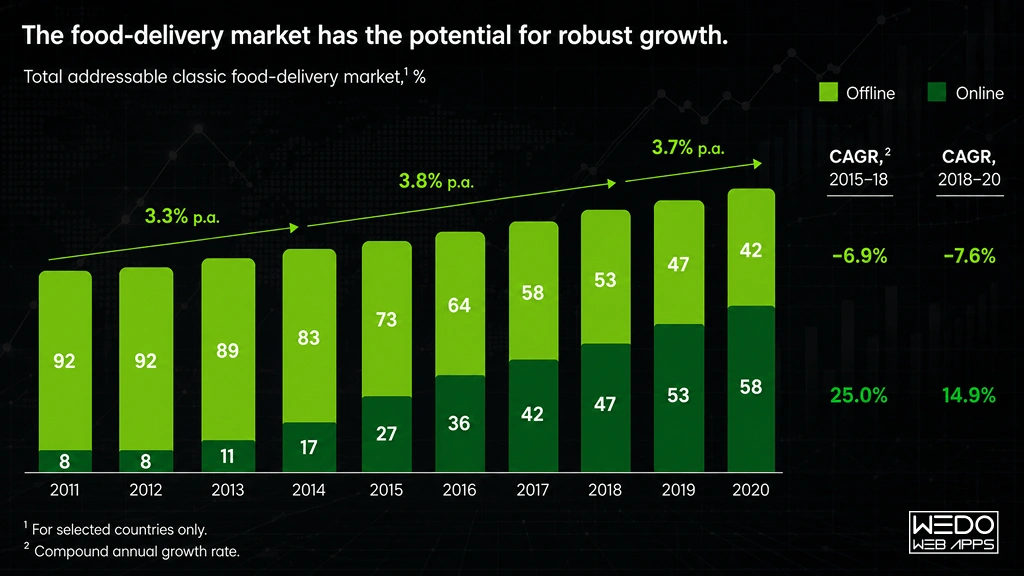

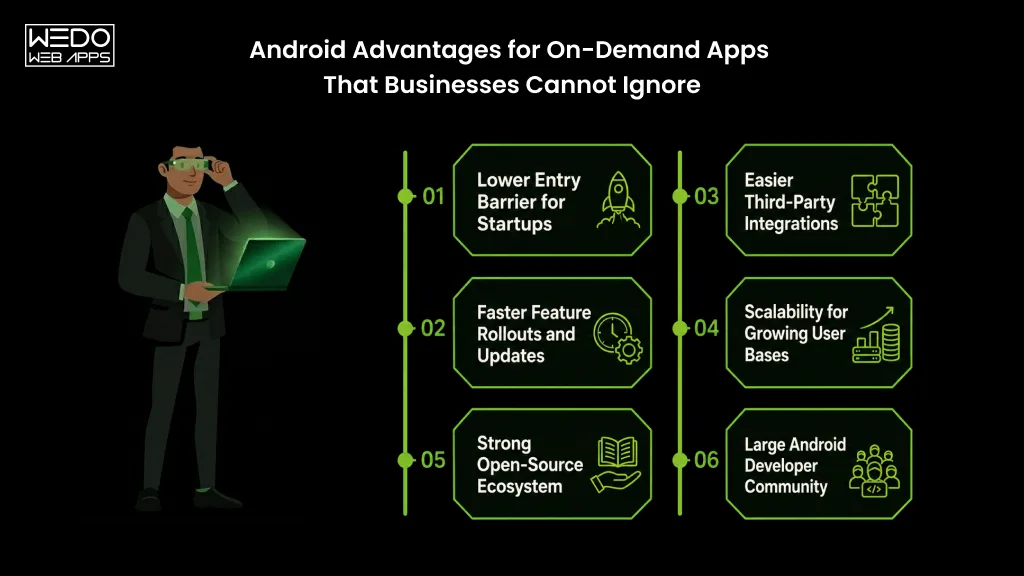
Android apps possess a massive share in the market:

as we already mentioned earlier, Android has 71.93% of the share in the entire operating system market worldwide. This data in itself is vast and is consistent with the fact that it is by far the most preferred system. We can deny opinions, not the facts. Here we present you with the most accurate facts brought to you straight from authentic surveys done by the best websites worldwide. Android app development is and will be beneficial to everyone in all domains. People prefer the android apps present on the play store. Statistics and figures worldwide indicate only one direction- Android is faulting better than iOS.According to reports on Reports show 3.3 million Android apps in totalAndroid also has an edge because of the vast geographical region covered by Android worldwide. Android apps also have a considerable share in the two densely or say markets- India and China- the most populated countries of the world. It’s definitely not confined to a particular continent. It finds its immense users based in large parts of Europe and South America, and even in many parts of Africa. On the other hand, iOS gets to witness its users restricted mainly to the US and Canada, if not for Australia.This clearly shows that if one wishes to reach out to a considerable mass of the populace, he should think about the platform best suited in the longer run. The only platform that would come to a developer’s mind when comparing the facts and figures of the audience being reached, a sensible one would not take a minute to go for Android app development.Likewise, on-demand applications have a great future if it is for the Android app development process. This procedure is the one that is adamant in bringing you success. Think of this as your mantra- The more influential the audience, the larger the reach, the better is the growth of your business.

Lenient and flexible app policies:

Lenient and flexible app policies are your way through any sensible, well-learned expert would have you believe that Google has the most flexible and developer and user-friendly app policies. These policies do not come in the way of developers during the android app development process, nor do they interrupt the working and usage of the end customers of the apps. Having such policies in place turns out to be a blessing for the developers. The guidelines that direct the app publishing and rejection are pretty lenient and easy on the developers. Stringent and hard to mold rules, terms, and conditions as not a thing of Android. The reviewing time taken at Android is even lesser than usual at the play store.Also, the tremendous expense that every developer or business owner wishes weren’t there is far less for Android developers than it is for iOS ones. While you’re developing an on-demand app, the requirements to pay that extra penny are eliminated. You pay a reasonable amount at Android- a contradiction to what you would pay to Apple.

More features, more fun: 

Who doesn’t like a little more than usual? Everyone wants to have that extra in just the same budget. Android allows you to have that little ‘extra’ in their apps. There is room for additional features in Android app development. Especially when creating on-demand apps, one needs to have several features handy that the customer is provided with the most convenient application to use. Features such as GPS and Maps are a boon for Android app users. These features are not something that should be, in anyways, left out. These help to communicate better with the customer and provide them with leverage of comfort. 

Customization is a piece of cake:

On-demand apps are not easy to maintain in general. Now and then, there’s something that needs to be changed to get a modified version of the app. Also, to cater to the needs of customers, you must include each functionality that is desired by your audience. This makes your app more reliable and convenient. To get this done, Android provides smooth and easy customization options for the developers to put in a feature and update the app whenever needed.

Google assistant: 

With Android, you get the benefit of google assistant. This assistant is incredibly profitable as it has a voice-enabled assistant at work. Your command is its order. You give the command, and it gets encrypted immediately, thereby leaving no room for dissatisfaction. You can search for a thing while doing a task effortlessly.

Better Data Storage: 

Google gets you 15 GB of data storage free of cost on its cloud. This data can be stored in Google Drive. This feature is highly beneficial when you wish to develop an on-demand application. Launching the on-demand app on Google Play Store will be smooth for you in light of the extensive storage that’s provided.

Multiple languages at one place: 

on-demand applicationThe on-demand application should likewise have various language support components as it depends on the B2C model. It is a significant advantage that Android offers help for around 100 dialects in contrast with simple 34 languages on account of iOS. Read more about New Trends In Mobile App Development

Closing Lines: Are You Ready to Build an On-Demand Android App?

These days, there’s a powerful desire for on-demand applications in the market. With pandemics revolving around our lives, we surely need certain on-demand apps to work for our essential needs to be catered. Well, we’ve provided you with enough reasons why choosing Android would be the best choice for anyone. Consider all these points and choose the best for yourself. With over a decade of experience in the field, we have covered almost all business areas of one or the other companies. If you have a project idea to discuss, you can contact us and discuss the details. Our android application development company will make the next android application a massive success!