skip to content

Should You Build an Android App? Pros, Cons & Business Considerations Explained

Introduction: Why Platform Choice is a Strategic Business Decision

Mobile application development plays a crucial role in the digital transformation strategy of a business. Businesses of every size and type are already investing more and more in mobile solutions to optimize their internal operations, enhance customer engagement, and boost their digital presence. Choosing the right mobile application development platform is an important, strategic decision in this journey.

Many businesses consider Android a strong contender because of its global market dominance and open-source flexibility. However, like any strategic technology-related decision, Android app development has its pros and cons. From device fragmentation to lower revenue per user (RPU), businesses need to consider factors like these carefully.

This blog will talk about the advantages of Android app development along with its disadvantages, providing valuable insights to help businesses develop a mobile strategy. This blog will be helpful for businesses of all sizes, from startups seeking cost-effective solutions to an enterprise looking for scalable, globally-ready solutions.

What Is Android App Development?

Android app development means building applications that run smoothly on devices based on the Android operating system. Application developers use programming languages like Java and Kotlin and use tools like Android Studio and Jetpack libraries.

According to the Android Developers Guide, modern Android apps are encouraged to use Jetpack Compose for UI, Kotlin for logic, and Firebase or Room for backend/database support.

The Dominance of Android App Development in 2025

Is Android Development a Business Opportunity?

Let’s know this with insights on Android market share and user base.

Android covers more than 70% of the global mobile phone market. This is why it is the most popular mobile operating system in the world. The dominance of Android is particularly evident in emerging markets such as the USA, India, the UK, and others, driven by the rapid adoption of affordable Android devices. For companies seeking global adoption or budget-conscious consumers, Android provides an unmatched market reach.

Trends Driving Android Popularity

  • Introduction of low-cost smartphones.
  • Google Play Store and Android App Ecosystem expansion.
  • Adoption of Android Tablets and smart devices. 
  • Android OS features supporting enterprise needs. 

Your business may reach a wide audience with Android’s substantial user base, attracting users who might not be available on other platforms.

Top Advantages of Android Application Development for Businesses

1. Expansive Market Reach

Android has attracted 70% of the smartphone market, making it the widely used operating system. This adoption is particularly observed in developing economies like the USA, India, Africa, and more.

Why Android’s Market Reach is Revolutionary?

  • Businesses may reach a larger audience by developing Android apps. 
  • Increases user engagement by enabling local features and regional customization
  • Due to Android’s large user base and availability through the Google Play Store and other third-party marketplaces, it raises awareness. 

Real-World Implications: Companies that want to launch low-cost products or aim for widespread market adoption benefit greatly from Android’s high reach.

2. Seamless Integration with the Google Ecosystem

Android applications seamlessly integrate with the Google Ecosystem, which includes tools such as Google Maps, Google Drive, and Google Ads.

Benefits of Android and Google Ecosystem’s Seamless Integration

  • Real-time location tracking with Google Maps APIs
  • You can use Firebase for powerful backend functions like performance monitoring, real-time databases, and cloud messaging. 
  • You can make use of Google Ads and analytics to streamline user statistics and monetization. 

Business Benefit of Android – Google APIs Integration: Android apps are faster to market and have stronger infrastructure support for app scalability and user retention.

3. Open Source Flexibility for Customization and Innovation

Android’s open-source nature provides developers with a unique level of freedom. This platform is developed on the Linux Kernel and allows for substantial customizations, which is not possible on platforms like iOS.

Why this matters for businesses:

  • Android allows for customized UI/UX, which is unique for your brand. 
  • It efficiently integrates with specialized third-party services and custom hardware.
  • Ideal for vertically specific solutions like smart devices, kiosks, or POS systems. 

We, at WEDOWEBAPPS, have built Android apps with custom kernels and modified system features for enterprise clients, something not easily possible with closed-source platforms like iOS.

4. Cost-Effective Development and Larger Talent Pool

Android app development is usually more cost-effective than iOS. With a larger pool of developers and open-source tools and frameworks, app development costs are usually lower.

Factors reducing cost:

  • Lower publishing fees on the Google Play Store as compared to the Apple App Store. 
  • Android supports cross-platform tools such as Flutter and React Native. 
  • Android’s preferred language, Kotlin, offers crisp syntax and lower bug rates, which leads to faster development cycles. 

Perfect for: Startups and SMEs who are looking for budget-friendly app launches without compromising on functionality.

5. Faster MVP Launch and Agile Development

Because of Android’s adaptability, companies can quickly prototype and launch minimal viable products (MVPs) and test ideas in actual market settings without having to make significant upfront investments. Android’s agile development cycles enable ongoing iteration in response to user feedback.

6. Developer-Friendly Tools

Android Studio, Kotlin, Jetpack Compose, Firebase, and Material Design offer a comprehensive and evolving development ecosystem.

Disadvantages and Business Risks to Consider

1. Device Fragmentation and Testing Complexity

Device fragmentation is the largest technical obstacle in Android development. Maintaining a consistent user experience is challenging given the hundreds of devices running different OS versions, screen sizes, and hardware specifications.

Key disadvantages:

  • Requires thorough debugging and testing of the gadget.
  • Multiple resolutions and performance capabilities must be accommodated in the design.
  • increases post-launch maintenance and QA cycles.

2. Security and Privacy Concerns

Security vulnerabilities are also introduced by Android’s open-source nature. Malware is more likely to be found in the Google Play Store since its app review procedures are rigorous than those of Apple’s App Store.

What companies must do:

  • Use HTTPS for all network operations and adhere to secure coding guidelines.
  • To fix vulnerabilities, do routine app audits and upgrades.
  • For further security, use programs like SafetyNet and Play App Signing.

3. Lower Average Revenue Per User (ARPU)

Android frequently generates less revenue per user than iOS, despite its larger user base. The popularity of free apps and user behavior in emerging markets are the primary causes of this.

Effect on business: 

  • Dependence on freemium or ad-based revenue models can be necessary.
  • Android users are less likely to make in-app purchases, particularly in areas with lower incomes.

4. Maintenance Overhead and Longer Support Cycles

Updates for the Android OS are rolled out inconsistently among devices. Because some users might never update, it might be challenging to add functionality or address bugs on all devices.

Challenges for developers:

  • Longer support for older Android versions is required.
  • Regression testing was given more attention.
  • Untested versions run the risk of app crashes or feature malfunctions.

Strategic Considerations for Businesses

When planning Android app development, align the strategy with your broader business goals.

  • Audience Geography: If your users are in cost-sensitive or emerging markets, Android provides the best coverage.
  • Budget and Resources: Android’s affordability makes it ideal for startups and growing businesses.
  • Industry Fit: Android’s flexibility serves well in sectors like healthcare (telemedicine apps), education (e-learning platforms), and logistics (fleet tracking solutions).
  • Future-Proofing: Android’s support for wearables (Wear OS), cars (Android Auto), and smart TVs (Android TV) makes it ideal for multi-device roadmaps

When Android App Development Makes the Most Business Sense

Android app development fits businesses that:

  • Target large, diverse user bases, especially in emerging markets or budget-conscious segments.
  • Want to leverage the Google ecosystem for marketing, analytics, and cloud infrastructure.
  • Need highly customizable apps that integrate with custom hardware or enterprise systems.
  • Are startups or SMEs aiming for quick MVP launches with limited budgets?
  • Seek to maximize reach rather than immediate revenue per user.

Case Study: Real Challenges from Our Kotlin-Based Android Project

In 2024, our team at WeDoWebApps developed a warehouse inventory management app using Kotlin, Jetpack Compose, and Firebase. A major challenge was ensuring stable payment integration across different Android versions (10 to 14).

“We used Firebase Test Lab to simulate real-device behavior and caught a critical bug on Samsung devices running Android 12. Without it, we would have missed a major compatibility issue.”

We reduced load time by 45% by optimizing Jetpack Compose layouts and implementing lazy lists effectively.

When You Might Want to Consider iOS or Cross-Platform First

Conversely, consider iOS or cross-platform if:

  • Your audience consists primarily of premium users in developed markets (the US, the UK, Canada, and Australia).
  • You prioritize a consistent UI/UX experience with minimal device variations.
  • Your revenue model depends heavily on subscriptions or in-app purchases (higher on iOS).
  • You want to reduce maintenance by building a single app for both platforms (using React Native or Flutter).
  • Security and privacy regulations favor iOS’s closed ecosystem for sensitive applications.

Android vs iOS: Comparison Table

FeatureAndroidiOS
Market Share~72% (Global)~27%
Development LanguageJava, KotlinSwift, Objective-C
Testing ComplexityHigh (fragmentation)Lower
App Store RestrictionsFewerStricter
Monetization PotentialModerateHigh
Hardware VarietyExtensiveLimited to Apple devices

How to Strategically Choose the Right Mobile App Platform

Selecting the right platform depends on a clear understanding of your:

  • Target Audience: Analyze demographics, geography, and device preferences.
  • Business Model: Consider revenue streams – ads, subscriptions, e-commerce.
  • Budget & Timeline: Evaluate your development resources and speed-to-market needs.
  • Technical Needs: Assess required integrations, customization, and security.
  • Long-Term Maintenance: Plan for updates, bug fixes, and OS upgrades.

Use this strategic framework to prioritize your platform choice, whether Android-first, iOS-first, or cross-platform.

Our Consultative Approach to Platform Strategy

At WEDOWEBAPPS, we understand that no two businesses are alike. Our consultative approach means we start with your business goals and challenges, not just technology specs. We help you:

  • Analyze your target market and user personas.
  • Benchmark competitors and industry trends.
  • Evaluate platform pros and cons for your specific context.
  • Recommend cost-effective, scalable development strategies.
  • Provide end-to-end mobile app development, from ideation to launch and maintenance.

choose the right platform for your business

Expert Insights & Tips

  • Use Kotlin over Java: Kotlin offers null safety, extension functions, and cleaner syntax.
  • Adopt Jetpack Compose: For modern UI development with less boilerplate code.
  • Invest in QA automation: Use tools like Espresso and Firebase Test Lab.
  • Plan for backward compatibility: Ensure support for older OS versions.

Don’t underestimate testing on low-end devices. In many markets, they make up your biggest user base.

Conclusion: Aligning Platform Choice with Business Goals

Android app development offers undeniable advantages: massive market reach, flexible development, and lower costs. But it also presents hurdles like device fragmentation, security issues, and inconsistent monetization.

The key lies in understanding your business goals and matching them with Android’s strengths. If you prioritize scale, flexibility, and innovation, Android could be your platform of choice.

Looking ahead: Choose Android when you need global scalability, seamless Google integration, or hardware-level control. And always work with an experienced Android app development company to navigate its complexities.

launch a high-performing Android app

Importance of Responsive Web Design for Modern Businesses

Introduction

Most users visit websites from their phones. If a site loads slowly or looks difficult to use on a small screen, users leave within seconds. That lost visit often means a lost customer.

This explains the importance of responsive web design. A responsive website adjusts automatically to mobile, tablet, and desktop screens, so every visitor gets a smooth experience. It improves usability, supports search rankings, and builds trust.

When you understand why responsive web design is important, the business value becomes clear. The benefits of responsive web design include better engagement, lower maintenance costs, and higher conversions. For companies aiming to grow online, a mobile-friendly website is no longer optional. It is a basic requirement.

In this guide, you will learn the mobile friendly website importance, the key benefits of responsive web design, and how responsive web design for businesses leads to higher traffic, better leads, and stronger sales outcomes.

What Is Responsive Web Design

Responsive web design is an approach where a website automatically adapts its structure, content, and visuals to match the screen size of the device being used. Instead of creating different versions for mobile and desktop, one flexible layout serves all users.

This method keeps the browsing experience consistent. Visitors can read, scroll, and interact easily, whether they are on a phone or a large monitor. For businesses, it means one website that works everywhere without extra maintenance.

Simple Definition with Example

In simple terms, responsive web design means a site reshapes itself to fit the user’s screen.

Think of it like text flowing inside a container. On a desktop, content may appear in multiple columns. On a mobile device, the same content stacks into a single column for easier reading. For example, an online store might show four products per row on desktop and one product per row on mobile.

How Responsive Layouts Adjust to Different Screen Sizes

Responsive layouts rely on flexible UI/UX, scalable images, and CSS media queries. These elements allow the page to resize and rearrange automatically.

Menus may turn into a compact icon. Images scale without distortion. Text blocks reposition to remain readable. This adjustment happens in real time, so users do not need to zoom or scroll sideways.

The result is a smooth and mobile-friendly browsing experience across devices.

Responsive vs Separate Mobile Websites

Some businesses create a separate mobile site, often hosted on a different URL. This means managing two designs, two codebases, and two sets of updates. It increases cost and often leads to inconsistent branding.

Responsive web design uses one website for all devices. Updates are easier, SEO performance improves, and users get the same experience everywhere. For most businesses, this single-site approach is more practical and efficient.

Is Your Website Perfect for Every Device

Why Responsive Web Design Is Important Today

A website is often the first interaction a customer has with your business. If it looks broken or difficult to use on mobile, visitors leave quickly. That single moment can cost you a lead or even a sale.

This explains why responsive web design is important. It ensures your website works smoothly across all devices, improves usability, and supports measurable business growth.

Growth of Mobile Users and Browsing Habits

Most users now browse with the help of their mobile devices rather than desktops.

  • They search for products.
  • They compare services.
  • They make purchases on the go.

If your site is not mobile-ready, you may lose a large share of potential customers. Responsive mobile app design keeps your pages accessible and easy to use on every screen.

Google Mobile First Indexing and Ranking Impact

Search engines evaluate the mobile version of your website before ranking it. This means:

  • A clear structure helps indexing.
  • Fast-loading improves rankings.
  • Mobile-friendly pages attract more traffic.

A responsive website meets these requirements naturally, which supports better SEO performance.

User Expectations for Speed and Usability

Visitors expect quick results and simple navigation. They want to:

  • Read content without zooming.
  • Tap buttons easily.
  • Move between pages smoothly.

Responsive layouts are built to match these expectations, which increases satisfaction and trust.

How Poor Design Leads to Lost Opportunities

A non-responsive website creates friction.

  • Slow pages increase bounce rate.
  • Cluttered layouts confuse users.
  • Broken elements reduce credibility.

Each issue pushes customers away. Responsive web design removes these barriers and helps convert visitors into inquiries, sign-ups, and sales.

Mobile-Friendly Website Importance for User Experience

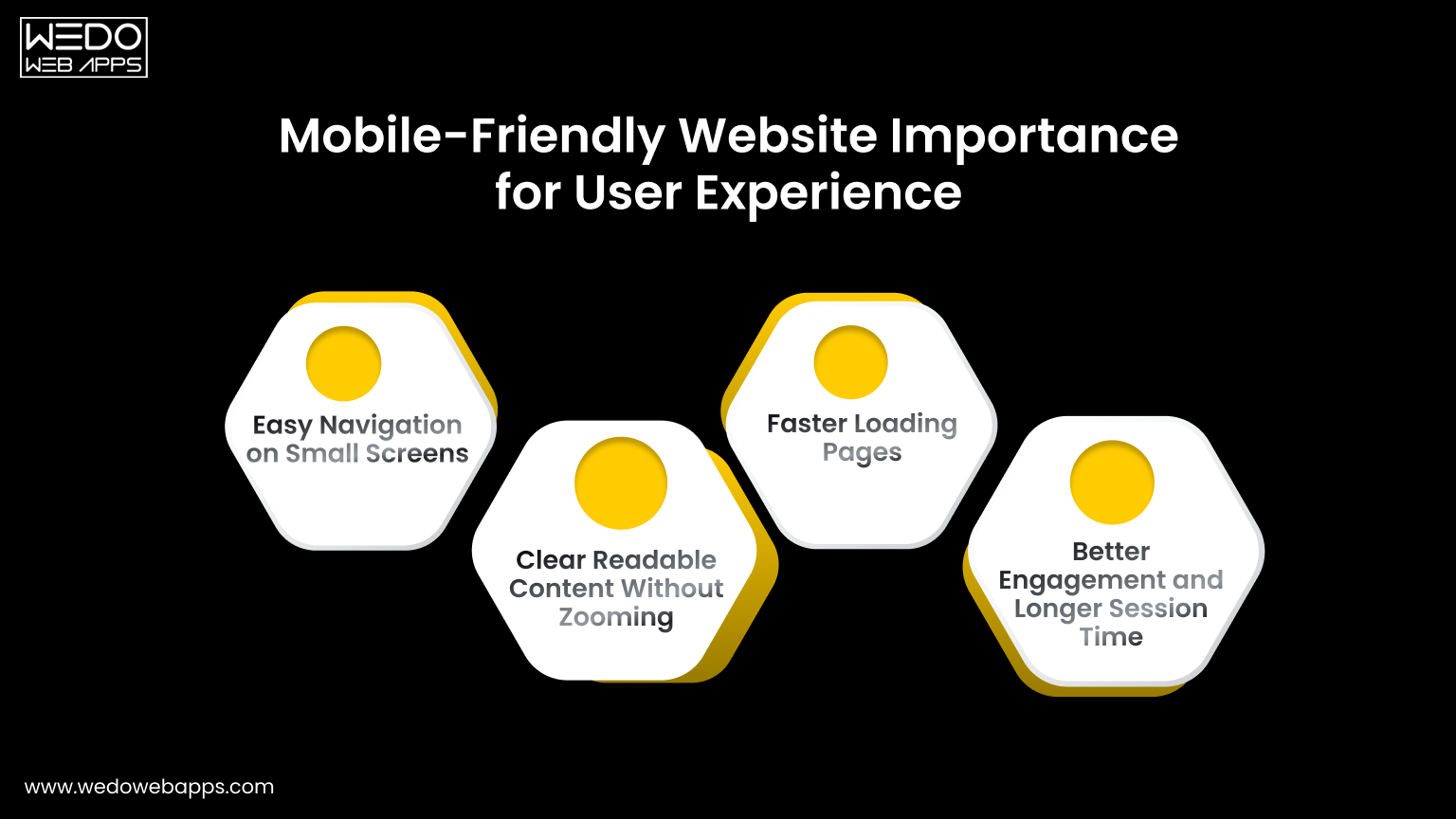
Mobile-Friendly Website Importance for User Experience

Most users now access websites through their phones. They expect pages to load quickly and content to fit their screen without any issues. If a site feels complex to use on mobile, visitors leave almost immediately.

This clearly shows the mobile-friendly website importance. A responsive and mobile-ready layout improves comfort, builds trust, and encourages users to stay longer and take effective action.

Easy Navigation on Small Screens

Navigation should feel simple and direct on a small display. Users must find what they need without confusion or extra taps.

Key practices include:

  • Clear and compact menus.
  • Large and easy-to-tap buttons.
  • Important links are placed within easy reach.
  • Minimal clutter on each screen.

When movement across pages is smooth, visitors are more likely to continue browsing.

Clear Readable Content Without Zooming

Content should adjust naturally to the screen size so users can read everything comfortably. They should not need to zoom in or scroll sideways.

A responsive structure ensures:

  • Text remains readable.
  • Sections stack vertically.
  • Images scale correctly.
  • Layouts stay clean and aligned.

This keeps the experience relaxed and frustration-free.

Faster Loading Pages

Speed plays a major role in keeping mobile users engaged. Even a short delay can cause them to exit.

A mobile-optimized website focuses on:

  • Compressed images.
  • Lightweight design elements.
  • Clean and efficient code.
  • Reduced unnecessary scripts.

Faster pages lead to lower bounce rates and stronger first impressions.

Better Engagement and Longer Session Time

When users enjoy the experience, they interact more with your website. A smooth mobile interface encourages deeper exploration.

As a result:

  • Visitors view more pages.
  • Time on site increases.
  • Form submissions grow.
  • Purchases become more likely.

This direct connection between usability and action proves why mobile responsiveness supports both user satisfaction and business growth.

Is Your Website Truly Mobile Friendly

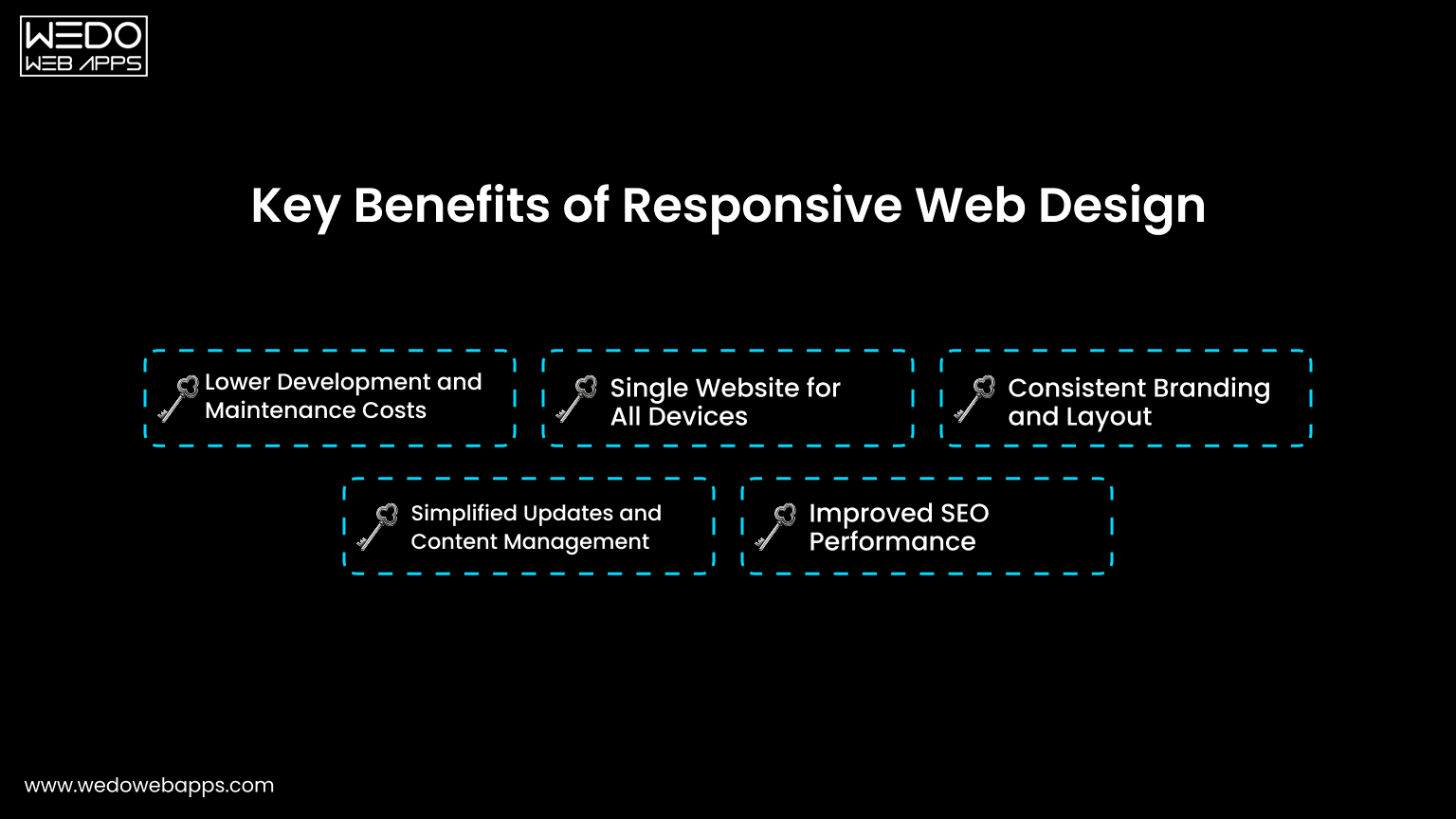
Key Benefits of Responsive Web Design

benefits of responsive web design

Once a website works smoothly across devices, the advantages go beyond appearance. Responsive web design improves performance, simplifies management, and supports long-term growth.

For businesses, this means fewer technical issues, lower costs, and better results from the same website. These practical gains clearly show the benefits of responsive web design.

Lower Development and Maintenance Costs

Managing separate desktop and mobile websites requires extra time, money, and resources. Every update must be repeated twice.

This helps you:

  • Reduce development expenses.
  • Save time on updates and fixes.
  • Avoid duplicate content management.
  • Lower long-term maintenance costs.

A single system keeps operations simple and efficient.

Single Website for All Devices

Responsive web design uses one layout that adapts to every screen size. This creates a consistent experience for all visitors.

It ensures:

  • Uniform design and branding.
  • Same content across devices.
  • Consistent functionality.
  • Easier testing and monitoring.

Users get the same quality experience whether they visit from mobile or desktop.

Consistent Branding and Layout

Brand trust depends on consistency. If your mobile site looks different from your desktop site, it can confuse users. Responsive design keeps colours, fonts, and layouts aligned across screens.

This consistency:

  • Strengthens brand identity.
  • Builds credibility.
  • Makes your business look professional.
  • Improves customer confidence.

A clear and familiar design encourages users to stay longer.

Simplified Updates and Content Management

Content should be quick-loading and straightforward. Updating multiple versions slows down your team.

With one responsive website:

  • Content is updated once.
  • Changes reflect everywhere instantly.
  • Errors are reduced.
  • Management becomes easier.

This allows your team to focus more on strategy rather than technical tasks.

Improved SEO Performance

Search engines prefer mobile-friendly websites. Responsive design supports better indexing and ranking by keeping everything under one URL.

Key SEO advantages include:

  • Faster page loading.
  • Lower bounce rate.
  • Better crawlability.
  • Stronger search visibility.

Higher visibility leads to more traffic, which ultimately brings more leads and sales.

Responsive Design Benefits for Business Growth

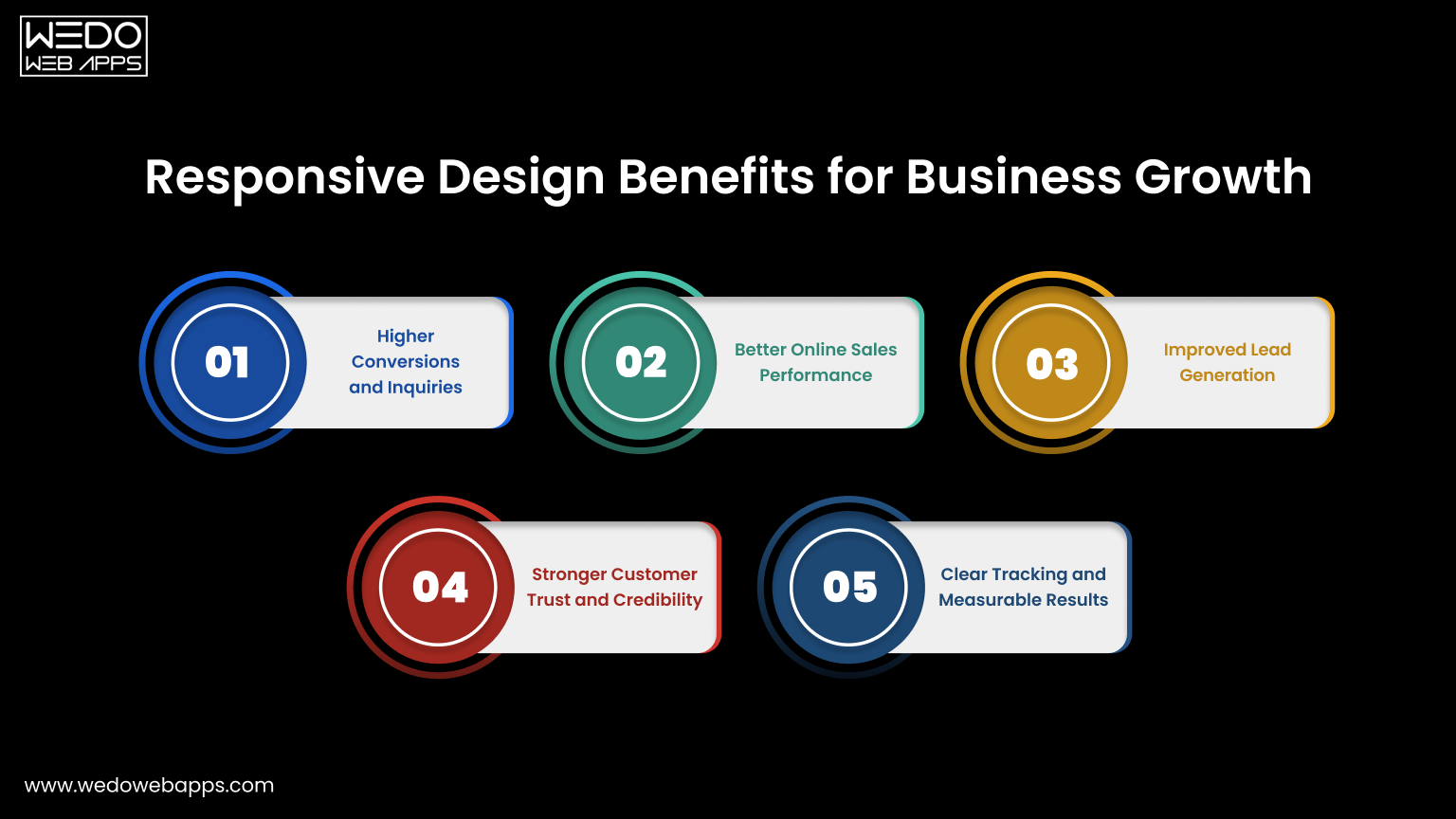
Responsive Design Benefits for Business Growth

A well-designed website should not only look good. It should help your business generate more leads, sales, and measurable results. This is where the responsive design benefit for business becomes clear.

When users can browse comfortably on any device, they are more likely to trust your brand and complete the action that supports your goals. A responsive setup removes barriers and creates a smooth path from visitor to conversion.

Higher Conversions and Inquiries

A mobile-friendly experience makes it easier for users to take the next step. Forms are simple to fill out. Buttons are easy to tap. Calls to action are clearly visible. This convenience increases the number of inquiries, sign-ups, and contact requests without additional marketing effort.

Key outcomes include:

  • More form submissions.
  • Higher lead generation.
  • Improved conversion rates.

Better Online Sales Performance

For eCommerce websites, usability directly impacts revenue. If the checkout process feels complicated on mobile, users abandon the carts.

Responsive web design helps in:

  • Displaying products clearly.
  • Simplifying navigation.
  • Making checkout smooth and fast.
  • Reducing cart abandonment.

A seamless shopping experience encourages more completed purchases.

Improved Lead Generation

Many users research services on their phones before making decisions. If your website loads quickly and presents information clearly, they are more likely to connect with you.

Responsive layouts support:

  • Easy access to contact details.
  • Click to call and quick action buttons.
  • Faster landing pages.
  • Better engagement with content.

These small improvements help turn visitors into qualified leads.

Stronger Customer Trust and Credibility

First impressions matter. A website that looks outdated or broken on mobile can make your business seem unreliable. A clean and consistent design across devices signals professionalism.

This builds:

  • Customer confidence.
  • Brand credibility.
  • Positive perception.
  • Higher return visits.

Trust often influences buying decisions more than pricing.

Clear Tracking and Measurable Results

Managing one responsive website makes performance tracking easier. All user data comes from a single platform, which improves accuracy.

You can measure:

  • Traffic sources.
  • User behavior.
  • Conversions.
  • Sales performance.

These insights help you refine marketing strategies and improve overall business outcomes.

Struggling to Keep Mobile Visitors Engaged

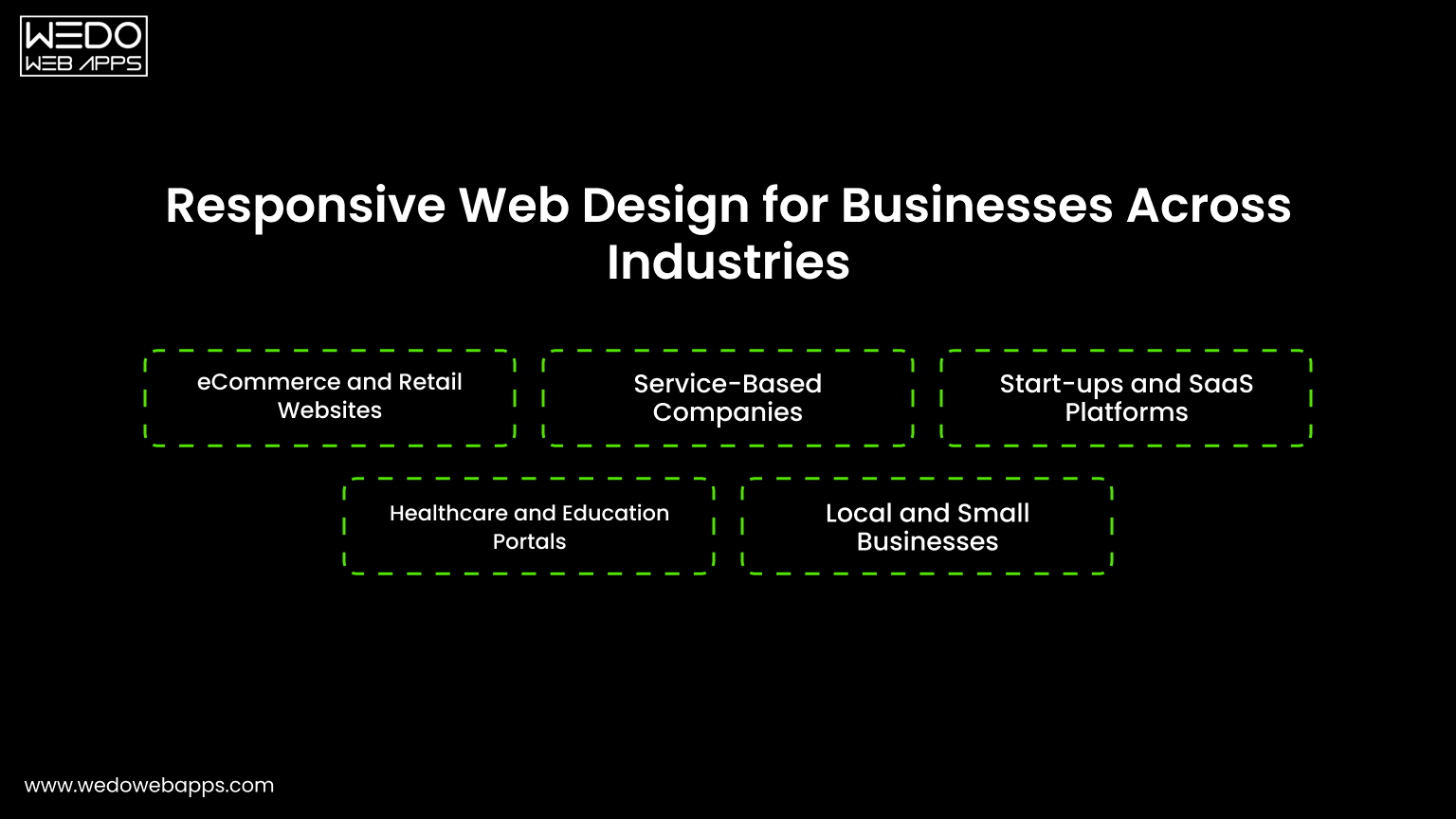
Responsive Web Design for Businesses Across Industries

Responsive Web Design for Businesses Across Industries

Every industry serves users who browse on multiple devices. Customers may search on their phones, compare options on tablets, and complete actions on desktops. If your website fails to adjust, you risk losing them at any step.

This is why responsive web design for businesses is valuable across sectors. It ensures consistent access, better usability, and smoother interactions for every type of customer.

eCommerce and Retail Websites

Online shoppers expect quick browsing and simple checkout. Any friction can lead to abandoned carts.

Responsive design helps by:

  • Displaying products clearly on small screens.
  • Making filters and categories easy to use.
  • Simplifying cart and checkout steps.
  • Supporting faster page loading.

These improvements directly increase completed purchases and revenue.

Service-Based Companies

For service providers, websites often act as the first contact point. Users check services, reviews, and pricing before reaching out.

A mobile-ready layout ensures:

  • Easy access to service details.
  • Clear calls to action.
  • Click to call or quick contact forms.
  • Better readability of content.

This makes it easier for visitors to turn into inquiries and leads.

Startups and SaaS Platforms

Startups rely heavily on online presence to explain products and capture sign-ups. A complex or slow interface can push users away.

Responsive web design supports:

  • Clear product demonstrations.
  • Smooth onboarding flows.
  • Faster landing pages.
  • Easy sign-up forms.

This creates a strong first impression and improves user adoption.

Healthcare and Education Portals

Users often search for important information such as appointments, schedules, or learning resources while on the move.

Responsive websites provide:

  • Quick access to essential information.
  • Simple navigation menus.
  • Clear content structure.
  • Comfortable reading on mobile devices.

This improves accessibility and user satisfaction.

Local and Small Businesses

Local customers frequently search on mobile devices for nearby services. If the website is not mobile-friendly, they may choose a competitor.

Responsive design ensures:

  • Contact details are easy to find.
  • Maps and directions load correctly.
  • Calls and bookings happen quickly.
  • Trust is built through a professional layout.

For small businesses, these small advantages can lead to steady growth and more walk-ins or inquiries.

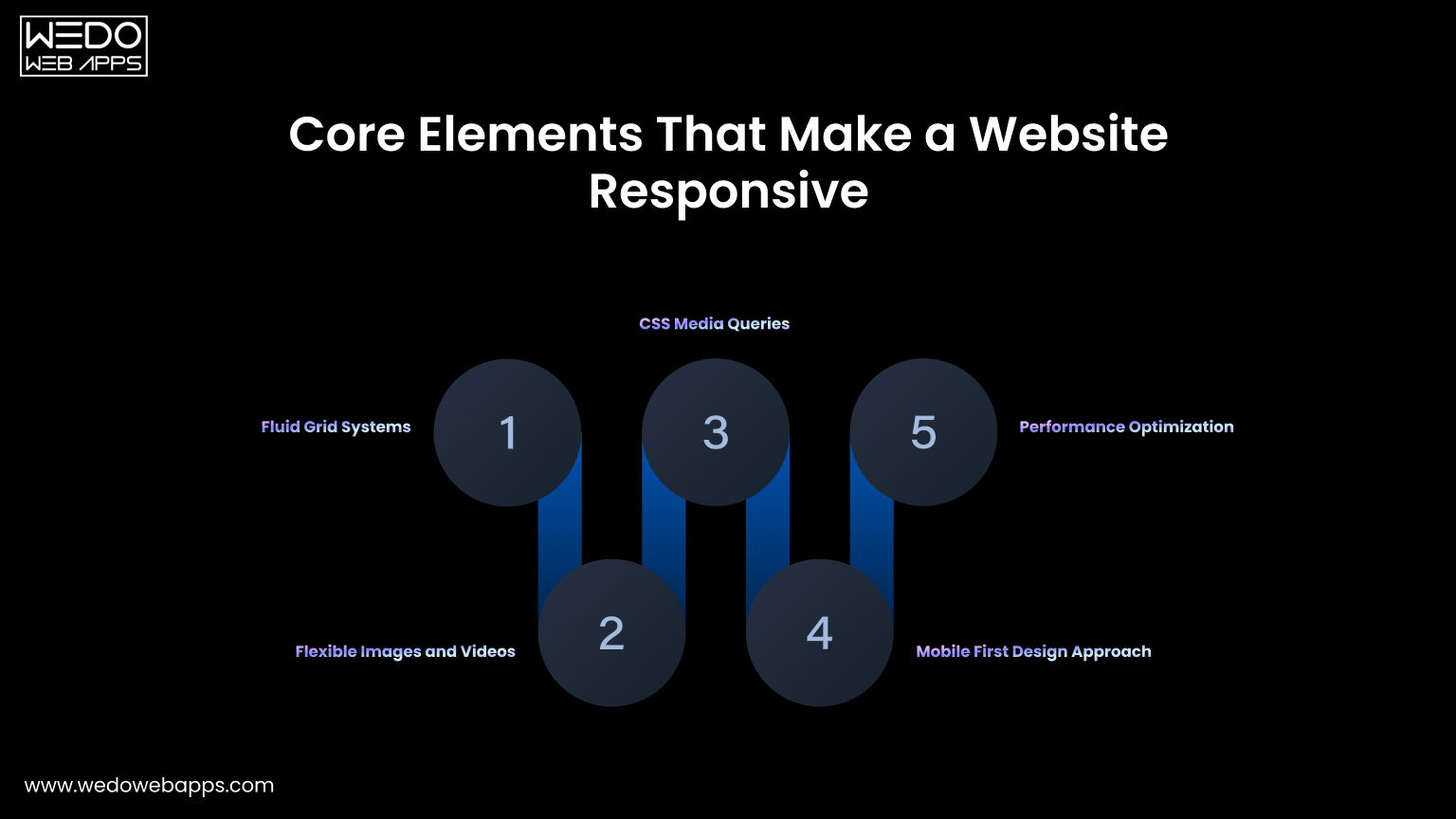
Core Elements That Make a Website Responsive

Core Elements That Make a Website Responsive

Responsive web design is not achieved by shrinking a desktop layout to fit a smaller screen. It requires a structured approach where every element adjusts naturally to the device. When these components work together, the website feels smooth, readable, and easy to use.

Understanding these building blocks helps businesses see how responsive web design delivers consistent performance across all devices.

Fluid Grid Systems

A fluid grid forms the base of any responsive layout. Instead of fixed widths, the design uses flexible proportions that adapt to the screen size.

This allows content to resize automatically.

Key characteristics include:

  • Percentage-based widths instead of fixed pixels.
  • Flexible columns that rearrange smoothly.
  • Balanced spacing across devices.

As a result, layouts look organized on both large and small screens.

Flexible Images and Videos

The media should scale without breaking the layout. Oversized images can slow down pages or overflow on mobile devices.

Responsive media ensures:

  • Images resize according to screen width.
  • Videos adjust without distortion.
  • File sizes remain optimized for speed.
  • Visual quality stays consistent.

This keeps the website visually appealing while maintaining performance.

CSS Media Queries

Media queries allow the website to apply different personal website styles based on screen size or device type. They help the design respond intelligently.

For example, the layout can change when the screen becomes smaller.

Common uses include:

  • Adjusting font sizes.
  • Stacking columns vertically.
  • Hiding unnecessary elements.
  • Repositioning menus and buttons.

These small adjustments improve usability without changing the core content.

Mobile First Design Approach

Mobile-first design starts with the smallest screen and then expands to larger devices. This keeps the experience focused and clutter-free.

It encourages teams to:

  • Prioritize essential content.
  • Simplify navigation.
  • Reduce unnecessary elements.
  • Improve loading speed.

Starting small often results in a cleaner and more efficient website overall.

Performance Optimization

Responsiveness is not only about layout. Speed and stability matter just as much. A slow website can drive users away, even if the design looks good.

Performance improvements include:

  • Image compression.
  • Minified code.
  • Reduced scripts.
  • Fast hosting setup.

Together, these optimizations create a faster and smoother experience for every visitor.

Want Visitors to Stay Longer on Your Website

Responsive vs Adaptive Design: Which Is Right for Your Business

When building a mobile-ready website, businesses often compare responsive and adaptive design. Both approaches aim to improve usability across devices, but the way they are built and maintained is different.

Responsive web design uses one flexible layout that adjusts automatically. Adaptive design creates multiple fixed layouts for specific screen sizes. The comparison below makes the differences easier to understand.

FactorResponsive Web DesignAdaptive Web Design
Layout structureSingle flexible layoutMultiple fixed layouts
CodebaseOne website for all devicesSeparate templates for each device
Development costLowerHigher
MaintenanceEasy to manage and update onceUpdates needed for each version
SEO performanceStrong with one URLCan create duplicate or split URLs
User experienceConsistent across screensCan vary between devices
ScalabilityAdapts easily to new screen sizesRequires new layouts for new devices
Time to launchFasterSlower
Best suited forMost businesses and growing brandsComplex or highly customized interfaces

For most companies, responsive web design for businesses is the practical choice. It reduces cost, simplifies maintenance, and delivers consistent performance across devices. Adaptive design may suit very specific use cases, but it often adds unnecessary complexity for standard business websites.

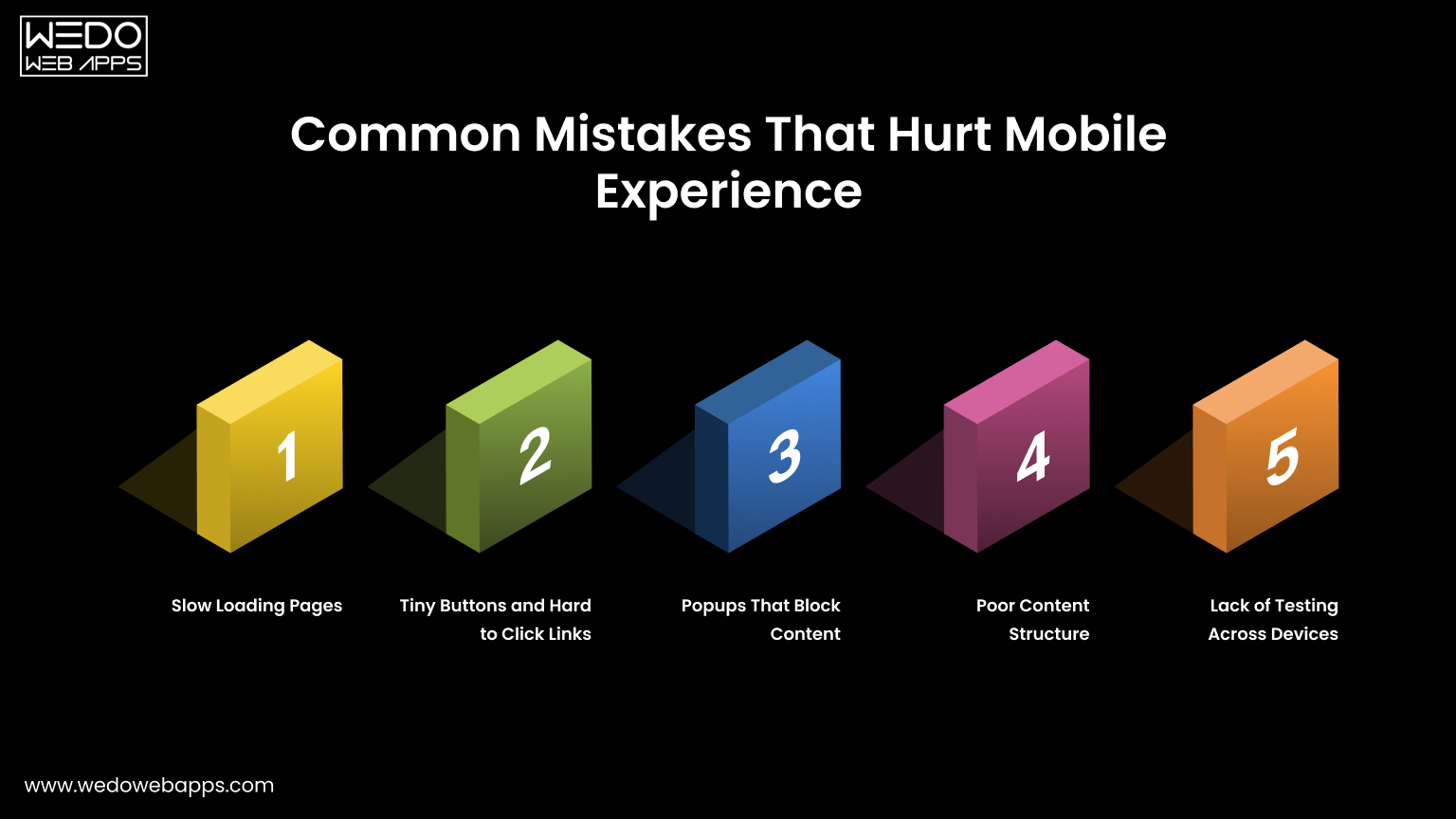
Common Mistakes That Hurt Mobile Experience

Common mobile website mistakes

Even after investing in responsive web design, small mistakes can weaken the mobile experience. These issues frustrate users, increase bounce rates, and reduce conversions.

A website may look fine on a desktop but still perform poorly on phones. Fixing these common problems protects usability and helps you get the full value from your mobile-friendly setup.

Slow Loading Pages

Mobile users expect quick access. If a page takes more than a few seconds to load, many visitors leave before it opens.

Common causes include:

  • Heavy images.
  • Too many scripts and plugins.
  • Unoptimized code.
  • Slow hosting servers.

Improving speed keeps users engaged and supports better search rankings.

Tiny Buttons and Hard to Click Links

Small buttons create frustration on touch screens. Users may tap the wrong link or struggle to complete actions.

Good mobile design should include:

  • Large tap-friendly buttons.
  • Proper spacing between links.
  • Clear call to action placement.
  • Simple forms.

Easy interaction encourages users to continue browsing.

Popups That Block Content

Pop-ups that cover the entire screen can interrupt the browsing experience. On mobile devices, they often feel intrusive.

This can lead to:

  • Higher bounce rates.
  • Lower engagement.
  • Missed conversions.

Using subtle banners or well-timed prompts keeps the experience smooth without disturbing users.

Poor Content Structure

Long paragraphs, cluttered sections, or cramped layouts make content difficult to read on small screens.

To improve readability:

  • Break content into short paragraphs.
  • Use headings and subheadings.
  • Add white space.
  • Highlight key points.

A clean structure helps users scan information quickly.

Lack of Testing Across Devices

A design that works on one phone may break on another. Without proper testing, issues go unnoticed.

Businesses should test on:

  • Multiple screen sizes.
  • Different browsers.
  • Various operating systems.
  • Real devices, not only simulators.

Regular testing ensures your responsive web design delivers a consistent experience for every visitor.

Avoiding these mistakes strengthens the mobile friendly website importance and ensures your website supports both usability and business performance.

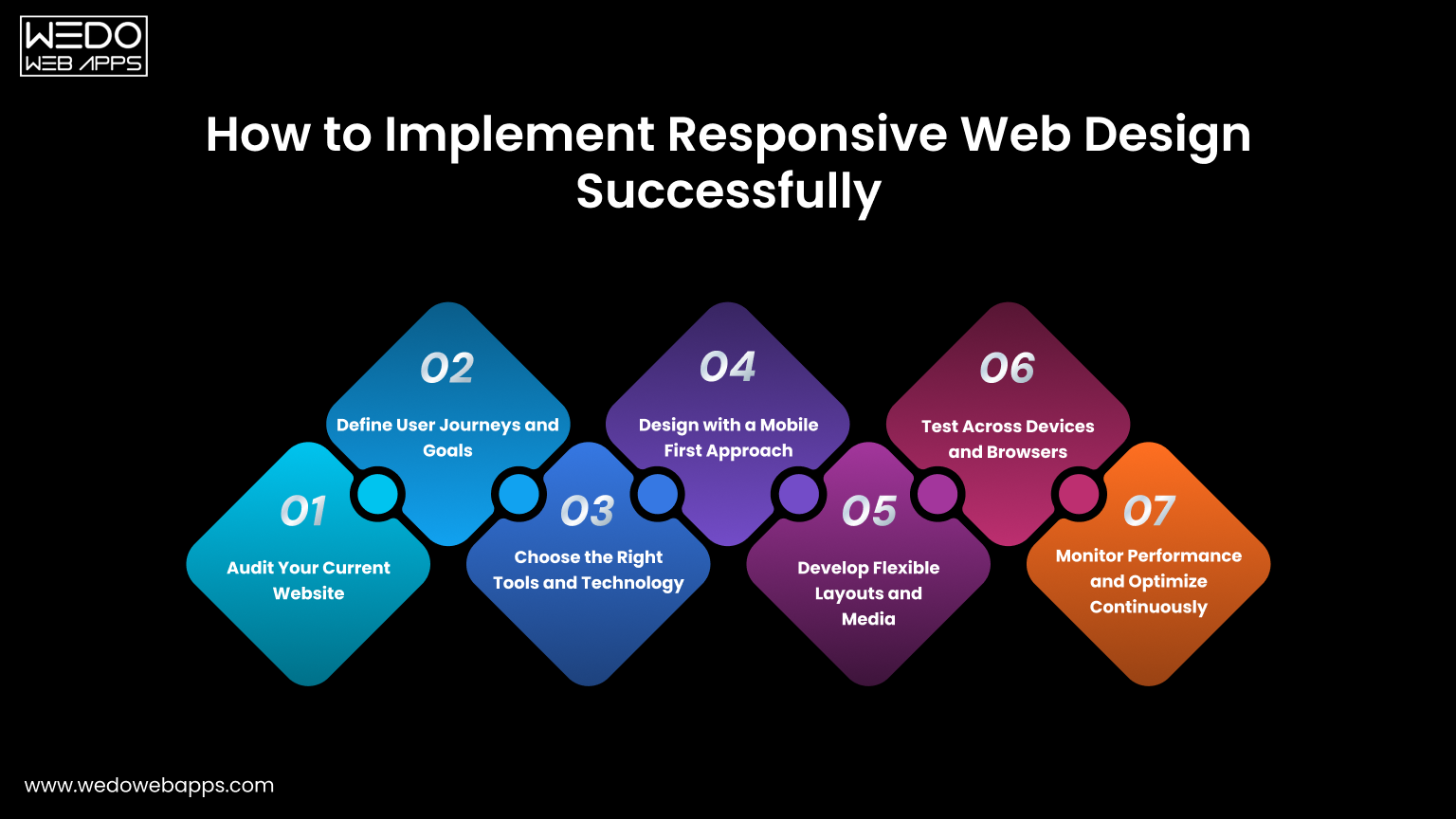
How to Implement Responsive Web Design Successfully

process to implement responsive web design

Creating a responsive website works best when handled step by step. A clear process reduces errors, saves time, and ensures your website performs smoothly across devices. For companies investing in responsive web design for businesses, this structured approach leads to better usability and measurable results.

Step 1. Audit Your Current Website

Begin by reviewing how your existing website behaves on mobile devices. Identify areas that create friction for users.

Check for:

  • Slow loading pages.
  • Layout or alignment issues.
  • Hard to use navigation.
  • High mobile bounce rates.
  • Low conversions.

This assessment highlights what needs immediate attention.

Step 2. Define User Journeys and Goals

Understand what visitors want to accomplish when they land on your site. Your design should guide them naturally toward those actions.

Common goals include:

  • Browsing products or services.
  • Reading key information.
  • Filling out contact forms.
  • Making purchases.
  • Booking appointments.

Clear journeys help you place content and calls to action effectively.

Step 3. Choose the Right Tools and Technology

Select frameworks or platforms that support responsive web design from the start. This simplifies development and future updates.

Consider:

  • Responsive front-end frameworks.
  • Mobile-optimized CMS themes.
  • Flexible design systems.
  • Custom development when required.

The right setup makes scaling easier.

Step 4. Design with a Mobile First Approach

Start with the smallest screen and expand outward. This keeps the layout clean and focused.

Prioritize:

  • Essential content first.
  • Simple navigation.
  • Large tap-friendly buttons.
  • Fast loading elements.

Once mobile works well, adapting for larger screens becomes straightforward.

Step 5. Develop Flexible Layouts and Media

Use responsive techniques that allow the design to adjust automatically.

Include:

  • Fluid grid systems.
  • Flexible images and videos.
  • CSS media queries.
  • Scalable typography.

These elements ensure your website looks balanced on every device.

Step 6. Test Across Devices and Browsers

Testing prevents unexpected issues after launch. What works on one device may fail on another.

Test on:

  • Multiple screen sizes.
  • Different browsers.
  • Android and iOS devices.
  • Real devices along with simulators.

This ensures a consistent experience for all users.

Step 7. Monitor Performance and Optimize Continuously

Responsive design needs regular improvement. Track how users interact and refine accordingly.

Monitor:

  • Page speed.
  • Bounce rates.
  • Session duration.
  • Conversion rates.

Ongoing optimization strengthens both user experience and business results.

Following these steps helps businesses build a mobile-friendly website that supports engagement, improves conversions, and delivers long term value.

Upgrade Your Website for Mobile Success

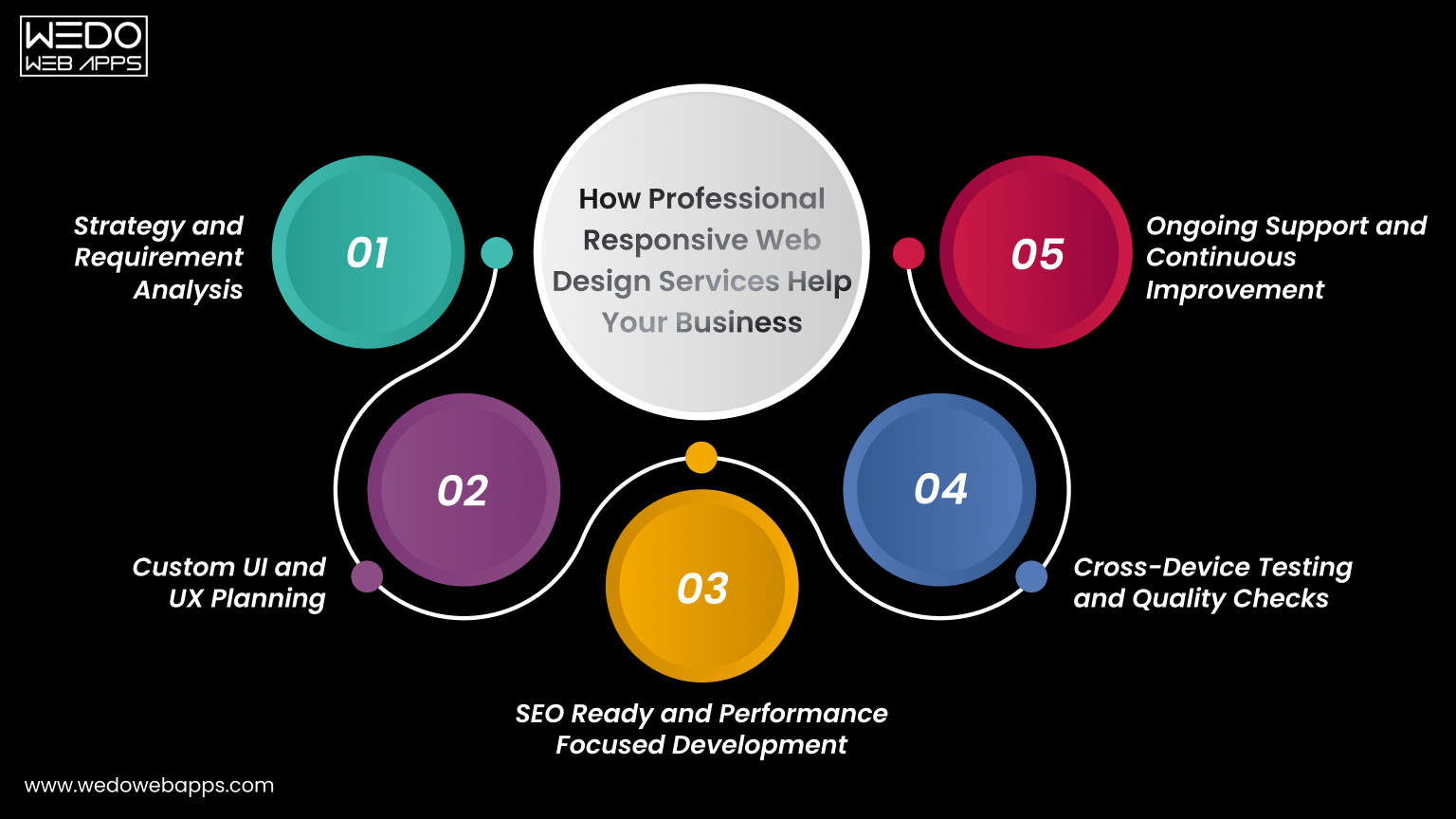
How Professional Responsive Web Design Services Help Your Business

Professional Responsive Web Design Help Business

While basic responsive adjustments can be handled internally, building a high-performing website often requires expert planning and execution. Professional teams understand how design, speed, usability, and SEO work together to support growth.

For companies looking at responsive web design for businesses, working with specialists reduces risks and delivers stronger results in less time.

Step 1. Strategy and Requirement Analysis

Every business has different goals. A professional team begins by understanding your audience, industry, and objectives before designing anything.

This includes:

  • Studying user behavior.
  • Identifying target devices.
  • Reviewing competitors.
  • Defining conversion goals.

A clear strategy ensures the website supports real business outcomes.

Step 2. Custom UI and UX Planning

Templates may not fully reflect your brand or user needs. Experts design layouts that match your identity and make navigation simple.

They focus on:

  • Clean page structure.
  • Intuitive navigation.
  • Clear calls to action.
  • Consistent branding across devices.

This improves both usability and trust.

Step 3. SEO Ready and Performance Focused Development

Responsive design works best when combined with technical optimization. Professionals build websites that load fast and rank well.

Key improvements include:

  • Mobile-friendly coding practices.
  • Optimized images and scripts.
  • Clean URL structure.
  • Search engine-friendly architecture.

These factors increase visibility and attract more organic traffic.

Step 4. Cross-Device Testing and Quality Checks

Experts test the website thoroughly before launch. This reduces errors that could affect user experience.

Testing covers:

  • Multiple screen sizes.
  • Browsers and operating systems.
  • Forms and checkout flows.
  • Speed and stability.

This ensures your site performs reliably for every visitor.

Step 5. Ongoing Support and Continuous Improvement

Websites need regular updates to stay effective. Professional services provide long-term support instead of one-time delivery.

This often includes:

  • Performance monitoring.
  • Security updates.
  • Design improvements.
  • Feature enhancements.
  • Conversion optimization.

Continuous improvements help you stay competitive and achieve better results over time.

Partnering with experienced teams allows businesses to fully realize the responsive design benefits for business, from better user engagement to higher leads and sales.

Conclusion

A website should work smoothly for every visitor, no matter which device they use. When pages adjust naturally to different screens, users stay longer, interact more, and complete actions with ease. This clearly shows the importance of responsive web design for any business that depends on online traffic.

From better usability to stronger search visibility, the benefits of responsive web design directly impact performance, and the designing services from trusted companies can play an important role. Faster pages, simple navigation, and consistent layouts help reduce bounce rates and improve conversions. Instead of managing multiple versions, businesses control one flexible website that supports growth and efficiency.

If you want steady traffic, higher engagement, and measurable results, investing in responsive web design for businesses is a practical step. A mobile-friendly website is not just a design choice. It is a smart business decision that supports long-term success.

encouraging businesses talk to experts

10 Key App Marketing Strategies Every Founder Must Know

Introduction

You’ve built a powerful mobile app. However, getting people to discover, install, and consistently use it is a much harder challenge. With thousands of apps being released every single day, visibility has become the biggest barrier for businesses. That’s exactly why brands today need well-planned, data-driven marketing for apps that helps them stand out in crowded app stores and reach the right users at the right time.

This guide breaks down the most effective app marketing strategies used by high-growth businesses to boost installs, improve retention, and build long-term user engagement. Whether you’re exploring the best way to market an app or preparing a complete app marketing plan, this blog gives you a step-by-step roadmap to promote your mobile app successfully, from pre-launch preparation to post-launch optimization.

What is App Marketing?

App marketing means the complete set of strategies and activities used to promote a mobile application, attract the right users, and keep them engaged over time. It goes far beyond just running ads. It includes everything from building awareness before launch to driving installs, optimizing user experience, and improving long-term retention.

A strong app marketing plan ensures that your app reaches the right audience on the right platforms with the right message. It combines research, App Store Optimization (ASO), content marketing, paid acquisition, influencer outreach, email nurturing, analytics, and continuous optimization.

In simple terms, app marketing answers three key questions:

  • How will users discover your app?
  • What will convince them to install it?
  • What will make them stay?

When all of these elements work together, businesses can build scalable, sustainable growth, even in competitive markets. This is why having well-structured marketing strategies for an app matters more than ever today.

Why App Marketing Matters More Than Ever?

The mobile app ecosystem is more competitive today than at any point in the past decade. With millions of apps across the Google Play Store and Apple App Store, even the most innovative product can get buried without the right marketing approach. This is why businesses can no longer rely on just “publishing the app”; they need a structured and ongoing marketing strategy.

1. The App Stores are Overcrowded

Every category, shopping, fintech, fitness, food delivery, education, etc, is filled with hundreds of similar apps. If users do not find your app within seconds, they move on. Effective app marketing strategies help your app gain visibility in a crowded marketplace.

2. User Acquisition Costs are Increasing

With rising ad costs and more brands competing for the same audience, acquiring users has become expensive. Strategic marketing helps you lower your Cost Per Install (CPI) by focusing on targeted channels and high-intent users.

Data Driven Ad Campaigns

3. Retention is the Real Challenge

Getting installs is easy, but keeping users active is hard. Studies show that most apps lose over 60% of their users within the first week. Strong marketing aligns your onboarding, engagement, and communication to improve retention and lifetime value (LTV).

4. Data-Driven Growth is Now Essential

Modern app marketing relies heavily on analytics, user behavior insights, and A/B testing. Businesses that invest in data-backed decision-making grow faster and more sustainably than those relying on guesswork.

In a world where attention spans are shrinking and competition keeps growing, strategic mobile app promotion strategies are the only way to build consistent, long-term app growth.

Key Stages of a Successful Marketing Plan

A powerful app marketing plan does not start after your app goes live; it begins much earlier. Successful apps follow a structured roadmap that covers three major stages: pre-launch, launch, and post-launch. Each stage plays a critical role in how well your app performs in the long run.

1. Pre-Launch Marketing: Setting the Foundation

The pre-launch phase determines how strong your initial visibility will be. This is where you build awareness, understand your audience, and set the groundwork for a high-impact release.

Market & Competitor Research

  • Identify your target audience
  • Study competitive apps: features, pricing, reviews, weaknesses
  • Define what differentiates your app

Define User Personas

  • Who will use your app?
  • What problems do they face?
  • Which features matter most to them?

A persona-driven approach ensures your marketing strategies for an app speak directly to user needs.

Build a Landing Page

  • Share core features, value proposition, demo videos
  • Add email sign-up to collect leads
  • Helps build a pre-launch audience and test messaging

Create Pre-Launch Buzz

  • Teaser Videos
  • Behind-the-scenes posts
  • Countdown campaigns
  • Pre-launch sign-up rewards

Conduct Beta Testing or Soft Launch

  • Gather real-user feedback
  • Identify bugs and UX issues
  • Improve onboarding flow
  • Build genuine early reviews.

A strong pre-launch strategy dramatically increases your app’s chances of ranking quickly once it goes live.

2. Launch Marketing: Maximizing Visibility

When your app officially launches, the goal is to drive a high volume of quality installs quickly. App store algorithms reward early traction, making the launch window crucial.

App Store Optimization (ASO)

  • Optimize title, description, visuals
  • Use category-specific keywords
  • Prepare screenshots and video previews
  • Encourage early reviews

ASO should be aligned with your overall app marketing strategies to ensure maximum visibility.

Launch Campaigns

  • Google UAC
  • Meta Ads
  • TikTok Ads
  • Influencers and PR announcements

These channels help boost initial installs and improve ranking signals.

Social Media Announcements

  • Share launch highlights
  • Partner with creators
  • Run contests or giveaways
  • Encourage user-generated content

This ensures your app gains momentum on multiple platforms simultaneously.

3. Post-Launch Marketing: Growth & Retention

Once the initial excitement fades, your focus shifts to keeping users engaged and improving retention. This is where long-term success is built.

Improve User Onboarding

  • Clear instructions
  • Fewer steps to sign up
  • Personalized suggestions
  • Strong first-time user experience

Engagement Campaigns

  • Push notifications
  • Email drip sequences
  • In-app messages
  •  Reward-based campaigns

These mobile app promotion strategies help turn one-time users into loyal, active customers.

Continuous Optimization

  • Track KPIs: retention rate, LTV, churn
  • A/B test your landing pages, app store listings, and onboarding
  • Regularly update features and fix issues

Retargeting & Re-engagement

  • Show ads to inactive users
  • Promote new features or rewards
  • Run win-back campaigns

A successful app does not grow or install alone; it grows when users keep returning.

Top Marketing Strategies for an App

App marketing techniques

Most businesses treat app promotion as a checklist. But successful brands follow a structured set of app marketing strategies that guide users from awareness to download and finally to long-term retention. Below are the most effective and widely used strategies that help apps scale sustainably, whether you are building a lifestyle app, SaaS tool, FinTech app, or on-demand service.

1. App Store Optimization (ASO) – Your #1 Growth Engine

ASO is the most reliable and cost-effective way to improve visibility. It works similarly to SEO but focuses specifically on app store ranking factors.

What ASO includes:

  • Keyword optimization in the title and subtitle.
  • A polished, benefit-driven app description
  • High-quality screenshots
  • Preview videos
  • Localization for different markets
  • Review & Rating Optimization

Why it Matters:

Over 60% of users discover apps through searches in the App Store or Play Store. If you want the best way to market an app organically, ASO is non-negotiable.

Optimize app store ranking

2. Social Media Marketing & Community Building

Your audience spends hours on social media apps, so your promotion must meet them where they already are.

What Works Best:

Social media marketing includes

  • Short-form videos (Reels, TikTok)
  • Behind-the-scenes content
  • Future demos
  • User-generated content
  • Polls, Q&As, and community threads

A strong community increases trust, boosts referrals, and drives consistent downloads.

3. Influencer Partnerships & UGC Creators

Instead of spending heavily on ads, many brands turn to micro-influencers and niche creators.

Why this strategy works:

  • High engagement
  • Lower cost compared to traditional ads
  • Social Proof -> More downloads
  • Access to the targeted audience segment

Influencers are especially effective for lifestyle, fitness, fashion, education, and productivity apps.

4. Paid Advertising (UAC, Meta Ads, TikTok Ads, YouTube Ads)

Paid campaigns help apps scale quickly, especially during launch and key promotional phases.

Best-performing ad types:

  • Google UAC (automated ads across Google properties)
  • Meta install ads
  • TikTok spark ads
  • YouTube discovery ads

Paid campaigns help you refine audience targeting and fuel growth during aggressive scaling phases.

5. Content Marketing & SEO

A powerful long-term strategy is often overlooked in marketing for apps.

What content works:

  • Blog posts
  • Comparison articles
  • How-to guides
  • YouTube tutorials
  • Case studies
  • Landing pages

This helps you own search visibility and drive traffic beyond the app store.

6. Referral Programs & Incentives

Referral programs are one of the highest-ROI mobile app promotion strategies.

Top Referral Incentives:

  • Free credits or coins
  • Premium features
  • Discounts
  • Bonus Rewards

People trust recommendations from friends far more than ads, making referral loops a key growth driver.

7. Email Marketing & Drip Sequences

Email remains underrated but powerful, especially for apps with onboarding steps.

Use email for:

  • Pre-launch waitlist building
  • Onboarding guidance
  • Feature announcements
  • Reactivation campaigns

A well-planned sequence improves retention and ensures new users complete onboarding.

8. Push Notifications & Personalized Engagement

Push notifications influence user behavior more than any other in-app tool.

Best Practices:

  • Personalized content
  • Relevant Timing
  • Behavior-based triggers
  • A/B testing messages

Used well, they increase retention and keep your app top of mind, without being spammy.

9. In-App Events & Offers

Apps that run in-app promotions see a significant boost in engagement and re-installs.

Examples:

  • Festive offers
  • Seasonal events
  • In-app sales
  • Feature drops

These events also help you appear in “Featured Sections” of app stores, increasing discoverability.

10. Retention & Re-Engagement Strategies

Acquisition helps you grow. Retention helps you survive. Apps with high retention rank better, convert better, and scale with less cost.

Powerful Retention Tactics:

  • Onboarding optimization
  • Gamification
  • Loyalty programs
  • In-app progress rewards
  • Periodic Updates

When users stay, your entire marketing strategy becomes more profitable.

 Improve App Retention

Common App Marketing Mistakes to Avoid

Top mistakes app marketing

Even strong app marketing strategies can fail if you overlook the fundamentals. Many app owners focus heavily on growth tactics but ignore the hidden bottlenecks that silently hurt installs, retention, and revenue. Avoiding these mistakes ensures that every campaign, whether organic, paid, or social, actually delivers long-term results.

1. Focusing Only on Installs and Not Retention

Most businesses measure success by the number of installs. But installs do not mean anything if users uninstall within the first week.

Common retention killers include:

  • Confusing onboarding
  • Lack of initial value
  • No follow-up engagement
  • Irrelevant push notifications

Remember: retention affects app store ranking more than raw downloads. If users stay active, engage, and return, your app climbs the charts faster and stays visible longer.

2. Ignoring Reviews & Allowing Low Ratings to Pile Up

Your app store rating is often the make-or-break moment for a user deciding whether to download.

Mistakes like:

  • Not responding to negative reviews
  • Ignoring crash reports
  • Not pushing for positive user feedback

Create a cycle where low ratings keep your app buried in the store. A solid review strategy boosts credibility, ranking, and conversion rates.

3. Not Measuring User Behavior

If you are not tracking behavior, you are marketing blindly.

Key behavior insights include:

  • Where users drop off
  • Which features do they use most
  • What triggers uninstalls
  • How long do they stay engaged

Tools like Firebase, Mixpanel, Amplitude, and Adjust make it easy to track events, funnels, and retention cohorts.

Data-driven marketing always outperforms guesswork.

4. Running Ads Without an Onboarding Funnel

Ads alone do not guarantee success. If users click an ad but get stuck during onboarding, the entire campaign fails, and your ad spend is wasted.

A strong onboarding funnel should include:

  • A clear value proposition
  • Progress indicators
  • Welcome screens
  • Permission prompts at the right time
  • First-session guidance

Paid campaigns only work when paired with a frictionless onboarding experience that quickly delivers the “aha moment.”

5. Not Having an A/B Testing Plan

Apps that do not test, do not grow.

You should regularly A/B test:

  • Screenshots & videos
  • CTA buttons
  • Landing Pages
  • Push Notification Copy
  • Onboarding Flows
  • Pricing or subscription prompts

Small improvements, even 5-10% boosts, create massive gains when applied at scale. A/B testing ensures you are constantly improving rather than guessing.

Tools & Platforms to Power Your App Marketing

Even the strongest app marketing strategies need the right tools to back them up. From ASO to analytics, automation, and competitor insights, the platforms you use determine how well you can optimize campaigns, improve retention, and uncover growth opportunities. Below are the essential tools every app marketer should consider.

1. ASO Tools (MobileAction, App Radar, Sensor Tower)

App Store Optimization becomes far more effective when you use professional-grade ASO platforms.

Top ASO Tools:

  • MobileAction: Keyword intelligence, competitor tracking, category ranking insights.
  • App Radar: Helps optimize titles, descriptions, metadata, and track keyword performance.
  • Sensor Tower: Strong for market intelligence, store trends, and competitive benchmarking.

Why You Need Them:

These tools help you identify keyword gaps, discover high-intent search terms, spot ranking opportunities, and optimize your listings for better visibility. Without ASO tools, you are essentially guessing what users search for, and guessing really wins.

2. Analytics Tools (Adjust, Firebase, AppsFlyer)

Analytics tools give you a clear view of user behavior, acquisition channels, and LTV. They are essential for minimizing waste and maximizing ROI.

Top Analytics Platforms:

  • Adjust: User attribution, cohort reporting, fraud prevention, cross-channel analysis.
  • Firebase Analytics: Deep user behavior tracking, event funnels, and crash analytics.
  • AppsFlyer: Enterprise-grade attribution, retention tracking, and multi-channel insights

Why They Matter:

Analytics reveal:

  • Where users come from
  • How they engage
  • Where do they drop off
  • What drives attention
  •  Which campaigns actually convert

These insights help you make data-driven decisions instead of relying on assumptions.

3. Marketing Automation Platforms

Automation tools streamline user engagement, onboarding, reactivation, and personalized messaging.

Popular Automation Tools:

  • Braze: Push notifications, email sequences, in-app messages, segmentation
  • MoEngage: AI-driven personalization, omnichannel automation, behavioral triggers
  • CleverTap: Funnels, retention analysis, automated engagement campaigns

How These Tools Help:

They ensure users receive:

  • Personalized notifications
  • Relevant onboarding prompts
  • Timing-Based nudges
  • Milestone celebrations
  • Reactivation messages

Automation boosts retention, and retention directly improves rankings.

4. Competitor Analysis Tools

Knowing what competitors are doing helps you avoid mistakes, discover gaps, and identify winning strategies.

Top Competitor Research Tools:

  • App Annie / data.ai: Market trends, category benchmarks, competitor downloads
  • SimilarWeb: Traffic sources, audience demographics, marketing channels
  • Sensor Tower (again): Keyword dominance, competitor ASO, ad intelligence

Why They are Essential:

Competitor tools help you analyze:

  • Their top keywords
  • Their pricing strategy
  • Their creatives & screenshots
  • App updates & feature releases
  • What is working (and what is not) in your category

This intelligence ensures your app marketing plan is sharper, faster, and more informed than your competition.

How to Measure the Success of Your App Marketing Plan

A strong app marketing plan is not just about creative campaigns; it is about measuring what works, improving what does not, and scaling what delivers results. The right KPIs help you understand user behavior, acquisition efficiency, and long-term profitability. Without accurate measurement, even the best strategies become guesswork.

Below are the core metrics and methods every app marketer should track:

1. Key KPIs to Track (CPI, CPA, ROAS, Retention Rate, LTV)

These KPIs give you a clear picture of your performance across acquisition, engagement, and revenue.

CPI (Cost Per Install)

How much are you paying to acquire a single app install?

  • Lower CPI = more efficient acquisition
  • Influenced by ASO, ads, and creatives

CPA (Cost Per Action)

Measures how much it costs for users to complete a key action: signup, purchase, upgrade, etc.

  • More important than CPI because actions = revenue

ROAS (Return on Ad Spend)

Shows how profitable your paid campaigns are.

  • ROAS > 100% = profitable
  • ROAS < 100% = losing money

Retention Rate

The percentage of users who return after Day 1, Day 7, and Day 30.

  • High retention boosts app store ranking.
  • Indicates strong onboarding and product value.

LTV (Lifetime Value)

The total revenue generated by a user over their entire journey.

  • LTV > CPA = profitable business
  • Determines how much you should spend on ads

These KPIs form the backbone of your app marketing plan and help you scale sustainably.

2. Acquisition vs. Retention Metrics

Most marketers obsess over acquisition metrics (installs, CTR, CPI) but ignore retention metrics (DAU, MAU, churn, engagement).

Acquisition Metrics Include:

  • Impressions
  • Clicks
  • Installs
  • CPI
  • Organic vs Paid Traffic

These help you understand how well your ads, ASO, and campaigns attract new users.

Retention Metrics Include:

  • Day 1/7/30 retention
  • Session length
  • Feature usage
  • Uninstall rate
  • Repeat purchase

These reveal whether users stay long enough to become profitable.

Bottom Line:

Acquisition grows user base. Retention grows your revenue. You need both to win.

3. How to Use Analytics to Improve Your App Marketing Strategies

Analytics is more than tracking; it is about learning and optimizing.

Identify Drop-Off Points: Find out where users abandon onboarding or stop engaging. Improve those touchpoints to increase activation and retention.

Understand Feature Adoption: Analytics shows which features users love and which they ignore. This helps prioritize product updates and promotional messaging.

Optimize Ad Spend: Analytics tools (Adjust, Firebase, AppsFlyer) reveal:

  • Which campaigns drive high-LTV users
  • Which channels waste budget
  • Where CPA is low, and ROAS is high

This helps you allocate budget smarter.

Run A/B Tests Using Real Data: Use data to test creatives, onboarding flows, screenshots, CTAs, pricing, and push notifications.

Build Better User Segments: Segment users by behavior, geography, device, or engagement to run more personalized campaigns.

Analytics is the engine behind smarter, faster, and more profitable app marketing.

Case Studies/Real Examples

Real-world success stories help readers understand what effective app marketing looks like when executed correctly. Here are two simplified but practical examples that demonstrate how strategy, optimization, and data-driven decisions can transform app performance.

Case Study 1: How a Startup Achieved 10,000 Installs in 30 Days

A newly launched productivity app struggled initially with visibility despite having a great user interface and solid functionality.

Challenges:

  • Low app store rankings
  • Limited initial downloads
  • Minimal awareness in the target audience

Strategies Implemented

  • Complete ASO overhaul: new title, keyword-rich description, updated visuals
  • TikTok and Instagram micro-influencer campaign targeting productivity niches
  • Launching a smile referral program offering premium features for every successful referral.
  • Running Google UAC ads for the first 14 days.

Results (Within 30 days)

  • 10,000+ installs
  • 35% reduction in CPI
  • #12 ranking in the “Productivity” category locally
  • 4.6+ app rating after encouraging satisfied users to review

What this proves: With the right combination of ASO and social-led campaigns, even new apps can scale rapidly without massive budgets.

Case Study 2 – How a Business Improved Retention Through Onboarding Optimization

A fitness and wellness app had decent acquisition (over 2000 installs monthly) but poor retention. Most users dropped off within the first 48 hours.

Challenges

  • Confusing onboarding sequence
  • Too many permission prompts upfront
  • No clear guidance on how to use key features

Steps Taken

  • Reduced onboarding steps from 6 screens to 3
  • Added an interactive tutorial to help new users experience value faster
  • Delayed permission prompts until after the first meaningful action
  • Personalized the first-session experience based on user goals

Results (After 60 Days)

  • 42% improvement in Day-7 retention
  • 28% drop in uninstall rate
  • Higher engagement with premium features
  • Positive reviews increased organically

What this proves: Retention is not luck; it is a direct result of how well you guide users in their fitay session.

Final Thoughts

In a market where millions of apps compete for user attention, the brands that win are the ones that continuously optimize, experiment, and adapt. Successful app marketing is not about applying strategies once; it is about evolving them as your audience, competition, and product grow.

Consistent A/B testing, analytics-driven improvements, and strong mobile app promotion strategies help ensure that every campaign becomes smarter and more profitable than the last. Remember, app marketing is a continuous journey, not a one-time checklist.

If you want expert support to improve your app visibility, scale installs, and boost retention, partnering with a team that understands both marketing and development can make all the difference. Partner with a digital marketing company that can help your business create high-performing app marketing plans, optimize user journeys, and build app experiences that keep users coming back.

End to end app growth strategy

How to Create a Web Application Using ReactJS: Complete Step-by-Step Tutorial

Introduction

Building a web application is no longer the difficult part. Building one that remains fast, maintainable, and easy to scale as features, users, and business requirements grow is where most projects succeed or struggle.

Many development teams begin with a clear vision and a solid technology stack, only to face challenges later due to poor code organization, inefficient rendering, and growing complexity. This is why ReactJS has become one of the most widely adopted technologies for modern web application development. Developed by Meta, React enables developers to build interactive user interfaces using reusable components, making applications easier to manage and expand over time.

If you are looking to understand how to create a web application using ReactJS, knowing how to write React code is only one part of the process. Creating a production-ready application requires a well-planned ReactJS project structure, efficient component organisation, routing, state management, API integration, testing, and deployment strategies.

In this ReactJS web application tutorial, you will learn how to build a web app with ReactJS step by step. From setting up your development environment to implementing the key ReactJS web app development steps, this guide will help you create a scalable application that supports both current requirements and future growth.

Build Modern App for Business Growth

What Is React JS and Why Is It Used for Web Application Development?

ReactJS is an open-source JavaScript library developed by Meta for building user interfaces. Instead of creating an entire page as a single block, React encourages developers to build applications from reusable components such as navigation bars, product cards, dashboards, forms, and modals. Each component manages its own logic and can be reused across different parts of an application.

One of React’s biggest advantages is its component-based architecture. This approach makes large applications easier to organize, maintain, and expand. When a new feature is added, developers can update or replace individual components without rewriting the entire interface.
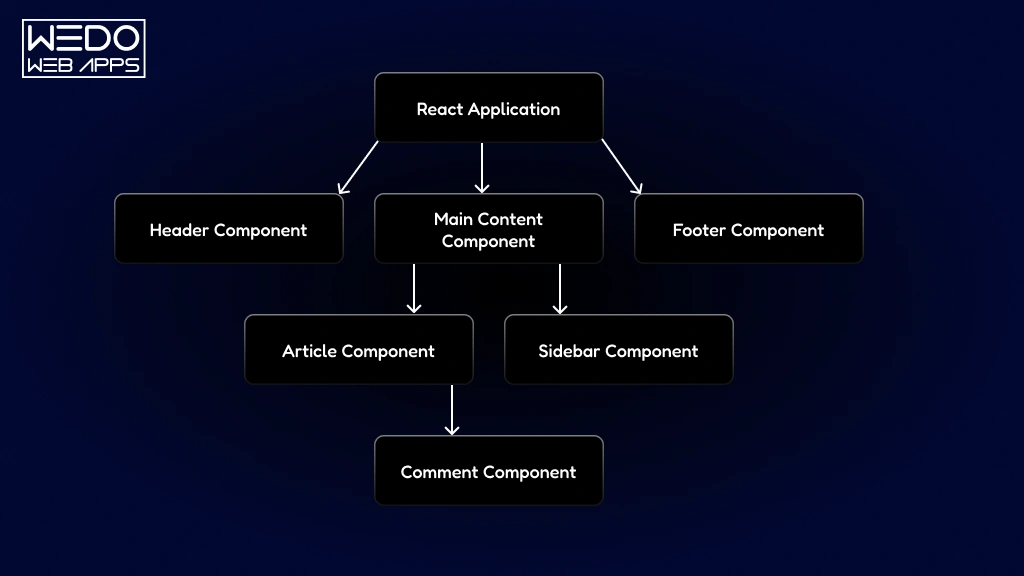
Why React JS Powers Web Apps

React also uses a virtual DOM, which updates only the parts of the page that change instead of reloading the entire page. This improves performance and creates a smoother user experience, especially in applications with frequent data updates or user interactions.

Why Developers Choose React

  1. Reusable components: Write a component once and use it in multiple places, reducing duplicate code.
  2. Efficient rendering: The virtual DOM minimizes unnecessary updates and improves application responsiveness.
  3. Scalable architecture: React works well for both small projects and large enterprise applications.
  4. Strong ecosystem: Developers can easily add routing, state management, testing, and deployment tools.
  5. Large community support: Extensive documentation, tutorials, and third-party libraries make development faster and easier.

These benefits are why React is commonly used for single-page applications, SaaS platforms, eCommerce websites, dashboards, and other interactive web applications. When combined with a well-planned ReactJS project structure, it becomes easier to build applications that remain maintainable as they grow in size and complexity.

Example

An eCommerce web app built with React can reuse the same product card component across category pages, search results, and recommendation sections. This saves development time and keeps the interface consistent throughout the application.

Prerequisites Before Building a React Web Application

Before you start building a React application, it is important to set up the right development environment. While React simplifies the process of creating interactive user interfaces, a successful project still depends on having the proper tools, foundational knowledge, and workflow in place.

The first requirement is Node.js, which provides the runtime environment needed to install packages and run React applications locally. Alongside Node.js, developers use npm (Node Package Manager) to manage dependencies, install libraries, and execute development scripts throughout the project lifecycle.

A reliable code editor is equally important. Many developers prefer Visual Studio Code (VS Code) because it offers features such as code completion, debugging tools, extension support, and Git integration that help streamline development tasks.

You should also have a basic understanding of the following concepts:

  • HTML for structuring web page content.
  • CSS for styling and layout customization.
  • JavaScript fundamentals, including variables, functions, arrays, and ES6 syntax.
  • Basic command line usage for installing packages and running development commands.

Having these prerequisites in place will make it easier to understand the ReactJS web app development steps covered in this tutorial and help you focus on building application features rather than resolving setup-related challenges.

React JS Web Application Development Steps
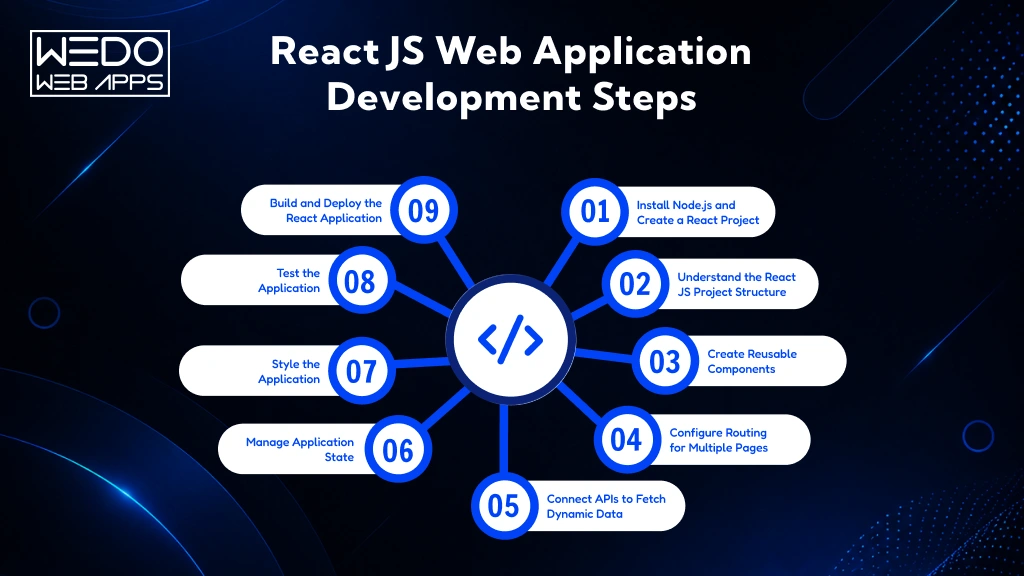
React JS Application Process

Creating a React application involves more than setting up a project and writing components. A well-structured development process helps maintain code quality, simplifies future updates, and supports application growth as new features are introduced.

From configuring the development environment and organising files to managing application state and deploying the final product, each stage contributes to the overall performance and maintainability of the application.

The following ReactJS web app development steps provide a structured approach to building a modern web application. Whether you are creating a simple business website, an eCommerce platform, or a feature-rich SaaS solution, these steps will help you establish a strong foundation for development.

Step 1: Install Node.js and Create a React Project

The first step of how to create a web application using ReactJS is setting up a development environment that supports React development. Before creating your application, you will need a few essential tools that help manage dependencies, run local servers, and streamline the development process.

Start by installing the following:

  • Node.js to run JavaScript outside the browser and supports React development tools.
  • npm (Node Package Manager) to install and manage project dependencies.
  • Visual Studio Code (VS Code) or another code editor for writing and managing application code.

Once Node.js is installed, verify the installation by running the following commands in your terminal:

node – v

npm – v

After confirming the installation, create a new React project. This will generate the initial application files and install the required packages automatically.

npx create-react-app-my-react-app

cd my-react-app

npm start

When the setup process is complete, React will launch a local development server and open the application in your browser. At this stage, you will have a working React environment ready for development.

Before moving to the next step, make sure you can:

  • Access the application in your browser.
  • View the default React welcome screen.
  • Make a simple code change and see it update automatically.
  • Navigate through the generated project files.

With the development environment successfully configured, the next step is understanding the ReactJS project structure and organizing your application for maintainability and future growth.

Step 2: Understand the React JS Project Structure

A React application can quickly become difficult to manage if files, components, and business logic are placed without a clear structure. While a small project may only contain a handful of files, larger applications often include hundreds of components, API integrations, utility functions, and assets. Organizing these elements from the beginning helps improve maintainability, collaboration, and future scalability.

When you create a React project, you will notice several default folders and files. As the application grows, developers typically organize the project into dedicated directories based on functionality.

A commonly used ReactJS project structure looks like this:

src/

├── assets/

├── components/

├── pages/

├── services/

├── hooks/

├── utils/

├── App.js

└── index.js

Here’s the purpose of each history:

  • assets/ stores images, icons, fonts, and other static resources.
  • components/ contains reusable UI elements such as buttons, navigation bars, cards, and forms.
  • pages/ includes page-level components that can be reused across multiple components.
  • services/ manages API calls and external data integrations.
  • hooks/ stores custom React hooks that can be reused across multiple components.
  • utils/ contains helper functions and reusable business logic.
  • App.js serves as the main application component.
  • index.js acts as the application’s entry point.

Benefits of using a structured project organization include:

  • Easier code maintenance as the application grows.
  • Faster onboarding for new developers.
  • Better separation of concerns.
  • Simplifies debugging and testing.
  • Improved scalability for future feature additions.

Think of your project structure as the blueprint of a building. A well-planned structure makes it easier to add new rooms, make renovations, and maintain the property without disrupting the entire foundation. The same principle applies when building a scalable React application.

Step 3: Create Reusable Components

One of the primary reasons ReactJS developers choose React is its ability to create reusable components. Instead of writing the same code repeatedly across multiple pages, React allows you to build self-contained UI elements that can be used wherever they are needed. This approach reduces duplication, improves consistency, and makes future updates significantly easier.

For example, elements such as navigation bars, buttons, forms, product cards, and footers often appear throughout an application. Rather than recreating these elements for every page, you can build them once and reuse them across the project.

A typical component structure may look like this:

components/

├── Header/

├── Footer/

├── Navbar/

├── ProductCard/

└── Button/

When creating reusable components, follow these best practices:

  • Keep each component focused on a single responsibility.
  • Use props to pass dynamic data between components.
  • Avoid placing complex business logic directly inside a UI component.
  • Create generic components that can be reused in different sections of the application.
  • Maintain consistent naming conventions across the project.

Consider an eCommerce application as an example. A single ProductCard component can display product information on category pages, search results, featured product sections, and recommendation widgets. Any design update made to the component will automatically be reflected wherever it is used.

Benefits of reusable components include:

  • Faster development cycles.
  • Cleaner and more organized code.
  • Consistent user interface design.
  • Easier maintenance and updates.
  • Improve scalability for larger applications.

By building reusable components early in the development process, you establish a foundation that supports efficient growth and simplifies future feature development.

Step 4: Configure Routing for Multiple Pages

Most web applications consist of multiple pages or views, such as home page, about page, user dashboard, and profile section. To navigate between these views without reloading the entire application, React uses client-side routing.

Routing helps create a smoother user experience by allowing users to move between different sections of the application while maintaining speed and responsiveness. The most commonly used library for this purpose is React Router.

Before configuring routes, install React Router in your project:

npm install react-router-dom

Once installed, you can define routes that connect specific URLs to individual pages within your application.

A typical routing structure may include:

  • Home page (/)
  • About page (/about)
  • Contact page (/contact)
  • Dashboard page (/dashboard)
  • Profile page (/profile)

Benefits of implementing routing include:

  • Faster page navigation without full page reloads.
  • Improved user experience and application performance.
  • Better organization of page-level components.
  • Easier management of application navigation.
  • Support for scalable multi-page applications.

As your application grows, you can further organize routes by creating a dedicated routing directory within your project structure. This helps centralize route management and simplifies updates when new pages are added.

For example, a SaaS application might include separate routes for user authentication, account settings, subscription management, analytics dashboards, and support pages. With proper routing in place, users can access these sections efficiently while maintaining a consistent experience throughout the application.

Once the routing structure is configured, the next step is connecting your application to external data sources through APIs, allowing you to display dynamic content and real-time information.

Step 5: Connect APIs to Fetch Dynamic Data

Most modern web applications rely on external data rather than displaying static content. Whether you are building an eCommerce platform, booking system, social networking application, or business dashboard, you will likely need to retrieve and display information from external services or databases. This is where APIs become an important part of React application development.

An API acts as a bridge between your React application and the backend system, allowing data to be exchanged securely and efficiently. Instead of manually updating content, the application can request and display real-time information whenever users interact with specific features.

Common API use cases include:

  • Retrieving product listings from a database.
  • Displaying user profile information.
  • Processing login and authentication requests.
  • Fetching analytics and reporting data.
  • Managing orders, bookings, or transactions.

React applications commonly use the Fetch API or libraries such as Axios to communicate with APIs and handle data requests.

When integrating APIs into your application, consider the following best practices:

  • Store API related logic in a dedicated services folder.
  • Handle loading and error states to improve user experience.
  • Avoid placing API requests directly inside multiple components.
  • Secure sensitive credentials and API keys.
  • Optimize requests to reduce unnecessary network calls.

A typical API workflow follows these steps:

  1. Send a request from the React application.
  2. Receive data from the server.
  3. Process the response.
  4. Update the application’s state.
  5. Display the data within the user interface.

By connecting APIs effectively, you can transform a static React application into a dynamic platform capable of delivering real-time information and personalized user experiences. Once your application can retrieve and display data, the next step is managing that data efficiently through React state management.

Hire React Developers for Projects

Step 6: Manage Application State

As your React application grows, managing data becomes increasingly important. Simple applications may only need to display static content, but larger projects often involve user authentication, shopping carts, form submissions, notifications, and real-time updates. Managing this information efficiently is known as state management.

In React, state represents data that can change during the application’s lifecycle. Whenever the state changes, React automatically updates the relevant parts of the user interface, ensuring users always see the most current information.

Common examples of application state include:

  • User login status.
  • Shopping cart items.
  • Form input values.
  • User preferences and settings.
  • Dashboard statistics and reports.
  • Notification messages.

React provides several ways to manage state depending on the application’s complexity:

  • useState for handling local component data.
  • useContext for sharing data across multiple components.
  • State management libraries for large-scale applications with complex data flows.

When managing state, follow these recommended practices:

  • Keep the state as close as possible to where it is needed.
  • Avoid storing unnecessary or duplicate data.
  • Separate UI state from business logic whenever possible.
  • Group related state values together for better organization.
  • Use shared state only when multiple components require access to the same data.

For example, in an eCommerce application, product information may come from an API, while cart items, user preferences, and checkout details are managed through application state. Proper state management ensures these features remain synchronized and function correctly across different pages.

Benefits of effective state management include:

  • Improved application performance.
  • Better user experience.
  • Easier debugging and maintenance.
  • Consistent data across components.
  • Greater scalability for future development.

Once your application’s data is properly managed, the next step is designing and styling the user interface to create a polished and engaging user experience.

Step 7: Style the Application

Functionality is important, but the way users interact with your application can significantly influence engagement and satisfaction. A well-designed interface helps users complete tasks more efficiently, understand information more clearly, and navigate the application with confidence.

React gives developers the flexibility to implement different styling approaches based on project requirements. The right choice often depends on the application’s complexity, design requirements, and development workflow.

Popular styling options in React include:

  • CSS for traditional stylesheet management.
  • CSS Modules for component-specific styling.
  • Tailwind CSS for utility-first design implementation.
  • Bootstrap for responsive layouts and pre-built UI components.
  • Styled Components for styling directly within React components.

When designing your application’s interface, consider the following best practices:

  • Maintain consistent colors, typography, and spacing.
  • Prioritize responsive design for different screen sizes.
  • Keep navigation simple and intuitive.
  • Use a clear visual hierarchy to guide user attention.
  • Optimize images and assets for faster loading times.

A typical React application may include styled elements such as:

  • Navigation menus
  • Landing pages
  • Forms and input fields
  • Product listings
  • User dashboards
  • Data visualization components

Benefits of implementing a well-structured design system include:

  • Improved user engagement.
  • Better accessibility and usability.
  • Consistent branding across the application.
  • Faster development through reusable design patterns.
  • Easier maintenance and future design updates.

For example, a business dashboard with clear navigation, responsive layouts, and consistent styling allows users to access reports, manage data, and perform tasks without unnecessary confusion or friction.

With the user interface in place, the next step is testing the application to ensure features work as expected and deliver a reliable experience across different environments.

Step 8: Test the Application

Building features is only part of the development process. Before releasing a React application, it is important to verify that every component, page, and user interaction works as intended. Testing helps identify issues early, reduces the risk of unexpected errors, and improves the overall reliability of the application.

Even a small issue in navigation, form validation, or data handling can affect the user experience. Regular testing allows developers to detect and resolve these problems before they reach production.

Key areas to test include:

  • Component functionality
  • Form submissions and validations
  • Route navigation
  • API integrations
  • User authentication flows
  • Responsive behavior across devices
  • Error handling scenarios

React developers commonly perform different types of testing based on project requirements:

  • Unit Testing to verify individual functions and components.
  • Integration Testing to ensure multiple components work together correctly.
  • User Interface Testing to validate user interactions and workflows.
  • Performance Testing to identify bottlenecks that may affect application speed.

When testing your React application, follow these best practices:

  • Test components independently before combining them into larger features.
  • Validate both successful and failed user actions.
  • Check application behavior across multiple browsers and devices.
  • Monitor loading states and error messages.
  • Review application performance before deployment.

Benefits of thorough testing include:

  • Improved application stability.
  • Faster issue resolution.
  • Better user experience.
  • Reduced maintenance costs.
  • Greater confidence during deployment.

Think of testing as a quality checkpoint before launch. Just as a product undergoes inspection before reaching customers, a React application should be tested thoroughly to ensure it performs reliably under real-world conditions.

Once testing is complete and all critical issues have been addressed, the application is ready for the final stage of the development process: deployment.

Step 9: Build and Deploy the React Application

After completing development and testing, the final step is preparing your React application for production. Deployment makes your applications accessible to users by hosting them on a live server where they can be accessed through a web browser.

Before deployment, React application should be optimized to improve loading speed, performance, and overall user experience. This process creates a production-ready version of your application by minimizing file sizes and removing unnecessary development resources.

To generate a production build, run the following command:

npm run build

This command creates an optimized build folder containing the files required for deployment.

Before publishing your application, make sure you have completed the following:

  • Verified that all features are functioning correctly.
  • Tested the application across different devices and browsers.
  • Checked API integrations and data flows.
  • Optimized images and static assets.
  • Removed unused code and dependencies.
  • Reviewed application security settings.

Popular deployment platforms for React applications include:

  • Vercel for fast and simplified deployments.
  • Netlify for frontend hosting and continuous deployment.
  • AWS for enterprise-grade hosting and scalability.
  • Microsoft Azure for cloud-based application hosting.
  • Google Cloud Platform for large-scale application deployment.

Benefits of deploying a production-ready React application include:

  • Faster page load times.
  • Improved application performance.
  • Better user experience.
  • Enhanced security and reliability.
  • Greater scalability as traffic increases.

At this stage, you have completed the core process of how to create a web application using ReactJS. From setting up the development environment and organizing the ReactJS project structure to creating components, configuring routes, managing state, integrating APIs, testing, and deployment, each step contributes to building a scalable and maintainable web application.

Book Free React Strategy Call

Recommended React JS Project Structure for Large Applications

As a React application grows, managing files and directories becomes increasingly challenging. What starts as a simple project with a few components can quickly expand into a complex application containing hundreds of files, multiple integrations, and numerous user workflows. Without a well-planned structure, maintaining and scaling the application can become time-consuming.

A scalable ReactJS project structure helps development teams keep code organized, improve collaboration, and reduce the effort required to introduce new features. It also makes debugging, testing, and long-term maintenance more manageable.

A commonly used project structure for medium to large React applications looks like this:

src/

├── assets/

├── components/

├── pages/

├── layouts/

├── routes/

├── services/

├── hooks/

├── context/

├── utils/

├── constants/

├── styles/

├── App.js

└── index.js

Each discovery serves a specific purpose:

  • assets/ store images, icons, fonts, and other static resources.
  • components/ contain reusable UI components used across multiple pages.
  • pages/ manages page-specific components and screens.
  • layouts/ defines shared page layouts such as dashboards and authentication screens.
  • routes/ centralizes application routing and navigation logic.
  • services/ handles API requests and third-party integrations.
  • hooks/ stores custom React hooks for reusable functionality.
  • context/ manages shared application state.
  • utils/ contains helper functions and reusable logic.
  • constants/ stores application-wide configuration values.
  • styles/ manages global styling and theme-related files.

Why use a structured project architecture?

  • Improve code maintainability as the application grows.
  • Simplifies onboarding for new developers.
  • Reduces code duplication across the project.
  • Support faster debugging and testing.
  • Makes feature additions more efficient.

For example, if a new payment module needs to be added to an eCommerce application, developers can quickly identify where APIs, components, pages, and utilities should be placed without disrupting the existing codebase.

A well-organized project structure acts as the backbone of a React application, helping development teams build applications that remain manageable, scalable, and easier to maintain over time.

Common Mistakes to Avoid When Building a React Web App
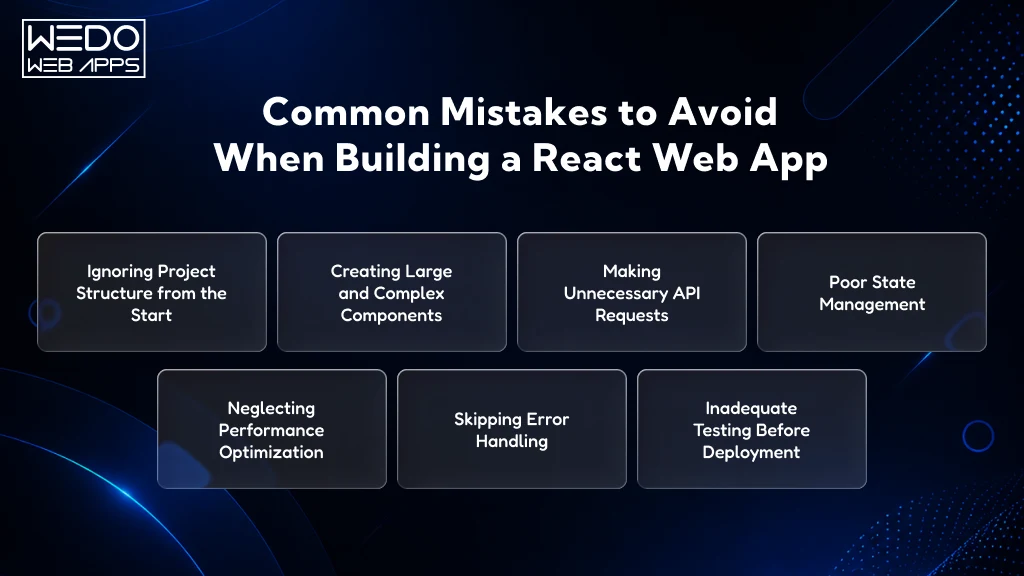
Avoid Common React JS Errors

Even with the right tools and development process, certain mistakes can affect the performance, scalability, and maintainability of a React application. Identifying these issues early can save significant development time and help prevent challenges as the project grows.

Here are some of the most common mistakes developers make when building React applications:

1. Ignoring Project Structure from the Start

Many developers begin by placing components, services, and utility functions in the same directory. While this may work for small projects, it often creates confusion as the application expands.

Best Practice: Establish a clear ReactJS project structure early in the development process and organize files based on their responsibilities.

2. Creating Large and Complex Components

Components that handle multiple responsibilities can become difficult to understand, test, and maintain. They also increase the likelihood of bugs during future updates.

Best Practice: Break large components into smaller, reusable components with a single responsibility.

3. Making Unnecessary API Requests

Excessive API calls can slow down application performance and create a poor user experience, especially when users navigate between pages frequently.

Best Practice: Fetch data only when necessary and implement efficient data management strategies to reduce redundant requests.

4. Poor State Management

Storing too much data in a single component or sharing state incorrectly across the application can lead to inconsistent behavior and unnecessary re-renders.

Best Practice: Use React’s state management features strategically and keep state as close as possible to where it is required.

5. Neglecting Performance Optimization

As applications grow, performance issues such as slow rendering and increased load times can become more noticeable.

Best Practice: Optimize components, reduce unnecessary re-renders, and implement techniques such as code splitting and lazy loading when appropriate.

6. Skipping Error Handling

Many applications focus on successful user interactions while overlooking scenarios where API requests fail or unexpected errors occur.

Best Practice: Implement proper error handling, fallback messages, and loading states to improve reliability and user experience.

7. Inadequate Testing Before Deployment

Launching an application without thorough testing can result in broken features, navigation issues, and inconsistent behavior across devices.

Best Practice: Test components, user workflows, API integrations, and responsive layouts before moving the application to production.

Building a successful React application involves more than following development steps. Maintaining a clean codebase, organizing files effectively, managing data properly, and prioritizing performance are equally important. By avoiding these common mistakes, developers can create React applications that are easier to scale, maintain, and improve over time.

Why Businesses Choose React for Web Application Development

Businesses today need a web application that can support growing user demands, changing business requirements, and continuous feature enhancements. This is one of the key reasons why React remains a preferred technology for modern web application development. Its flexible architecture and extensive ecosystem help organizations build applications that are easier to maintain, scale, and improve over time.

Reusable Components Accelerate Development

React allows developers to create reusable components that can be implemented across multiple sections of an application. Rather than rebuilding the same interface elements repeatedly, teams can create them once and use them wherever required.

Benefits of reusable components include:

  • Faster ReactJS web app development.
  • Reduced code duplication.
  • Consistent user experience across pages.
  • Easier maintenance and future updates.

For example, a single product card component can be used across product listings, search results, and recommendation sections without requiring separate development efforts.

Faster and More Responsive User Experiences

Application speed directly affects user engagement and satisfaction. React uses a virtual DOM that updates only the necessary elements on a page, helping applications respond more efficiently to user interactions.

This approach helps businesses:

  • Improve application responsiveness.
  • Reduce unnecessary page updates.
  • Deliver smoother user experiences.
  • Support dynamic content more effectively.

These advantages make React particularly suitable for businesses looking to build web app with ReactJS that handles frequent user interactions.

Scalability for Long-Term Growth

Many applications start with a limited feature set but gradually expand as business needs evolve. React’s component-based architecture supports this growth by allowing developers to introduce new functionality without disrupting the existing application.

Key scalability benefits include:

  • Easier feature expansion.
  • Better code organization.
  • Simplified collaboration among development teams.
  • Improved maintainability for large projects.

When combined with a structured ReactJS project structure, React can support both small applications and enterprise-level platforms.

Strong Ecosystem and Community Support

React has one of the largest developer communities in the frontend development industry. This provides businesses with access to a wider range of tools, libraries, and technical resources.

Organizations benefit from:

  • Extensive documentation.
  • Regular updates and improvements.
  • Third-party libraries for additional functionality.
  • Faster issue resolution through community support.

This ecosystem helps reduce development complexity and supports efficient ReactJS web application development.

Suitable for Multiple Business Applications

React’s flexibility allows it to be used across various industries and business models. Whether the goal is customer engagement, operational efficiency, or digital transformation, React can support a wide range of application requirements.

Common use cases include:

  • eCommerce platforms
  • SaaS applications
  • Customer portals
  • Healthcare management systems
  • Learning management platforms
  • Business dashboards
  • Financial service applications

This versatility is one of the reasons businesses continue to create web app using React for different operational and customer-facing needs.

Simplified Maintenance and Future Enhancements

As applications evolve, maintenance becomes an ongoing requirement. React’s modular structure allows developers to update individual components without affecting unrelated areas of the application.

This helps businesses:

  • Reduce maintenance efforts.
  • Accelerate feature updates.
  • Improve application stability.
  • Minimize development costs over time.

A well-structured React application is easier to manage, making it more practical for long-term business use.

Supports Modern Development Requirements

Modern web applications often require API integrations, cloud deployment, real-time data processing, and responsive user experiences. React works effectively with these technologies, making it a reliable choice for businesses planning future growth.

Organizations can benefit from:

  • API driven architecture.
  • Cloud-based deployment options.
  • Responsive design capabilities.
  • Integration with modern development tools.

These capabilities make React a practical technology choice for businesses seeking scalable and future-ready web applications.

React App Development Consultation

Conclusion

Building a successful web application requires more than selecting the right technology. It involves creating a solid foundation that supports performance, scalability, maintainability, and future growth. ReactJS helps achieve this by providing a flexible development approach that simplifies the creation of dynamic and interactive user interfaces.

Throughout this guide, we have covered how to create a web applications using ReactJS, from setting up the development environment and organizing the ReactJS project structure to creating reusable components, configuring routing, integrating APIs, managing application state, testing, and deployment. Each step plays an important role in building an application that can support both current business requirements and future expansion.

Whether you are planning to build web app with ReactJS for a startup, an enterprise platform, an eCommerce business, or a SaaS product, following a structured application development process can help reduce complexity and improve long-term project success.

As React continues to be a leading choice for modern web application development, understanding these React JS web app development steps will help you create applications that deliver better user experiences while remaining easier to maintain and scale over time.