skip to content

30+ Best Alternative App Stores For Your Applications

Bored of the same old app stores? Now is the time to discover the world of alternatives! Even though Google Play and the Apple App Store are undisputed leaders in the app market, other options are available.

In this blog, we shall analyze some fantastic alternative app stores that provide a new world of applications. Whether you are seeking a more comprehensive range of apps, lower prices, or just are sick of what is in the mainstream, these app stores are the ones to satisfy the market gap in the most suitable way for you.

Do you want to launch your own app

Why You Should Consider Using An Alternative App Store?

A lot of Google and Apple competitors are not exactly looking to compete with Google Play and the App Store head-on; instead, they are looking for different niches and strategies.

Besides, a fact that cannot be denied is that third-party app stores are often willing to offer download incentives and more attractive app deals than Google Play and the Apple App Store.

However, the question is, can a third-party app store make users experience a profitable journey? The answer is complicated.

Our evaluation should not be limited to the pros and cons of alternative app stores. So, what benefits come with downloading apps from the alternative app store? Let’s dive into it.

Multiple alternative stores give premium app versions at a discounted price or offer frequent other money-saving promotions.

They usually don’t charge for uploading and may promote the app further by featuring it as an “app of the day” or offering advertising discounts for developers who cooperate with them.

Besides, developers stand a better chance of getting better rankings on alternative platforms as they need more space in Google Play and the App Store, which are almost full.

To developers, testing MVP apps in the app stores with free apps seems a brilliant idea, as opposed to Google Play, which charges a $25 registration fee, and the App Store, which requires a $99 annual developer fee.

A third-party store might set itself apart by presenting a smaller and curated list of apps that have already been reviewed for quality, target age group, or unique goals.

Many companies hire mobile app developers to create apps that will be available in such stores because people seek them out for their high quality and specificity.

At the end of the day, remember the huge pool of apps and games that will never be available on Google Play or the Apple App Store. So, third-party app stores give you a much larger variety in apps.

Are you looking to create an app

Why Developers Choose Alternative App Stores

While most users explore alternative app stores to bypass region restrictions or access unique apps, developers often have different motivations. Here’s why many publishers and indie creators prefer non-traditional stores:

  • Better Revenue Share: Unlike Google Play’s 15–30% commission, platforms like the Epic Games Store and Aptoide offer more generous cuts—sometimes even up to 100%.

  • Fewer Content Restrictions: Some apps, such as emulators, crypto wallets, or niche tools, may not meet Google’s policies but are allowed on platforms like F-Droid or GetJar.

  • Faster Approval Process: Developers can skip the lengthy app review cycle, get feedback faster, and iterate quicker.

  • Decentralized Distribution: Platforms like Aptoide support blockchain-based app distribution, giving developers more control over updates and licensing.

Pro Tip: If you’re launching an MVP or niche utility app, alternative stores can be an ideal low-barrier entry point to test user response.

Are Alternative App Stores Safe?

Security is a valid concern when sideloading apps from platforms outside the official Google Play Store. While some stores maintain high safety standards, others may be riskier.

Things to Watch For:

  • Verified Publisher Badges

  • Open-source codebase (like in F-Droid)

  • Avoid apps without user reviews or permissions info

  • Do not install APKs from stores that lack HTTPS or proper encryption

Security Tip: Always read community reviews and scan APKs using tools like VirusTotal before installing them manually.

As there is a rise in marketplace application there is a high demand for a custom app for delivery. We provide an enterprise mobile app solution that helps your business launch its own secure, high-performing, and scalable application in the market.

Best Alternative App Stores For Android

Here’s a selection of the best 3rd party app stores for Android devices. These alternative platforms offer a wide range of apps, often with features and options that go beyond what’s available in the Google Play Store:

  1. 9Apps: A free app store with a versatile range of applications, including gaming, social media, music streaming, and health apps, is a rich source of all types of applications. One of the best things about this app store is that users are free to explore popular Android apps without any downloading fees.
  2. Accrescent: A modern and one of the most well-regulated application stores for Android is Accrescent. As of now, Accrescent is in its pre-alpha stage, and only the lead developer responsible for the precious programming is permitted to upload any more apps.  The system strives to become a developer-friendly hub with a focus on modern security and privacy standards.
  3. ACMarket: An alternative app store for Android, ACMarket is basically for cracked, hacked, and altered apps. It stands out as one of the most popular go-to unofficial app stores for Android, with over 15,000 applications. Given its continuous development, ACMarket keeps introducing new updates and improvements.
  4. Amazon App Store: This provides an excellent alternative to Google Play. The app store features a cross-platform analytics service that makes it easy for developers to use. Developers pay 70% of the app’s listed price, including in-app purchases. Both developers and app submitters receive a free first-year subscription to the Amazon program.
    They even designed and included an app compatibility test that gives developers notice of the problem with their app.
    Their Appstore Developer Select program gives developers free ad impressions and allows the acquisition of customers through the use of Amazon coins. In addition to that, users get a free paid app or game every day.
  5. APKMirror: The APKMirror site is a portal to the latest applications programmed in APK (.apk) suitable for specific consumer needs. APKMirror also updates a list of daily apps the user is concerned about.
  6. APKPure: This app store sells apps and paid games at low prices. The user-friendly platform is accompanied by a developer console that lets you access the apps you desire, regardless of location.
  7. APKTime: The APKTime platform helps people find and download APK files. The best part is that they already come in distinct entertainment, games, and sports categories and are currently the most updated.
    APKTime also allows users to download and install APKs free of charge without registering or creating a Google account and bypassing any regional restrictions.
  8. APKUpdater: APKUpdater is another interesting app that allows users to specify which apps they want to bypass updating. It also includes a utility to simplify the discovery of updates for installed apps and helps users find and install updates even if they have yet to be released.
  9. AppBrain App Market: This app discovery platform allows users to acquire premium apps for free or at a significant discount and is also an avenue to discover first-rate Android apps. It has different app promotion tools, which some brands use to enhance their app visibility in various mobile app stores.
  10. AppSales: This store provides access to paid apps that are discounted or free temporarily on Google Play. The app store also equips the user to predict the price of apps in the past market and access the content from restricted geographical locations.

Best Alternative iOS App Stores

Here’s a curated list of the best alternative app stores for Apple devices. Explore these alternatives to discover new possibilities for your Apple devices:

  1. AltStore: AltStore is the first Apple-endorsed store to be available to EU residents as an alternative to the official Apple App Store. The annual subscription of €1.50 includes a complimentary application called Delta, a Nintendo emulator, and a clipboard manager named Clip.
  2. AppCake: AppCake is one of the best alternative app stores for iOS. It is a native app designed to install an IPA file on iOS. Its signature feature is a wide range of applications with no in-app advertisements.
  3. AppValley: AppValley online is an iOS hotspot for finding apps with modifications. The major attraction among them is unlocked games and apps, such as Snapchat++, which are all trustworthy.
  4. Cydia: Cydia is an alternative app store for Apple that is specific to jailbreakers. It’s not an app or website like the other top app stores. Additionally, to use Cydia, one must have a jailbreaking tool.
  5. AppEven: Contrary to other app stores for Apple, AppEven can be directly installed from the internet without having to jailbreak your device. It works fine on iOS 8 to 16 systems and gives access to applications that are normally not on the official App Store of iOS.
  6. BuildStore: BuildStore allows customers to access more than 800 applications and games that were not accepted by Apple.
    While not an app like many tweak stores, BuildStore runs on a subscription model and thus requires a monthly fee, yet it compensates for that with vast exclusive features and added functionality, like different classic game emulators.
  7. Emus4U: It is not only an app store. Users can also download themes and wallpapers without jailbreaking. Furthermore, it allows you to customize the available apps, providing many options, such as Junk Cleaner, which are not available in the regular App Store.
  8. EonHub: EonHub is yet another unofficial app that contains a diverse list of apps that don’t appear on the official Apple App Store. EonHub stands out with its infinite app download option at no cost.
  9. iOS Haven: This app store embraces the sideloading trend, offering over 2,000 tweaked, modified, and converted apps. The site also offers a comprehensive search engine, themes, and games. Additionally, iOS Haven provides a free blog for the tech community.
  10. Setapp: This is an EU-based Apple-approved smartphone app store that is one of the forerunners in the tech sector. Like its Mac app store, it follows a subscription model, providing a selection of carefully chosen apps for a monthly fee.
  11. SideStore:  An unofficial iPhone store where apps can be downloaded without jailbreaking. Once the setup has been made, SideStore does not require a computer. The user can download and install apps through the internet connection directly on the phone, only using Wi-Fi.
  12. Sileo: It is another alternative to Cydia; it was introduced to welcome the newer iOS versions benefitting the new technological advancements. It is functional with iOS 12 and any 64-bit device. This means that users can securely jailbreak their devices and still download or buy other applications.
  13. TopStore: You can access TopStore through an app or a web browser. No matter where you are, you can download various apps without jailbreaking your device and themes from the store, all free.
  14. TweakBox: The TweakBox platform was designed to offer tweaked apps that provide extra features like screen recording. It is one of the popular options because it is easy to use and provides complete security of the user’s data.
  15. Xabsi: Xabsi is one of the leading app stores for hacked apps. Besides, it offers jailbreak and hacking features. It also occupies other universal alternative app stores, presenting a wide array of digital products, together with system apps that allow iOS file system customization. 

Best Alternative Cross-Platform App Stores

If you’re looking for something beyond the usual app stores, it’s time to explore some great alternatives. These cross-platform app stores offer a wide range of apps and features that you might not find in the standard options:

  1. MyAppFree: This platform allows users to view and download one free app daily. With a user base of 1.5 million people, the app is also available on the App Store and Google Play. The section “featured apps” showcases exclusive deals on the best applications. Users can earn badges and prizes, collect stars, and be at the top of the table through their actions.
  2. CokerNutX: CokerNutX has a large number of users, more than a million globally, and it offers about 5000 applications for non-jailbroken iOS devices, iOS jailbreaks, Android, and other platforms with an option to go through the best practices for using the site. A vital feature of this platform is its security commitment, demonstrated by its use of SSL encryption to safeguard users’ data.
  3. Mobile9: It is a trendy alternative app store that arranges app downloads about 240 million times monthly. Customers are given a massive list of things to look for, and they can enjoy books, comics, games, and wallpapers. These are all downloadable and have no charge added. As the report states, submitting an app on Mobile9 is free.
  4. HipStore: It is a digital store that is in the same manner to the app store, it is a marketplace where Apple, Android, and PC users will find free applications, themes, screen recorders, and ringtones. Every download’s content is protected by SSL encryption, which ensures a user’s safety.
  5. TutuApp: Many people are familiar with TutuApp because the user base contains over three hundred million people worldwide. Its feature allows people to submit an app without much hassle, supports various payment systems, and is integrated with SDKs, which makes the app platform attractive.
  6. Mobilism: This is the best place to search for modded apps and e-books across different operating systems, with more than 300,000 applications and 600,000 e-books being available for download.
    The shop is popular with over two million users, who among other things can browse and download mods, trending applications, and games for free.
  7. Mobilention: This Mobilention App Marketplace is a newly released app store that provides businesses within the EU with an alternative to the Apple App Store. Wherein, they are given not only a place to distribute public apps but also their internal employee apps. It was launched in March of 2024 and companies were offered a simple way to distribute apps with relaxed publication rules as opposed to Apple’s standards.
  8. Panda Helper: The app store is known for its efficiency on both Android and iOS operating systems. It also presents emulators, themes, and file manager apps not available on other platforms and lets users update the app directly.
  9. Rootpk: In the app store capacity, Rootpk is independently functioning. It is a platform that allows the sale of applications available on the Google Play Store.  Also, It facilitates developers by letting them upload their applications to Rootpk without any charges. Furthermore, users will use a small search tool to determine which apps are where and trending.

Best Manufacturer-Specific App Store Alternatives

Here, you will find the top alternatives to manufacturer-specific app stores. Whether you’re looking for unique apps or enhanced functionality, these alternatives have you covered:

  1. Huawei AppGallery: The Huawei AppGallery is the official app store for Huawei devices. According to Huawei, it is the third largest app store worldwide after Google’s Play Store and Apple’s App Store.  The platform delivers a lineup of applications, games included, to over 600 million Huawei product users in more than 170 countries.
  2.  VIVO App Market: The VIVO App Market is primarily aimed at VIVO developers who want to distribute their apps through this platform. AI is utilized to classify the applications and games most relevant to users’ local trends and characteristics.  The distribution network extends to South Asia and a large part of Southeast Asia, mostly in Indonesia.
  3. OPPO App Store: The exclusive OPPO App Store is just one of the many features of OPPO phones for OPPO users. Practically speaking, this tool is the central hub for different apps, games, and themes that OPPO has developed.  As a direct store, all the apps are created with the latest version of OPPO, and they undergo a complete check for maliciousness and bugs.
  4. Samsung Galaxy Store: The only official app store among all Samsung gadgets, is already activated and can bring in a broad and quick-starting consumer base for apps.
    The Samsung Galaxy Store and its relationship with the developers are such that they become pre-loaded on every Samsung device, ensuring a broad and immediate market base.
    The Store attracts developers by offering them the opportunity to earn more by giving away cool theme templates and unique, different font choices for Samsung users.
  5. Xiaomi GetApps: Xiaomi provides a device-oriented app store relevant to your interests. It uses the Avast, Kingsoft, and Tencent security tools to ensure that app downloads are safe and secure. GetApps can only be reached on Redmi, Poco, or Mi smartphones.

Best Chinese App Store Alternatives

  1. Tencent My App: China’s users have many options in app stores, such as Tencent My App, the biggest one. The software in question is produced by Tencent, which offers developers certain advantages.

For instance, Tencent allows developers to certify their apps, which might not be as readily available in Western markets. This makes it an appealing option when you choose to hire app developers to launch your own app and get it certified. 

Feature Comparison Table of Top App Stores

To help you choose the right platform for your needs, here’s a quick comparison of some of the best-known alternative app stores:

Store Open Source Monetization Developer Cut Security Model
Aptoide No Ads / In-App Sales Up to 75% Community + anti-malware
F-Droid Yes None 0% Manual code review
Amazon Appstore No In-App, Subscriptions 70% Amazon-reviewed apps
GetJar No Ads / Downloads Variable Developer reputation
Epic Games No Direct Sales Up to 100% Developer controlled

Best Alternative App Stores (With Developer & Security Insights)

1. Aptoide

A popular decentralized app store known for its flexibility and global reach.

    • Monetization: Supports ads and in-app purchases; developers can keep up to 75% of revenue.
    • Security: Community-based moderation and integrated malware scanning via their Aptoide Trusted Badge system.
  • User Base: Strong presence in emerging markets like Brazil, India, and Southeast Asia.

2. Amazon Appstore

An official app store backed by Amazon, especially popular on Fire devices.

  • Monetization: Standard in-app purchases, subscriptions, and access to Amazon Coins.
  • Security: All apps are manually vetted by Amazon’s review team.
  • User Base: Ideal for US-based users, Fire Tablet owners, and developers looking for brand-aligned monetization.

3. F-Droid

An open-source app store for Android with a focus on privacy and transparency.

  • Monetization: No native monetization model; relies on donations or off-platform support (e.g., Patreon).
  • Security: Manual code review of all apps; source code is publicly available.
  • User Base: Appeals to privacy advocates, open-source communities, and tech-savvy developers.

4. GetJar

One of the oldest app stores that still offers apps across multiple platforms.

  • Monetization: Ad-supported model with basic developer revenue sharing.
  • Security: Reputation-based; not as actively vetted as Amazon or F-Droid.
  • User Base: Popular in South Asia and Eastern Europe, especially among users of legacy Android devices.

5. SlideME

Curated store offering a mix of free and premium apps, often featured on devices without Google Play.

  • Monetization: Offers in-app billing and direct purchases; flexible payout model for devs.
  • Security: Manual review process; malware checks before apps are published.
  • User Base: Serves OEM preloaded devices, custom ROMs, and low-end Android users.

6. Epic Games Store (Android/Web-based)

Best known for Fortnite, Epic Games bypasses Google Play via its own launcher.

  • Monetization: Developers retain up to 100% of revenue; ideal for game publishers.
  • Security: Handled in-house; relies on Epic’s game platform infrastructure.
  • User Base: Focused on gamers, especially those seeking AAA and indie titles outside traditional app ecosystems.

7. Samsung Galaxy Store

Samsung’s proprietary store is available on all Galaxy devices.

  • Monetization: Offers subscriptions, in-app purchases, and special promotional opportunities.
  • Security: Strong vetting backed by Samsung Knox infrastructure.
  • User Base: Exclusive to Samsung users, especially in Asia and Europe.

App Store Optimization (ASO) in Alternative Stores

Just like SEO helps websites rank on Google, ASO (App Store Optimization) helps apps rank within stores.

While Google Play relies heavily on keyword metadata, alternative stores vary in their ranking mechanisms:

Store Ranking Factors
Aptoide Downloads, user reviews, update recency
Amazon App title relevance, description
F-Droid Open-source transparency, categories

ASO Tips:

  • Use targeted keywords in your app title and description.

  • Encourage users to leave positive reviews and ratings.

  • Regularly update your app to stay visible and relevant.

Want to grow app installs organically? Learn more about search engine optimization strategies tailored for apps.

Final Thoughts

Are you searching for the best app stores to download apps from? Many users find that Google Play and the App Store don’t always meet their expectations.

Depending on your preferences and needs, you should consider diverse iOS application stores, Android application stores, cross-platform app stores, and manufacturer-specific app stores provided in this guide.

The third-party app market offers a more open and flexible platform, giving developers and users alike new opportunities to discover and share apps.

see your app thrive on alternative app stores

Best Free Workout Apps for Every Fitness Enthusiast

Introduction

Free workout apps have gained massive popularity in recent times. Many fitness enthusiasts worldwide are looking for practical solutions without spending a dime, and free workout apps work significantly for them.

So, whether a person wants to build muscle, improve endurance, lose weight, or simply stay active, there are a variety of free, good workout apps to assist them. The global fitness app marketing is growing at a rate of 13.88% from 2025 to 2030. Having a better app will lead to growth in your business.

These workout apps will help meet fitness goals under expert supervision and coaches. This will motivate people to undergo strength training, cardio workouts, yoga sessions, pilates classes, and diverse exercise routines.

But before moving to the list of best workout apps for free, let’s first understand the reason behind their popularity.

Developing Your Fitness App

Reasons For The Growing Popularity of Workout Apps

Workout apps are great application software examples that combine usability and functionality to help users achieve fitness goals effortlessly. Workout apps have guided workouts, exercise databases, and tracking features that simplify home workouts. That is why many fitness enthusiasts want to develop their own iOS applications from reputable iOS app development company at an affordable price. Take a look below:

  • Workout At Your Convenience – These apps allow users to access guided workouts anytime per their schedule without relying on a gym membership or equipment.
  • Large exercise libraries—The best workout tracker apps provide hundreds of exercises covering multiple fitness modalities led by certified trainers to keep workouts interesting.
  • Customization options—Many apps let users filter workouts based on available equipment, skill level, goal, and other factors to suit their needs.
  • Community support—The workout apps help users interact through features like posting progress, joining challenges, and following other users to stay accountable.
  • Integration with devices—These apps are compatible with Fitbit, Apple Watch, and other best fitness trackers, making tracking workout metrics seamless.
  • Variety of free content—While premium versions offer extra features, many workout apps give access to a good amount of content without any subscriptions.

So, these are the reasons that show the rise of the popularity of workout apps worldwide.

If you are looking for the best workout apps for free that can be the ideal option for achieving your fitness goals, read on.

Looking to enter the digital wellness market?

Our team provides end-to-end fitness app development services for AI-driven health platforms.

Partner with the top mobile app development company

Top 10 Free Workout Apps To Consider For Your Fitness Goals

Want to know the top 10 free workout apps to meet your fitness goals? Well, we have prepared a detailed review of the top-rated apps, including their key aspects and potential pros and cons, to choose a workout app that meets your priorities and fitness goals.

  • Best Free Workout App Overall: Caliber:

Caliber stands out as one of the best exercise apps for free as it offers nutrition and strength training app that helps users achieve their fitness goals. It is a comprehensive workout app that provides personalized exercise plans tailored to one’s current abilities through a quick assessment.

Features:

  • Effective Workouts: Caliber provides a variety of effective strength training workouts tailored to an individual’s fitness level and goals. After a quick assessment upon signing up, it generates custom workout programs.
  • Strength Metrics: The app accurately tracks key strength metrics like weight lifted, reps, and sets and also measures progress through body measurements. This data-driven approach helps users monitor improvement in their workouts.
  • Seamless Tracking: Workouts can be easily logged into the app for seamless tracking. The recorded data is also used to modify workout programs based on performance to challenge users continually.
  • Weekly Lessons: The app offers weekly lessons on various topics, such as proper form, nutrition, and recovery, to boost users’ learning and fitness. This comprehensive training approach aids in faster progression.
  • Video Instructions: Each exercise includes an in-depth video demonstrating the proper form and technique for safe and effective performance. This visual learning method helps prevent injury and maximize results.
  • Nutrition Syncing: The app syncs with other health apps to provide personalized nutrition recommendations based on goals and tracked macros. This all-encompassing support promotes balanced lifestyle changes.

Pros:

  • Scientific training plans
  • Easy to use

Cons:

  • Limited integration with fitness trackers
Type of Training Available On
Strength Training iOS, Android
  • Best Free Workout App for Different Sports: Nike Training Club :

Nike Training Club is an excellent free app for staying fit through diverse workouts. Its extensive library includes over 1000 on-demand and live sessions led by expert trainers across formats like strength training, yoga, cycling, and more.

Key Features:

  • On-demand and Live Classes: Based on the user’s time and preferences, they can choose the on-demand workout videos across different categories like strength training, yoga, cycling, and more. The app also offers live online classes to experience a real gym-like setting.
  • Expert Trainers: All workouts are led by certified fitness instructors who provide clear instructions on performing exercises correctly and safely. Their expertise and motivation keep users engaged throughout.
  • Variety of Goals: In addition to full-body workouts, this app also has targeted routines and programs, such as weight loss, muscle building, or toning. 
  • Customization: Users can filter classes by equipment, workout type, trainer, duration, and skill level to best match their access and abilities. This flexibility makes the workouts conveniently customizable.
  • App Access: With free membership, the extensive library of on-demand and live videos can be accessed from any location at any time based on convenience.

Pros:

  • Completely free with diverse workouts
  • Expert-led classes

Cons:

  • Limited community features in the free version
Type of Training Available On
Strength Training, Cardio, Yoga iOS, Android

Even if you access the free app but the success of the application only depends on what its design feels like to users. To develop a better app, you can connect with the company that offers UI/UX design services to maintain better engagement.

  • Best Free Workout App for Sprinters: Map My Fitness

Map My Fitness is the go-to GPS app for runners, offering comprehensive, free features. It’s easy-to-navigate interface is well-suited to track runs, rides, and other outdoor exercises. The app helps fitness enthusiasts stay motivated through challenges, group events, and interaction with other athletes.

Key Features:

  • Route Tracking: The GPS mapping function accurately records distance, pace, elevation, and path while running or cycling outdoors. This data is saved to track progress over time.
  • Large Community: Runners and cyclists can connect and follow each other on the app. They can also post and comment on group feeds to get motivation or suggestions from community members.
  • Integration: The app seamlessly syncs workout data with other health and fitness solutions, like Garmin, Fitbit, and Apple Health.
  • Personal Records: The app marks personal bests for distance, time, and pace on saved routes. Users can compete with themselves to improve on past performances and smash milestones.
  • Planned Routes: The app allows users to download pre-set runs guided by other MMF users for new route ideas while traveling. The mapped paths also serve as guides during the activity.

Pros:

  • Accurate GPS tracking
  • A large community of users

Cons:

  • Limited community interaction in the free version
Type of Training Available On
Running, Cycling, Walking iOS, Android
  • Best Free Workout App for Gym-Goers: Jefit

Jefit is one of the best exercise apps for free for gym enthusiasts to plan, track, and optimize strength workouts. As a platform focused on resistance training, it provides a valuable library for extensive exercise to build routines.

Key Features:

  • Professional Workout Plans: The app provides many routines designed by coaches for strength, muscle building, and fat loss. These programs lay out the complete gym workflow.
  • Progress Monitoring: Jefit accurately logs all exercises, weights, reps, and sets to comprehensively track improvements over time and calculate strength benchmarks and one-rep maxes.
  • Exercise Logging: Users can search the extensive library of exercises by muscle group or ment and easily add them to personal routines or track gym sessions with weighted parameters.
  • Notes: Helpful notes can be made during workouts, such as the weight lifted, how it felt, fatigue, and targeted muscles. This detailed documentation aids in reviewing past performances.
  • Customization: Workouts can be tailored by rearranging or substituting exercises based on personal preferences, expanding rest periods, and tracking personal records.

Pros:

  • Extensive exercise library
  • Professional workout plans

Cons:

  • Limited cardio options
  • Presence of ads
Type of Training Available On
Strength Training, Bodybuilding iOS, Android
  • Best Free Workout App for Workout Routines: ClassPass

ClassPass is an all-inclusive app offering access to various local fitness studios and guided workout videos from the comfort of your home. As a subscriber, you gain entry to thousands of studios worldwide using monthly credits for bookings.

Key Features:

  • WOD Creation: The app allows customized creation of CrossFit workouts(WODs) by selecting exercises and specifying parameters like time, repetitions, etc., based on ability and accessibility of equipment.
  • Tracking: Track workout of the day in real-time through the built-in timer. It will help you keep a record of your fitness regime and time spent on rest intervals.
  • Database: Users browse thousands of preloaded workouts designed by experts or followed by athletes for their intensive training. 
  • Form videos: Visual guides for complex moves like snatches, clean, and jerks enhance learning technique safely through some of the embedded exercise videos in the app.
  • Equipment Filter: Each WOD generated is adjustable to the user’s home gym constraints by selecting which gear is accessible, such as dumbbells, barbells, or gymnastic rings.

Pros:

  • Variety of wellness activities
  • Video-led workouts for guided sessions

Cons:

  • Potential issues with cancellation policies
  • Limited options in some areas
Type of Training Available On
Strength Training, Cardio, Yoga, Pilates iOS, Android

Tips: Does your business also have an idea for the app? You can start by connecting with mobile app developers to turn your app into a scalable and secure product.

  • Best Free Workout App for CrossFit: SmartWOD

As the best free app for workout, SmartWOD brilliantly caters to CrossFit athletes. Using an interactive tool, it provides random routines tailored to one’s available gym equipment. Scaled-down weight and skill options consider all experience levels.

Key Features:

  • WOD Creation: The app allows the customized creation of CrossFit workouts(WODs) by selecting exercises and specifying parameters like time, repetitions, etc., based on ability and accessibility of equipment.
  • Tracking: The built-in timer, will help you track real-time updates on your fitness regime. It will also help you acknowledge your repetitions and the time spent on rest intervals.
  • Database: Users may browse through preloaded workouts created by experts or followed by athletes to upscale their skill and strengths.
  • Form videos: The visual guide of complex exercises will help you enhance your skills, techniques, and strength to make your body more athletic.
  • Equipment Filter: Each workout can be easily adjusted to the user’s home gym. They just need a few gears in hand such as dumbbells, barbells, or gymnastic rings.

Pros:

  • Fun and varied workouts
  • Tailored to available equipment

Cons:

  • Limited filtering options
  • It may not be suitable for beginners
Type of Training Available On
High-Intensity Interval Training (HIIT) iOS, Android
  • Best Free Workout App for Beginners: FitOn

Fans have a very easy-to-use app designed with newcomers in mind. Gone are the days of aimless internet searches, with FitOn providing guided beginner-friendly workouts across categories like yoga, strength training, Pilates, HIIT, and more.

Key Features

  • Guided Workouts: The extensive workout library offers a wide range of options, from yoga, Pilates, and meditation to HIIT and dance workouts led by expert trainers through video sessions.
  • Community Support: Users can follow trainers and other members to get workout inspiration, ask questions, and support each other on their fitness journeys through the social feeds.
  • Progress Tracking: All activities are automatically logged to monitor increases in active time, steps, and burned calories and track evolution over weeks through detailed stats on the app.
  • Customization: The free version offers many adjustable filters to select workouts based on type, trainer, targeted muscles, and duration compatible with any level or schedule.
  • Explanations: Each exercise is demonstrated along with modification options to ensure proper form catering to beginners and prevent the risk of injuries while learning new movements.

Pros:

  • Simple and user-friendly interface
  • Guided workouts for beginners

Cons:

  • Limited advanced features
  • It may not offer enough challenge for experienced users
Type of Training Available On
Strength Training, Cardio, Yoga iOS, Android
  • Best Free Workout App for Yoga: Down Dog

Down Dog is a unique yoga platform that tailors routines based on user preferences, making every session a fresh mind-body experience. 

With over 200 unique poses included, the app smoothly incorporates balancing, stretching, and strengthening postures based on the difficulty level, music choice, and desired yoga genre a user selects – whether it be hatha, vinyasa, yin, or restorative yoga.

Key Features:

  • Different Yoga Styles: Down Dog provides options to select from several popular yoga styles, such as Hatha, Vinyasa, and Forest. You can mix up your yoga routine by choosing a new style daily. 
  • Practice Based on Your Experience Level: The app allows users to set the desired difficulty level for your yoga session. The levels can be adjusted based on your experience and current fitness level. 
  • Guidance Through Each Pose: The flow is led by a virtual yoga instructor who provides audio guidance to move through each pose. The instructor demonstrates the alignment and form for every asana through image and voice, making it perfect for free, good workout apps.
  • Tracking Your Yoga Practice: Down Dog allows you to track key metrics, like time spent, calories burned, etc., for each session. Over time, this data will help me in your flexibility, strength, and overall yoga prac improvement time.
  • Personalized Recommendations: Based on your usage and feedback, the app algorithm studies your preferences to provide personalized yoga poses and recommendations.

Pros:

  • High-quality instruction
  • Variety of yoga styles and difficulty levels

Cons:

  • Fewer features in the free version compared to the paid version
Type of Training Available On
Yoga iOS, Android

If you are also inspired by the features of these apps, then you can develop one for your services. Connect with the mobile app development company to make an engaging app for you.

  • Best Free Workout App for Cycling: Strava

Strava has established itself as the best free app for workout, especially favorite among cyclists and runners due to its integrated social sharing and performance tracking. It allows users to record their outdoor routes or indoor bike sessions from major fitness brands and seamlessly sync the data to the app.

Key Features:

  • Route Tracking: Cyclists can map outdoor routes using the GPS functionality and view maps with distance, elevation, speed, and other crucial metrics from recorded sessions.
  • Performance Analysis: The app’s detailed charts and analytics scrutinize improvements in distance, speed, elapsed time, and other achievements over similar rides to gauge progress.
  • Social Features: The prominent community aspect through follower, kudo, and club features provides network opportunities to get motivation, route ideas, or cycling tips from peers sharing adventures.
  • Challenges: Pre-set distances, climbing, or timed challenges between connected cyclists ignite friendly competition and extra encouragement to put forth more outstanding efforts during rides.
  • Premium Upgrades: While many primary features are free on the app, there are a few subscriptions to unlock extra benefits like heart rate, power meter zones, live tracking, and route mapping for indoor workouts using rollers or intelligent trainers.

Pros:

  • Strong community aspect
  • Comprehensive performance analysis

Cons:

  • To experience more premium features you must buy their subscription. 
Type of Training Available On
Cycling, Running iOS, Android
  • Best Free Outdoor Workout App: AllTrails

Nature lovers on the trail will appreciate AllTrails’ extensive guide to outdoor spaces. This database holds over 400,000 trails globally and continually expands through expert verification and user reviews.

Key Features:

  • Trail Maps: The app database holds maps and geographic details of thousands of trails globally with delineated routes, trailheads, and surrounding landmarks.
  • User Reviews: Trail users can share their experience through reviews, photos, difficulty ratings, and notes on terrain, views, and other practical information to help inform their planning.
  • GPS Tracking: Location tracking enables hikers to stay on course with visual guidance along selected trails and an auto-pause feature to preserve battery life during stops or breaks in outdoor activity.
  • Offline Maps: Download specific trail maps for instant navigation with low or no internet connectivity in remote or international areas.
  • Route Sharing: Completely constructed routes involving multiple trails stitched together can be scheduled, followed, or shared as an activity list with other AllTrails users for companionship options while exploring.

Pros:

  • Extensive trail database
  • User reviews and ratings

Cons:

  • Limited workout guidance
  • It may not be suitable for users who prefer indoor workouts
Type of Training Available On
Hiking, Trail Running, Outdoor Activities iOS, Android

Final Thoughts

Reputable iOS and Android app development services focus on processes like the agile testing life cycle to ensure workout apps deliver a seamless user experience.

So, the popularity of free good workout apps has led to creative solutions fitting diverse goals and skills from beginners to advanced athletes. 

For most, a suitable companion can be found among these top-rated free workout apps for men and women. Features like guided routines, social communities, and performance tracking promote consistency from home or on the go. 

This is why many people are considering hiring reputable iOS and Android app development services to enter this industry and make the most of it. So, whether you are searching for new yoga poses, strolling nature paths, or joining the CrossFit fray, empowering your fitness is now easier than ever with the best fitness tracker apps.

Top 10 Low Code Platforms For Building Applications

Introduction

Imagine developing a fully functional app or any web-based solution in just a few days, with less and minimal coding. Okay, if it sounds too good to be true, then we have some news for you.

Welcome to the world of low-code development platforms! These innovative tools helps businesses in bringing their ideas to life quickly and efficiently with the help of a robust mobile app development company.

As the demand for digital transformation keeps getting higher, low code application development platforms grow increasingly popular. In this blog, we dive deeper into the list of the top 10 low coding apps in 2024.

The Future Is Low-Code: Key Trends

Before we get into the list of top 10 low code app development platform, we must equip ourselves with the latest trends in the development of the low coding platform and how does it impact our business:

  • Digital Transformations

In a world where technology is constantly evolving, low-code no-code platforms are at the forefront of digital transformation. These Companies are leveraging these tools to swiftly develop and deploy applications, enabling them to adapt quickly to market changes.

This shift, particularly for businesses seeking to modernize old legacy systems without entering into overall revamping, is very rewarding. Drag-and-drop interfaces, prebuilt templates, and customized workflows can help businesses speed up the processes and applications.

  • AI-Powered Integrations

Artificial intelligence is no more of the future, but now a standard across most low coding platforms. AI-driven integrations enrich the functionality of the platforms with process automation, better decision making, and personalized experiences for users.

The integration of AI is revolutionizing low-code platforms by significantly enhancing their capabilities and efficiency. With AI embedded into these platforms, tasks that once required complex coding can now be automated, allowing for faster and more accurate application development.

Some platforms integrate advanced frameworks like React Native Hermes, optimizing the performance of mobile apps. Hermes, a JavaScript engine, significantly enhances the speed and efficiency of apps developed using React Native. This makes it a valuable tool for businesses looking to leverage low-code platforms for high-performing applications.”
These placements ensure the keywords fit naturally while enhancing the content’s relevance and depth.

  • Enhanced Collaboration Features

The collaborative nature of low code app builder platforms is another trend to watch. With a rise in remote employees, demand for tools that allow for collaboration across teams has never been greater. Low code development platforms answer this by allowing multiple users to work on the same project.

This presents an avenue for seamless collaboration, no matter where anyone might be. Equally, having one platform for development enables teams to integrate better and bring an application to market faster.

  • The Rise of the Citizen Developer

One of the most exciting trends in the world of low-code is the rise of the citizen developer. These are individuals who, despite having little to no coding experience, are now empowered to create powerful applications using low code application development platforms.

Low code app development platforms even let non-developers participate in the development process, so professional developers are free to deal with more complex tasks.

  • Expansion of Ecosystems and Marketplaces

With the popularity of low code platform development comes a fast-growing ecosystem around these platforms. An increasing number of low-code providers is tending to expand marketplaces with an enormous variety of built-in components, templates, and integrations.

The growth of such ecosystems also fosters a community feeling among their users. This is the tip of the iceberg; more is yet to come as users receive more tools and resources to make their low-code experience richer.

  • Security and Compliance

The growing use of low code app builders has been matched by an increase in security and compliance features being packed into businesses. Thus, businesses have to ensure that the applications that will be built will be secure and in compliance with the guidelines of the regulated industry.

Now, attribute many low-code application platforms that pack in features to ensure security, from encryption to access controls, and strive to be compliant with standards such as GDPR and HIPAA.

What to Look for in a Low-Code Platform?

Choosing the right low code app development platform is crucial to the success of your project. With so many options available, it can be challenging to determine which platform is best suited to your needs. Here are some key factors to consider when evaluating low code development platforms:

  • Ease of Use

The main reason why developers are into low code no code platforms is the relative ease by which one can build applications on these platforms. Look out for drag-and-drop intuitive interfaces, prebuilt templates, and user-friendly design tools. All of these will let you develop applications quickly with very little programming knowledge required.

  • Customization and Flexibility

While ease of use is important, you also want a platform that gives you customization and flexibility. Low coding code platforms offer a broad range of choices for personalization including the capacity to add custom code, create unique workflows, and integrate with third-party services.

  • Scalability

The reason that as your business grows, so will your application needs, is directly related to the need for a low code app development platform that scales with your business.

Opt for those which provide very strong performance, support for high numbers of users, and intricate applications. Scalability means that your applications grow with your business without having to completely overhaul everything.

  • Security

Security should be the prime factor in the selection of any low code application development platform. Ensure that your chosen platform provides relevant security features, including encryption methods, access controls, and frequent security updates. You should also consider whether the platform is compliant with industry standards and regulations like GDPR, HIPAA, or PCI DSS.

  • Integration Capabilities

Finally, consider the integrative capacity of the platform. Look for low code development platforms that have a large base of integrations and connect custom APIs to your applications. This will guarantee a seamless integration of your applications with your existing systems and ensure a seamless user experience.

Understanding your development approach is crucial. For instance, evaluating native app vs cross-platform development is an essential step when choosing a low-code platform. Native apps often provide better performance and deep integration, whereas cross-platform solutions prioritize flexibility and quicker development cycles. Low-code platforms are increasingly equipped to support both, helping businesses achieve their unique goals efficiently.

Top 10 Low-Code Platforms in 2024

Now that we’ve covered what to look for in a low code app development platform, let’s look at the top 10 low code development platforms of 2024 so far. We have handpicked each of the following application platforms based on their unique features, compatibility, and pricing.

  • Mendix

A Low code development platform at high speed, having a strong and well-rounded set of tools that will help any size company looking to accelerate the development process while keeping up with the standards.

Key Features: 

  • Mendix uses drag-and-drop interfaces 
  • AI-powered automation
  • Excellent collaboration features in its design 
  • Build multi-device applications with ease
  • Updated in Real-time premises.

Compatibility: Mendix is quite versatile among web, mobile, and desktop applications, so quite agile.

Cost: Mendix has a free tier, though most businesses should expect to pay between $70 to $1,000 per month for advanced features based on your requirement.

  • Appian

With its strong automation features, Appian has been wining in the low code application platform market. So if your business lives by efficiency, and you are looking for a platform that ushers in productivity, you might find your perfect mate in Appian.

Key Features: 

  • An AI-driven low coding platform.
  • Deploys workflows and robotic process automation  
  • Stands out for its ease of use 
  • Provides enterprise-grade security.

Compatibility: Web and mobile applications work on any device with a seamless user experience.

Cost: Starts from $90 per user per month, with more comprehensive enterprise plans available.

  • Xeno

One of the recent entries in the low code no code platforms space is Xeno, and it has very rapidly risen to fame because of the friendliness of this design. It is ideal when one wants to create applications without too much deep diving into coding.

Key Features: 

  • Large collection of inbuilt templates and components. 
  • Easy-to-use Interface

Compatibility: Xeno is developed for use in web applications; however, it does support mobile apps through responsive design.

Cost: Xeno has both free and subscription plans. Paid options start at $50 per month.

  • Nintex

Nintex is a powerhouse when it comes to process automation and workflow management. For companies looking to make operations less tiring or more efficient, the low-code platform development tools provided by Nintex are pretty difficult to improve.

Key Features: 

  • Known for document generation.
  • Creates powerful e-signature
  • Robust process automation capabilities.

Compatibility: Nintex works great with both web and mobile applications, allowing flexibility in many use cases.

Cost: Pricing starts at $25 per user per month.

  • Betty Blocks

Betty Blocks concentrates on the enablement of users to create complex applications without the need to write a single line of code. Perfectly ideal for businesses that balance ease of use and customization.

Key Features: 

  • Provides visual development environment  
  • High degree of customization. 

Compatibility: Betty Blocks supports applications across web, mobile, and multi-device environments.

Cost: The pricing starts from $1,000 per month.

  • Salesforce Lightning

The best-of-breed choice for businesses already within the Salesforce ecosystem is Salesforce Lightning. It is a low-code application platform designed to build and manage custom business applications with ease.

Key Features: 

  • Detailed settings with AI capabilities 
  • Huge collection of built-in components and templates. 

Compatibility: Works on Web, Mobile, and Desktop applications to ensure your apps work seamlessly on any device.

Cost: The paid plans start from $25 per user per month, with enterprise options available.

  • Caspio

Caspio is designed for business use when you want to create database-driven applications with not too much coding. If you’re working with data-heavy projects, Caspio could be the perfect low-code app development platform.

Key Features: 

  • Easy to use 
  • Robust database management features.
  • Excellent security features to handle sensitive data.

Compatibility: Primarily Caspio is developed for applications on the Web. However, it has responsive design support to extend functionality to mobiles.

Cost: Paid plans start at $100 per month.

  • Quickbase

Quickbase is all about flexibility and personalization; that is why it is perfect for companies with unique needs. Whether you’re a small startup or a large enterprise, Quickbase has you covered.

Key Features: 

  • Prebuilt templates and components
  • Vigorous reporting and analytics. 

Compatibility: Web and mobile applications are supported in Quickbase.

Cost: The pricing starts at $600 per month for small teams, with larger plans available for enterprises.

  •  Wave Maker

Wave Maker is a fully-featured low code platform development tool. It’s especially very strong when one talks of mobile app development. If you are solely focused on building mobile apps, Wave Maker’s features will help you to be efficient in doing your job.

Wave Maker’s robust features make it a strong contender for businesses focusing on multiplatform mobile app development. Its capability to build mobile and web apps seamlessly ensures a consistent experience across devices, making it ideal for a mobile-first approach.

Key Features: 

  • Wave Maker offers drag-and-drop interfaces, real-time collaboration, and multi-device support.
  • It is known for its strong mobile app development capabilities, which make it most competitive for any business.
  • Good for businesses following a mobile-first strategy.

Compatibility: Wave Maker provides web, mobile, and desktop applications with uniformity in experience across all devices.

Cost: The pricing starts at $5 per user a month, while enterprise plans with more features are available.

  •  Jotform

Jotform is a low code app builder anyone will adopt to create a mobile app quickly and easily. It has an easy design and hundreds of templates to get you right away to having a fully functional app.

Key Features: 

  • Built-in templates 
  • Drag-and-drop interfaces, 
  • Easiest app platform to use. 

Compatibility: Jotform can work with both mobile and web apps seamlessly.

Cost: Paid plans start at $29/month.

These are the best among the best that 2024 has in low code application development. Each one provides value in its own special way, so whether you are an accomplished developer or a new guy, there will be something here for you.

How to Choose the Right Low-Code Platform for You?

With so many low code application development platforms to choose from, how do you decide which one is right for you? Well you need to do the research and find the best mobile app development company in your budget. Here are the following things, you need to consider:

  • Assess Your Needs

First, assess your specific needs. What kind of applications do you want to build? How complex are your requirements? In the light of this understanding, you will be better placed to narrow options and settle on a platform that avails features and capabilities in line with your needs.

  • Budget Considerations

Another important factor to consider is the budget. Low-code app development platforms come very differently priced, so selecting one that will fit your wallet is crucial. Be aware that while most of these platforms have free plans, nearly all of them require an upgrade to paid plans for advanced features and technical support.

  • Test Before You Commit

Finally, test before you buy. Most low-code development platforms give you the opportunity to try them out with free versions or demos. Take these up and delve deep to see that the platform you are picking is exactly what you are looking for.

Conclusion: Get Ahead with Low-Code in 2024

The benefits of low code application development are easy to see, and adopt: faster development time, reduced costs, and even non-developers are able to create powerful applications.

Whether you are an experienced developer or a business professional with no experience in coding, there is a low code app builder for you. And if you’re looking to take your project to the next level, consider partnering with the best mobile app development services in the USA to ensure your low-code app meets the highest standards.

So what are you waiting for? Go ahead and explore the breadth of these platforms, which will allow you to get your applications up and running. The future of app development is here and it’s low-code, so don’t miss out on it!

Top Mobile App Ideas and Trends to Kickstart Your Business

Introduction

Mobile phones have become the most important part of our lives. It’s bitter but a truth that we do not even step out of our homes without our mobile phones. Owing to this fact, mobile app development companies are not just benefiting from this but are also bombarded with hundreds of innovative mobile app ideas for businesses that cater to the ever-growing digital market. As of August 2024, a report published by Statista stated that the Google Play app store encompasses approx. 2.3 million applications, whereas the Apple store has made up to 2 million applications. With such huge figures, it is merely impossible for the mobile app development company to find app ideas for its clients. App ideas that are unique and enticing and have never been heard or thought of before.

Mobile Applications dominate the entire internet market. Whether it is a small to medium-sized business or a big enterprise, everyone is getting their dedicated mobile apps developed to attract more customers through mobile devices. If you have an unusual mobile app idea for your business, we are glad that you’ve come here. Here in this article, we have listed industry-specific mobile apps ideas separated by various industries. But before knowing about the best mobile app ideas, it is essential to know various mobile app development types. Understanding different types of mobile apps will help you select the platform that will be suitable for your business niche. Read more to learn about the types of mobile app development.

Types of Mobile Applications

Based on the application’s technical features, mobile applications can be grouped into three different categories: native mobile applications, web applications, and hybrid applications. But what are they? Follow our blog to learn more about mobile app development types.

  1. Native Applications: Native applications are those that are built to be used on a particular platform or an operating system. Hire the best Native Mobile app developers from WEDOWEBAPPS to turn your app idea into reality.
  2. Web Applications: A web Application is a program stored on a remote server and delivered over the Internet through a browser interface. Web apps are comparatively more reactive than websites and can operate on any operating system, be it Android or iOS.
  3. Hybrid Applications: Like native apps run on the device and are written with web technologies like HTML, CSS, and Javascript, hybrid applications run under the native containers and leverage the browser engine.

These are various types of mobile applications that can be developed to potentialize your business. Now that we know the different types of mobile apps, let’s discuss some of the best mobile app ideas for 2024 that can steal the market.

Top Mobile App Ideas for Startups

Get familiar with the tools for mobile app development for a successful startup and contact us to leverage our mobile app development services. Our mobile application development services can be specific for every industry, be it healthcare, food, or any other. Give your startup a new online selling opportunity with WEDOWEBAPPS.

Fitness Tracking Apps

Fitness-tracking apps cater to health-conscious users by offering personalized workout plans, diet tracking, and social features to keep users motivated. Key Features:

  • Custom Workout Plans: Provide routines tailored to individual fitness goals and levels.
  • Nutrition Tracking: Allows users to log meals, monitor calorie intake, and track macronutrients.
  • Integration with Wearables: Sync with devices like smartwatches to capture real-time fitness data.
  • Progress Monitoring: Track workout completion, set fitness milestones, and visualize progress.
  • Community Features: Enable users to share progress, join fitness challenges, and connect with friends.

Remote Work Tools

Remote work tools are essential as more companies adopt flexible working arrangements. These apps support collaboration, virtual meetings, and project management.  Key Features:

  • Video Conferencing: Facilitate high-quality virtual meetings with screen sharing and recording capabilities.
  • Task Management: Organize tasks, set deadlines, and send reminders to keep teams on track.
  • Real-Time Collaboration: Provide shared workspaces for simultaneous document editing and brainstorming.
  • Secure File Sharing: Ensure encrypted file transfers to protect sensitive data.
  • Productivity Analytics: Offer insights into team performance, project timelines, and productivity metrics.

E-commerce Platforms

E-commerce platforms must provide a seamless shopping experience with personalized recommendations and secure payment options.  Key Features:

  • Personalized Recommendations: Use AI to suggest products based on user behavior and preferences.
  • User-Friendly Interface: Ensure easy navigation with fast load times and an intuitive layout.
  • Secure Payment Options: Offer multiple payment methods with robust encryption to safeguard transactions.
  • Real-Time Inventory Updates: Display accurate product availability and manage stock levels efficiently.
  • Customer Support: Provide 24/7 assistance through chatbots and support agents to resolve user queries.

Healthcare Apps

Healthcare apps are transforming how people access medical services, offering telehealth, mental health support, and health monitoring features. Key Features:

  • Virtual Consultations: Enable video calls with doctors for remote medical advice and check-ups.
  • Mental Health Support: Provide access to counselors, mental health resources, and self-help tools.
  • Medication Reminders: Send alerts to remind users to take prescribed medications.
  • Health Monitoring: Track vital signs, fitness levels, and other health metrics.
  • Data Security: Implement strong encryption to protect user health information and ensure privacy.

Sustainability Apps

Sustainability apps appeal to eco-conscious users by promoting green practices and providing tools for sustainable living. Key Features:

  • Carbon Footprint Tracking: Help users monitor and reduce their carbon emissions.
  • Recycling Guides: Offer information on how to properly recycle various materials.
  • Sustainable Living Tips: Provide daily tips to help users reduce their environmental impact.
  • Smart Home Integration: Connect with smart home devices to optimize energy use and reduce waste.
  • Community Challenges: Engage users in sustainability challenges and local environmental initiatives.

45 Best Industry-Specific Mobile Apps Ideas in 2024

Remember the times when one would jokingly say, “I wish there was an app for that.” Now, this is the time when there is an app for almost everything one wishes for. In this blog, along with the trending Mobile app ideas for restaurants and healthcare and almost every industry, we have also listed some of the best app objectives that one can consider for a startup. So, let’s have a quick look at the best Mobile App Development Ideas for 2024.

Healthcare App Ideas

Medical Applications, Health solutions, or, you can say, Healthcare application solutions for patients have now acquired an important position in the market. Development and usage of healthcare applications are increasing along with the global growth of smartphone usage. Here are some of the trending Healthcare App Ideas for your business.

  1. Personal Medical Records App

This app idea is basically a diary kind of application where patients can add their personal health-related records manually and share them with the doctor whenever necessary. This will enable the doctors to know about the patient’s health history and prescribe medicines accordingly or take any other further action.

  1. Healthcare Monitoring App

Healthcare Monitoring Apps are mainly developed to keep track of chronic conditions like diabetes, sugar levels, cancer, blood pressure, and much more. The app allows doctors or healthcare professionals to monitor and track the health conditions of every patient by keeping their health history and providing the perfect treatment or prescription to the patients.

  1. Appointment Booking App

Appointment Booking apps are usually built for the doctor’s or healthcare professional’s benefit. Various medical practitioners or doctors develop their mobile applications for their clients to book an appointment. With this application, patients can even check the availability of doctors. Another alternative is to create a portal for the patients and the doctors to connect to share the medical problems and solutions, respectively.

  1. Mental Health Application

Stress, Depression, and a sad lifestyle are some of the significant mental issues observed in people these days. Hence, you can develop an application mainly for people fighting with these mental health issues. One of the most innovative app ideas is to create an app that can track people who are feeling lonely or need urgent help. Lack of sleep is another mental illness faced by people worldwide. The high work pressure has led to so many people being sleep-deprived. You can help these users by developing a relaxing music application. Also, the app should help users in developing a fixed routine for sleep.

  1. Pharmacy Delivery App

The COVID-19 pandemic has forced people to stay indoors for a longer time. During this pandemic, we ordered many things online, and one such thing was medicines or other pharmacy-related products. No doubt the situation is getting better day by day, but many people still fear going outdoors. Keeping this in mind, you can develop an application where the users will be able to upload the e-prescriptions on the application and will be able to order the medicines online. The demand for such applications is only going to increase with time. Hence, a pharmacy delivery app is an excellent idea if you are planning to launch a startup.

  1. Medical Translation App

One of the very best ideas for medical app development is the medical translation app for doctors. Many doctors have international patients who are unable to discuss their health issues properly due to the language barrier. Hence, a medical translation app can be very beneficial for the doctors and the staff as well. Doctors and staff can use this kind of application to understand the health issues of their patients and can prescribe the medication accordingly.

  1. Online Therapy App

With an intention to make therapies accessible to as many people as possible, you can develop an Online therapy app to allow users to pay the subscription fees. In addition, such applications can help patients to reduce their hesitation to talk in person about their health matters. Much more study is done in the health sector, which can be done with such healthcare app development. In addition, professional therapists can also interact with each other reach more patients, and grow their networking.

  1. Recovery App for Drug Addicts 

Somewhere somehow, we all are addicted to something or the other. But some addictions can take the life out of you, take your time, take your everything, and put you on a different track in life. Alcohol addiction, caffeine addiction, Drug addiction, and many other addictions need to be abandoned as soon as possible. A drug recovery app can help patients get rid of their addictions and come back to their lives. WEDOWEBAPPS LLC can help you develop an application that can help people get rid of any kind of addiction.

  1. General Health and Wellness Test App

General Health and Wellness Test Apps are used for people who are either suffering from a disease or want to track their health with tools like blood pressure monitors, heart rate tests, or diabetes. In addition, these types of applications are used by people who want to track and record their health data on a regular basis.

  1. Health Reminder Apps

Health Reminder Apps work as alarms for users to improve their health by reminding them to perform specific tasks and achieve their personal health goals. For instance, a medication reminder app can be developed to allow users to monitor medication intake and set reminders regarding the medicines and their dosage. A great example of this can be a Healthy Living app that allows users to track their daily intake of medications. You can even develop a water reminder app that reminds users to consume water at regular intervals. Likewise, you can consider many different ideas for healthcare apps for your business.

Best Food App Ideas 

The food industry is an ever-evolving and developing sector. Food businesses do not lose their plot, given they always provide good food to their consumers. When it comes to opening a food business startup, developing a food application with the current tech can be beneficial for maintaining demand and supply balance. Hence, if you want your customers to use the strength of food on-demand apps using amazingly designed applications, below are some exclusive food app ideas that will promote your business online.

  1. Grocery Delivery App

According to the report from Statista, an average person visits a grocery store approximately 1.6 times a week and an average of around 60 hours per year. Now imagine if there was an application that would have delivered the grocery items to your doorstep. Isn’t it so convenient? If you are planning to launch a startup in this field, you can build a grocery shopping and delivery app that will allow customers to hunt for grocery stores near them and place an order with the shopkeeper to get the doorstep delivery done.

  1. Food Coupons and Discounts App

One of the most unique and brilliant food app ideas that will take no time to develop and find the right audience. This app will give you alerts when any restaurant is offering discounts or a coupon offering free food. This will also help the restaurants in promoting their brands. Restaurant promotions take place the whole year, and providing food at discounted rates will increase sales and marketing across the world and will attract new customers. Many people stay unaware of such delicious offers and miss the deal. This is where such apps come into action and thereby provide a beneficial deal for the restaurants and the consumers as well.

  1. Calorie Tracker App 

The food you eat is directly related to your health. Therefore, the more healthy you eat, the fitter you will be. Therefore, tracking daily calories is essential. These Days, it has become very simple to track the calories. There are several applications available where people can track every calorie they eat to maintain their healthy lives.

  1. Apps for Exploring Restaurants

Technology has made so many advancements in the current times. One such technological advancement is you can explore so many places sitting at home using AR technology. The same is the case with restaurants. Using Augmented reality, you can promote your restaurant business to maintain client satisfaction and engagement. Many visitors select restaurants based on how lively the environment of the restaurants is. Using Augmented Reality, you can achieve this and attract new customers to your restaurant.

  1. Customized Cooking App

Many people love to eat the dishes with their preferred ingredients. So you can build a customized cooking application in which the customers would be able to choose their favorite cuisine and ingredients to get the dish cooked by an expert chef. This will make every customer of the restaurant feel special. To take your restaurant ahead of the competition, you should introduce such an application. Moreover, you can also add the necessary ingredients to the cuisine in order to maintain the authenticity of your food. This will preserve the uniqueness of your business.

  1. Food Delivery App

Food Delivery, as the name suggests, these applications are used for doorstep food delivery. For food lovers, this is the only way to get delicious food delivered to their doorsteps. This can be done by just enabling the location of their phones in the application. In case you are planning to launch an online food delivery application but do not have the source to deliver the food to the customers, you can hire a third party for the food delivery like Zomato, swiggy, UberEats, etc. Read more about 3 Leading On-Demand Food Delivery Platforms for Achieving Success in the Restaurant Industry

  1. Food Recipe App

If you are a Foodie, you might love cooking new dishes, watching YouTube, or reading books. What if these recipes come under an application? It would be very convenient. Isn’t it? You can develop an application with step-by-step guidelines to cook any dish. With this application, even inexperienced chefs can cook a great meal. You can even add different categories for various cuisines, which will help the user find the cuisine and dish they want quickly.

  1. Food Wastage Reduction App

We usually see a lot of food getting wasted at restaurants and homes. Therefore, a very unique and helpful idea is to develop a Food Wastage Reduction Application. A startup company looking to launch a food application can develop this app to provide leftover food from restaurants and homes to poor individuals in need. As the poor and homeless population grows with time, developing such an app can benefit both the company and the poor people.

  1. Reviews and Rating Application

Nowadays, people choose the food and the restaurant based on the reviews and ratings of the restaurants posted on different websites. Therefore, any food ordering application comprises this type of feature as this helps the customers select food on the basis of customer reviews. And also helps the owners know their weak points and where improvements are needed. Therefore, a great startup idea is to develop a review and rating application where people can post their reviews in order to help other people select the best food. The owners can ask the people to post the feedback. This app will definitely help people get delicious food and owners improve their services.

  1. Restaurant Reservation Application

What if you could make restaurant reservations from your phone while also getting cashback? Well, by developing a restaurant reservation app, it’s possible! Just by signing up to the account, the user can start making reservations at their favorite restaurants using the app. With every visit to an eligible restaurant across the city, you get points that can then be redeemed for cashback and coupons.

Fitness App Ideas

Health and Fitness are the primary concerns for people of all ages these days. It is crucial to keep part of your body functioning well and avoid diseases that could stop you from performing your daily activities. Generally, the people who prefer to do gyming hire personal gym trainers and dieticians to stay fit and healthy. Therefore, developing fitness apps can be a very beneficial idea for starting your startup. Below are some of the latest and trendy fitness app ideas you can choose for your business.

  1. Fitness Tracking Application

Fitness tracking apps are top-rated among every age group and around every corner of the world. Therefore, investing in fitness apps could be a great deal for your business. Generally, these kinds of apps take the data from the users and record their progress. Thus, these apps track every activity of the user and keep a record. Fitness Tracking Applications record the number of steps walked per day, the number of stairs climbed, the number of push-ups completed, the duration of time spent on a particular exercise, and other fitness measures. These days, many fitness apps are coming with fitness trackers. So, if you want to stay in the competition, develop a fitness application with an in-built fitness tracker.

  1. Workout and Exercise Guide Applications

These Apps are generally used by fitness freaks. These apps provide a set of exercises or a complete Workout guide to the people who love and want to be fit as per their requirements. Additionally, it also helps users to create and follow their regular workout and diet plans.

  1. Diet and Nutrition Guide Apps

The Diet and Nutrition apps guide users with their diet plans and the nutrition they should take. These kinds of applications suggest what and what not to eat, guiding you with what you should eat in higher quantities and what you should stop eating to stay healthy and fit. If you are developing such apps, you can also add the feature of guiding the users with the right time to eat a particular food item. All these suggestions are given based on your daily workout plan. Therefore, developing such an application will definitely be profitable for your business.

  1. Fitness Assessment Application

People who are fitness freaks like to take their fitness assessments on a regular basis. If you are planning to launch a startup, then developing a fitness assessment application can give you a tremendous amount of profit. Fitness Assessment Applications are the ones that take weekly or monthly fitness assessments of the users to track their progress. For example, the app you will develop can take the data of weight loss, weight gain, user’s stamina, or the ability to practice heavy workouts, etc.

  1. One-On-One Fitness Consultation App

There might be many beginners who might be thinking of getting started with their fitness journey. But, unfortunately, these beginners do not trust workout guides, diet plans, etc., thereby needing one-on-one fitness consultation sessions with the fitness experts. Therefore, invest in an application that offers a personal consultation session for those fitness freaks who are initially unable to trust diet plans and workout guides.

  1. Yoga Application

Even though Yoga is not a gym-related activity but is related to people’s Fitness, many people do not get time from their daily activities to go to the yoga centers or the gyms to stay fit. For those people, a yoga application can be beneficial. If your niche is Yoga or Fitness, invest in developing a Yoga Application that will teach people to practice Yoga taking time from their busy schedule.

  1. Fitness Video Tutorials Apps

If you are considering developing a fitness video tutorial application, you can provide fitness-related video tutorials made by expert fitness trainers. These applications are predominantly used by absolute beginners who do not know the proper technique for performing different exercises. Users can learn and perform the different workouts and physical exercises by watching the video tutorials on the application.

  1. Daily Fitness Activity Checklist

You can either create a separate application or add this feature to your complete fitness app; both would be suited. However, I suggest you go with the second option, as creating a separate app for the daily checklist makes no sense. A fitness checklist allows users to check every fitness-related activity they compete in on a particular day. It will help the users to make sure that they are not missing any fitness activity of the day.

Educational App Ideas

The Coronavirus pandemic has hit humankind with the most massive waves of digitization. There is not a single industry spared from digitization, and the education industry is one of them. As we can see, almost everything has moved to online applications. There are so many educational applications available on the app store. How to get recognized in the competition then? Education applications have made the learning process easy and full of fun. Therefore, if you invest in developing educational applications, you will earn a huge profit. Here are some of the best and in-trend educational app ideas that will help you earn more.

  1. Application for Handicapped Kids

Handicapped kids or specially-abled kids having some or other disabilities, education startups should feel honored to develop an educational app for such people. These kinds of applications should be made keeping in mind that any type of disabled person can use that app easily. The features of this app may include connecting the students with the teachers, and other students via calls or messages, listening and writing activities, and you can also have specially designed games for them.

  1. Student’s Progress Tracking Application

Schools and universities find it difficult to keep up with the progress of the students. As a result, it becomes difficult for the teachers to pick up the students who are the year’s best performers. Students’ progress tracking applications help the teachers keep track of the student’s performance in studies and other co-curricular activities. Teachers can allocate the grades according to the overall development of the students that are tracked in the application. The same application can also be used for student-teacher interaction and learning purposes. It will be a beneficial educational app idea for both the teachers and the students.

  1. Language Learning App

Today, students participate in exchange programs, international competitions, or foreign activities, allowing them to learn other languages. Therefore, developing a language learning app may be an excellent idea for people who want to learn different languages and will definitely benefit your business. You can add a unique functionality in your app where the students will be able to set a pre-decided time to learn the different languages of their choice. The application will remind them at that particular time to ensure that the students do not forget to remember. The users can also track the progress of their learning. This education app idea will make you stand out from your competitors.

  1. Competitive Exam Preparation Application

Many competitive exams like GRE, GMAT, SLAT, CAT, JEE, etc., require thorough learning and understanding of the concepts. Therefore, investing in an application that can benefit the entrance exam aspirants can make a massive profit for your business. A Competitive Exam Preparation application can be a savior for students in stressful times. The application developed by you can provide essential questions and answers, checklists, ebooks, progress tracking, references, to-do lists, or anything required by the students. The entrance exam aspirants can even take mock tests and check their performance.

  1. Career Guidance Application

Choosing the right career path may be very challenging at times. However, selecting the wrong direction may destroy a student’s entire career. This is where a career guidance application comes into the actual film. A career guidance application can help students to select what’s best for their careers. You can even add the functionality for contacting expert career counselors to help the students choose the path that may take their careers to different heights. If you are ready to develop a career guidance application, you can also add a list of programs users should enroll in to make their future. The developers at WEDOWEBAPPS LLC offer the best mobile app development in Gold Coast; they will deliver the best application according to your requirements.

  1. Private Tutor Mobile App

The recent COVID-19 pandemic had a significant impact on the tutorship. Teachers and the students were unable to meet in person, cutting a tutor’s income too short. In such a case, developing a private tutor application can prove to be a great way to connect the teachers and the students as they will no longer be limited to any geographical position. Additionally, the app will allow the teachers and students to connect, no matter what the circumstances are. Therefore, making this type of application is one of the most excellent opportunities for your business.

  1. Question and Answer App

Question and Answer or Educational Applications add an exciting dimension to learning new things. If you are a startup and developing a question-and-answer application, you can rely on an app that allows users to increase their knowledge through frequent reading or posting answers. Most importantly, these learning apps are significant from a creative point of view; users can add new questions and answers at regular intervals or post answers to the already posted questions. Furthermore, you can keep these updates either free or paid; this will give you an opportunity to obtain significant revenue from your app.

Banking and Finance App Ideas

The bank and finance apps manage all the transactions of a company or a person. In today’s rapidly growing world, in-person physical transactions are time-consuming and outdated; the world has moved on to the digital world, and so have the banking and finance sectors. Banking and Finance Apps are real-world solutions for speeding up secure transactions. Read further to get some insight into banking and finance app ideas for your startup.

  1. eWallets

eWallets are the most in-demand banking applications that offer users the convenience of making payments within the blink of an eye. With eWallets, users do not have to carry any physical wallet or credit/debit cards to purchase groceries, household items, or other products. A report from Grand View Research shows the popularity of eWallets and unveils that the global eWallet market will reach up to $7581 billion by 2024. Is there anything else we need to say about the popularity Mobile eWallets have gained? Therefore, you should consider developing a Mobile eWallet as a startup and step into the line of succession.

  1. P2P Payment Solutions

The peer-to-peer payment market has grown swiftly in no time. Google Pay, Venmo, Zelle, and PayPal are some of the notable examples of the P2P Payment Program. These payment programs are perfect for sending money to individuals such as acquaintances or relatives. Therefore, developing P2P payment solutions is a great idea for your startup business. People using these solutions can conveniently send money from their bank accounts to other people’s digital wallets. Furthermore, these apps are made to eliminate the need for any middlemen, allowing users to save money on commission fees when they are doing transactions. If you plan to develop a P2P payment application, the most eminent technologies that can be used are NFC, voice commands, and facial recognition.

  1. Loan Lending App

These applications are primarily used to fill the gap between the people who want loans and the loan lenders. Using such apps, those people can connect and fulfill their requirements. A loan lending app can help lenders reach more customers and offer them loans at a higher interest rate. In the same way, it can also allow the borrowers to connect with various lenders and take loans from the one offering the loan at a lower interest rate. If you are developing a loan lending application, you need to ensure that you add privacy and security features to make users feel secure about their loans.

  1. Crypto Exchange App

Cryptocurrency apps target users looking to enter the decentralized markets by dealing with cryptocurrencies. In these kinds of apps, users can choose from a variety of digital coins and exchange them for foreign currencies. One of the real benefits of crypto exchange apps is the information security of blockchain. These apps enable users to exchange one cryptocurrency with the other, receive crypto tokens for fiat money, and buy/sell cryptocurrencies.

  1. Personal Finance Management App

Developing a Personal Finance Management Application is another excellent idea for the startup mobile app idea. This app allows users to keep track of their spending, investments, savings, and earnings. You can even add a unique functionality to categorize their expenses and set the monthly expense limit. In addition, the app will give users an alarm when the expense crosses the set limit. A personal finance management app will help users to smartly and efficiently manage their finances and savings. If you consider this idea for mobile app development, make sure that the app is user-friendly, functional, and appealing. Consider hiring a mobile app development company that will help you develop such applications.

  1. Financial Advisory Apps

These applications are developed to provide customized financial advice on the basis of user’s spending patterns and income for the entire future. In addition, these apps are smart enough to discover after-tax profits by examining the user’s expenses and assets. Additionally, the app automatically recommends some financial management solutions so that individuals can make informed decisions for their future investments.

  1. Blockchain Apps

Blockchain technology is getting famous with each passing day; people use cryptocurrency to make their transactions. Hence, developing a blockchain app that allows users to make transactions using cryptocurrency can be an innovative and the best idea for your startup. Veem, Circle, LAToken, We. Trade and PayStand are some of the notable examples of Blockchain applications. If you consider this app idea for your startup, make sure to go through the above applications to properly understand their business model, monetization strategy, and other requirements.

  1. Digital Banks

Users can open an account, trade, block or unblock cards, add beneficiaries, and much more by utilizing digital banks that need only a few clicks on the developed applications. Thus, digital banking apps have already served a large audience online in this digital era. Moreover, because of the integration of AI chatbots, such an application is ideal for financial assistance and quick consultations.

  1. RegTech Applications

RegTech App is yet another finance and banking app idea that is fascinating to the market. These applications allow financial companies and institutions to obey both local and global standards and follow the rules for the correct practice in finance. These kinds of applications will automate major processes like customer identity verification, report compilation and submission, transaction monitoring, and many more. The goal of such applications is to practice customer retention and seek customer satisfaction. Therefore, regTech applications can prove to be the best idea for your startup.

  1. Insurance Apps

Insurance is the best service for every banking and financial institution. Insurance tech apps offer highly specialized and personalized options and risk analysis. As a result, insurance companies can accelerate operations and improve the quality of their customer service by using FinTech app solutions. Leverage expert mobile app development services in Brisbane and Melbourne for innovative iPhone solutions tailored to your business needs.

On-Demand Mobile App Ideas in 2024

Here we will discuss a few creative On-demand mobile and web app development ideas:

  1. On-demand Uber Like Apps for Traveling 

As of 2024, Uber has approximately 150 million monthly active users. The on-demand mobile apps, which started with companies like Uber and Airbnb, revolutionized the transport industry with services such as Lyft and Careem. Having spent years of experience as one of the top mobile app developers, we have great expertise in creating on-demand travel apps such as Uber. The transport sector has avenues for apps that deal in cargo logistics, taxi booking, and rental of e-scooters. The perfect traveling application should be accessible, budget-friendly, and deliver features such as live traffic, GPS navigation, and flexible ride options.

  1. On-demand Mechanics Apps 

The North American plumbing fixtures market was valued at USD 22.40 billion in 2020 and is expected to reach USD 40.00 billion by 2028, growing at a compound annual growth rate (CAGR) of 7.5% from 2021 to 2028. A desperately high demand for car repair apps is filling the gap between a mechanic and the owner of the car, especially in remote areas that do not have garages. Such apps are an asset for travelers. To start an on-demand app, always look for the right niche and provide special features. A mechanic app will be taken to remote areas and skilled mechanics will be hired to develop the core business.

  1. On-demand Doctor Booking Apps

In the mid of the night, you suddenly fall sick and you are not in the condition to drive or visit your nearby clinic to get yourself checked by the doctor. In such a situation, if you have an on-demand doctor booking application, you can immediately consult a doctor through a video or audio call. The doctor can then prescribe medicines to you, and if needed, can even visit your house. You do not have to make such a huge effort for these remedies.

  1. On-demand Insurance Apps

On-demand insurance apps cut unnecessary paperwork. Since most of the millennial population is already insured, insurers need to get updated with the latest technologies to accommodate these customers. Companies like Lemonade, Insurify, and Root are providing speedy convenient digital insurance services on demand. On-demand insurance enables a customer to activate or deactivate the coverage at will and sends reminders about when payments are due to ensure timely payments. It is useful for infrequent, unusual risks that usually fall outside of the main streams of standard policies. There are two types of on-demand insurance apps: dedicated apps, which provide insurance for one specific type of risk, such as Metromile for driver coverage, and aggregator apps, which provide coverage for various liabilities, like Digital Risks for cyber and public risks.

  1. On-demand Health Apps

Indeed, the mobile health market is expected to reach $189 billion by 2025. As people are becoming health conscious, many will not find time for the gym or meditation. In such a scenario, apps of this nature can be a workout and wellness companion to any user. Some app ideas are having a doctor on your consultation, disease information, health and fitness regimes, and meditation. The rising market gives a substantial source of revenue and brand recognition. If entering the health app space is what you think of, then this is the best time to do so.

Mobile App Trends 2024

Now you know about various unique mobile app development ideas for your business. With this, you should also know Future trends in mobile app development. So, let us discuss Top mobile app trends for the upcoming year:

  1. IoT App Integration: IoT connects devices to the Internet, offering convenience and automation, like smart homes. With mobile apps, users can remotely control appliances, enhancing daily life. The IoT market reached $318 billion in 2023, with software leading the growth. Expect increased IoT-focused app development in 2024 for smart devices, cars, and healthcare.
  1. Apps for Foldable Devices: Foldable devices are making a comeback, offering users adjustable screen sizes. App developers must ensure seamless display on folding devices, as this trend is expected to grow rapidly, reaching 25 million devices worldwide by 2024.
  1. 5G Technology: 5G will transform mobile apps by boosting speed and efficiency, enabling more advanced features without affecting performance. Developers should leverage 5G’s capabilities during app development and testing in 2024.
  1. Wearable Devices: Wearables like smartwatches continue to grow, with dedicated apps now available on devices like Apple Watch. Mobile apps will increasingly cater to wearable integration in 2024.
  1. Beacon Technology: Beacons enable proximity marketing by sending notifications to users’ smartphones based on location. This technology will continue growing, expected to reach $56.6 billion by 2026, offering advanced app functionalities across sectors.
  1. Mobile Commerce: As of 2023, mobile commerce accounts for about 60% of global e-commerce sales, with expectations to reach $558 billion in the U.S. by 2024. Nearly 80% of consumers prefer shopping via mobile devices, highlighting the need for companies to enhance their mobile commerce apps to meet growing consumer demands.
  1. AI Integration: AI mobile apps are enhanced with features like image recognition, sentiment analysis, and predictive maintenance. Expect greater AI-driven mobile app ideas to be developed in 2024 to improve app functionality and user experience.
  1. Mobile Wallets: As of 2023, mobile payment adoption is rising rapidly, with the market expected to reach $3.84 trillion in 2024, up from $2.98 trillion in 2023. This growth reflects a CAGR of 26.93% from 2020 to 2025. By 2025, the global mobile payment user base is projected to hit 3.8 billion. To remain competitive, developers must integrate popular wallet features like Apple Pay and Google Pay.
  1. AR and VR: AR/VR technologies in mobile app development will continue to transform mobile app development, with applications in gaming, training, and creative filters. 2024 will see more AR/VR mobile apps for various use cases.
  1. Chatbots: AI-driven chatbots will become a standard feature in mobile apps, providing human-like responses and enhancing customer service. The global chatbot market continues to grow rapidly.
  1. App Security: With increasing cyberattacks, app security will be crucial in 2024. Developers must prioritize security features like “Sign in with Apple” for user data protection.
  1. Predictive Analytics: Predictive analytics will become more mainstream in 2024, enhancing app personalization and user experience based on behavioral data.
  1. On-Demand Apps: On-demand services, from food delivery to healthcare, continue to grow. This trend presents a significant opportunity for app developers and businesses in 2024.
  1. Cloud Computing Integration: Cloud computing will further penetrate the app industry, enabling efficient data storage and cost-effective app development. Keep an eye on cloud technology for enterprise apps in 2024.
  1. Instant Apps: Android Instant Apps allow users to try apps without installation. The future of android app development will increase in 2024, offering a better user experience and improving app conversions.

Conclusion

Regardless of which app idea you choose for your startup, the success of a mobile app depends on the mobile application development company you have hired. It also includes the expertise and the efforts the development team has put into crafting an app. Sometimes a highly-featured mobile application with the most complex functionalities fails to reach the targeted audience, whereas a simple yet intelligently developed application reaches the desired goal. Therefore, the only difference is how the mobile app development company transforms your app idea into a final product.  Since 2024 as of now, has shown a massive shift to the digital world, there will be an application present for almost everything you wish to do shortly. So, why not grab the opportunity now? If you want to know how to develop a successful mobile app in 2024 or you have an app idea from the above list that completely suits your business requirements, or you have any other app idea in mind that would hit the market differently, contact us, discuss your query, and hire mobile app developers for your business. We will develop a promising application from your unique vision to transform the idea into reality.

Advantages of Using Flutter for Multiplatform Mobile Development

Introduction to Flutter

Google developed Flutter. It is an open-source framework for building natively compiled apps for mobile, web, and desktop. You can build them all from a single codebase. Since its release, Flutter has become very popular with developers. This is because of its flexibility, speed, and ease of use. This framework is great for multiplatform mobile app development. It allows businesses to create apps that work well on different operating systems, such as iOS and Android.

Why Choose Flutter for Multiplatform Mobile Development?

Single Codebase for Multiple Platforms

Using Flutter has many advantages. One of the biggest is its ability to make apps for many platforms with one codebase. This feature greatly cuts development time and costs. It is an efficient solution for businesses aiming to reach a broader audience.

High Performance

Flutter applications are known for their high performance. The framework uses Dart, a programming language optimized for fast apps on any platform. Flutter’s built-in widgets and rich motion APIs ensure smooth animations and a responsive user interface, providing an excellent user experience.

Hot Reload Feature

Flutter’s hot reload feature allows developers to see changes in real-time without restarting the app. This feature speeds up the development process, making it easier to experiment, build UIs, add features, and fix bugs.

Customizable Widgets

Flutter provides a wide range of customizable widgets that adhere to the Material Design and Cupertino (iOS-style) guidelines. These widgets enable developers to create a consistent and aesthetically pleasing user interface across different platforms.

Benefits of Using Flutter

Faster Time to Market

Flutter lets developers create a single app. This app works on both iOS and Android. It greatly reduces the time to market. Speed is crucial in the competitive app development world. It lets businesses launch products faster and gain an edge.

Cost-Effective Development

Developing separate apps for different platforms can be expensive. Flutter’s single codebase approach eliminates the need for separate iOS and Android teams. It reduces overall development costs.

Consistent User Experience

Flutter ensures a consistent user experience across different platforms. The framework’s widgets look and feel native on iOS and Android. They give users a seamless and familiar interface.

Strong Community Support

As an open-source framework, Flutter has a robust community of developers who contribute to its growth and improvement. This community support ensures that developers have access to many resources, libraries, and tools. It makes development more efficient.

WEDOWEBAPPS’ Expertise with Flutter

At WEDOWEBAPPS, we have extensive experience in developing multiplatform mobile applications using Flutter. Our team of skilled developers is good at Dart. They have done many projects that use all of Flutter’s potential. Here’s why you should choose WEDOWEBAPPS for your Flutter app development needs:

Proven Track Record

WEDOWEBAPPS has a proven track record of delivering high-quality Flutter applications. Our portfolio includes a wide range of successful projects that showcase our ability to create robust and scalable mobile apps.
Skilled Development Team

Our team of developers is highly skilled and experienced in using Flutter. We stay updated with the latest trends and advancements in the framework, ensuring that our clients receive the best possible solutions.

Client-Centric Approach

We believe in working closely with our clients to understand their unique requirements and business goals. This collaborative approach allows us to deliver tailored solutions that meet our clients’ specific needs.

Focus on Quality

Quality is at the core of everything we do at WEDOWEBAPPS. From the initial planning and design stages to development and testing, we ensure that every app we create is robust, reliable, and user-friendly.

Case Studies

Case Study 1: E-Commerce App Development

WEDOWEBAPPS developed a multiplatform e-commerce app for a leading retailer using Flutter. The app featured an intuitive UI, secure payment options, and real-time inventory updates. By leveraging Flutter’s capabilities, we were able to create a seamless shopping experience across iOS and Android devices, significantly enhancing customer satisfaction.

Case Study 2: Healthcare App Development

For a healthcare provider, we built a multiplatform app using Flutter. The app enabled patients to book appointments, access medical records, and communicate with doctors. Our solution improved patient engagement and streamlined healthcare services, demonstrating the power of Flutter in creating efficient and user-friendly applications.

Future Trends in Flutter Development

The future of Flutter looks promising, with several emerging trends shaping its evolution:

Integration with Artificial Intelligence (AI)

Integrating AI with Flutter can enhance app functionality by providing personalized recommendations, predictive analytics, and advanced automation. As AI continues to evolve, its integration with Flutter will open up new possibilities for mobile app development.

Internet of Things (IoT) Integration

As IoT devices become more prevalent, there will be a growing demand for apps that can interact with these devices. Flutter is evolving to support IoT integration. It lets developers create apps that can talk to IoT devices seamlessly.

Augmented Reality (AR) and Virtual Reality (VR)

AR and VR technologies are transforming various industries, from gaming to real estate. Flutter’s support for AR and VR will let developers create immersive and interactive experiences. It will also expand the framework’s capabilities.

Conclusion

Flutter has many advantages for multiplatform mobile development. These include cost savings and faster time to market. Flutter also provides a consistent user experience and high performance. By choosing Flutter and partnering with a skilled team like WEDOWEBAPPS, businesses can ensure their app stands out. Our expertise, focus on clients, and commitment to quality make us the ideal partner for your Flutter app development needs.

Contact Us

Ready to start your Flutter app development project? Contact WEDOWEBAPPS today to discuss your requirements and get a tailored solution that drives your business forward.

TypeScript vs JavaScript: Which One is Better to Choose?

Introduction

TypeScript and JavaScript are two of the most popular programming languages for building client-side applications on the web. Both share syntax similarities but differ in fundamental aspects, like static vs. dynamic typing.

JavaScript has been around since 1995 and is natively supported in all modern browsers. It is an essential part of the web and powers client-side logic through scripts. Its dynamic nature allows flexibility but lacks compiler checks.

TypeScript was developed by Microsoft in 2010 as a typed superset of JavaScript, adding static typing and tooling support while still compiling to plain JavaScript. It aims to apply rigorous checking during development to reduce bugs.

Since then, TypeScript has grown rapidly due to its promise of enhanced developer productivity and code quality. However, a pure replacement of JavaScript is not feasible given its ubiquity. This has led to diverse opinions on whether to choose TypeScript or JavaScript for a new project.

This blog analyzes the core differences between TypeScript and JavaScript regarding their type systems, tooling, performance, and ecosystem to help understand their strengths and whether one is a better choice in different scenarios. It also addresses common questions developers face when deciding which language to adopt.

Experts help choose TypeScript or JavaScript

What is TypeScript?

Introduction to TypeScript

TypeScript is an open-source programming language developed and maintained by Microsoft. It is a strict syntactical superset of JavaScript and primarily adds optional static typing to the language.

This helps catch errors early and allows leveraging modern tooling. Today, 55,944+ websites are using this effective language worldwide.

TypeScript compilation outputs plain JavaScript code, allowing it to run directly in any web browser or JavaScript runtime environment. It builds on JavaScript syntax and provides features like classes, interfaces, typed variables, and error checking during compilation. This superior type-safety and IntelliSense capabilities aid in managing large codebases.

The codebases are also highly scalable and reusable. Its static analysis at compile time means programmers can build robust apps with more maintainable code.

With increased adoption by enterprises, TypeScript promises longevity and acts as the safe evolution of JavaScript. It has secured its place in the industry with continued enhancements.

What is JavaScript?

Overview of JavaScript

JavaScript is a lightweight, cross-platform, and interpreted scripting language best known as the scripting language for Web pages. It was spearheaded by Netscape in 1995 and has since become essential for adding interactivity to Web pages.

JavaScript can update dynamic HTML/XML content, control program flow, and handle events. It has made front-end development easier by enabling dynamic content reloading without reloading the web page.

JS also forms the basis of frontend frameworks like AngularJS and ReactJS for enhanced productivity. JavaScript is used by 98.7% (or 49,501.698 websites) of the websites worldwide.

While JS excels at enabling interactive UIs and websites, its weakly typed and loosely structured nature initially made codebases hard to scale. However, features like classes, modules, and type-checking have advanced it significantly. Still evolving rapidly with improvements, JS remains the primary language for browser-based scripting.

Core differences between TypeScript and JavaScript

Core differences between TypeScript and JavaScript

Now, we are in the post’s primary section, where we will emphasize “Typescript vs JavaScript” in terms of different aspects. Let’s start!


1. Static Typing

Static typing refers to a type system where the data type is known at compile time rather than run time. This means the compiler can validate and ensure the code uses the expected types correctly.

Table 1: Differences between TypeScript and JavaScript according to Static Typing

TypeScript JavaScript
TypeScript uses static typing where data types are known at compile time. JavaScript uses dynamic typing, where data types are checked at run time only.
The benefits of static typing include catching errors early during compilation, providing auto-complete suggestions in editors, and refactoring code safely. No type-checking is done during compilation. Any type of error is caught during execution.

Benefits of static typing in TypeScript:

  • Catch errors early: Static type checking during compilation catches errors related to types, like passing wrongly typed parameters to functions. This helps fix issues early.
  • Auto-complete: Editor suggestions are available based on static types, improving developer productivity.
  • Refactoring: Refactoring code is safer as the compiler catches any introduced type errors.
  • Documentation: Types provide documentation for parameters/return values useful during collaboration.

JavaScript is dynamically typed:

  • No type-checking was done during compilation. Code is only checked at runtime.
  • No errors were caught during the writing/editing of code related to types. Only surfaces during execution.
  • No auto-complete suggestions related to types in code editors.
  • Refactoring carries the risk of introducing hidden type bugs not caught until runtime.
  • Missing documentation for functions regarding expected/return types.

2. Compile-time Checks

TypeScript code is compiled to JavaScript, allowing static analysis that catches errors before runtime. This improves productivity by fixing bugs sooner. Features like refactoring are also safer in TypeScript. JavaScript, on the other hand, does not have this compile-time safety net.

Table 2: Differences between TypeScript and JavaScript according to Compile-time Checks

Aspect TypeScript JavaScript
Compilation Type checks and errors are shown No compilation – Runs directly
Benefits Fix errors early, and refactors are safe Errors only at runtime

TypeScript compilation process:

  • TypeScript code is first compiled into JavaScript code.
  • During compilation, the type checker validates types across the codebase.
  • Any type errors, missing imports, etc, are reported at compile time before runtime.

Benefits of compile-time checks:

  • Catches errors early before running code
  • Fix and prevent bugs before they occur at runtime
  • Enables refactoring safely by catching issues during compilation
  • Improves code quality by validating the correct usage of types

No compile-time checks in JavaScript:

  • JavaScript code executes directly without the compilation step
  • No type checking or validation of code is done beforehand
  • Errors related to types only occur and are reported at runtime
  • No guarantee code is bug-free before executing

3. Interfaces

Interfaces in TypeScript define contracts for objects and functions to implement. This allows for describing relationships between various components. Interfaces promote code reuse through strong abstraction and decoupling of types from implementations. This aids in developing robust and maintainable apps over JavaScript’s looser implicit typing.

Table 3: Differences between TypeScript and JavaScript according to Interfaces

TypeScript JavaScript
Supports primitive types (numbers, strings, booleans) and advanced types like arrays, objects, tuples, enums, unions, and void. Supports primitive types, but lacks advanced static typing and structured type systems.
Allows type aliases and interfaces for reusable and structured type definitions. No native support for custom types, relies on dynamic typing.

Benefits of TypeScript interfaces:

  • Enforce contracts between classes/functions
  • Self-documenting code with interfaces
  • Strict type-checking for objects
  • Aids refactoring by catching failures to adhere to the shape

JavaScript does not have interfaces:

  • No way to define custom value shapes that classes/functions can adhere to
  • Missing type safety between functions/classes interacting with each other
  • Harder to understand expected object properties from code
  • Difficult refactoring if changing class structure

4. Object-Oriented Programming

OOP refers to programming using objects and related concepts like abstraction, encapsulation, polymorphism, and inheritance. It allows the modeling of real-world entities as objects that interact by passing messages.

Below are the features that we are going to assess in context to the comparison of TypeScript and JavaScript:

  • Classes. Classes are blueprints for objects that define their properties and behaviors. They support inheritance and polymorphism.
  • Encapsulation. It is the bundling of data with the methods that operate on that data. Encapsulation prevents data from direct modification.
  • Inheritance. It allows the creation of new classes that reuse and inherit properties and behaviors of existing classes.
  • Interfaces. Interfaces define common behaviors/actions but leave implementation to classes. It allows polymorphism.
  • Abstraction. It focuses on important attributes hiding unnecessary details behind class/interface definitions.
  • Polymorphism. It means multiple forms and allows one interface with multiple implementations through inheritance.

Table 4: Differences between TypeScript and JavaScript according to OOP

Feature TypeScript JavaScript
Classes Supported with the class keyword Prototypal inheritance with constructor functions
Encapsulation Access modifiers like public, private, and protected No access modifiers
Inheritance Classes can be extended to other classes Prototypal inheritance
Interfaces Define common structures for classes to follow No language-level interfaces
Abstraction Abstract classes & interfaces No language abstraction support
Polymorphism Method overriding Polymorphism via prototypal inheritance

Benefits of OOP in TypeScript:

  • Supports OOP concepts like classes, inheritance, and abstraction, allowing object-oriented modeling
  • Encapsulates state and behaviors within classes
  • Interfaces define common shapes for multiple classes
  • Inheritance allows code reuse through class extension

Limited OOP concepts in JavaScript:

  • Prototypal inheritance instead of classes
  • No access modifiers like private
  • Object models built via prototypes lack abstraction and structure
  • Functions mimic classes but miss OOP structure

5. Development Tools and IDE Support

Development tools refer to compilers, linters, editors, debuggers, etc, that improve developer productivity and code quality. Below are the attributes that differentiate between TypeScript and JavaScript. Check it out:

  • Auto Complete. It intelligently suggests properties and methods as code is typed based on static type analysis.
  • Refactoring Support. Refactoring is supported through rename/extract methods, etc., without breaking existing code.
  • Linting & Errors. Linting performs static analysis to find stylistic/structural errors, while errors highlight issues.
  • Debugging. Debugging tools allow stepping through code, inspecting the scope, accessing variable values, etc.
  • Code Navigation. It allows quickly navigating to references, traversing hierarchical imports, file structures etc.

Table 5: Check out the development tools and IDE support available in TypeScript vs JavaScript:

Feature TypeScript JavaScript
Auto Complete Supported based on static types No auto-complete of types
Refactoring Support Supported with type-checking Limited due to a lack of types
Linting & Errors Supported by the TSC compiler Limited linting, errors at runtime
Debugging Full source-level debugging Limitations in debugging
Code Navigation Go to the definition, see callers supported No static type aware navigation

Benefits of TypeScript IDE Features:

  • Autocomplete speeds up coding based on expected types
  • Refactoring safety via compilation checking for breaking changes
  • Bugs caught during editing via linting rather than runtime
  • Seamless debugging experience with source maps

JavaScript tooling has improved, but it is still inconsistent with TypeScript’s static analysis abilities.

6. Application Performance

Performance refers to how fast an application executes and responds, as well as efficient memory usage.

Here are a few app performance features that differentiate TypeScript and JavaScript.

  • Type Check Overhead. Type checking during compilation increases bundle size and initialization time.
  • Bundle Size. Larger bundles require more bandwidth for loading applications.
  • Initialization. Initialization is the loading and execution of code during app startup.
  • Runtime. Runtime is the time taken for code execution after app initialization and loading.

Table 6: Check out the Application performance considerations in TypeScript vs JavaScript:

Feature TypeScript JavaScript
Type Check Overhead Types removed through transpilation No type-checking overhead
Bundle Size Slightly larger due to type definitions Smallest size without types
Initialization Marginally slower with type checks Fastest initialization
Runtime Near identical performance Potentially faster execution

Type erasure removes types after TypeScript compilation, keeping code size almost equivalent to JavaScript. Modern bundlers also minimize runtime overhead. In most cases, nominal performance differences are negligible compared to gains in developer productivity from TypeScript.

7. Backward Compatibility

Backward compatibility refers to the ability of newer versions of software to work with older versions.

Below are the features of Backward Compatibility that showcase the difference between TypeScript and JavaScript:

  • Compilation Target. Older JS versions for wider browser coverage without the latest JS features.
  • JavaScript Compatibility. Maintains compatibility while adding new language features.
  • Browser Support. Needs compilation for older browser support, while JS runs directly.
  • Features Parity. Maintains language structure and semantics comparable to JavaScript.

Table 7: Check out the Backward Compatibility in TypeScript vs JavaScript

Feature TypeScript JavaScript
Compilation Target Compiled to plain JavaScript Interpreted/JIT compiled
JavaScript Compatibility Can use any JavaScript library Natively compatible
Browser Support Requires transpilation for browser support Runs natively in browsers
Features Parity Occasional missing features vs latest JS Keeps full parity

TypeScript compiles to plain JavaScript, allowing the use of any existing JavaScript libraries and frameworks without issues. New TypeScript versions don’t break existing code and stay backward compatible.

JavaScript has remained backward compatible by design. Newer scripts can run in older JavaScript environments. Features are added without breaking changes to existing codebases.

8. Modern JavaScript Support

Keeping pace with the latest advances in JavaScript language and ecosystem, we have identified 3 features to compare TypeScript and JavaScript.

Here are these 3 features:

  • Latest ECMAScript: A standard programming language used for client-side scripting on the World Wide Web.
  • Type Checking: A feature that checks your program is correctly coded before execution. There are 2 types of Type checking. Static and Dynamic.
  • Transpiling for Older Browsers: A feature to convert a language’s source code into an equivalent version of the same or different programming language.

In the table below, we have represented how these features are used in the ecosystem of TypeScript and JavaScript

Table 8: Check out the differences between TypeScript and JavaScript in the context of Modern JavaScript Support:

Feature TypeScript JavaScript
Latest ECMAScript Features Supported via TypeScript versions Support varies across environments
Type Checking for New Features Yes, provides types for all features No type of safety for new APIs
Transpiling for Older Browsers Compiles to ES5 for browser compatibility Needs transpilation for older browsers
Future-Proof Code Leverage upcoming features now Need to wait for native support

TypeScript adds typed support for new JavaScript features as they emerge, enabling their use immediately. JavaScript must wait for native implementation across runtimes.

9. Learning Curve

It means the amount of initial effort that is required to learn the language. Below, we discuss differences of the same in terms of TypeScript and JavaScript.

Table 9: Check out the Learning Curve differences for TypeScript vs JavaScript:

Aspect TypeScript JavaScript
Static Typing Concepts Must learn the static typing paradigm No prior static typing is needed
Code Editing Robust IDE with types improves DX Limited DX without types initially
OOP Concepts To understand classes and interfaces To learn Prototypal patterns
Ramp-Up Time More effort than JavaScript Easy to pick up dynamically typed code
Long-Term Benefits Outweighs the initial learning time Flexible but lacks type safety

While TypeScript has a larger initial learning curve, its benefits, such as safety and productivity, far outweigh the costs over the long term. Both languages can coexist and be learned together.

10. Maturity and Adoption

When it comes to maturity and adoption, it is considered to be different phases or stages of development and community support levels. Below, we discuss different parameters of development stages that differentiate TypeScript and JavaScript.

Table 10: Check out the Maturity differences in TypeScript vs. JavaScript:

Parameter TypeScript JavaScript
Age Introduced in 2012 Existed since 1995
Adoption Growth Growing exponentially Almost universal
Framework Support Excellent compatibility Prototypical inheritance
Language Specification ECMA standard approved in 2020 ECMA-262standard
Community Support Very active on GitHub, Stack Overflow One of the largest communities
Future Roadmap Actively developed by Microsoft Maintained by TC39 committee

While JavaScript has decades of head start in terms of maturity, TypeScript adoption is growing rapidly among new projects due to strong developer experience and backing from Microsoft. Both have large communities and long-term prospects.

Use Cases for JavaScript

Common use cases for JavaScript

JavaScript remains the go-to choice in many practical scenarios. Here is when JavaScript is the more sensible pick:

Quick Scripts & Prototypes

  • When the speed of setup matters more than long-term maintainability.
  • Throwaway scripts or proof-of-concept apps that won’t scale.

Small, Single-Developer Projects

  • Personal websites, landing pages, or small tools.
  • Projects where a single developer owns the entire codebase.

Brower-Native Scripting

  • Lightweight DOM manipulation without a build pipeline.
  • Scripts that run directly in the browser with no compilation setup.

Legacy Codebases

  • Maintaining an existing JavaScript project where migration costs outweigh the benefits.
  • Teams are already deeply invested in plain JS tooling.

Use Cases for TypeScript

TypeScript shines in an environment where code quality, team collaboration, and long-term maintainability are priorities. Here is when to use TypeScript:

Large-Scale Enterprise Applications

  • Complex code-based with multiple modules and dependencies.
  • Applications are expected to grow significantly over time.

Team-based Development

  • Multiple developers working on shared code benefit greatly from type contracts.
  • Static types act as built-in documentation for teammates.

React, Angular & Node.js Projects

  • TypeScript is the default in Angular and strongly recommended for React.
  • Full-stack Node.js APIs benefit from end-to-end type safety.

Long-lived Production Apps

  • Product that will be maintained and refactored for years.
  • Catching a type error at compile time saves hours of debugging in production.

Help choosing TypeScript or JavaScript

Should I learn JavaScript or TypeScript?

TypeScript builds on JavaScript syntax and adds optional static types, interfaces, and class features. Learning TypeScript is better for new projects because of its robust type safety and compiler checks, which reduce bugs.

However, JS still has excellent browser support and compatibility. Overall, it is better to learn both for a full-stack career.

Will TypeScript Replace JavaScript?

Considering JavaScript’s dominance in web development, it is unlikely TypeScript will fully replace it. However, TypeScript is projected to become the mainstream language of choice for new complex web applications due to its strong typing, compiler capabilities, and being a superset of JavaScript.

It ensures safer and more maintainable apps at scale. JavaScript will still be required for runtime compatibility, but TypeScript will eventually overtake JavaScript for new large projects for its advantages.

Future Trends in JavaScript and TypeScript

Both languages are evolving rapidly. Here is what to watch for in the coming years:

Typescript: Microsoft continues to ship major TypeScript versions with improved type inference, performance, and decorators support, closing the gap with full OOP languages.

JavaScript: TC39 is actively working on proposals like type annotation at runtime (stage 10, which could bring optional typing directly to JavaScript without a compile step.

Tooling Convergence: Tools like Bun, esbuild, and SWC are making TypeScript compilation dramatically faster, removing one of the last practical objections to adopting it in smaller projects.

Industry Adoption: TypeScript is now the default in most new enterprise frameworks, and job descriptions increasingly list TypeScript as a required (not just preferred) skill.

Common Misconceptions About TypeScript vs JavaScript

There are several widely held beliefs about these two languages that often lead developers to make the wrong choice. Let’s set the record straight.

Myth: TypeScript will eventually replace JavaScript entirely.

Fact: TypeScript compiles down to JavaScript and cannot run natively in browsers on its own. JavaScript is the runtime language of the web. TypeScript is a development-time layer on top of it. Both will coexist for the foreseeable future.

Myth: TypeScript is only useful for large teams or big companies.

Fact: Even solar developers benefit significantly from TypeScript’s autocomplete, inline error detection, and safer refactoring. The productivity gains are noticeable from day one, regardless of team size.

Myth: Switching to TypeScript means rewriting everything from scratch.

Fact: TypeScript is a superset of JavaScript, meaning any valid JavaScript file is also valid TypeScript. Teams can migrate incrementally, file by file, without disrupting the existing codebase.

Myth: TypeScript makes JavaScript slow at runtime.

Fact: TypeScript’s type annotations are completely stripped out during compilation. The JavaScript that runs in the browser or server is virtually identical in size and speed to hand-written JavaScript.

How the Team Decides Between TypeScript and JavaScript

There is no universal right answer to this. The best choice actually depends on your project’s specific context and the demand. Here is a practical decision framework that most engineering teams use:


Decision Factor Choose JavaScript Choose TypeScript
Team Size Solo developer or very small team (1-2 people) 3+ developers sharing a codebase
Project Scope Small tools, landing pages, or scripts Enterprise apps, SaaS products, or complex APIs
Codebase Lifespan Short-term or prototypes Long-lived product (1+ years in production)
Existing Codebase Already in JavaScript with no migration budget Greenfield project or team with migration runway
Onboarding Speed Need to ship fast without ramp-up time Willing to invest upfront for long-term gains
Framework Vanilla JS projects, simple jQuery scripts React, Angular, NextJS, or Node APIs

In practice, many teams adopt a hybrid approach by maintaining existing JavaScript code while starting all new modules in TypeScript. This allows gradual migration without disrupting ongoing development.

Choose the right tech stack for your team

Final Verdict

So, TypeScript combines the debugging and catch-errors-early benefits of static typing with JavaScript’s flexibility to significantly improve the mobile app development experience without major trade-offs in comprehension, compatibility, or performance.

For new applications, libraries, and frameworks, TypeScript is generally the best choice to write high-quality code while leveraging modern IDE features and tooling.

While JavaScript will remain relevant, TypeScript hits an excellent balance of type safety with approachability, making it the future-proof option. Make your choice wisely!

Connect with experts for TypeScript vs JavaScript

Which is Better: Native App Development vs. Cross-Platform App

In the rapidly evolving world of mobile app development, choosing the right approach can make or break your project’s success. The decision between native app development and cross-platform app development is a critical one that every app development agency and business must consider. In this article, we will explore the pros and cons of both approaches, shedding light on the key differences between native and cross-platform mobile development. By the end of this discussion, you’ll be better equipped to make an informed choice that suits your project’s unique requirements.

Understanding Native App Development

Native app development involves creating applications specifically tailored to a particular operating system (OS) or platform, such as iOS or Android. These apps are written in platform-specific languages like Swift or Objective-C for iOS and Java or Kotlin for Android. Let’s delve into the advantages and drawbacks of native app development:

Advantages of Native App Development

  • Performance Excellence: Native apps are known for their superior performance. They take full advantage of the device’s hardware, resulting in smoother animations and faster load times.
  • Optimized User Experience: Native apps provide a seamless and intuitive user experience, as they are designed according to the guidelines and UI patterns of each platform.
  • Access to Device Features: Developers can harness the full potential of device-specific features, such as GPS, cameras, and sensors, to create feature-rich apps.
  • Security: Native apps are generally considered more secure because they adhere to platform-specific security protocols.

Drawbacks of Native App Development

  • Higher Development Costs: Building separate apps for each platform can be costlier and time-consuming, as it requires two separate development teams.
  • Maintenance Challenges: Maintenance becomes complex when updates and bug fixes must be deployed separately for iOS and Android.
  • Limited Code Reusability: The codebase is not easily transferable between platforms, leading to code duplication.

Unpacking Cross-Platform App Development

Cross-platform app development, on the other hand, allows developers to create a single codebase that can run on multiple platforms. This approach uses frameworks like React Native, Flutter, or Xamarin. Here’s a closer look at its benefits and limitations:

Advantages of Cross-Platform App Development

  • Cost Efficiency: Developing a single codebase for multiple platforms significantly reduces development costs.
  • Faster Time to Market: Cross-platform development allows for quicker development and deployment, which can be a competitive advantage.
  • Code Reusability: A significant portion of the codebase can be reused a cross platforms, saving time and effort.
  • Simplified Maintenance: Updates and bug fixes can be implemented once and applied across all platforms.

Drawbacks of Cross-Platform App Development

  • Performance Limitations: Cross-platform apps may not achieve the same level of performance as native apps, especially for graphics-intensive or highly complex applications.
  • Limited Access to Platform Features: Some platform-specific features may be challenging to access or require additional customization.
  • Dependency on Third-Party Libraries: Cross-platform development often relies on third-party libraries, which may have compatibility issues or limitations.

Making the Choice: Native vs. Cross-Platform

Now that we’ve examined both approaches, the decision between native and cross-platform app development boils down to your specific project requirements. Here are some factors to consider:

Project Complexity: For simple apps with basic features, cross-platform development may suffice. However, for complex or performance-critical applications, native development is often the better choice.

Budget and Time Constraints: If you have limited resources and need to launch quickly, cross-platform development can be more cost-effective and time-efficient.

User Experience: If providing the best possible user experience is a top priority, especially for graphics-rich apps or games, native development is the way to go.

Long-Term Maintenance: Consider the long-term maintenance requirements of your app. If you anticipate frequent updates, cross-platform development might be more manageable.

User Interface and Design: One critical aspect to consider is the user interface and design of your app. If you aim to provide a highly customized and platform-specific design, native development allows for greater flexibility in crafting a UI that aligns perfectly with the native guidelines. Native apps can offer pixel-perfect design, intricate animations, and a more natural feel. In contrast, cross-platform frameworks often require more effort to achieve the same level of design fidelity.

Scalability and Future Growth: Think about the long-term scalability and growth potential of your app. If your project has the potential to expand to new platforms or if you plan to integrate with emerging technologies, native development may offer more room for growth. native apps on android can adapt more easily to changes in platform requirements and hardware advancements.

Development Team Expertise: Take into account the proficiency of your team in development. If your team is proficient in specific programming languages, such as Swift, Objective-C, Java, or Kotlin, native development may be a more natural fit. Conversely, if your team has experience with cross-platform frameworks like React Native or Flutter, this expertise can significantly expedite development.

Market and Target Audience: Analyze your target audience and the markets you plan to enter. Different regions may have varying preferences for iOS or Android devices. In some cases, you might find that one platform dominates a particular market. Understanding your audience’s platform preferences can influence your development strategy.

Third-Party Integrations: Think about the third-party integrations your app requires. If your app heavily relies on platform-specific APIs or third-party libraries that are more readily available for one platform, it may impact your decision. Cross-platform development might require additional effort to bridge the gap between platforms in such cases.

Testing and Quality Assurance: Never undervalue the significance of testing and quality assurance. Native apps typically require separate testing for each platform, which can be more time-consuming and resource-intensive. Cross-platform development offers some advantages in terms of testing, as a single codebase simplifies the testing process across multiple platforms.

Now that we’ve covered a comprehensive overview of native and cross-platform app development, let’s delve deeper into the comparisons and considerations surrounding these approaches, incorporating the keywords you mentioned.

Read also: Native App v/s Web App: Which One Should I Choose?

Cross-Platform vs. Native: A Closer Look

When it comes to choosing between cross-platform and native development, it’s essential to weigh the pros and cons carefully. Let’s compare these two methodologies more directly:

Cross-Platform vs. Native

  • Development Approach: Cross-platform development involves creating a single codebase that can run on multiple platforms, reducing development effort and costs. Native development, in contrast, requires separate codebases for each platform, resulting in a potentially higher upfront investment.
  • Time to Market: Cross-platform development often boasts a faster time to market, thanks to code reusability and streamlined development. This advantage can be a game-changer for startups and businesses aiming for rapid product releases. Native development may take longer due to the need for platform-specific development.
  • User Experience: Native apps excel in providing a tailored user experience. They adhere closely to platform-specific design guidelines, resulting in apps that feel intuitive and native to each operating system. Cross-platform apps might require extra effort to achieve a similar level of user experience.
  • Performance: Native apps generally outperform cross-platform counterparts, especially when it comes to graphics-intensive or complex applications. This performance gap is because native apps have direct access to platform-specific hardware and APIs, optimizing performance.
  • Development Costs: Cross-platform development shines in terms of cost efficiency, as it reduces development costs by sharing a single codebase a cross platforms mobile development vs native. Native development can be more expensive due to the need for separate development teams and codebases.

Native Cross-Platform Mobile Development

  • Hybrid Approaches: Some approaches bridge the gap between native and cross-platform development. Technologies like React Native and Flutter enable developers to write code that has a native-like feel while still maintaining cross-platform compatibility. These tools are becoming increasingly popular due to their ability to combine the best of both worlds.
  • Android Native Apps: Android, being one of the dominant mobile platforms globally, often leads businesses to consider native development for this platform. However, it’s worth noting that there are cross-platform options available for Android as well, providing cost-effective alternatives.
  • User Interface and Design: Native apps offer precise control over the user interface and design, allowing for pixel-perfect customization. Cross-platform frameworks may require extra effort to achieve this level of design fidelity, making it an essential consideration for design-centric projects.
  • Third-Party Integrations: The ease of integrating third-party services and APIs can vary between native and cross-platform development. Native development can provide more straightforward access to platform-specific integrations, whereas cross-platform development might require additional work to bridge the gap.

Native Apps vs. Cross-Platform Apps

  • Performance: Native apps consistently deliver top-notch performance thanks to their direct access to platform resources. This performance advantage is critical for applications requiring real-time responsiveness, such as gaming or multimedia apps.
  • Cost-Effectiveness: Cross-platform apps stand out as cost-effective solutions, particularly for projects with tight budgets. Sharing a codebase across platforms can significantly reduce development expenses.
  • Maintenance: When it comes to maintaining apps post-launch, cross-platform development offers simplification. Updates and bug fixes can be applied once and propagated across all platforms, streamlining the maintenance process.
  • Market Reach: Cross-platform development extends your market reach by allowing your app to run on multiple platforms with a single codebase. Native apps, while offering platform-specific advantages, require separate development for each platform.

Conclusion

In the ever-evolving landscape of app development, the choice between native and cross-platform approaches is a critical one. There is no one-size-fits-all answer, as the decision should align with your project’s specific needs, budget, and timeline. Both native and cross-platform development have their advantages and drawbacks, and understanding these nuances is essential for app development agencies and businesses aiming to deliver successful mobile applications.

Ultimately, the success of your project depends on your ability to make an informed decision and adapt to the evolving needs of your target audience. Whether you choose native or cross-platform app development, the key is to deliver an app that meets user expectations and provides value in today’s competitive app market.

Remember, when seeking expert guidance on app development, consider consulting an app development agency that specializes in your chosen approach. Their expertise can be invaluable in navigating the complex world of mobile app development.

So, whether you choose native or cross-platform app development, remember that the ultimate goal is to create an app that not only meets your business objectives but also delights and engages your target audience. The success of your project depends on your ability to adapt to the evolving needs of your users and deliver a mobile app that stands out in a crowded app ecosystem. Which path will you choose for your next mobile app project? The answer lies in the unique requirements and goals of your venture.

Comparing Microservices vs API: Which is Best for Software Design?

The development of software is constantly changing, and modern architectures such as microservices and APIs have been adopted to create efficient yet flexible systems. In this post, we will dive into the comparison between these two methods with an emphasis on their benefits, challenges, plus how to choose the right option for your project’s needs. This exploration aims at providing a comprehensive overview that guides you through current trends in software architecture from basic concepts up until real-world implementations. By the end of it all ,you’ll gain insight into not just what makes microservices vs API unique but also why they are beneficial for those engaging in software design endeavors going forward .

Key Takeaways

  • Microservices and APIs are essential elements for creating flexible and scalable software architecture, providing a platform for services to communicate.
  • Security measures such as OAuth 2.0 authentication and HTTPS encryption must be taken into account when implementing microservices & APIs.
  • Choosing between the two requires evaluating factors like complexity, scalability, & security according to application needs.

Understanding Microservices

Microservices architecture is a way of approaching software applications that have deviated from the traditional monolithic model to be more agile and scalable, composed of smaller services dealing with different business capabilities. This method differs compared to service-oriented architectures as it affords developers greater control when handling modern systems complexities. The core elements needed for this type technology stack are APIs, Business Logic, Data Access Layer and Database – these make up the building blocks on which development teams can create independent services in their preferred programming languages. Allowing them increased flexibility plus data access so they can accomplish tasks quickly and effectively.

Components of Microservices

The microservices architecture has revolutionized software development through its improved fault isolation. It is based on multiple APIs, which enable communication and integration between components in a seamless manner. Microservice-based applications consist of individual services, containers, service meshs for service discovery as well as an API gateway. All necessary elements to facilitate the smooth operation of each component within the application, be it state full or stateless ones. This monolithic approach helps developers accelerate production cycles while also simplifying maintenance tasks such as data access layer management and business logic implementation amongst other key aspects involved with development process improvement steps towards successful outcomes.

Advantages of Microservices

Microservices architecture yields a range of advantages that affect the whole system, such as faster development cycles for independent services and increased ability to employ multiple technologies. This promotes team autonomy while also safeguarding data security and availability which helps organizations swiftly react to customer demands or market shifts. Technology diversity facilitates scalability in microservice based applications allowing greater flexibility when working with them at once. Altogether, this leads to an efficient yet resilient overall setup enabled by microservices architecture itself.

Understanding APIs

Application Programming Interfaces (APIs) are software intermediaries that promote communication and data flow between diverse applications, by adhering to a set of guidelines regarding their usage. They form an integral part in connecting different components within the infrastructure such as benefits of microservices. APIs allow for distinct platforms to exchange information conveniently, promoting scalability while providing ease during app development processes through standardization tactics. Notably, web API facilitate integration between services developed using multiple programming languages. Thereby making it easier to blend different technologies into one application suite. This has made them irreplaceable tools today’s digital eco-systems rely on significantly due to these numerous advantages they offer: standardized approach capability , platform versatility , simplified process throughout development and so forth.

Types of APIs

APIs can be divided into different groups, namely public, private or partner Audience APIs and REST, Graph or gRPC Architecture ones. Protocols include HTTP and Web Socket as well. Such software systems are commonly utilized for a variety of purposes like YouTube videos integration onto other sites. Trip planning websites acquiring up-to-date info on flights costs and times. Social networks logging in options through Google’s & Facebook’s API implementations. Plus navigation programs having access to live transit details provided by transit services’ APIs. GET requests along with PUT, DELETE.

Advantages of APIs

APIs bring a multitude of advantages, such as uniformity in communication between diverse applications to simplify integration. The scalability offered by APIs makes it feasible for apps to be separated into smaller parts that can easily adapt with changes. Using APIs allow businesses an effortless way of incorporating new features and services which provide enhanced customer experiences including added payment gateways. Lastly, the simplified development process brought about by API implementation has transformed application creation across various platforms.

Microservices and APIs: How They Interact

Microservices architecture is enhanced by the cooperation difference between microservices and APIs, which enables software systems to be efficient and adaptable. Microservice components are connected via APIs that facilitate data transfer for each component. This allows development cycles to speed up as well as making maintenance simpler. With an API in place, coordination of various services within a micro services structure is possible resulting increased scalability with flexible design options.

Communication Mechanisms

Communication between microservices is a crucial part of ensuring their efficient contribution to the entire system. REST APIs are known for being standardized, language-independent and thus highly favored as they enable integration amongst services easily without compromising quality or capability. Synchronous and asynchronous messaging also facilitate two-way communication with APIs and one-way communication between the different components respectively, granting much needed flexibility in such complex systems that require specific requirements.

API Design Principles for Microservices

For development teams utilizing microservices architecture, it is important to employ consistent design principles in order to create effective APIs. These include following best practices and employing common patterns like the single responsibility principle, decentralized data management, API-driven design, statelessness and loose coupling. Tools such as Swagger or Open API can be used for producing comprehensive documentation of these services which enhance software delivery capabilities while also making them easier to maintain over time. In sum proper use of well designed APIs helps streamline integration within a microservice context thus improving organizational performance overall. microservices vs api

Challenges in Implementing Microservices and APIs

Microservices and APIs offer a range of advantages, but also bring certain challenges that must be considered in order to maximize their potential. Development teams need an understanding of microservices and how they function together with APIs so as to effectively tackle the issues associated with them – such as security, monitoring & observability, versioning/backward compatibility, documentation and data consistency. By properly addressing these difficulties head-on. Development teams can benefit from using both technology types for optimal software system output.

Security Considerations

In order to ensure a secure and reliable system, it is important for developers of microservices and APIs to implement authentication and authorization mechanisms such as OAuth 2.0 or JSON Web Tokens (JWT). This allows them to create a safe data exchange between services. Using HTTPS encryption in combination with good API key management Secures REST APIs. Taking these measures into account will give the software an added level of protection which preserves the integrity of information shared by means of microservices. Read also: 10 Secrets to Android app development to help your business grow

Monitoring and Observability

Monitoring and observability play a key role in the successful deployment and management of microservices and APIs. Developers should log, trace, and collect metrics to enable them to identify any problems quickly which could then be rectified immediately by their team for superior software delivery. This form of oversight Improves overall organizational performance as well ensuring that all associated technologies are working optimally at all times.

Real-World Examples of Microservices and APIs

Real-world examples such as Amazon, Netflix, PayPal and Twitter are all proof of the effectiveness of microservices and APIs in scaling businesses to levels that may not have been reachable before. These companies show how technology can be leveraged to bring agility into a business while enjoying increased profits at the same time. The use cases presented by these successes illustrate just how powerful integrating microservices and APIs could be for modern software development – allowing developers more options when building their systems so they remain competitive on a global scale. From improved efficiency through scalability right down to driving growth within an increasingly digital environment. Understanding this concept is key if one wishes unlock its potential benefits for themselves or their organization. With comprehensive knowledge about harnessing power from API’s & Micro Services comes immense opportunities offering transformation where desired within system operations. Giving you unparalleled advantages over your competition which ultimately leads towards higher revenue streams with better ROI’s than ever before!

Choosing Between Microservices and APIs

In order to make an informed decision between microservices and APIs, it is essential to consider the complexity, scalability, flexibility, performance integration needs of a specific application. benefits of  Microservices architectures utilize APIs in order to enable communication and integration among services. Weighing all these factors can lead not only help developers choose between them but also provide beneficial improvements on software design as well as development & deployment procedures resulting with future growth prospects for their product or service.

Summary

To sum up, the combination of microservices and APIs is becoming increasingly important in terms of software design. This powerful duo offer numerous advantages such as flexibility, scalability and efficiency that are essential for modern applications to stay ahead amid a rapidly changing digital world. When considering what type of approach to take it’s key to keep your project requirements at heart – understanding both their benefits and difficulties will allow you maximize these technologies potentials. Helping ensure prosperous outcomes for your organization’s future endeavors.

The Ultimate Guide to Generating Unique Cash App Card Ideas

Whether it’s for convenience, entertainment, or financial transactions, apps have revolutionized the way we interact with our smartphones. If you’re considering entering the app development arena, you’re in the right place. In this comprehensive guide, we’ll explore a wide range of app ideas and cash app card concepts designed to inspire your next big project.

Table of Contents

  1. Introduction
  • Understanding the App Development Landscape
  • The Potential of Cash App Cards
  1. Generating App Ideas
  • Identifying Problems and Pain Points
  • Leveraging Your Interests and Passions
  • Trend Analysis and Market Research
  1. Cash App Card Ideas
  • Personalized Cash App Cards
  • Gamified Cash App Cards
  • Charity Donation Cash App Cards
  • Limited Edition Cash App Cards
  1. Cash App Name Ideas
  • Naming Your Cash App
  • Branding and Identity
  1. Designing Your Cash App Card
  • User-Centric Design
  • Graphic Design Considerations
  1. Monetizing Your App Idea
  • Freemium Models
  • In-App Advertising
  • Subscription Plans
  • Virtual Goods and Merchandise
  1. App Development for Beginners
  • Choosing the Right Development Platform
  • Finding a Development Team
  • Learning Resources for Beginners
  1. App Idea Validation
  • MVP Development
  • User Testing
  • Feedback and Iteration
  1. Marketing Your App
  • App Store Optimization (ASO)
  • Social Media Marketing
  • Influencer Collaborations
  1. Conclusion
  • The Ever-Evolving App Landscape
  • Taking the First Step

1. Introduction

Whether for enhancing convenience, providing entertainment, or facilitating financial transactions, these apps have fundamentally transformed the way we engage with our smartphones. If you find yourself contemplating a venture into the realm of app development, you’ve arrived at the right destination. Within the confines of this comprehensive guide, we embark on a journey to explore an extensive array of app concepts and innovative cash app card ideas, all meticulously designed to ignite the spark for your next ambitious project.

Understanding the App Development Landscape

The app development landscape is a dynamic and ever-evolving field. With millions of apps available across various platforms, it’s essential to understand the competitive nature of this industry. Success in app development requires not only a great idea but also a solid understanding of market trends, user behavior, and emerging technologies. Stay updated with the latest industry news, as well as the strategies that have worked for successful app developers.

The Potential of Cash App Cards

Cash App cards have emerged as a game-changer in the world of mobile finance. These personalized debit cards, linked to popular apps like Cash App, offer users a convenient way to make payments, access funds, and customize their financial experience. The potential of Cash App cards lies in their ability to provide users with a personalized and seamless financial tool. Exploring innovative ideas in this space, such as unique card designs or gamified features, can be a profitable venture.

2. Generating App Ideas

Coming up with a great app idea is often the first and most crucial step in the app development process. Here are some strategies to inspire your creativity:

Identifying Problems and Pain Points

Successful apps often address real-world problems or pain points. Consider problems people face daily, such as time management, health and fitness, or personal finance. Apps that provide solutions to these issues can attract a loyal user base.

Leveraging Your Interests and Passions

Your personal interests and passions can be a valuable source of inspiration. If you’re enthusiastic about a particular hobby, lifestyle, or industry, think about how you can create an app that enhances or simplifies related activities. For example, if you’re a fitness enthusiast, you might develop a workout-tracking app.

Trend Analysis and Market Research

Market research is a fundamental aspect of app idea generation. Analyze industry trends and user preferences to identify gaps in the market. Stay active on platforms like Reddit, where discussions about app ideas, challenges, and user needs are prevalent. Additionally, keep an eye on emerging technologies, such as augmented reality (AR), artificial intelligence (AI), and blockchain, as these can provide unique app development opportunities.

In the following sections, we will delve deeper into cash app card ideas, app naming strategies, app design considerations, monetization techniques, app development tips for beginners, idea validation, and effective app marketing strategies. Each topic will provide valuable insights to help you kickstart your app development journey.

3. Cash App Card Ideas

Cash App cards have evolved beyond mere financial tools; they’ve become a canvas for self-expression. Here are some exciting ideas to take personalized Cash App cards to the next level:

Personalized Cash App Cards: Let users unleash their creativity by designing their Cash App cards. They can upload their favorite photos, and artwork, or choose from a library of unique designs. This not only adds a personal touch but also fosters a sense of ownership over their card.

Gamified Cash App Cards: Turn everyday spending into an engaging experience. Create a gamified Cash App card where users earn points, rewards, or even cashback for making transactions. Leaderboards and challenges could encourage healthy competition among users.

Charity Donation Cash App Cards: Foster a sense of social responsibility. Allow users to link their Cash App card to a charity of their choice. A percentage of every transaction could be donated, empowering users to make a positive impact on their spending.

Limited Edition Cash App Cards: Drive excitement and exclusivity by launching limited edition Cash App Cards. These could feature special designs, premium materials, or unique benefits. Scarcity creates a buzz and encourages users to upgrade.

cash app card design ideas

4. Cash App Name Ideas

Choosing the right name for your Cash App is essential for branding and recognition. Here are some naming considerations:

Naming Your Cash App: Consider names that resonate with your app’s core purpose, like “PayWise,” highlighting financial wisdom, or “CashPal,” emphasizing a friendly, helpful approach to managing money.

Branding and Identity: Don’t just pick a name; create a complete branding package. Develop a captivating logo and color scheme that aligns with your app’s mission and values. A strong visual identity helps your app stand out.

Cash App cards and names are pivotal elements in making your financial app distinctive and memorable. By incorporating these ideas, you can provide users with a personalized and engaging financial experience.

In the ever-expanding world of mobile apps, innovation is key. Whether you’re a beginner or a seasoned developer, these concepts can serve as a source of inspiration to create unique, user-centric apps that resonate with your target audience.

5. Designing Your Cash App Card

Designing your Cash App card is a crucial aspect of creating a visually appealing and user-friendly financial tool. Here, we’ll explore two key aspects of designing your Cash App card: User-Centric Design and Graphic Design Considerations.

User-Centric Design

User-centric design places the user’s needs and preferences at the forefront of the design process. In the context of Cash App cards, this means creating a card that is easy to understand and use. Consider the following:

Clear Navigation: Ensure that users can easily navigate through the card’s features and settings. Use intuitive icons and labels to guide them.

Accessibility: Make your card accessible to a wide range of users. Consider factors like font size, contrast, and user-friendly gestures for those with disabilities.

Security: Prioritize the security of the card by implementing robust authentication methods and encryption. Users should feel confident that their financial data is protected.

Feedback Mechanisms: Incorporate feedback mechanisms so users can report issues or provide suggestions. This can help you continually improve the card’s usability.

Graphic Design Considerations

The visual design of your Cash App card is what catches the user’s eye and leaves a lasting impression. It’s essential to create a visually appealing card that aligns with your brand identity and resonates with your target audience. Here are some considerations:

Consistency: Ensure that the design of the Cash App card aligns with the overall branding of your app. Consistency in color schemes, typography, and logo usage is key.

Customizability: If your app allows users to customize their card’s appearance, provide them with a range of design options, such as colors, patterns, and images.

Clarity: Keep the design clean and uncluttered. Avoid overwhelming users with a lot of information or complex visuals. Focus on clarity and simplicity.

Resolution and Quality: Use high-resolution images and graphics to maintain a professional and polished look. Poor-quality visuals can give a negative impression.

Designing a Cash App card requires a user-centric approach that prioritizes usability and security. Simultaneously, attention to graphic design details ensures that the card is visually appealing and aligned with your app’s branding.

6. Monetizing Your App Idea 

Monetizing your app idea is a crucial step in turning your concept into a sustainable and profitable venture. There are various monetization strategies to consider, including Freemium Models, In-App Advertising, Subscription Plans, and Virtual Goods and Merchandise.

Freemium Models

Freemium models offer a free version of your app with limited features while providing a premium, paid version with additional functionalities. This approach allows users to experience your app’s core features before deciding to upgrade. It’s an effective way to attract a broad user base and convert some into paying customers.

In-App Advertising

Integrating non-intrusive advertisements within your app is a common monetization strategy. However, it’s essential to strike a balance between generating revenue and not disrupting the user experience. Ensure that ads are relevant to your target audience and do not hinder app usability.

Subscription Plans

Subscription plans involve offering users premium content, features, or services for a recurring fee. This model provides a stable stream of revenue and encourages user retention. When implementing subscription plans, clearly communicate the added value that subscribers will receive.

Virtual Goods and Merchandise

If your app’s concept allows for it, consider selling virtual goods or merchandise within the app. This monetization method is particularly effective in gaming, social networking, or e-commerce apps. Users can purchase digital items or physical merchandise related to your app, enhancing their overall experience.
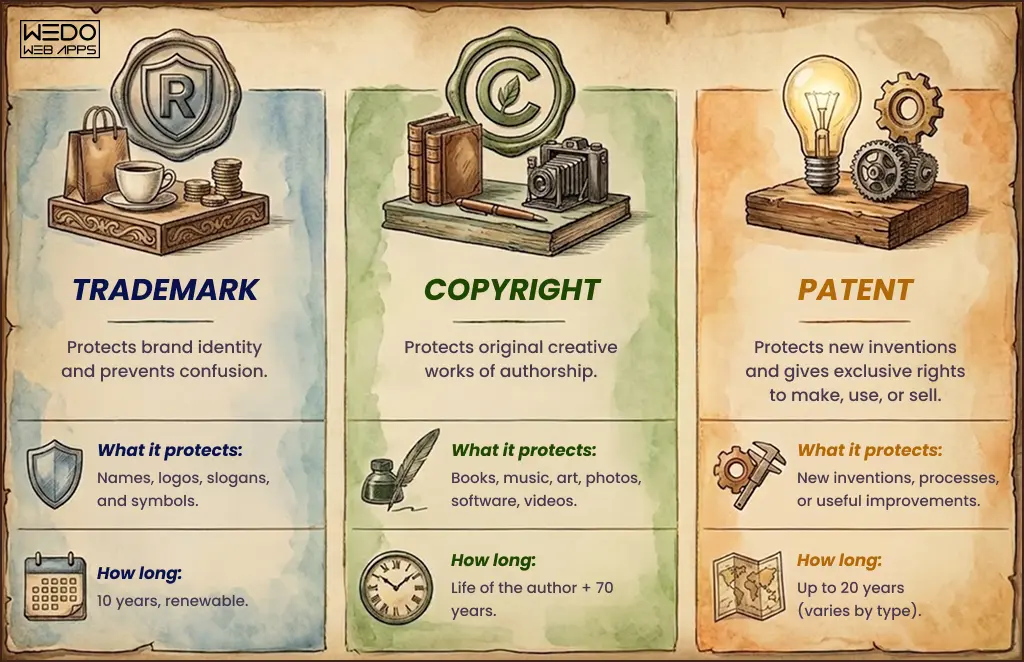
When choosing a monetization strategy, it’s crucial to consider your target audience, the nature of your app, and industry trends. A combination of these methods or tailored approaches may be the key to maximizing your app’s revenue potential.
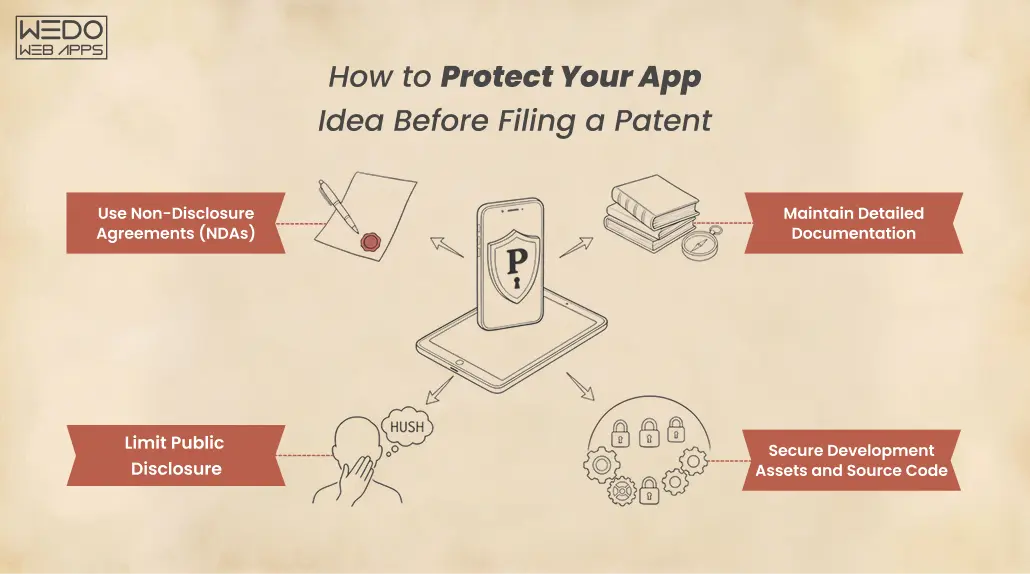
Designing your Cash App card and selecting the right monetization strategy are essential steps in the app development process. These decisions can significantly impact your app’s success, so careful consideration and user-focused design are paramount.

Read also: 45 Stellar Mobile App Ideas that will Kickstart your Business

7. App Development for Beginners 

As a beginner in the world of app development, it’s important to start with a strong foundation. This section will guide you through the initial steps, including choosing the right development platform, assembling a development team, and finding valuable learning resources.

Choosing the Right Development Platform

Before diving into app development, you need to decide which platform you want to target: iOS, Android, or both. Consider your target audience and your app’s features. iOS is known for its premium user base and consistent hardware, while Android has a larger market share but greater device fragmentation. Alternatively, cross-platform development tools like React Native and Flutter allow you to build apps that work on both iOS and Android, saving time and resources.

Submit for app ideas: Start by evaluating which platform aligns with your app idea. For instance, if your app idea revolves around unique Cash App card designs, consider targeting both iOS and Android to reach a broader audience.

Finding a Development Team

If you lack coding skills, building a development team is crucial. Look for developers with experience in the chosen platform(s). You may also need UI/UX designers, QA testers, and project managers. Consider collaborating with freelancers, hiring in-house developers, or outsourcing to development agencies based on your budget and project requirements.

If you have an innovative cash app card idea, connect with developers who have expertise in mobile payment systems and graphic designers skilled in creating custom card designs.

Learning Resources for Beginners

For beginners, there’s an abundance of learning resources available to kickstart your app development journey. Online courses, tutorials, and communities can provide valuable insights and hands-on experience. Some popular platforms for learning app development include Udemy, Coursera, edX, and free resources like YouTube channels and blogs.

Explore design tutorials and resources to understand the nuances of creating visually appealing and user-friendly cash app card designs.

cash app card ideas

8. App Idea Validation

Once you’ve settled on your app idea and assembled your team, the next crucial step is validating your concept. This involves creating a Minimum Viable Product (MVP), testing it with real users, and iterating based on their feedback.

MVP Development

An MVP is a simplified version of your app that includes its core features. It allows you to quickly bring your idea to life and gather essential feedback. For instance, if your app idea involves unique Cash App card designs, your MVP could focus on the card customization feature. Develop a basic version of your app that showcases its primary functionality. In the case of mobile app ideas, focus on the core user experience and cash app integration.

User Testing

User testing involves having real users interact with your MVP and providing feedback. This step helps you identify usability issues, bugs, or features that may not resonate with users. Consider beta testing with a small group or using platforms like TestFlight (iOS) and Google Play Beta (Android).

Feedback and Iteration

Prioritize improvements and refinements that enhance the user experience, fix critical bugs, and align the app more closely with your original vision.

Implement user feedback and make incremental updates to your app. For instance, if users suggest additional customization options for Cash App cards, work on integrating these features.

By following these steps, you can begin your app development journey as a beginner, armed with the knowledge needed to choose the right platform, build a capable team, learn the necessary skills, and validate your app idea effectively. Whether you’re exploring mobile app ideas or cash app card concepts, a structured approach will increase your chances of success in the competitive app market.

Read also: Top mobile app ideas that startups should consider in the year 2023!

9. Marketing Your App

Marketing your app effectively is crucial to ensure its success. You can have a fantastic app idea, but without the right marketing strategies, it may never reach its full potential. Let’s explore three key aspects of app marketing:

App Store Optimization (ASO)

App Store Optimization, or ASO, is the process of optimizing your app’s listing on app stores like the Apple App Store and Google Play Store. It involves using relevant keywords, optimizing your app’s title and description, and creating eye-catching visuals. To tie this into your app, consider including keywords related to your app’s functionality, such as “cash app card design ideas” or “unique cash app names ideas” to attract users searching for specific features your app offers.

Social Media Marketing

Tailor your content to your target audience by posting about app ideas, cash app card designs, and unique cash app names. Engage with your audience through interactive posts, contests, and regular updates to build a community around your app.

Influencer Collaborations

Influencer marketing involves partnering with individuals who have a significant following in your app’s niche. Collaborating with influencers can give your app a boost in visibility and credibility. Look for influencers who resonate with your app’s concept, such as those interested in app ideas for beginners or cool app ideas. They can create engaging content, reviews, and tutorials, effectively reaching a wider audience.

10. Conclusion

The Ever-Evolving App Landscape

The app development landscape is dynamic and ever-changing. To thrive in this environment, it’s essential to stay adaptable and open to innovation. Keep an eye on emerging technologies, market trends, and user feedback.

Taking the First Step

Bringing your app idea to life is an exciting journey. Remember to start with a clear vision, conduct thorough market research, and validate your concept. Create a user-friendly design, and don’t forget the potential of cash app cards to enhance your app’s value. When it comes to marketing, ASO, social media, and influencer collaborations can significantly boost your app’s visibility.

As you embark on your app development and marketing journey, always prioritize delivering value to your users. By focusing on their needs and preferences, you’ll have a better chance of creating a successful app that stands out in the ever-competitive app market. So, take that first step, and turn your app idea into a reality! Contact us our mobile app development company to convert your app idea into reality.