skip to content

Cost of Hiring Dedicated Developers What You Need to Know

In today’s fast-paced digital age, having a team of dedicated developers can be the difference between success and failure for your business.

But, how much does it cost to hire dedicated developers?

In this article, we will explore the various factors that influence the cost of hiring dedicated developers and provide you with insights that can help you make an informed decision. 

Now here’s the twist:

In this blog you will get to know the cost to hire programmers some of the top developers having different skills:

  1. Hire iOS Developer
  2. Hire Android Developer
  3. Hire REACT NATIVE Developer
  4. Hire Flutter Developer
  5. Hire IONIC Developer
  6. Hire E-Commmerce Developer
  7. Hire Woocommerce Developer
  8. Hire Magento Developer
  9. Hire WordPress Developer
  10. Hire Shopify Developer
  11. Hire BigCommerce Developer
  12. Hire Front-End Developers
  13. Hire Back-end Developers
  14. Hire Laravel Developer
  15. Hire Code Igniter Developer
  16. Hire ReactJS Developer
  17. Hire AngularJS Developer
  18. Hire VueJS Developer
  19. Hire NodeJS Developer
  20. Hire Progressive Web Application Developer
  21. Hire PHP Developers
  22. Hire Kotlin Developer
  23. Hire Dedicated Native Mobile App Developers
  24. Hire Swift Developer
  25. Hire Dedicated HTML5 App Developers

So, whether you are a startup or an established business, read on to discover the costs associated with hiring dedicated developers and their skills to consider getting the most value for your investment. Along with this you also get answers to some of the most asked questions which people have: 

  • How To Hire Developers For A Startup?
  • How To Hire A Software Developer?
  • How To Hire A Programmer with 3-5 years of experience?
  • How To Hire A Developer for front end and back end developer?
  • How Much Does It Cost To Hire A Programmer? [For different skills]

So let’s get started

Hire Dedicated Developers? Look At The Top Skills To Evaluate And Average Cost

1. Hire An iOS Developer: Check Out Right Skills And Cost

With 1.36 billion iPhone users worldwide, iOS app development has become a lucrative industry. However, finding a competent iOS developer who can turn your app idea into a high-quality product is easier said than done.

iPhone’s users are known to spend a significant amount of money on apps and premium features, and that’s why it’s crucial that your apps offer them a flawless experience. 

But, how do you ensure that the iOS developer you hire got considerable skills to make feature-rich iOS apps, and how much does it cost to develop iOS apps? Find out everything below:

Right Skills To Hire An iOS Developer

  • Swift is the Boss for iOS Developers

Any iOS developer worth their salt should be a Swift pro. It’s the main language for iOS app development, and a good developer should know its ins and outs like the back of their hand.

  • Xcode is their BFF

If a developer isn’t tight with Xcode, then they’re not a true iOS developer. It’s the tool they use to build their iOS apps, and they need to know it inside and out to create quality apps.

  • Frameworks are their friends

iOS has loads of built-in frameworks that developers can use to build their apps. An experienced iOS developer should know which ones to use to achieve the functionality they want.

  • They know what looks good

An iOS developer should have an eye for design and know how to create an interface that users will love. They should make sure their apps are easy to use and provide an awesome user experience.

  • Version control is key

Any good iOS developer should know how to use Git or other version control tools. It’s essential to keep track of changes to the codebase and ensure that everything is organized and in check.

How Much Does It Cost To Hire A Programmer for iOS app development?

Cost Of Hiring An iOS Developer In Different Regions or the approximate hourly rates for iOS developers based on different regions are:

  • North America: $80 – $250 per hour
  • Europe: $60 – $200 per hour
  • Australia: $75 – $150 per hour
  • Asia: $30 – $100 per hour

2. Hire An Android Developer: Check Out Right Skills And Cost

So, you’ve got an idea for an Android app, and you need to hire a rock star Android developer to make it happen. But where do you start?

With Android being the most popular mobile operating system with 3.3 billion globally, it’s important to create an app that stands out from the crowd. 

Therefore, with that many Android developers out there, finding the right one can feel like a needle in a haystack. Don’t worry, we’ve got your back!

Right Skills To Look For While Hiring An Android Developer

  • Java and Kotlin Skills

A great Android developer should have mad skills in both Java and Kotlin. These are the main programming languages used in Android app development.

  • Know-How of Android Architecture Components

A pro Android developer should know their way around the Android Architecture Components. Stuff like LiveData, ViewModel, Room, and Navigation should be second nature to them.

  • Familiarity with Android SDK

A kick-ass Android developer should be well-versed in the Android SDK. They should know how to use it like a pro to create awesome apps.

  • Experience with REST APIs

REST APIs are an essential part of Android app development. A top-notch Android developer should have experience working with REST APIs to get data from servers.

  • Understanding of Material Design

A great Android developer should know all about Google’s Material Design guidelines. They should be able to create user interfaces that follow these guidelines and look slick as hell.

  • Android Studio Savvy

Android Studio is where the magic happens in Android app development. An amazing Android developer should be able to whip up apps in no time using this environment.

Cost Of Hiring An Android Developer In Different Regions

The approximate hourly rates for Android developers based on different regions:

  • North America: $80 – $200 per hour
  • Europe: $60 – $150 per hour
  • Australia: $70 – $160 per hour
  • Asia: $15 – $50 per hour

3. Hire A ReactJS Developer: Check Out Right Skills And Cost

If you are looking to build a website or web application on ReactJS, a popular JavaScript library used for building user interfaces, and it’s used by developers worldwide.

You have to have a killer ReactJS developer for it. But let’s be real, finding the perfect ReactJS developer for your project can be tough, especially if you’re not a tech wizard.

Right Skills To Look For While Hiring A ReactJS Developer

  • JavaScript Wizardry

A top-notch ReactJS developer needs to be a JavaScript pro. After all, React JS is a JavaScript library, so they know their stuff.

  • ReactJS Framework Mastery

A ReactJS developer should be a master of the ReactJS framework. That means they should know all about React Components, JSX, Virtual DOM, and React Router.

  • State Management Library Know-How

Redux and MobX are the bee’s knees when it comes to state management libraries in ReactJS development. A ReactJS developer should be experienced with these libraries.

  • Front-End Tech Savvy

A ReactJS developer should be familiar with front-end technologies like HTML, CSS, and JavaScript frameworks such as Angular and Vue. They should be able to work magic with these tools.

  • REST API Knowledge

REST APIs are a must for ReactJS app development. A ReactJS developer should have experience working with REST APIs to get data from servers.

  • Build Tool Familiarity

A ReactJS developer should be familiar with build tools like Webpack, Babel, and NPM. They should be able to work their way around these tools like a pro.

Cost Of Hiring An ReactJS Developer In Different Regions

The approximate hourly rates for ReactJS developers based on different regions:

  • North America: $80 – $200 per hour
  • Europe: $60 – $150 per hour
  • Australia: $70 – $160 per hour
  • Asia: $15 – $50 per hour

4. Hire An AngularJS Developer: Check Out Right Skills And Cost

Finding the right AngularJS developer for your project can be a challenging task, especially if you’re looking to build a dynamic and robust web application.

Let’s take you through the essential skills and qualities you need to look for when hiring an AngularJS developer.

Right Skills To Look For While Hiring An AngularJS Developer

  • JavaScript Pro

A Skilled AngularJS developer, also must be a JavaScript wizard. Because AngularJS is also a JavaScript framework, they need to be able to work their magic with the language.

  • AngularJS Framework Ninja

An AngularJS developer should be a master of the AngularJS framework, including Angular Components, Directives, Services, and Dependency Injection. They should be able to use these tools to build great apps.

  • State Management Library Jedi

NgRx and Redux are the top state management libraries used in AngularJS development. An AngularJS developer should have experience working with these libraries to make sure their apps run smoothly.

  • Front-End Tech Savvy

An AngularJS developer should be familiar with front-end technologies like HTML, CSS, and JavaScript frameworks such as React and Vue. They should be able to work with these tools like a pro.

  • REST API Knowledge

REST APIs are crucial for AngularJS app development. An AngularJS developer should have experience working with REST APIs to get data from servers.

  • Build Tool Master

An AngularJS developer should be familiar with build tools like Webpack, Babel, and NPM. They should be able to use these tools to streamline their development process and make their apps even better.

Cost Of Hiring An AngularJS Developer In Different Regions

The approximate hourly rates for AngularJS developers based on different regions:

  • North America: $80 – $200 per hour
  • Europe: $60 – $150 per hour
  • Australia: $70 – $160 per hour
  • Asia: $15 – $50 per hour

5. Hire A VueJS Developer: Check Out Right Skills And Cost

VueJS has become increasingly popular in recent years due to its simplicity, flexibility, and high-performance capabilities. It is similar to React, and Angular we discussed earlier.So let’s take you through the essential skills and qualities you need to look for when hiring a VueJS developer.

Right Skills To Look For While Hiring A VueJS Developer

  • Proficiency in JavaScript

VueJS is a JavaScript framework, so a strong command of JavaScript is essential for any VueJS developer.

  • Knowledge of VueJS Framework

A VueJS developer should have a good understanding of the VueJS framework, including Vue Components, Vue Directives, Vue Router, and Vuex.

  • Familiarity with State Management Libraries

Vuex is the most popular state management library used in VueJS development. A VueJS developer should have experience working with this library.

  • Experience with Front-end Technologies

A VueJS developer should have experience working with front-end technologies such as HTML, CSS, and JavaScript frameworks such as React and Angular.

  • Understanding of REST APIs

REST APIs are essential for VueJS app development. A VueJS developer should have experience in working with REST APIs to fetch data from a server.

  • Knowledge of Build Tools

A VueJS developer should be familiar with build tools such as Webpack, Babel, and NPM.

Cost Of Hiring A VueJS Developer In Different Regions

The approximate hourly rates for VueJS developers based on different regions:

  • North America: $80 – $200 per hour
  • Europe: $60 – $150 per hour
  • Australia: $70 – $160 per hour
  • Asia: $15 – $50 per hour

6. Hire A NodeJS Developer: Check Out Right Skills And Cost

You’re not alone in looking to hire a NodeJS developer.

But with the rising demand for NodeJS web applications, finding a skilled developer who can deliver high-quality results can be a challenge.

If you’re not sure where to start? Here are:

Right Skills To Look For While Hiring A NodeJS Developer

  • Proficiency in JavaScript

NodeJS is also a JavaScript-based runtime environment, so a strong command of JavaScript is a must for any NodeJS developer.

  • Knowledge of NodeJS Framework

A NodeJS developer should have a good understanding of the NodeJS framework, including Node Modules, Express, and Socket.IO.

  • Understanding of Asynchronous Programming

NodeJS is asynchronous, so a NodeJS developer should have experience in working with asynchronous programming.

  • Familiarity with Databases

A NodeJS developer should have experience working with databases such as MySQL, MongoDB, and PostgreSQL.

  • Experience with Front-end Technologies

A NodeJS developer should have experience working with front-end technologies such as HTML, CSS, and JavaScript frameworks such as React and Angular.

  • Knowledge of Build Tools

A NodeJS developer should be familiar with build tools such as Grunt, Gulp, and NPM.

Cost Of Hiring A NodeJS Developer In Different Regions

The approximate hourly rates for NodeJS developers based on different regions:

  • North America: $80 – $200 per hour
  • Europe: $60 – $150 per hour
  • Australia: $70 – $160 per hour
  • Asia: $15 – $50 per hour

7. Hire A REACT NATIVE Developer: Check Out Right Skills And Cost

React Native apps are in high demand because of its cross-platform functionality. But choosing the right React Native app developer for your application is very important and confusing for React Native also.
So Below are:

Right Skills To Look For While Hiring A React Native Developer

  • Proficiency in JavaScript

A React Native developer should possess strong proficiency in JavaScript since React Native is based on JavaScript.

  • Knowledge of React Native Framework

Understanding the React Native framework, including React Native Components, React Native APIs, and React Navigation, is vital for any React Native developer.

  • Familiarity with Mobile Development

Familiarity with mobile development, specifically iOS and Android platforms, is essential for a React Native developer.

  • Understanding of Native Modules

Experience working with Native Modules is a must-have skill for a React Native developer as React Native allows for the integration of Native Modules.

  • Experience with Front-end Technologies

A React Native developer should have experience with front-end technologies like HTML, CSS, and JavaScript frameworks like React and Angular.

  • Knowledge of Build Tools

Knowing how to use build tools like Xcode, Android Studio, and NPM is crucial for a React Native developer.

Cost Of Hiring A React Native Developer In Different Regions

The approximate hourly rates for React Native developers based on different regions:

  • North America: $80 – $200 per hour
  • Europe: $60 – $150 per hour
  • Australia: $70 – $160 per hour
  • Asia: $15 – $50 per hour

8. Hire A PHP Developer: Check Out Right Skills And Cost

If you’re planning to build a web application using PHP, a server side programming language, it’s essential to hire a skilled PHP developer who can deliver high-quality results.

Here Is The List Of Skills To Look For While Hiring A PHP Developer

  • PHP and PHP Frameworks Pro

PHP developers who are masters of the PHP language must have experience in popular PHP frameworks such as Laravel, Symfony, and CodeIgniter.

  • Database Dabbler

It’s important for a PHP developer to have worked with databases like MySQL, PostgreSQL, and MongoDB.

  • OOP Expertise

Object-Oriented Programming is fundamental in PHP development. A PHP developer should be experienced in working with OOP principles.

hiring dedicated developers

  • Front-End Fun

A PHP developer should have experience working with front-end technologies like HTML, CSS, and JavaScript.

Cost Of Hiring A PHP Developer In Different Regions

The approximate hourly rates for PHP developers based on different regions:

  • North America: $80 – $200 per hour
  • Europe: $60 – $150 per hour
  • Australia: $70 – $160 per hour
  • Asia: $15 – $50 per hour

9. Hire A Flutter Developer: Check Out Right Skills And Cost

Flutter Developers are high in demand for natively compiled mobile applications for both iOS and Android platforms using a single codebase.

Here is a comprehensive list of what to look for in a Flutter developer:

Right Skills To Look For While Hiring A Flutter Developer

  • Proficiency in Dart

If you’re looking for a Flutter developer, make sure they have a solid grasp of Dart since Flutter is a Dart-based framework.

  • Knowledge of Flutter Framework

Also, they should be familiar with the Flutter framework, including the Flutter Widgets, Animations, and Navigation.

  • Familiarity with Mobile Development

Since Flutter is a mobile development platform, experience with iOS and Android is a must-have.

  • Understanding of Native Modules

Native Modules are an important part of Flutter, so a Flutter developer should have experience working with them.

  • Experience with Front-end Technologies

Lastly, a Flutter developer should have experience working with front-end technologies like HTML, CSS, and JavaScript frameworks such as React and Angular.

Cost Of Hiring A Flutter Developer In Different Regions

The approximate hourly rates for Flutter developers based on different regions:

  • North America: $80 – $200 per hour
  • Europe: $60 – $150 per hour
  • Australia: $70 – $160 per hour
  • Asia: $15 – $50 per hour

10. Hire A Kotlin Developer: Check Out Right Skills And Cost

Kotlin’s concise syntax, null safety, and interoperability with Java make it an ideal choice for building robust and scalable Android applications.
But choosing a professional Kotlin developer is not that easy, look for the right skills before hiring one.

Right Skills To Look For While Hiring A Kotlin Developer

  • Solid Kotlin skills

Obviously, a Kotlin developer needs to be fluent in Kotlin. Make sure they can code in Kotlin without any issues.

  • Knowledge of Android Development

Kotlin is becoming increasingly popular for Android app development, so your Kotlin developer should have experience working with Android development platforms like Android Studio.

  • Object-Oriented Programming (OOP) Skills

OOP is a fundamental concept in Kotlin development, so a Kotlin developer should be comfortable working with OOP principles.

  • Familiarity with Java

Kotlin and Java can work together, so a Kotlin developer should have experience working with Java.

  • Front-end technologies

A Kotlin developer should have experience working with front-end technologies like HTML, CSS, and JavaScript.

  • Build Tools

A Kotlin developer should be familiar with build tools like Gradle and Maven

Cost Of Hiring A Kotlin Developer In Different Regions

The approximate hourly rates for Kotlin developers based on different regions:

  • North America: $80 – $200 per hour
  • Europe: $60 – $150 per hour
  • Australia: $70 – $160 per hour
  • Asia: $15 – $50 per hour

11. Hire A Magento Developer: Check Out Right Skills And Cost

Magento is one of the most popular e-commerce platforms, and with its increasing demand if you’re planning to build or migrate an online store using Magento, it’s essential to hire a skilled Magento developer who can bring your vision to life.

Right Skills To Look For While Hiring A Magento Developer

  • PHP Mastery

Magento is built on PHP, so any Magento developer worth their salt needs to have a strong command of PHP.

  • Knowledge of Magento Framework

Your developer should have a good understanding of the Magento framework, including the layout, blocks, and templates.

  • Understanding of Object-Oriented Programming (OOP)

OPP is an important concept in Magento development, so your developer should be experienced with OOP principles.

  • Familiarity with MySQL

Magento uses MySQL for data storage, so your developer should know their way around MySQL.

  • Experience with Front-end Technologies

Your developer should have experience working with front-end technologies such as HTML, CSS, and JavaScript.

  • Knowledge of Magento Extensions

Magento has a massive extension ecosystem, so your developer should have experience working with Magento extensions.

Cost Of Hiring A Magento Developer In Different Regions

The approximate hourly rates for Magento developers based on different regions:

  • North America: $80 – $200 per hour
  • Europe: $60 – $150 per hour
  • Australia: $70 – $160 per hour
  • Asia: $15 – $50 per hour

12. Hire A Shopify Developer: Check Out Right Skills And Cost

Shopify powers over a million online e-commerces stores worldwide.
You’ll need a skilled developer who can create a user-friendly and visually appealing website and skyrocket your e-commerce.Here are the right skills to consider before going for one:

Right Skills To Look For While Hiring A Shopify Developer

  • Proficiency in Shopify

A Shopify developer should have a deep understanding of the Shopify platform, including its features, functionalities, and limitations.

  • Knowledge of Liquid

Liquid is the templating language used by Shopify, so a Shopify developer should have experience working with Liquid.

  • Proficiency in HTML/CSS/JavaScript

A Shopify developer should have experience working with front-end technologies such as HTML, CSS, and JavaScript.

  • Understanding of APIs

Shopify has a robust API that allows developers to build custom integrations, so a Shopify developer should have experience working with APIs.

  • Knowledge of E-commerce Best Practices

A Shopify developer should have a good understanding of e-commerce best practices, including conversion rate optimization, user experience design, and payment gateway integration.

  • Familiarity with Shopify Themes and Apps

Shopify has a vast ecosystem of themes and apps, so a Shopify developer should have experience working with Shopify themes and apps.

Cost Of Hiring A Shopify Developer In Different Regions

The approximate hourly rates for Shopify developers based on different regions:

  • North America: $80 – $200 per hour
  • Europe: $60 – $150 per hour
  • Australia: $70 – $160 per hour
  • Asia: $15 – $50 per hour

13. Hire A WordPress Developer: Check Out Right Skills And Cost

WordPress is the most popular content management system (CMS) on the internet, powering over 40% of all websites.

If you’re looking to build a website or a blog using WordPress, you’ll need a skilled developer who can help you create a visually appealing and user-friendly website.

Right Skills To Look For While Hiring A WordPress Developer

  • Deep Understanding of WordPress

A WordPress developer should be a walking encyclopedia when it comes to WordPress, including all the latest features, functionalities, and limitations.

  • Expertise in PHP

PHP is the backbone of WordPress, so a WordPress developer should be well-versed in PHP and its syntax.

  • Knowledge of WordPress APIs

WordPress has some killer APIs that help developers to create custom integrations, so a WordPress developer should know their way around APIs.

  • Mad Skills in HTML/CSS/JavaScript

A WordPress developer should have top-notch front-end development skills such as HTML, CSS, and JavaScript.

  • Familiarity with WordPress Themes and Plugins

WordPress has an extensive collection of themes and plugins, so a WordPress developer should have experience working with them.

  • Security is a Must

As a popular platform, WordPress is always under attack from hackers. Therefore, a WordPress developer should know security best practices and keep the site safe and secure.

Cost Of Hiring A WordPress Developer In Different Regions

The approximate hourly rates for WordPress developers based on different regions:

  • North America: $80 – $200 per hour
  • Europe: $60 – $150 per hour
  • Australia: $70 – $160 per hour
  • Asia: $15 – $50 per hour

14. Hire A E-commerce Developer: Check Out Right Skills And Cost

In today’s world, having an online store is essential for any business looking to expand its reach and increase revenue. 

To build a successful e-commerce website, you’ll require an E-commerce developer who understands the complexities of online shopping and can create a platform that provides a seamless user experience.

Right Skills To Look For While Hiring A  E-commerce Developer

  • Pro at E-commerce Platforms

Your e-commerce developer should have experience working with popular platforms like Shopify, WooCommerce, Magento, or whatever platform you’re using.

  • Web Development

An e-commerce developer should be knowledgeable about web development technologies such as HTML, CSS, and JavaScript.

  • Payment Gateway Experience

Your developer should be able to integrate payment gateways like PayPal and Stripe without breaking a sweat.

  • SEO

E-commerce sites require optimization for search engines, so your developer should know a thing or two about SEO.

  • Security Guru

E-commerce sites often deal with sensitive customer data, so your developer should be familiar with security best practices.

Cost Of Hiring A  E-commerce Developer In Different Regions

The approximate hourly rates for E-commerce developers based on different regions:

  • North America: $80 – $200 per hour
  • Europe: $60 – $150 per hour
  • Australia: $70 – $160 per hour
  • Asia: $15 – $50 per hour

15. Hire A Woocommerce Developer: Check Out Right Skills And Cost

Woocommerce made creating an online store quick and easy. Being the most important ecommerce plugin for WordPress, hiring a knowledgeable developer is not that easy.

Right Skills To Look For While Hiring A Woocommerce Developer

  • WooCommerce Skills

A WooCommerce developer should be a pro at working with the WooCommerce platform and know all the ins and outs.

  • WordPress

Since WooCommerce is a WordPress plugin, a WooCommerce developer should have a solid understanding of WordPress development.

  • Front-end

A WooCommerce developer should be skilled in the front-end development techs, like HTML, CSS, and JavaScript.

  • Back-end

A WooCommerce developer should know PHP like the back of their hand and have experience working with databases such as MySQL.

  • Payment Gateway

A WooCommerce developer should be experienced in integrating payment gateways, like PayPal, Stripe, and more.

  • SEO

To get WooCommerce sites ranking on search engines, a WooCommerce developer should know their way around SEO principles.

  • Security

WooCommerce sites deal with sensitive customer data, so a WooCommerce developer should have a strong understanding of security best practices

Cost Of Hiring A Woocommerce Developer In Different Regions

The approximate hourly rates for Woocommerce developers based on different regions:

  • North America: $80 – $200 per hour
  • Europe: $60 – $150 per hour
  • Australia: $70 – $160 per hour
  • Asia: $15 – $50 per hour

16. Hire A BigCommerce Developer: Check Out Right Skills And Cost

With its intuitive interface, powerful features, and flexibility, BigCommerce is an excellent choice for businesses of all sizes.This excellency is also important when choosing the right BigCommerce Developer.

Right Skills To Look For While Hiring A BigCommerce Developer

  • Proficiency in BigCommerce

A BigCommerce developer should have experience working with the BigCommerce platform and be familiar with its features and capabilities.

  • Front-end Development

A BigCommerce developer should be skilled in front-end development technologies such as HTML, CSS, and JavaScript.

  • Back-end Development

A BigCommerce developer should be proficient in PHP and have experience working with databases such as MySQL.

  • Experience with Payment Gateways

A BigCommerce developer should have experience integrating payment gateways such as PayPal, Stripe, etc.

  • Understanding of SEO

BigCommerce sites require optimization for search engines, so a BigCommerce developer should have an understanding of SEO principles.

  • Understanding of Security Best Practices

BigCommerce sites often deal with sensitive customer data, so a BigCommerce developer should have an understanding of security best practices.

  • Knowledge of Theme Development

A BigCommerce developer should have experience with customizing and developing BigCommerce themes.

Cost Of Hiring A BigCommerce Developer In Different Regions

The approximate hourly rates for BigCommerce developers based on different regions:

  • North America: $80 – $200 per hour
  • Europe: $60 – $150 per hour
  • Australia: $70 – $160 per hour
  • Asia: $15 – $50 per hour

17. Hire A Front-End Developer: Check Out Right Skills And Cost

A front-end developer will be responsible for creating the user interface, design, and functionality of your client-side web applications.
So unless you don’t care for the user experience of your website, here are some tips to finding the right Front-End Developer.

Right Skills To Look For While Hiring A Front-End Developer

  • HTML, CSS, and JavaScript Mastery

A front-end developer should be a master at these three technologies.

  • Responsive Design

A front-end developer should know how to make designs that work on different devices and screen sizes.

  • Understanding of CSS Preprocessor

A front-end developer should have experience with CSS preprocessors such as Sass or Less.

  • Front-End Framework Familiarity

A front-end developer should be comfortable using popular frameworks like React, Angular, or Vue.

  • UX Design Knowledge

A front-end developer should know how to create interfaces that are easy to use and intuitive.

  • API Integration Skills

A front-end developer should know how to work with APIs to get and use data in websites or apps.”

Cost Of Hiring A Front-End Developer In Different Regions

The approximate hourly rates for Front-End developers based on different regions:

  • North America: $80 – $200 per hour
  • Europe: $60 – $150 per hour
  • Australia: $70 – $160 per hour
  • Asia: $15 – $50 per hour

18. Hire A Back-End Developer: Check Out Right Skills And Cost

Back-End developers are similarly responsible for the functionality of your server-side web applications.

So again, unless you don’t want smooth backend functionality for your website, here are some tips to finding the right Back-End Developer.

Right Skills To Look For While Hiring A Back-End Developer

  • Proficiency in a Back-End Language

A back-end developer should have expertise in at least one programming language such as PHP, Python, Ruby, Java, or Node.js.

  • Knowledge of Databases

A back-end developer should have experience working with databases such as MySQL, MongoDB, or PostgreSQL.

  • Experience with Server-Side Frameworks

A back-end developer should have experience working with popular server-side frameworks such as Ruby on Rails, Django, or Laravel.

  • Understanding of API Design and Development

A back-end developer should have experience creating and working with APIs to facilitate communication between different systems and services.

  • Knowledge of Security Best Practices

A back-end developer should have an understanding of security best practices and be able to implement security measures to protect user data.

  • Ability to Work with Front-End Technologies

A back-end developer should have a basic understanding of front-end technologies such as HTML, CSS, and JavaScript to effectively collaborate with front-end developers.

dedicated developers

Cost Of Hiring A Back-End Developer In Different Regions

The approximate hourly rates for Back-End developers based on different regions:

  • North America: $80 – $200 per hour
  • Europe: $60 – $150 per hour
  • Australia: $70 – $160 per hour
  • Asia: $15 – $50 per hour

19. Hire A IONIC Developer: Check Out Right Skills And Cost

As Ionic is built on top of one of the top frameworks AngularJS and Apache Cordova. It is equally important to look for an IONIC developer wisely.

Right Skills To Look For While Hiring A IONIC Developer

  • Mad Ionic Framework Skills

If you’re looking for an Ionic developer, make sure they’re a pro at using the Ionic Framework, which is like the superstar of open-source frameworks for building mobile apps.

  • Angular Expertise

Since Ionic is built on top of Angular, a top-notch Ionic developer should have Expertise in Angular.

  • HTML, CSS, and JavaScript Wizardry

An Ionic developer should also have a super-strong grip on HTML, CSS, and JavaScript since these bad boys are essential for mobile app development.

  • Experience with Cordova and Capacitor

Cordova and Capacitor are like the Batman and Robin of plugins that allow access to native device features when building hybrid mobile apps. So a skilled Ionic developer should have experience working with these two sidekicks.

  • Mobile Design 

An Ionic developer should have a sharp eye for mobile design principles and be able to create beautiful, engaging user interfaces.

  • Mobile App Development

A professional Ionic developer should have a deep understanding of mobile app development best practices, including performance optimization, testing, and debugging.

Cost Of Hiring A IONIC Developer In Different Regions

The approximate hourly rates for IONIC developers based on different regions:

  • North America: $80 – $200 per hour
  • Europe: $60 – $150 per hour
  • Australia: $70 – $160 per hour
  • Asia: $15 – $50 per hour

20. Hire A Laravel Developer: Check Out Right Skills And Cost

If you’re planning to build a web application using Laravel, a PHP framework used for developing web applications. , then hiring a Laravel developer is a crucial step.

Right Skills To Look For While Hiring A Laravel Developer

  • Laravel Framework

A skilled Laravel developer should be proficient in using the Laravel Framework, which is a popular PHP framework for building web applications.

  • PHP

Since Laravel is built on top of PHP, a skilled Laravel developer should have strong proficiency in PHP.

  • Knowledge of HTML, CSS, and JavaScript

A skilled Laravel developer should also have a strong grasp of HTML, CSS, and JavaScript since these technologies are used heavily in the development of web applications.

  • Understanding of Relational Databases

Laravel uses the Eloquent ORM to interact with relational databases such as MySQL and PostgreSQL. A skilled Laravel developer should have a strong understanding of how to work with these databases.

  • Knowledge of RESTful API Development

A skilled Laravel developer should have experience building RESTful APIs using Laravel’s built-in functionality.

  • Understanding of Web Development Best Practices

A skilled Laravel developer should have an understanding of web development best practices, including security, performance optimization, testing, and debugging.

Cost Of Hiring A Laravel Developer In Different Regions

The approximate hourly rates for Laravel developers based on different regions:

  • North America: $80 – $200 per hour
  • Europe: $60 – $150 per hour
  • Australia: $70 – $160 per hour
  • Asia: $15 – $50 per hour

21. Hire A Code Igniter Developer: Check Out Right Skills And Cost

CodeIgniter is a popular choice for building scalable and secure web applications quickly.

If you’re looking to build a web application using the CodeIgniter framework, you’ll need to hire a competent developer.

Right Skills To Look For While Hiring A Codeigniter Developer

  • CodeIgniter Framework

Your CodeIgniter developer should know their way around the CodeIgniter Framework, which is a super popular PHP framework for building web applications.

  • PHP Skills

Since CodeIgniter is built on top of PHP, a skilled CodeIgniter developer should be a PHP master.

  • HTML, CSS, and JavaScript Knowledge

A CodeIgniter developer should also be a pro at HTML, CSS, and JavaScript since these technologies are used a ton in web application development.

  • Relational Databases Understanding

CodeIgniter uses the Active Record pattern to interact with relational databases like MySQL and PostgreSQL. A skilled CodeIgniter developer should know how to work with these databases like a boss.

  • RESTful API Development Knowledge

A skilled CodeIgniter developer should be experienced in building RESTful APIs using CodeIgniter’s built-in functionality.

  • Web Development Best Practices Understanding

A skilled CodeIgniter developer should know the best practices for web development, including security, performance optimization, testing, and debugging.

Cost Of Hiring A Codeigniter Developer In Different Regions

The approximate hourly rates for CodeIgniter developers based on different regions:

  • North America: $80 – $200 per hour
  • Europe: $60 – $150 per hour
  • Australia: $70 – $160 per hour
  • Asia: $15 – $50 per hour

22. Hire A Progressive Web Application Developer: Check Out Right Skills And Cost

With the increasing usage of mobile devices and the internet, businesses are now focusing on delivering a seamless user experience across different platforms.
Hiring a skilled Progressive Web Application developer can help you create an engaging and responsive web application that performs seamlessly across different devices and platforms.

Right Skills To Look For While Hiring A Progressive Web Application Developer

  • Proficiency in JavaScript

A skilled PWA developer should have strong proficiency in JavaScript, which is the primary language used in PWA development.

  • Understanding of Service Workers

Service workers are a key component of PWA development. A skilled PWA developer should have a strong understanding of how to use service workers to implement features such as offline functionality and push notifications.

  • Knowledge of Progressive Enhancement

Progressive enhancement is a design philosophy that emphasizes providing a basic, functional experience for all users while also providing enhanced features for users with more capable devices. A skilled PWA developer should have an understanding of how to use progressive enhancement in PWA development.

  • Familiarity with Web APIs:

PWAs often rely on web APIs such as the Geolocation API and the Notification API. A skilled PWA developer should be familiar with these and other web APIs.

  • Knowledge of Web Development Best Practices

A skilled PWA developer should have an understanding of web development best practices, including security, performance optimization, testing, and debugging.

Cost Of Hiring A Progressive Web Application Developer In Different Regions

The approximate hourly rates for Progressive Web Application developers based on different regions:

  • North America: $80 – $200 per hour
  • Europe: $60 – $150 per hour
  • Australia: $70 – $160 per hour
  • Asia: $15 – $50 per hour

23. Hire A Dedicated Native Mobile App Developer: Check Out Right Skills And Cost

Developing a high-quality mobile app requires a dedicated and experienced native mobile app developer who understands the intricacies of app development and has the necessary skills to build a robust and reliable app.

Right Skills To Look For While Hiring A Dedicated Native Mobile App Developer

  • Expertise in Programming Languages

A skilled native mobile app developer should have high Expertise in programming languages such as Java, Kotlin (for Android) or Objective-C, Swift (for iOS).

  • Knowledge of Mobile App Frameworks

He also should have knowledge of popular mobile app frameworks such as React Native or Xamarin.

  • Experience with Mobile App Development Tools

And experience with mobile app development tools such as Android Studio, Xcode, or Visual Studio.

  • Understanding of Mobile App Design Principles

Additionally, must have an understanding of mobile app design principles, such as user interface (UI) and user experience (UX) design.

  • Knowledge of App Store Guidelines

Finally, He should be familiar with the guidelines of app stores such as Google Play and the App Store.

Cost Of Hiring A Dedicated Native Mobile App Developer In Different Regions

The approximate hourly rates for Dedicated Mobile App developers based on different regions:

  • North America: $80 – $200 per hour
  • Europe: $60 – $150 per hour
  • Australia: $70 – $160 per hour
  • Asia: $15 – $50 per hour

24. Hire A Dedicated HTML5 App Developer: Check Out Right Skills And Cost

HTML5 is popular due to its cross-platform compatibility and accessibility. However, finding a skilled HTML5 app developer can be a challenging task.

Right Skills To Look For While Hiring A Dedicated HTML5 Developer

  • Proficiency in HTML, CSS, and JavaScript

A skilled HTML5 app developer should be a pro in these core web technologies.

  • Knowledge of HTML5 APIs

A skilled HTML5 app developer should have knowledge of HTML5 APIs such as Canvas, WebSockets, and Web Workers.

  • Understanding of Responsive Design

Understanding of responsive design principles and frameworks like Bootstrap to ensure that their app works well on different screen sizes.

  • Experience with Cross-Browser Compatibility

He should have experience with cross-browser compatibility testing and debugging to make sure that their app works on different browsers.

  • Understanding of Web Performance Optimization

Finally, A skilled HTML5 app developer should have an understanding of web performance optimization techniques to improve app performance and user experience.

Cost Of Hiring A Dedicated HTML5 Developer In Different Regions

The approximate hourly rates for Dedicated HTML5 developers based on different regions:

  • North America: $80 – $200 per hour
  • Europe: $60 – $150 per hour
  • Australia: $70 – $160 per hour
  • Asia: $15 – $50 per hour

How To Hire Developers For A Startup – Quick Tips

If you are planning to launch your own app or website and for that you want to know how To Hire A Software Developer, well you should try WEDOWEBAPPS. 

Why Hire Dedicated Development Team From WeDoWebApps?

WeDoWebApps USA is one of the best website and mobile app development companies in USA.

We have a dedicated team of web and app developers who are highly skilled and experienced in different technology so if you want a basic app or a feature-rich complicated app, we can help you. 

Choose WeDoWebApps’ dedicated team of developers to build your brilliant project because we:

  • Are a team of dedicated programmers with experience in a wide range of programming languages.
  • Offer flexible engagement models, including dedicated teams, time and material, and fixed-price projects.
  • Hold expertise in developing custom software solutions, from web applications and mobile apps to enterprise software and more.
  • Follow a collaborative approach to software development by working closely with clients.
  • Masters in deploying agile development methodologies.
  • Have an excellent track record of meeting your expectations with high-quality software solutions.
  • Keeping abreast of the most recent developments in software development trends and technology.
  • Full transparency and regular communication with our clients throughout the development process.
  • Culture of innovation and creativity, constantly pushing the boundaries of what’s possible in software development.

Wrapping Up

Hiring a dedicated developer can be a significant investment for your business, but it can also bring substantial benefits. The key is to carefully assess your needs and consider the skills, experience, and cost of different developers. 

Whether you choose to hire an offshore developer or a local developer, make sure to look for someone with the necessary technical expertise, communication skills, and problem-solving abilities to help you achieve your goals. 

If you want to hire dedicated developer right now, connect with WEDOWEBAPPS LLC.

While the cost of hiring a dedicated developer may vary based on a range of factors, it is important to remember that investing in the right person or software development company can pay off in the long run by improving the quality of your software, reducing development time, and enhancing the overall success of your business.

The Most Comprehensive Guide On How To Import Your Orders From Magento 1 To Magento 2

Magento 2.0 has now become a top pick for web stores that are powered by Magento. This well-known e-commerce website comes with multiple benefits, such as quicker page loading speed, responsive web designs, an in-built and user-friendly admin interface, a configurable admin panel, as well as integration with central payment gateways, and a streamlined checkout process.

Usually, store owners often encounter several data transfer problems when migrating data from one Magento system to a new one. Migrating orders from Magento 1 to Magento 2.0 is a typical problem many e-store owners face when moving to the newly updated platform. 

Here, we will guide you through the step-by-step process of how to import your orders from Magento 1 to Magento 2 that you can follow to conveniently migrate your orders from Magento 1 to Magento 2. We will also share a comprehensive overview of how to use Magento 2.0 extensions to migrate orders quickly. 

What Is The Import Order Feature In Magento 2.0?

In Magento 2.0, the Import Order feature is a tool that lets merchants import customers orders into their Magento store. This can be beneficial when migrating from another e-commerce platform or importing orders from a third-party system, such as a point-of-sale system or a marketplace.

To use the Import Order feature in Magento 2.0, merchants first must prepare CSV files that contain the required order data, such as export customers information, product SKUs, quantities, and costs. This file can be made using a spreadsheet program or a specialized order management system.

Once the CSV file is prepared, merchants can upload it to their Magento store by taking help of the Import Orders tool. The tool will then process the file and make new orders in the Magento database based on the information given in the CSV.

The Import Order feature in Magento 2.0 can save merchants time and effort by automating the process of entering orders manually. Nevertheless, it is crucial to ensure that the CSV file is formatted correctly and that the data is accurate in order to avoid inconsistencies and blunders in the order data.

Things To Remember Before You Import Orders To Magento 2.0

Before you import orders to Magento 2.0, there are some things to remember to ensure a successful and error-free import process:

  • CSV File Format

The order data should be given in a CSV file format, which must be compatible with Magento 2.0. The file should have all the required fields and data, such as customer information, product SKUs, quantities, costs, shipping and billing addresses, order status, and payment details.

  • Data Validation

Before importing the orders, it is essential to validate the data to assure that it is correct and uniform. This can be achieved by taking help of tools such as Microsoft Excel or OpenOffice Calc, which can spotlight any inconsistencies or mistakes in the data.

  • Field Mapping: 

When importing the orders, make sure that the fields in the CSV file are precisely mapped to the related fields in Magento 2.0. It is specifically crucial for custom fields or fields with non-standard data.

  • Order Numbering

If you are importing orders with existing order numbers, ensure that the order numbers do not mismatch or clash with current orders in Magento 2.0. You can modify the order numbers in the CSV file before importing them if required.

Magento store

  • Customer Data

If you are importing orders with existing customer data, ensure that the customer data is accurately mapped to the related fields in Magento 2.0 and that any identical customer data is precisely managed.

  • Payment And Shipping Integration: 

If your orders incorporate payment and shipping integrations, ensure the integrations are precisely set up and configured in Magento 2.0 before importing the orders.

  • Testing:

Once the orders are imported, test them to assure that they are perfectly processed and that any payment and shipping integrations are functioning as anticipated. It will help pinpoint any problems or mistakes that must be handled before going live with the new orders.

Furthermore, importing orders to Magento 2.0 requires meticulous planning, comprehensive, and attention to detail testing to ensure a successful import process. It may be beneficial to seek the help of an expert migration service provider or a certified Magento developer in order to ensure a smooth and hassle-free import process.

What Are Some Of The Impediments Of The Default Magento 2 Import Export Product?

The default Magento 2 Import Export product functionality has a number of limitations that may impact the import and export process. Some of the limitations are as follows:

  • Fixed File Format Support

Magento 2 only supports CSV file format for import and export. Other file formats, such as XML and XLS, are not supported.

  • Fixed Data Fields

The default import export product functionality merely lets you import and export a fixed set of product data fields. Extra fields must be added utilizing custom code or third-party extensions.

  • Delimited Customization Choices

The default Magento 2 Import Export product functionality lacks customization alternatives, making it hard to tailor the import and export process to distinct business requirements.

  • Restricted Error Handling

The default import-export functionality does not furnish detailed error messages or logs, making pinpointing and resolving problems during the import and export process challenging.

  • Performance Impediments 

The default import-export product functionality can be sluggish and ineffective when importing or exporting many products or intricate data structures.

While the default Magento 2 Import Export product functionality is helpful for uncomplicated product import and export tasks, it may not be appropriate for other  scenarios. Custom development or third-party extensions may be needed to get rid of these impediments.

Struggling with theme mismatches? Learn how to handle theme mismatches in our comprehensive guide on importing orders from Magento 1 to Magento 2.

How To Import Orders Using A Magento 2.0 Import Orders Extension?

If you want to import orders using the Magento 2.0 Import Orders extension, you can follow the steps explained below:

  • Make Sure You Install The Import Orders Extension First: Download and install the extension from the Magento Marketplace or a third-party provider.
  • Create The CSV File: In the next step, you will have to create a CSV file with the order data which needs to be imported while following the format defined by the extension. The CSV file must have all the required information, including customer information, prices, shipping and billing addresses, product SKUs, quantities, order status, as well as payment details
  • Upload The CSV File: Carefully follow this step. In the Magento Admin Panel, navigate to System > Data Transfer > Import Orders. Click on the “Choose File” button and choose the CSV file which needs to be uploaded.
  • Next You’ll Have To Configure The Import Settings: Configure the import settings, such as the delimiter, the encoding, and the validation rules. You can also define whether to make new customers or connect the orders to existing customers.
  • Mapping Of The Fields: Next, you’ll have to map the fields in the CSV file to the related fields in Magento 2.0 utilizing the drag-and-drop interface supplied by the extension. Make sure that all the fields are accurately mapped and that any custom fields are appropriately specified.
  • Preview And Validate The Data: In the next step, you will have to preview and validate the imported data against the validation rules defined in the import settings. This phase is critical to guarantee that the data is precise and uniform and to pinpoint any mistakes or inconsistencies that have to be fixed.
  • Import The Orders: Once the data is validated, click the “Import” button to import files and the orders into Magento 2.0. The extension will process the CSV file and make new orders in the Magento database based on the information given in the file.
  • Do A Verification Of The Imported Orders: In the final step, you must verify that the imported orders are accurate and that all the order details and customer information are appropriately transferred. Test the orders to make sure that they are accurately processed and that any payment transactions and shipping integrations are functioning well.

Importing orders using the Magento 2.0 Import Orders extension can help you in saving a lot of time and effort, particularly when dealing with extensive volumes of orders or when migrating from another e-commerce platform. Nevertheless, it is crucial to make sure that the CSV file is formatted correctly and that the data is factual and uniform.

Step-By-Side Guide To Specifically Migrate Orders From Magento 1 To Magento 2.0

Migrating orders from Magento 1 to Magento 2 can be a complicated process, as it requires transferring product data from one platform to another while guaranteeing that all the order details and customer information are accurately transferred. Here is a general overview and a step-by-step guide that will help you in migrating orders from Magento 1 to Magento 2 easily:

Step 1 – Export Order Data from Magento 1

Initially, you will have to export the needed order data from your Magento 1 installation with Orders Export and Import.

Go to System>Import/Export>Aitoc Order Export in order to access the module’s export settings.

Here you will be able to configure the export by choosing any of the available alternatives

  • Local Server: After the export is done, you may download a file with exported order data from the local server.
  • Email: The exported file will be sent by the system to the email provided in the settings.
  • Remote FTP: The system will then put up a file that has exported order data on the remote FTP.

Choose the right data format. We suggest you pick an XML file to ensure ceaseless and impeccable order Magento data migration between two Magento installations.

You can control automatic export settings too.

You’ll also get access to Order filtering. Make sure you determine the order statuses you will export, for example, pending and which orders you require.

If you want to plan the export, you can benefit from exporting by cron. You can export those orders that haven’t been exported earlier.

Step 2 – Configure Export Output

You can choose the order entities you want to export in the Order Entities Tab.

You can select the order fields that you want to export.

Step 3 – Export Order Data

Once you have selected all the required options, click the ‘Save and Export’ button, and it will initiate the export process. The system will then redirect you to the processor tab, where you can monitor the export’s progress.

Once you are done with the exporting process, the system will redirect you to the tab where you’ll be able to download the exported file. In the history tab, you can download formerly exported files too.Magento developer

Step 4 – Finally, Migrating Order Data from Magento 1 to Magento 2

In order to import the file with the order data you have just exported, you will require this, for example, Orders Export and Import for Magento 2.

Now you just have to open the admin panel and then look for Extensions>Aitoc Import Orders in the System tab.

Next, press the ‘Import New File’ button at the top right side of the ‘Import History’ page so that you can select options to import. In the settings, you can determine whether you wish to import orders from affiliated stores or make registered customers based on their billing or shipping addresses. In the settings, you can select separate store views too.

Next, you can continue selecting the import behavior. You’ll get the options given below that will be available:

  • Appending Complex Data: Here, the import will be processed even if the Order ID is not there in the system.
  • Replacing Existing Complex Data: In case the import orders with IDs are already there in the system and they are found, then the existing orders will be substituted by those itemized in the imported file.
  • Delete Entities: Here, the extension will delete all the orders with duplicate IDs in the imported file.

Next, you’ll have to upload the file along with the order data you will import and show the data format.

Next, press the ‘Check Data’ button for a comprehensive report consisting of all the warnings and blunders for the file at the top right side of the page.

You may make use of the report to re-upload the file, fix the blunders, or simply skip it and click the ‘Start Import’ option to import profile and the order data.

Once the import is finished, you’ll be able to open the Import History page to access all of their imported files, statuses, and logs with warnings and errors.

And finally, we are done here! This way, you can conveniently import your order data from Magento 1 to Magento 2 with the support of the extensions explained above. We hope this comprehensive guide on how to import your orders from magento 1 to magento 2 guide will be useful for you!

Find out how to import product reviews to Magento 2 while you import your orders from Magento 1 in our detailed guide.

Conclusion

Migrating orders from Magento 1 to Magento 2.0 can be a complicated process that needs meticulous planning and implementation. The process incorporates multiple steps, such as data mapping, cleansing, migration, and verification. 

While there are numerous tools and extensions accessible to facilitate the process, it’s essential to work with a unit of professional developers and project managers who can ensure a smooth migration and lessen the risk of data loss or corruption.

Moreover, with regard to technical concerns, it’s similarly essential to assess the effect of the migration on your business processes that your customer addresses. Speaking with customers about any likely disruptions or transformations in their order history can help to mitigate any adverse consequences.

Furthermore, successfully migrating orders from Magento 1 to Magento 2.0 will help to enhance your store’s performance, functionality, and user experience. With thorough groundwork and execution, you can ensure a seamless change that lets you take maximum benefit of the features and advantages of Magento 2.0.

If you want help with migrating orders from Magento 1 to Magento 2, visit WeDoWebApps.com 

How To Make The Switch From PrestaShop To Magento 2

As your online business grows, your current eCommerce platform may become insufficient. 

Magento 2 is a fantastic choice if you’re already running the PrestaShop site but looking to upgrade to a more robust and scalable platform. The reason is clear, Magento 2 is an excellent eCommerce solution for businesses of all sizes, thanks to its powerful features and flexibility. 

However, while migration can be daunting, it can also result in data loss and downtime. 

This article will guide you step by step through the data transfer process from PrestaShop to Magento 2, so you can confidently make the switch.

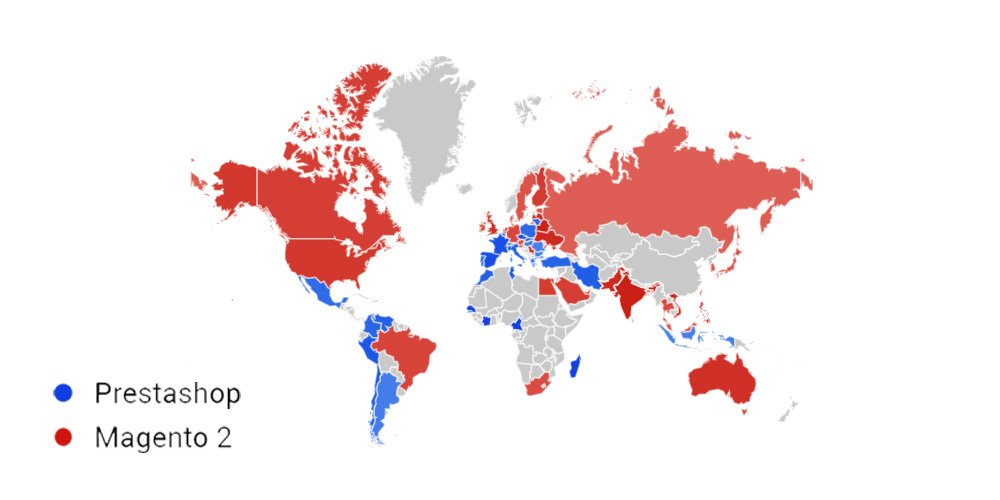
Prestashop and Magento 2 Usage Worldwide

Reasons to Choose Magneto 2 Over PrestaShop for Migration 

The release of Magento 2 has led to a migration trend across the web towards it.  As for the overarching platform, PrestaShop has been surpassed by Magento 2 in several areas, making it the number-one platform for online retailers. 

The following is a list of 3 noteworthy features that make Magento a more attractive eCommerce platform than PrestaShop, causing a trend of Magento migration from PrestaShop.

Features Due To Which You Should Move To Magento 2 From PrestaShop

1. Empowering Admin Experiences

PrestaShop and Magento will provide unique features to launch and manage your online store, regardless of your chosen platform. 

It is important to note that both platforms support your business by providing simple built-in features like import and export capabilities, payment processing, order management, essential analytic/statistical tools, etc. 

They help you run your business smoothly. A unique feature of this platform is that it allows you to create bulk products (a grouping of several products) and combinations (products with variants of colors and sizes).

Magento offers the same basic features as PrestaShop for launching and managing your store. Nevertheless, its modern and fully functional user interface can enhance your productivity. 

Some features available in the Magento admin site, such as automatic email marketing reminders, private sales, reward points, gifting options, etc., are available by default. 

However, using PrestaShop requires finding and installing modules from the Addons section to use some of the above-mentioned functions.

2. Agile And Increased Scalability

As part of the Magento Commerce (a.k.a. adobe commerce) version, you can access many out-of-the-box and advanced features, enhanced security, and customer support. Magento 2.0 offers comprehensive performance and scalability improvements:

  • Increasing order processing rate by a remarkable margin on the same hardware 
  • The server responds almost instantly when browsing a catalog
  • Reduce response times for the cart and checkout pages by more than double 
  • An improved process for handling extra-large records and large customer lists 
  • Support administrative users on the backend with more professional assistance 

Additionally, Magento supports touch-friendly and easy-to-customize mobile responsive themes. Moreover, Prestashop does not have mobile-friendly themes by default, but you can add them from the Addons section.

There is also one significant difference between Magento and PrestaShop: Magento allows you to choose from two different versions of eCommerce solutions, namely Magento Open Source (aimed at small and mid-size stores) and Magento Commerce (aimed at medium and large stores). Therefore, merchants have an excellent opportunity to scale up their businesses.

3. State-Of-The-Art SEO Features

Despite being very different yet similar, PrestaShop and Magento have some basic SEO options, such as page titles, meta descriptions, or personalized URLs. 

However, PrestaShop requires the installation of additional modules if it is to meet SEO criteria, whereas Magento provides a wide range of built-in SEO features.

The Rich Snippets feature is one of the most significant improvements that Magento 2 SEO offers. The rich snippets can now be added to the default Magento 2 functionality, rather than requiring an extension to use them. 

In addition, you can improve your product pages’ SERP (Search Engine Result Page) visibility by implementing structured data. 

Aside from that, Magento makes it easy to add Product Labels and create Schema.org (A structured data markup schema that helps search engines understand information on web pages and provide richer results) without any additional extensions.


Magento commerce

The PrestaShop to Magento 2 Migration Process

Switching from PrestaShop to Magento is worthwhile because of its powerful features, wider community, enterprise-level options, and many other factors. 

Unfortunately, Magento 2’s standard automated migration tool doesn’t support all entities associated with e-commerce sites. 

Nevertheless, some solutions fix the missing import process, automate data migration (if you want to migrate slowly), and resolve the issue with different attribute standards in just a few clicks. Furthermore, it integrates with ERPs, CRMs, marketplaces, databases, and more.

1. Migrate from PrestaShop to Magento 2 Using Data Files

  • Download and install the extension

You will need to install an extension on your PrestaShop website so that you will have access to XML, CSV, and JSON files so that you can import and export all your data, such as products, orders, customers, catalogs, and other entities, via official PrestaShop Store. 

The installed extension will allow you to choose any file format you wish to export your data. 

  • Create an import job in Magento 2 admin

The next step would be to go to your Magento 2 admin area once your PrestaShop store has been transferred to data files. Then, create a new job under System -> Improved Import / Export -> Import Jobs.

  • Configure Settings and Apply Mapping

Configure the General Settings, Import Settings, Import Behavior, and Import Source according to your business requirements. 

  1. The General Settings feature allows you to set up a schedule of updates and specify a job title;
  2. Click Import Settings on the PrestaShop menu and select one of the following entities to migrate: Products, Categories, Customers, Advanced Pricing, Orders, Attributes, Cart Price Rules, CMS Pages and Blocks. Each entity has its own characteristics. As an example, you can remove product associations like product data, tier price for products but not orders;
  3. Select the appropriate import behavior, validation strategy, and separators in Import Behavior;
  4. Choose the type of import file and its source in Import Source. Ensure all other parameters are configured, then upload and validate the file.
  5. You can now map PrestaShop attributes to Magento 2 attributes.
  • Create entity-wise import jobs.

Set up a separate import job for each entity in the system and configure it accordingly.

  • Run the import processes.

With the assistance of the data files, run multiple import processes to migrate from PrestaShop to Magento 2.

2. Migrate from PrestaShop to Magento 2 Using API

  • To import data into Magento 2, go to the admin area and create a new job. Firstly, go to your Magento 2 admin, and under System -> Import / Export -> Import Jobs, you will find the option to create a new job.
  • Configure General Settings according to business needs and use API.

Depending on your business needs and requirements, configure General Settings, Import Settings, Import Behavior, and Import Source;

  1. To migrate PrestaShop entities to Magento 2, set ‘Use API’ to ‘Yes’ in Import Settings and select Product, Category, Customer, Advanced Pricing, Orders, Attributes, Cart Price Rules, CMS Pages and Blocks. Each entity has its unique features. For instance, you can remove product associations or old categories; 
  2. Pick an import behavior option and validate the import strategy along with all the separators needed in Import Behavior;
  3. Configure other parameters and validate your import file in Import Source, then select the import file type (XML or JSON).
  4. You can now map PrestaShop attributes to Magento 2 attributes using mapping.
  • Specify Import Source

Set up a separate import job for each entity in the system and configure it accordingly.

  • Run Process.

Using an API connection, you can run multiple import processes to migrate from PrestaShop to Magento 2.

What Are The Most Important Post-migration Activities To Perform?

Once you have successfully migrated from PrestaShop to Magento 2, there are a few things you should consider to make your new online store run smoothly. 

You must perform these activities to optimize your store’s performance and maximize online sales. You should complete the following vital post-migration tasks to ensure successful Magento 2 migration and launch.

1. Install New Themes

You cannot migrate themes from PrestaShop to Magento, so you must use a third party or design it yourself to give your store a visual presentation.

Magento provides users with only 10 free and paid themes in Marketplace (paid versions cost from $30.00 to $499.00), limiting users’ options. As a result, you need to be well-versed in the technical side of Magento or have a good team of developers to design and add the code. 

Magenest’s store offers some professional themes that experienced web designers design for the best front-end selection.

Prestashop to Magento

2. Add New Extensions

Magento Marketplace has nearly 3,000 extensions that can help you enhance your store in every way. In addition, installing some extensions can help you enhance your store’s performance.

3. Change DNS And Switch Domains

After completing your shopping cart migration, the first thing you should do is change the domain of your PrestaShop to a Magento domain name. 

4. Set Up Shipping And Payment Gateways.

The Magento Marketplace has 394 apps available for you to choose from if you want to opt for third-party payment methods. 

5. Testing

After completing the entire migration process, you must now test your store to see if it works as expected. Placing a test order will help you better understand your customers’ purchasing journey. As a result, you can make some changes to make the journey more enjoyable and easier.

Test orders can be run for the following types of transactions:

  • Performing successful and unsuccessful transactions with billing address
  • Canceling and refunding an order with shipping address
  • Order fulfillment or partial fulfillment
  • Creating a successful order and saving it

Conclusion

Migrating from PrestaShop to Magento 2 can be intimidating, but it’s well worth it for businesses wanting to grow their online stores. Through Magento 2’s advanced features and customization options, you can enhance your store’s performance, streamline your operations, and provide a better customer experience. 

In addition, you can ensure a smooth migration by following the steps outlined in this guide and planning it carefully. Then, you can successfully migrate to Magento 2 with patience and attention to detail.

Are you looking for a service provider that can help you migrate from Magento 1 to Magento 2? Wedowebapps is an ideal choice for this. Whether you want to migrate your business to Magento or make it a smooth and hassle-free process, WeDoWebApps has the expertise to help you. Learn more about Zen Cart to Magento 2 migration and gain insights into understanding Magento data migration for a comprehensive understanding of the process.

Boost Your Business with Shopify Website Development

Great tools Inspired Great ideas. To endorse a Business online shopping stores are a great idea and from a small shop to big brand names are working with online shops these days. This Online Shop brings the buyers and sellers one step closer and makes it easy for both to earn the profit.

If you have your won Store or Business or say it you have your goods to sell; then there is one option which is known as Shopify Website Development.

So, What is Shopify?

Shopify is a complete eCommerce solution that allows you to set up an online store to sell your goods. It lets you organize your products, customize your storefront, accept credit card payments, track and respond to orders — all with a few clicks of the mouse.

There are Other Different Options Available for eCommerce Solutions, but Shopify is the Easiest way to Organize your Store Online. It gives an Ease to access a Different kind of choice in products and for Every customer whether he/she is non-technical, It’s easy to operate and shop through the same. SO, For every small wander to big shopping brands, It’s easy to set up your online store and expand the business in various parts of the world.

The beauty of Shopify Website is its Compatibility with all kind of devices. It’s that much easy to customize that you can operate it from your small mobile phone to big screen Computer as well and that is also very quick.

So, If you are looking for Online Shopify Development, then we are here to help you with the same. WeDoWebApps LLC, have professional Shopify Developers who are willing to provide you with very best quality work and customization which will suit your business correctly, and It will be the best option for you to expand the business online. We even Provide After-sale services as well, and we maintain the websites also if there is any that need.

While building a powerful online store is crucial, ensuring its ongoing success requires dedicated Shopify website development care to keep everything running smoothly.

So what are you waiting for?

To unlock the full potential of your online store, don’t miss out on these essential keys for Shopify website development that can take your business to the next level.

Route your queries to sales@WeDoWebApps.com 

Common WooCommerce Myths That Stop Businesses from Scaling

Introduction – Why WooCommerce Myths Exist

Are the common WooCommerce myths actually true, or are they based on outdated assumptions?

In most cases, they are misconceptions, not accurate reflections of what WooCommerce can do today.

When researching WooCommerce, many business owners come across claims that WooCommerce is not scalable, not secure, only suitable for small stores, or too hard to customize. These statements create hesitation, especially for businesses comparing platforms and trying to decide if WooCommerce is a reliable long-term choice.

The reality is that most myths about WooCommerce originate from poorly implemented websites, low-quality plugins, weak hosting setups, or experiences that are several years old. As WooCommerce has evolved, its capabilities have grown significantly, but many online discussions still rely on legacy perceptions rather than current platform performance.

This article addresses the most common WooCommerce myths and WooCommerce misconceptions using a fact-based approach. We will compare myth vs reality, explain what is actually true, and highlight where WooCommerce performs well, where it has limitations, and how to evaluate whether it fits your business goals. By the end, you should have a clearer, more confident understanding of what WooCommerce can and cannot realistically offer.

Why These Myths Persist

Most WooCommerce misconceptions do not come from limitations of the platform itself. They are usually the result of how WooCommerce websites are built, configured, and discussed online.

Several recurring factors contribute to the spread of common WooCommerce myths:

1. Outdated Information Still Ranking

WooCommerce has evolved significantly in recent years, but older content continues to appear in search results.

  • Many articles reference WooCommerce from years ago
  • Platform performance, security, and scalability have improved since then
  • Readers often assume old experiences reflect current reality

This disconnect causes outdated opinions to shape modern purchasing decisions.

2. Poor Implementation Experiences

WooCommerce is flexible, which means quality varies.

  • Bloated themes slow down websites
  • Excessive or poorly coded plugins create conflicts
  • Lack of optimization leads to performance issues

When these problems occur, users often conclude that WooCommerce itself is the issue. In reality, the problem is usually poor implementation, not the platform.

3. Inadequate Hosting Environments

Hosting plays a major role in WooCommerce performance.

  • Cheap shared hosting limits resources
  • Server misconfigurations affect stability
  • No caching or CDN increases load times

When WooCommerce runs on weak infrastructure, it reinforces myths such as “WooCommerce is slow” or “WooCommerce cannot scale.”

4. Confusion Between Platform and Responsibility

WooCommerce is open-source and self-hosted.

This means:

  • You control hosting
  • You choose security layers
  • You manage updates

Some users interpret this responsibility as a disadvantage. Others compare WooCommerce to SaaS platforms that hide technical complexity behind a monthly fee. This difference in ownership model often gets mistaken for platform weakness.

5. Second-Hand Opinions Spread Faster Than Facts

Many myths about WooCommerce are repeated rather than verified.

  • Blog posts quote other blogs
  • Forum answers get reused without context
  • Individual bad experiences become “general truths”

Over time, repetition creates the illusion of consensus, even when the claims lack technical foundation.

Bottom line: WooCommerce myths persist because of outdated sources, poor builds, weak hosting, and a misunderstanding of how open-source platforms work, not because WooCommerce is fundamentally incapable.

Common WooCommerce Myths vs Reality

Myth 1: WooCommerce Is Not Scalable

One of the most common WooCommerce myths is that the platform cannot handle growth. Many people assume WooCommerce is only suitable for small stores and will eventually break when traffic, products, or orders increase.

Reality: WooCommerce scalability depends on infrastructure, architecture, and optimization, not on a fixed platform limitation.

WooCommerce itself does not impose a hard ceiling on store size. Instead, scalability is shaped by how the store is built and maintained.

Why This Myth Exists

  • Stores running on cheap shared hosting struggle under load
  • Poorly coded plugins slow down performance
  • No caching or optimization leads to bottlenecks

When these issues occur, WooCommerce gets blamed, even though the root cause is the setup.

What Actually Determines WooCommerce Scalability

Several technical and structural factors control how well a WooCommerce store scales:

  • Hosting quality and server resources
  • Database optimization
  • Caching and CDN implementation
  • Clean, efficient theme code
  • Selective plugin usage

When these are handled correctly, WooCommerce can support:

  • Large product catalogs
  • High daily order volumes
  • Concurrent users during peak traffic

WooCommerce Can Scale With the Right Architecture

WooCommerce is built on WordPress, which supports:

  • Object caching
  • Page caching
  • Scalable database configurations
  • Cloud-based hosting environments

This allows store owners to gradually increase capacity as their business grows rather than rebuilding on a new platform.

A More Accurate Way to Think About Scalability

Instead of asking:

“Is WooCommerce scalable?”

A better question is:

Is WooCommerce implemented in a scalable way?

Because scalability is not a switch you turn on. It is an outcome of good technical decisions.

Bottom line: WooCommerce is not inherently unscalable. The platform can support growth from small stores to large operations when hosting, optimization, and architecture are handled properly.


WooCommerce scalability planning for online stores

Myth 2: WooCommerce Is Not Secure

Another widespread WooCommerce misconception is that the platform is inherently insecure. This belief often stems from hearing about hacked WordPress sites or compromised online stores, leading to the assumption that WooCommerce itself is unsafe for handling customer data and payments.

Reality: WooCommerce security depends on how the store is configured and maintained, not on an inherent weakness in the platform.

WooCommerce is built with security best practices in mind and is actively maintained by a large development community. Like any open-source platform, its safety is shaped by the quality of updates, plugins, hosting, and ongoing maintenance.

Why This Myth Exists

  • Outdated WordPress or WooCommerce versions
  • Vulnerable or pirated plugins and themes
  • Weak admin passwords or no two-factor authentication
  • Poor hosting security measures

When stores ignore these fundamentals, they become easy targets. The resulting incidents then get attributed to WooCommerce rather than to neglected security practices.

What Actually Makes a WooCommerce Store Secure

Security is a layered process. A well-protected WooCommerce store typically includes:

  • Regular core, plugin, and theme updates
  • Reputable plugins from trusted sources
  • SSL certificates for encrypted data transfer
  • Secure hosting with firewalls and malware scanning
  • Strong authentication policies

Together, these measures significantly reduce risk.

Payments and Customer Data Safety

WooCommerce does not store raw credit card data by default.

Instead, payments are processed through trusted gateways that handle sensitive information externally. This design reduces exposure and aligns with industry-standard security requirements.

A More Realistic Security Perspective

No eCommerce platform is “automatically secure.”

Security is ongoing.

WooCommerce provides the foundation, but store owners must apply best practices consistently.

Bottom line: WooCommerce is not insecure. A properly maintained WooCommerce store can be highly secure. Most security problems come from outdated software, poor plugins, or weak configurations, not from WooCommerce itself.

Myth 3: WooCommerce Is Only for Small Stores

A common belief is that WooCommerce is fine for startups or small shops, but unsuitable once a business begins to grow. This misconception often overlaps with scalability concerns and creates the impression that WooCommerce must eventually be replaced.

A common question behind this myth is: Is WooCommerce good for large stores? In practice, store size alone does not determine whether WooCommerce is a suitable platform.

Reality: WooCommerce is used by businesses of many sizes, including growing and large stores. Store size alone does not determine platform suitability.

WooCommerce does not impose limits on the number of products, orders, or customers you can have. Growth challenges typically arise from infrastructure and optimization choices, not from WooCommerce itself.

Why This Myth Exists

  • Many beginners start with WooCommerce, creating an association with “small stores”
  • Entry-level hosting plans are often used for early-stage sites
  • Poor performance on low-budget setups gets mistaken for platform limitations

These patterns create the illusion that WooCommerce is only meant for small operations.

What WooCommerce Can Support

With proper configuration, WooCommerce can handle:

  • Thousands of products
  • High daily transaction volumes
  • Multiple payment and shipping integrations
  • Complex tax and pricing rules

As a business grows, its WooCommerce store can grow with it through better hosting, caching, and database optimization.

Growth Does Not Automatically Require Platform Migration

Many businesses assume that reaching a certain size means they must move to a different platform.

In reality:

  • Scaling infrastructure is often enough
  • Optimizing the existing architecture solves many bottlenecks
  • Rebuilding on a new platform is usually more expensive

Platform migration should be a strategic decision, not a default reaction to growth.

Bottom line: WooCommerce is not limited to small stores. It can support growing and large businesses when implemented and maintained correctly.

Myth 4: WooCommerce Is Hard to Customise

Many people believe that customizing WooCommerce requires deep technical expertise or that changes are difficult, risky, and expensive. This WooCommerce myth often comes from experiences with rigid themes, plugin conflicts, or limited page builders.

Reality: WooCommerce is highly customizable. The ease of customization depends on how the store is built and who builds it.

WooCommerce is open-source and built to be extended. It supports thousands of themes, plugins, and custom development options that allow businesses to shape their stores around specific workflows and design requirements.

Why This Myth Exists

  • Heavy themes that restrict layout flexibility
  • Overreliance on plugins for simple features
  • Lack of clean code structure
  • Poor development practices

When customization is attempted on top of an unstable foundation, changes become difficult and unpredictable.

What Makes WooCommerce Flexible

WooCommerce allows customization at multiple levels:

  • Design (themes and child themes)
  • Functionality (plugins and extensions)
  • Custom code (hooks, filters, templates)
  • API integrations with external systems

This layered flexibility makes WooCommerce suitable for both simple stores and complex setups.

Customization Should Be Intentional

Not all customization is beneficial.

A better approach is:

  • Identify real business needs
  • Choose lightweight, reputable plugins
  • Use custom development for core workflows
  • Avoid stacking unnecessary features

This keeps the store maintainable and easier to evolve.

Bottom line: WooCommerce is not hard to customise by nature. Customization becomes difficult only when the store is built without a clear architecture or long-term plan. Complex customization becomes manageable when you work with experienced teams or hire WooCommerce developers who follow clean development practices.

Real Limitations of WooCommerce (Honest Perspective)

While many myths about WooCommerce are exaggerated or inaccurate, it is important to acknowledge that WooCommerce is not a perfect solution for every situation. Being aware of its real limitations helps set realistic expectations and leads to better platform decisions.

Below are some genuine constraints to consider.

1. WooCommerce Requires Quality Hosting

WooCommerce is self-hosted, which means performance is tied directly to your hosting environment.

  • Cheap hosting plans often struggle with eCommerce workloads
  • Resource limitations affect speed and stability
  • Scaling requires upgrading the store over time

WooCommerce performs best on optimized hosting built for WordPress and eCommerce.

2. Ongoing Maintenance Is Necessary

WooCommerce stores are not “set and forget.”

  • Core updates must be applied
  • Plugins and themes need monitoring
  • Compatibility issues can occasionally occur

Regular maintenance is part of owning a WooCommerce store.

3. Plugin Conflicts Can Happen

WooCommerce’s ecosystem is large.

  • Not all plugins follow the same coding standards
  • Conflicts may arise between extensions
  • Testing is important before deploying changes

Using fewer, higher-quality plugins reduces risk.

4. Performance Optimization Is Your Responsibility

WooCommerce does not automatically optimize itself.

  • Caching setup
  • Image optimization
  • Database cleanup
  • CDN integration

These require intentional configuration.

Bottom line: WooCommerce is powerful, but it assumes a level of technical responsibility. Businesses that prefer a fully managed, hands-off platform may find this model less appealing.


Clean WooCommerce customization for scalable stores

When WooCommerce May NOT Be the Right Choice

WooCommerce is flexible and capable, but it is not universally ideal. Certain business scenarios may be better served by other types of platforms.

WooCommerce may not be the right choice if:

You Want a Completely Hands-Off Platform

WooCommerce requires:

  • Hosting management
  • Updates and maintenance
  • Occasional troubleshooting

If you prefer a system where everything is handled for you with minimal involvement, a fully managed SaaS platform may feel more suitable.

You Only Need a Very Simple Website

For businesses that only require:

  • A few static pages
  • Basic product listings
  • No advanced eCommerce features

WooCommerce may be more than necessary. A simpler website builder could be sufficient.

You Require Highly Specialized Enterprise Systems

Some enterprises need:

  • Deeply integrated ERP systems
  • Custom backend infrastructures
  • Complex multi-region architectures

While WooCommerce can integrate with many tools, certain enterprise environments may be better supported by platforms designed specifically for large-scale enterprise ecosystems.

Bottom line: WooCommerce is best suited for businesses that value flexibility, ownership, and scalability. If your priority is absolute simplicity or fully managed infrastructure, other options may align better.

How to Decide If WooCommerce Fits Your Business

Choosing an eCommerce platform is less about finding the “best” option and more about finding the right fit for your specific goals, resources, and growth plans.

Use the following factors to guide your evaluation.

1. Your Business Size and Growth Plans

Ask yourself:

  • Are you starting small but planning to scale?
  • Do you expect product volume to increase?
  • Will traffic grow significantly over time?

WooCommerce works well for businesses that want a platform capable of growing alongside them.

2. Your Customization Requirements

Consider:

  • Do you need unique workflows?
  • Custom product configurations?
  • Integrations with third-party tools?

WooCommerce is a strong choice when flexibility is important.

3. Your Budget Structure

WooCommerce has:

  • Lower entry cost
  • Variable ongoing costs

You control where money is spent: hosting, plugins, development, and optimization. This appeals to businesses that prefer cost control rather than fixed platform fees.

4. Your Preference for Ownership

With WooCommerce:

  • You own your store
  • You control your data
  • You choose your infrastructure

If ownership matters, WooCommerce aligns well.

Bottom line: WooCommerce is a good fit for businesses that want flexibility, scalability, and long-term control, and are comfortable managing or outsourcing the technical side. If you’re planning a serious WooCommerce build or customization, speaking with a custom WooCommerce solutions provider can help you avoid common implementation mistakes.


WooCommerce platform guidance for business growth

Conclusion

Most WooCommerce myths exist because of outdated information, poor implementations, and misunderstandings about how open-source platforms work. When evaluated objectively, WooCommerce is neither inherently unscalable, insecure, limited to small stores, nor difficult to customise.

The reality is simpler:

WooCommerce’s performance, security, scalability, and flexibility are determined primarily by how the store is built, hosted, and maintained.

For businesses that value ownership, customization freedom, and the ability to scale gradually, WooCommerce remains a strong and reliable eCommerce platform. At the same time, it is honest to acknowledge that WooCommerce requires responsible management and is not intended to be a fully hands-off solution.

If you approach WooCommerce with realistic expectations and a clear technical strategy, many of the commonly cited limitations disappear. What remains is a flexible platform capable of supporting both early-stage stores and growing eCommerce businesses.

Understanding the difference between myths, realities, and real limitations puts you in a much better position to decide whether WooCommerce is the right foundation for your online store.


WooCommerce specialists helping businesses

Unleashing The Power of Advanced Features in Joomla Development

Developing a website with Joomla requires excellence and proper knowledge of the platform. There are a variety of tasks that one can carry out while availing of these services. Here is a blog on, Introduction to some advanced features of a Joomla Development Company in which we are going to guide you about such services of this platform, using which we can quickly develop a highly responsive website.

Some Advance Features of a Joomla Development Company

Here are some of the advanced features that one can get from a Joomla development company. With the help of all these features, it becomes an easy task for the user to develop a highly versatile Joomla website.

Custom Module Development

The Modules are situated on the screen, nearby the components of the website. The application of each of these modules differs from each other. With the help of custom module development, the developers will be able to develop highly efficient modules that will provide better results both to the users as well as administrations.

Custom Development

We will be able to carry out the website’s full development with the help of Joomla Custom Development. There is a need to develop a site in such a manner that accessing its features, as well as navigating through the various tabs, becomes more comfortable. Hence, the developer should emphasize on multiple available tools and techniques for the development.

While exploring the advanced features in Joomla development, don’t miss out on understanding the latest web development technologies in Birmingham to keep your skills up to date.

Theme Integration

Any website must appear attractive. With the help of  PSD to Joomla theme integration, we can develop such kind of website. There are plenty of options available to us when it comes to the themes. Therefore, using the issue appropriately, we have to develop such a beautiful website.

Maintenance Service

One often requires carrying out the maintenance of the website at regular intervals. This prevents the formation of bugs and unexpected break down of the website. Due to this, the significance of these services cannot be ignored.

Installation and Configuration

Installation, as well as the configuration of the Joomla website, also demands a lot of expertise from us. The developer must be knowing all the necessary tools and techniques. Furthermore, he must be able to cope with the other team members and adequately install the website.

Along with discovering the advanced features in Joomla development, understand the supremacy of Bootstrap development to enhance your web projects.

Extension Integration

The extensions enhance the workability of the Joomla website. Apart from that, there are plenty of options available to us when it comes to extensions. Therefore, we can utilize every extension appropriately to carry out the development of a Joomla website that will provide us with an optimum result on all grounds.

With this blog on, Introduction to some advanced features of a Joomla Development Company, our main aim was to focus on such services of Joomla, which have played a significant role in making this platform highly versatile. We hope that this compilation will be helpful to you for deciding the nature of your services.

Build iPad App

The iOS platform has become a staple in the mobile app development market. All iOS devices may be targeting the premium users more, but it is nonetheless a quite beautiful piece of software. Apple has made it easier for developers to create iOS apps. Even beginners can start developing apps more comfortably than ever before utilizing the iPad Application Development Services. They have lowered the entry barriers, and the development process is easier than ever before.

The iPad caters to a premium kind of customer segment, and so it becomes somewhat of a necessity that businesses look into developing iPad Applications. There is a lot of scopes there, and one can produce all kinds of apps and games. Here is a basic understanding of how to Build an iPad App with the help of iPad Application Development Services.

How to avail the Build iPad App Services

Android has a higher market share in the market as per studies, and it is also pretty evident. But, the iPad has yet to see a worthy competitor in terms of performance and all other things when it comes to the tablet market. Its popularity and demand have been steadily increasing. As a result, businesses are leaning towards iPad Application Development Services. Here are a few of the basics to build iPad apps.

The basics are pretty simple, and the to-be developers should consider these points if they are looking to develop an application. The process may have been made more accessible, but the development still isn’t natural, as some may think. Let us see how the event works and how to build an iPad app.

Signing Up

The first step is signing up as a developer on Apple. This will give developers access to support materials, and they can also connect their iOS devices so that Apple can test the apps. Signing Up is free unless the developer is looking to sell apps. Then it would cost £69 per year for selling apps on the iTunes Store. One can use an existing Apple ID or make a new one altogether. There are also some programming skills that one needs to know before developing applications.

Set a clear objective

There is a need to set a fixed objective before one goes for Build iPad App. A developer needs to map out what kind of an app or a game they want to build. Decide what the ultimate motive of the app is. Devise its features, scope out its theme, and then gather the assets to start developing it. Please keep it simple and map out a strategy on how to get started. Focus on what features to include and also not too many features.

Looking to build an iPad app? Discover whether native or hybrid app development is the best fit for your project.

Coding the App

If someone is looking to move into iPad Application Development Services, they should think about coding their app. It may or may not be accessible, depending on how much they know about coding. Nonetheless, Apple has reduced the barriers for iPad app coding with the release of iOS 8. Along with that, they also lowered the barriers for Swift back in 2014. Swift is the official programming language of Apple in which the code of the iPad App is written. iOS development companies are thoroughly acquainted with it.

Hiring a Developer

Many companies in the market offer iPad Application Development Services. If coding is impossible, then hiring an experienced developer may be the best course of action. iOS Development Companies have experienced developers with enough expertise to deliver a top-notch application for a business. They keep in mind all the specs and requirements and create an app that stays true to those needs.

Read also: App Programming iOS

Benefits of Building iPad App

When someone wants to Build an iPad App, they usually have something in mind. What leads them towards it is the benefits that it offers. The iPad is considerably higher on the list of popular tablets; it is at the top. It also has a vast user base, and that is why one should cater to those customers. That, in turn, helps one grow the scope of a business and thus grow. There are a lot of benefits, but here are some of them.

  • Paying Clients: iOS has more clients that pay for in-app purchases and buy apps. Unlike Android, Apple Apps rake in more money than the average Android Application. They usually cover the expenses which come from the premium segment of users.
  • Consumer Experience: Customers who use iPad apps have a great experience because the apps are elegantly designed to be user-friendly. Moreover, the user interface is leaps and bounds ahead of anything in the market. It makes it easier to use the apps and reach more potential customers.
  • Interface: As tablet users have come to know, the user interface of Apple is much better than its competitors in terms of design and performance. The app’s design makes a significant impact on business growth as the customers are inclined to use it and even recommend it to others.
  • Tech-Savvy Audience:iPad apps have always been attracting tech-savvy Audiences, increasing the number of future customers. How this happens can be understood by looking at the user base of Apple devices. Those customers would never settle for something less, and that can be a great asset to a business looking to build iPad Applications.
  • Security:This is one of the most critical aspects when keeping customers and businesses in mind. Apple’s own operating system’s security measures remove threats like phishing and hacking effectively. Even the transactions are encrypted to avoid any data loss in case something goes wrong, which never happens.

With this, we have explained the basics of iPad Application Development Services and also its benefits. Build an iPad App can be very helpful for a business or an individual looking to make a name in the tablet market. We hope that this post has been of enough help to you in this matter.

Planning to build an iPad app? Ensure success by securing top services from a mobile development company to guide you through the process.

Picking The Best Language To Expedite iOS App Development

Web development and app development is an accelerating subfield of technology. There has been an exponential increase in the app development sector over the past few years. One can witness the difference in their daily lives. Development of applications comes with the responsibility of choosing the right language and platform for successful development.

The Best Language For iOS in 2021

This should not come as a surprise that in Aug 2021, 56.94% of online relations were made through the help of mobile devices, as it is indicated by StatCounter data. These days, people are more dependent on mobile phones than any other device. 

Things to Remember before working on iOS application development:

Developing an application can be a tedious task. We have created a handy list to avoid any mistakes and ensure that the development is fruitful for you and the audience. You must check the list given below, before you hop onto the development process.

iOS application development

1. Clarify the main purpose: You must be clear of the reason why you wish to develop and publish the app. The application that you’re working on should serve a purpose, and you ought to be aware of the same. These simple questions might help you get a clear vision:

Why does this app need to be built?

Who will all benefit from this app?

Is there any other app with the same background purpose? If so, what can I change about my app to make it unique? Answering these simple to look at yet tricky questions will get you ahead on the journey. In addition, you will get a clearer picture of the purpose of your work.

2. Market research is necessary: Before diving into the whole process of developing an app, you must consider taking a tour of the current market. A well-researched and well-known developer is way better for your app development venture. Skills are one part of the development, while researching is another portion that must not be missed. It gives a better perspective and makes you aware of the recent trends, the needs of the targeted audience, and many more aspects of iPad application development. Even being one of the critical steps, many entrepreneurs often miss out, and they pay for it later. This further would lead to the great success of your iOS app.

3. Detailed planning of the app development: Once you get done with the first two significant steps, the following very obvious step is to plan every detail of your application. Go for the best iOS app development services to get this work done. Ensure that the company you’re hiring for the project is well-versed and has experience in the field. Ask the iOS app development services to map out a detailed plan of the project in front of you. Make sure you explain the requisites and your purpose to the team. 

All the goals of the application development must be considered while planning out the app formulation procedure. Try making the following question while on this stage:

  • What technology is apt for the development procedure?
  • What frameworks should be used?
  • Which language should the app be built on?
  • How to measure the success of the app?
  • Will the chosen requisites serve the iPad application development well?
  • How would you secure the app?
  • Do you wish to make other versions for the different operating systems as well? If yes, how will you plan out the development process?
  • What are the goals of the development?

4. Is the app compatible with iOS?: Make sure that the security and compatibility test is not missed. Not all iOS users update the system regularly, Hence, developing an app that is compatible with such alterations and works just fine is necessary. iOS app development services are well aware of the measures to make your app compatible with such devices. Do not disappoint a huge populace with compatibility issues. Ensure to check out one cash aspect of compatibility and safety.

5. Your capabilities must be known: With this, we mean that you must be aware of, “what are your internal capacities?”. You should know how much you are allowed to spend on the app. Time, money, and everything should be analyzed and comprehended beforehand. Once you have handed the project to the iOS app development services, there is little chance of withdrawing, and it might as well embarrass you.

Top Language for iOS App development:

Coming to the best language for mobile app development 2021, we list the top chosen languages. We have curated this list only after meticulous research while considering many aspects of iOS application development. 

Remember, while choosing a language for your application development procedure, you should have the farsightedness to grab the best opportunity. You might have to alter a thing or two in the future. Keeping that in mind, choose a flexible language and can work for multiple devices if you somehow choose to change the specifications.

Read also: iOS App Development Tools and Remarkable Apple Store Apps

To help around this crucial decision, we have listed several programming languages you can choose from for iPad application development.

  • Swift: Be it macOS, iOS, watchOS, iPad, or apple tv, Swift is there to serve all these devices in one go. You can develop an app on Swift for multiple devices without any hassle. Originated in 2014, Swift has become the face of the most preferred choice for iOS development over time. Swift was previously aimed to work with Cocoa, Cocoa Touch, and a substantial codebase written in Objective-C. As the stats at Stack Overflow 2020 Developer Survey indicate, Swift is among the top 17 famous programming languages around the globe. Another interesting fact states that Swift is used by 5.9% of developers worldwide. Swift can come in handy for those who wish to create an application built real quick and can be expanded later on without much hassle. Being relatively easier to learn, the language offers a quick development of an application for iOS devices. Furthermore, the language is frequently updated, so you can easily improvise the features from time to time.
  • Objective-C: This one was created as an extension of the C language, previously very popular. The objective term comes from its capabilities of object-oriented programming. Created in early 1980 by Tom Love and Brad Cox, this language found its origin in the company named Stepstone (previously called PPI- Productivity Products International). A general-purpose language as it is, objective C is used to develop iOS and their APIs- Cocoa and Cocoa Touch. Objective C has scored a rank of 20th among the most popular programming languages index. After Swift, this is probably the best choice for iOS developers.
  • C#: Adding adjectives like high level, general-purpose, and object-oriented would be very fair for C# language. It is integrated closely with .NET which serves as a framework as well as the runtime environment. Most commonly, C# is used for developing windows systems. One can easily develop native software in the C# language for any platform, even iOS. C # is the 7th most popular open-source programming language developed by Microsoft. There are 5 to 8 million C# and .NET developers worldwide. Thus, if you wish to develop an application that could run for both iOS and Android, C# has got to be your best choice.
  • HTML 5: By finely defining the content and structure of the application, HTML 5 is the newest version of HTML. Often paired up with CSS and JavaScript, HTML and the combination turns out to be the best among all the languages. So, if you wish to quickly get a hands-on, simple iOS application that works offline, go for HTML5.
  • Java: Another excellent alternative for iOS development would be Java. Class-based, object-oriented, general-purpose are also its features. What is significant about this language is that it can be run on any platform without taking the hassle of recompilation. It is used by over 9 million developers worldwide. The best thing about Java is that it is flexible and can be used for cross-platform developments.Read more about New Trends In Mobile App Development

And if you still have doubts about which to choose – here is a brief summary of the most important differences between these technologies.

Takeaway:

With most languages being highly functional and lucrative, we have presented scope for comparison among the top languages. Therefore, you may follow the instructions carefully and choose wisely for your next iOS application development. Schedule a free consultation with us to choose the best solution for you.

Getting Familiar with BigCommerce Development

BigCommerce Web Development is one of the best e-commerce solutions around. Anyone aspiring to open up shop on a website, BigCommerce is the service to bank on. E-commerce is gaining a reputation, and people are learning more and more towards it. Online Shopping is easier; hence it is the go-to solution for most of the shoppers. Let’s see what the concept behind BigCommerce is.

Using BigCommerce Web Development

BigCommerce gives all the services and features one needs to build an online store. It is not just an online store builder; it is instead a service that streamlines the online business. That, in turn, helps one focus more on selling their products. BigCommerce provides web development services, and they assist the owner from the start to the end. Here is the process of Web Development and all the main steps of designing a store.

Getting Started

The first step in making any online store is signing up. Signing up for the services of a website builder such as BigCommerce is even better. BigCommerce sure does have a lot of services, but the signing is necessary. It gives a trial period of 15 days to check out the facilities and see whether they are proper or not. After the trial period, store owners have to pay for the services.

Build an Online Store

The next step after signing up is to get started on building the online store. There are lots of beautiful themes and responsive templates to showcase the brand and store. High customization allows one to control their website any way they want.

Host Securely

Secure hosting is one of the grave necessities in managing an online store. BigCommerce handles hosting quite professionally with an average of 99.99% uptime. Managing servers can cost a lot of money over the run. So, opting for BigCommerce is a viable option. It takes care of security, too, with Level 1 PCI Compliance and leading performance. Read also: Hire Dedicated BigCommerce Developers

Accept Payments

Once the online store is ready, orders are going to start to pour in. Whether the customer is global or local, it isn’t going to be a bother because BigCommerce web development provides the options to transact globally.

Order Fulfillment and Shipping

Online Store owners can avail of the extensive shipping options on BigCommerce. Shipping Options are available to encourage customer loyalty, improve conversion, and streamline operations.

App Integrations

BigCommerce has a selection of integrations and third-party apps to help and achieve better solutions. One can impeccably connect their store with software to sell efficiently. They also get Marketing and Conversion apps to boost their sales. There are several ins and outs while designing an online store, and it is not all easy. But with BigCommerce Web Development, everything falls into place like a dream. After reading this article on BigCommerce, understanding the website becomes relatively easy. One can also make use of this guide when they are thinking of setting up their online store.