skip to content

Changing Your Magento Server? Here’s What You Need To Know.

As time passes and your business advances, you may feel the need to migrate Magento store to a new server that is more effective, fast, and reliable.  For instance, you require an upgraded web server, are unsatisfied with your hosting company’s service quality, or wish to expand your platform performance with different add-ons and believe it will function steadily.  Regardless of the reasons that you have for migrating the Magento store,moving a working store is not a simple task, and you may encounter different hurdles while executing it. Here, we’ll explain the best Magento 1 to Magento 2 data migration steps to move your Magento 1 to Magento 2 data migration to a new server smoothly.  What Is Magento? Magento is an open-source and one of the finest e-commerce platforms written in PHP. It employs various PHP extensions & frameworks, namely Symfony and Laminas. Magento’s website allows its users to manage their online store’s appearance, content, and functionality without undermining the user’s shopping experience.  Moreover, Magento website offers its users a combination of helpful features and tools, including marketing, catalog management, and search engine optimization tools. In general, a new Magento store can accommodate any store, regardless of its size. Whether you’re serving a few customers or the numbers are huge, Magento delivers a free Magento Open Source and a full of feature Headless Magento Commerce Store, implying the platform can develop and grow with your business. Often, companies have to switch platforms as they advance and develop. However, Magento setups make it simple to remain in one spot and keep advancing.  The platform likewise presents its customers with various plug-ins and themes to do whatever they wish and however they like their website to appear. It can even improve customer experience and strengthen customer relationships. Read more: Hire Magento Developers: Everything You Need to Know!

Steps To Be Followed To Magento 2 Migration To Another Server

In case you are moving to a dedicated hosting service, the probabilities are they will deliver a free migration assistance with your hosting subscription.  However, if you are migrating to a DIY provider such as Amazon Web Services (AWS) or DigitalOcean, you will have to do everything on your own and follow the Magento 2 data migration steps carefully. Before you start, keep in mind that you take an entire backup of your website. If you are operating on a dedicated hosting service, you can utilize the control panel to manually back up your store or contact your service provider’s tech support crew for help.  As an option, you can take a photo of your server if you are harnessing a provider like AWS or DigitalOcean.

STEP 1: Prepare A Complete Backup Of The Magento Database

Throughout the Magento 2 server migration, you must maintain and shift two fundamental parts of your Magento store: the filesystem and the database.  The Magento database includes information of/about your store, e.g., orders, products, customers, and store settings. And the file system consists of all product media, the Magento codebase, and extension code. We will move the Magento file system’s contents utilizing rsync, a file synchronization tool on Linux.  But as the Magento database is stowed in a distinct location, we will prepare a backup of the database in the Magento file system to allow us to move everything to the new server employing just a single command. If you are deploying a Magento 2.3.0 version, you can prepare a Magento 2 database migration database settings backup within the Magento admin panel by obeying Adobe’s guide for Magento backups or through CLI.  For additional latest Magento versions, you will just have to employ the command line in order to back up the store database. By following the below steps, you can prepare a full backup of your Magento database through the command-line interface utilizing the mysqldump program:

  1. Access your server over SSH and shift to the Magento filesystem owner.
  2. Navigate to the Magento filesystem root by changing and typing the command given below in the terminal:

<code> $ cd <path-to-magento-root> </code>

  1. Confirm you are in the correct location by executing the command given below to document/list all the directory contents:

<code> $ ls -la </code>

You may notice a checklist of all the folders and files in the Magento root directory, namely, app/, var/, pub/, and vendor/.

  1. As soon as you have confirmed that you are in the correct location, you can utilize the mysqldump tool to make a full backup of the Magento database by running the command given below:

<code> $ mysqldump -u magento-db-user -p magento-db-name > var/backups/magentobackup.sql </code>

Remember to substitute the value for magento-db-user and magento-db-name with the proper values for your store. Furthermore, ensure that the /var/backupsfolder subsists in your file system. Or else the command will show an error. After running the command, you will have to type the Magento database user password.  Once you have typed the password and pressed “Enter,” you will not be able to view anything until and unless the database backup is finished. Generally, you can anticipate the new database backup to take about 30 seconds to 1 minute per gigabyte. Therefore, if you are migrating an extensive store database, get ready to wait for a little before the backup finishes. You will not get a verification notification until the backup database is done. Rather, the terminal will restart to the normal prompt screen.

  1. Confirm the contents of the var/backups directory by executing the command given below:

<code> $ ls -la var/backups </code>

And here you go, you had your database SQL file saved successfully inside the Magento file system.  Before you move ahead, make sure to place your store in maintenance mode. It will deter data fickleness/inconsistencies/instabilities throughout file migration. You can allow maintenance mode by navigating to the Magento root directory location and running the command given below, being the Magento filesystem owner:

<code<> $ php bin/magento maintenance:enable </code>

STEP 2: Create The Destination Server

Without further ado, you must create your destination server by installing the extensions Magento demands for its procedures and operations.  It’s crucial to note that you must verify each extension version is well-suited and compatible with your Magento version during Magento 2 extension migration. Before going ahead, you can cross-reference Adobe’s system requirements and compatible software for Magento’s 2.3.0 versions and so on. You must also confirm your server contains the resources required to run a CPU-bound application such as Magento. Given below are some things to remember while you create your new server:

  1. Make sure you use the exact title for the Magento file system owner on the destination server as the origin server.
  2. Utilize equivalent database credentials on the origin as well as on the destination server.
  3. Employ equivalent credentials for additional tools, e.g., Redis or Varnish, on both servers.

As soon as you organized and made your new server, ensure you cleared the Magento destination root folder by running the commands given below as a superuser or the directory owner:

<code> $ rm -r /var/www/public_html/* </code> Confirm the directory is cleared by documenting or listing its contents utilizing the command described below: <code> $ ls -la /var/www/public_html </code>

Once you have confirmed it’s cleared, you can carry on to the subsequent stage and relocate your store data to the new server. migrate Magento store to new server

STEP 3: It’s Time To Migrate The Data

Without any delay, it’s time for you to migrate the store data to the new server. We will employ rsync because of its performance benefits and reduced bandwidth consumption.  First, you’ll have to log in into the destination server as the filesystem owner and execute the command explained below to start copying from the origin server over SSH:

<code> $ rsync -avzh ssh <username>@<origin-server-ip>:/var/www/html/ /var/www/public_html/ </code>

Command defined:This command can be split into 7 parts including:

  1. rsync
  2. -avzh
  3. ssh
  4. <username>
  5. <origin-server-ip>
  6. :/var/www/html/
  7. /var/www/public_html/.

When you run the command mentioned above, you will have to type a password for the <username> user on the origin server.  It is required if you connect via SSH with the password login, but not with the key. Once the transferring starts, you will witness a lengthy output on your terminal screen as it moves ahead.  The whole file transfer process can take minutes to finish, which might depend on the stored data size. Once it’s done, you can confirm if all files have been copied by executing the command given below in the destination directory:

<code> $ ls -la </code>

Once you have ascertained all the folders and files corresponding to the origin directory, you can continue with the subsequent steps.

STEP 4: Configuration Of Your New Store

When we applied the rsync command to shift the files to the new host server domain, we maintained all ownership and permissions according to the new server domain folder.  If the filesystem owner on your new server has the exact title as the one has on the origin server, you will not have to reallocate ownership. Nevertheless, you must reallocate file permissions to guarantee that the remaining setup functions steadily. Run the command given below as the filesystem owner in the Magento root folder:

<code> find . -type f -exec chmod 644 {} \; find . -type d -exec chmod 755 {} \; find ./var -type d -exec chmod 777 {} \; find ./pub/media -type d -exec chmod 777 {} \; find ./pub/static -type d -exec chmod 777 {} \; chmod644 ./app/etc/*.xml chmod777 ./app/etc chmod777 var/log chmod777 generated </code>

Then, we will have to restore the backed-up database from the Magento files system. You’ll have to execute the command mentioned below in the terminal:

<code> $ mysql -u magento-db-user -p magento-db < var/backups/magentobackup.sql </code>

It might take some time to complete. The screen will restart to the normal prompt screen once it completes. Once it is done, you are finally all set to go live.

STEP 5: You Can Go Live Now!

The following steps will smoothly get the job of Magento 2 migration done if you have observed and done everything precisely. Before you’ll be able to surf the website, you will have to update the DNS records of your domain and show it to the latest one server IP address. Once you have done that, it will take a few minutes to hours to propagate, which will rely on your Time-To-Live settings. For the time being, let’s fix together some odds and ends before you begin operating your website. First, you will have to install cron to enable Magento to execute major background tasks. Run the command given below as the Magento filesystem owner in the Magento root directory in order to install cron:

<code> $ php bin/magento cron:install </code>

Then, change and set up your store into production mode so that it will disable cache management, recompile data, and turn off maintenance mode. It is doable if you run the command given below:

<code> $ php bin/magento deploy:mode:set production </code>

Once it completes, you can access your store in a browser. You may witness the website running slowly when you will load it for the first time. This problem must be fixed once the Magento cache starts generating after the initial load.

Is Migrating Magento Store The Right Choice For You?

The decision of Magento 1 2 migration can’t be nor should be taken instantly. It requires meticulous forethought and implementation.  The whole objective behind operating a perfect website is to deliver customers and visitors an excellent user experience that results in increased conversions and sales. It is where the significance of migrating to Magento 2 plays its role.  Below are some of the essential characteristics of moving to Magento 2 that can influence customer experience.

  • It delivers more promising SEO and search features
  • 50% quicker page loading time
  • Touch-friendly and thoroughly responsive UX
  • Enhanced UX for admin panel accompanied by an upgraded backend
  • It has more occasional needs for third-party or custom extensions
  • It delivers manageable checkout and reduces the cart abandonment rate
  • E-retailers can handle more extensive amounts of SKUs and orders
  • It is simple to make and handle web content
  • It allows you to make more user-friendly and mobile-optimized experiences
  • Users can select from PaaS and self-hosting alternatives.

So basically, it is certainly an excellent decision to migrate to the latest version and retain your e-commerce business as competent and expandable.  This platform will provide access to the latest features and extensions, convenient maintenance, reduced Magento 1 to 2 migration costs, and a lot more advantages. 

What Are Some Mistakes To Avoid While Migrating? 

There are a lot of things that you need to take care of during the Magento 1 to 2 migration. It’s important to avoid these mistakes while migrating and those mistakes are as follows:

  • Starting without forethought or appropriate preparation, arrangements, and goal setting.
  • Not studying the effect of migration internally.
  • Not corroborating convertibility/acceptableness/modifiability
  • Not experimenting sufficiently
  • Overlooking SEO equity
  • Not discarding obsolete and futile data
  • Not heeding Adobe’s officially recommended method and tools
  • Bypassing consultation with experienced Magento 2 Migration agencies
  • Not outsourcing licensed or qualified Magento migration experts
  • Not scanning the webshop post-migration.

magento 2 server migration

Conclusion

Magento 2 is a more significant and beneficial update until now, and Magento 2 migration steps are essential are pretty straightforward too.  You’ll get a lot of features and benefits from Magento 2 migrations and upgrades such as adaptable website architectures, engrossing customer experiences, streamlined business experience, 50% quicker page loading speeds, secured payments, and more straightforward maintenance and upgrades.  Ultimately, Magento 2 is a more functional, enhanced, and rapid version of Magento. After coming across objections and contradictory remarks, the developers rebuilt it and eliminated all the flaws. If you are searching for a quicker, securer, and expandable website, Magento 2 is all you need! We at WeDoWebApps, a development company, help you migrate your Magento 1 site to Magento 2 seamlessly. Need help? Contact us anytime. 

Salesforce Commerce Cloud To Magento 2 Migration: Everything You Need To Know

Migrating important data of your e-commerce store from Salesforce Commerce Cloud to Magento 2 is one of the most beneficial decisions you’ll ever make!

Here’s why. 

Salesforce’s commerce cloud has many limitations that are not present in Magento 2. Customization capabilities being one of them. 

Magento 2 shines here. It’s backed by advanced technical support and capabilities, unmatched flexibility, and a vast ecosystem of plugins and extensions that’s remains unmatched till date. 

So, if you want to migrate from Salesforce commerce cloud to Magento 2, we are here to help. We make the entire Salesforce migration process effortless with right tools and guidance. 

This blog post will highlight the key advantages of switching from Salesforce Commerce Cloud to Magento 2 and offer empathetic support to address your concerns with easy migration processes.

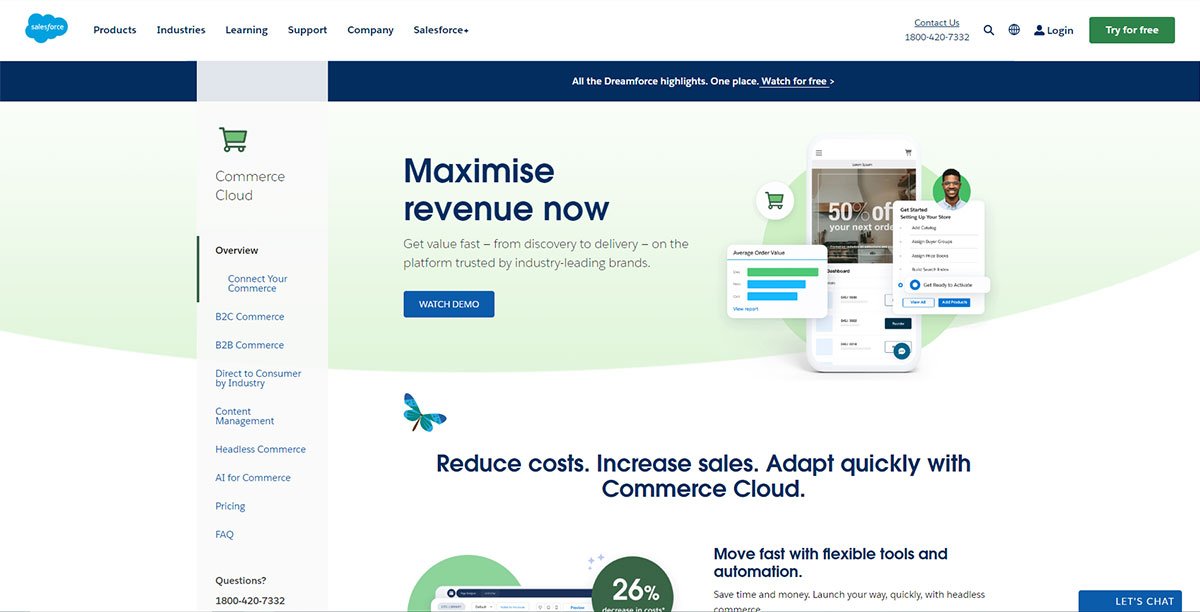
What is Salesforce Commerce Cloud?

Salesforce commerce cloud

An e-commerce platform based on cloud computing, Salesforce Commerce Cloud is a tool that allows companies to create online stores. 

In addition to product catalogs, shopping carts, order status and management, payment gateways and shipping options, personalized promotions, and other features, Salesforce Commerce Cloud allows businesses to create and customize their online stores. Additionally, the platform provides tools for managing product data, inventory, fulfillment, and customer service.

With Salesforce Commerce Cloud, you can create a seamless customer experience across all touchpoints by integrating it with other Salesforce solutions, such as Marketing Cloud and Service Cloud.

The small startup company, large enterprise, and ecommerce brands use Salesforce Commerce Cloud in fashion, retail, consumer goods, and manufacturing industries.

As part of Salesforce Commerce Cloud, you can also manage inventory, fulfillment, and customer service. The platform was built on a cloud-based, multi-tenant architecture and can be customized through templates, themes, API integration, and development tools. 

Besides SEO and mobile responsiveness, the platform also includes analytics and reporting capabilities as well as a way to integrate with Salesforce products, such as Marketing Cloud and Service Cloud.

Why Migrate From The Salesforce Commerce Cloud To Magento 2?

Despite its popularity with businesses of all sizes, Salesforce Commerce Cloud may not be right for all businesses. Many companies may find the platform lacking certain features and capabilities crucial to their success. 

Magento 2 is the answer to that problem. With Magento 2, businesses can grow and thrive online with more comprehensive and flexible e-commerce tools and features. However, here are some areas where Salesforce Commerce Cloud falls short.

Salesforce Pitfalls

Salesforce simplifies the sales process and provides an excellent omnichannel experience, but a few disadvantages can cause you to overlook its strengths. Here they are:

  • Unpredictable ownership cost

A Salesforce subscription costs a percentage of your overall revenue, meaning the more successful you become, the more Salesforce charges. Such policies make it difficult for merchants to plan ahead.

  • Separate B2B and B2C capabilities

The Salesforce platform does not offer the ability to combine B2B and B2C operations. Therefore, unless you require a CMS that gives B2B and B2C functionality, Salesforce may not interest you.

  • Insufficient customization opportunities

There is limited customization possible with Salesforce SaaS. As a result, delivering a unique user experience is challenging, which is an essential component of a successful online business.

Magento vs salesforce commerce cloud

  • Small commerce-focused community

An extensive CMS community can be a valuable resource for solving platform-related issues. Unfortunately, there aren’t enough Salesforce users with the expertise necessary for a particular niche or location in the Salesforce community. Thus, Salesforce support is more challenging to rely on without a dedicated support team during an emergency.

How Can Magento 2 Be Fit For Your Needs?

With so many e-commerce platforms, choosing which will fit your business’s unique requirements can be challenging. However, Magento 2 is gaining popularity among businesses of all sizes because of its scalability, flexibility, and customization capabilities.

With Magento, many sellers have already skyrocketed their sales, notably:

  • Delivering diverse user experiences allows online entrepreneurs to gain a competitive advantage, Complete control, and unconditional flexibility;
  • Technology and tools for advanced business intelligence;
  • The Magento community is large, with many user cases, making it an excellent partner for e-commerce;
  • The architecture and infrastructure are modern and optimized.

Magento vs Salesforce Commerce Cloud – Overview

  • Medium- and large-sized businesses can benefit from Magento Commerce (now Adobe Commerce) and Salesforce Commerce Cloud (formerly Demandware).
  • Powered by PaaS (Platform as a Service), Magento offers flexibility and customization. Magento offers B2B and B2C platforms optimized for market segments.
  • With over 300,000 stores, Magento is one of the oldest and most widely used eCommerce platforms.
  • Magento provides maximum flexibility to brands for creating bespoke experiences.
  • Since Magento is an open-source platform, developers can download and modify its code. Due to this, it has the largest community of third-party developers. Magento may not offer a feature you need, but a plug-in can provide it.

Salesforce Commerce VS Magento 2 Pricing

You can choose from three versions of Magento: Magento Open Source, Magento Commerce, and Magento Commerce Cloud. 

Using Magento Open Source costs nothing, but customizations are likely needed to meet customer expectations, which means you’ll spend money on the development, which can be costly. 

In addition, additional costs, such as hosting ($10–50/month) and domain registration ($10–400/year), can add up.

A Magento Commerce Cloud subscription includes a hosting fee. Also, a license fee is negotiable for the premium versions (contact a Magento sales representative for a quote based on your specific business requirements).

Here are the license costs for Magento Commerce and Magento Commerce Cloud.

Magento 2 Pricing Based on Gross Revenue
Gross revenue-generating companies Magento 2 Commerce Magento 2 Commerce Cloud
$0 – $1 million $22,000.00 $40,000.00
$1 – $5 million $32,000.00 $55,000.00
$5 – $10 million $49,000.00 $80,000.00
$10 – $25 million $75,000.00 $120,000.00
$25 – $50 million $125,000.00 $190,000.00

On the other hand, even though Salesforce Commerce Cloud license costs are negotiated based on the enterprise’s size and revenue, there is a starting price tag. 

Salesforce offers three plans for B2B: commission fees per order, gross merchandise value (GMV), and Subscription-based model. 

With the starter packs, you have all the essential features that will enable you to go to market quickly. However, as you move up the ladder, other features, including support for multiple channels and multiple storefronts, are available.

Here is Salesforce Commerce Cloud’s pricing plan:

Pricing Plans by Market Segment
Market Segments Plans
Starter Growth Plus
B2B Commerce $4 Price Per Order (billed annually) $6 Price Per Order (billed annually) $8 Price Per Order (billed annually)
B2C Commerce 1% Gross Merchandise Value (billed annually) 2% Gross Merchandise Value (billed annually) 3% Gross Merchandise Value (billed annually)
B2B2C Commerce 1% Gross Merchandise Value (billed annually)

Plugins And Extensions For Magento Vs Salesforce Commerce Cloud

Don’t worry if either platform does not contain a feature you require out-of-the-box; Magento and Salesforce Commerce Cloud offer clear technical documentation for developers and extensions and plugins.

With both the free and premium extensions marketplaces, there is no doubt that the extensions in the marketplaces are of high quality, as both platforms evaluate each extension submitted by a third-party developer for compliance with coding standards and development best practices.

However, Magento has a significant advantage when it comes to extensions. Having a large customer base and more solution partners, Magento has more extensions designed for specific uses. Check out this detailed Migration checklist and start worry-free with Magento 2 migration.

For merchants, Magento offers over 5,800 free and paid extensions to help them with challenges related to marketing, checkout, fulfilment, inventory, order management, etc.

Read more: 18 Best Magento Migration Companies All Over The World

What Is The Best Way To Migrate Salesforce Commerce Cloud Online Store To Magento 2?

  • Getting Started with the Third-Party Extension App

Creating an account or logging in on a website for a third-party migration service is quick and easy. Alternatively, you can use your Google or Facebook account to log in quickly.

  • Getting Started with Your New Migration

Here are two simple steps you must follow:

Providing data from the Source store (Salesforce Commerce Cloud)

Data from the Target store (Magento 2)

  • Providing source store data to Salesforce Commerce Cloud

Click the Create New Migration button on the Migration Page to begin a new migration. Next, choose Source Cart Type, then enter the URL of the source store.

  • Provide target store data using Magento 2

Once the Target Cart Type option has been selected, enter the URL of the source store.

You can choose the connection for your third-party app after downloading the connector, unzipping it, and uploading it to the Target Store’s root folder.

This screen automatically displays the Connector Installation without requiring any manual intervention.

  • Select the Source Store Entities you want to migrate.

Select all entities or specific data to move—for instance, only Products, Customers, and Orders.

You can extend your migration options by selecting your third-party app (if your extension app offers these options). In addition, the new store will match languages, order statuses, and customer groups to display information appropriately.

Follow the instructions in the form that appears to export your data files from your source store and upload them into this form.

Magento 2 commerce cloud

Start the full migration immediately, or try the demo first.

  • Use The Demo

Ensure you have a manageable number of entities when starting your demo migration. Alternatively, you can skip demo migration by clicking “Skip Demo Migration”. 

  • Executing The Complete Migration

To perform complete migration immediately, please click “Skip Demo Migration”. During your data move, please be patient; once completed, your chosen third-party app system will notify you by email. Now, your data will be migrated to your new preferred store.

Custom Themes and Extensions Migration

Migrating custom themes and custom-developed extensions from Salesforce Commerce Cloud to Magento 2 is a critical step in ensuring your online store maintains its unique look and functionality. For a detailed guide on this process, refer to our article on migrating custom themes and extensions.

Magento Store Cpanel to Cloud Migration

Migrating your Magento store from Cpanel to cloud can significantly enhance your store’s performance, scalability, and security. Learn more about the benefits and process of Magento store Cpanel to cloud migration.

Read also:- Important Segments An Android Application

Conclusion

To conclude, migrating your Salesforce Commerce Cloud store to Magento 2 has the potential to be challenging, but it can also be transformational. You can take your online store to the next level by choosing Magento 2, a platform with the technical capabilities, flexibility, and customizability you need. 

However, migrating to a new platform can be challenging and requires planning and execution. Choosing an ecommerce migration services provider with a proven track record of successful migrations is crucial to a business’s ecommerce migration.

Work with WeDoWebApps as we can handle the entire migration process from start to finish. With us, you can make an informed decision about your e-commerce business’s future and ensure it’s successful in long term. 

Understanding Headless Magento for Modern eCommerce Architecture

Introduction: The Shift Toward Headless Ecommerce

Ecommerce platforms are increasingly being evaluated not just on features, but on how well their architecture supports speed, flexibility, and long-term scalability. As customer experiences expand across web, mobile, and emerging digital touchpoints, many businesses are rethinking traditional monolithic storefront models.

This shift has accelerated the adoption of headless Magento, where the frontend experience is decoupled from the core commerce engine. Instead of relying on a tightly coupled theme layer, Magento operates as a backend system that exposes commerce functionality through APIs, allowing frontend applications to evolve independently.

For ecommerce teams focused on performance optimization, omnichannel consistency, and frontend innovation, headless architecture offers a fundamentally different way to design and scale digital commerce experiences. Understanding why businesses are moving in this direction, and what architectural changes it introduces, is the foundation for evaluating the benefits of headless Magento in modern ecommerce environments.

What Is Headless Magento?

What is Headless Magento Architecture

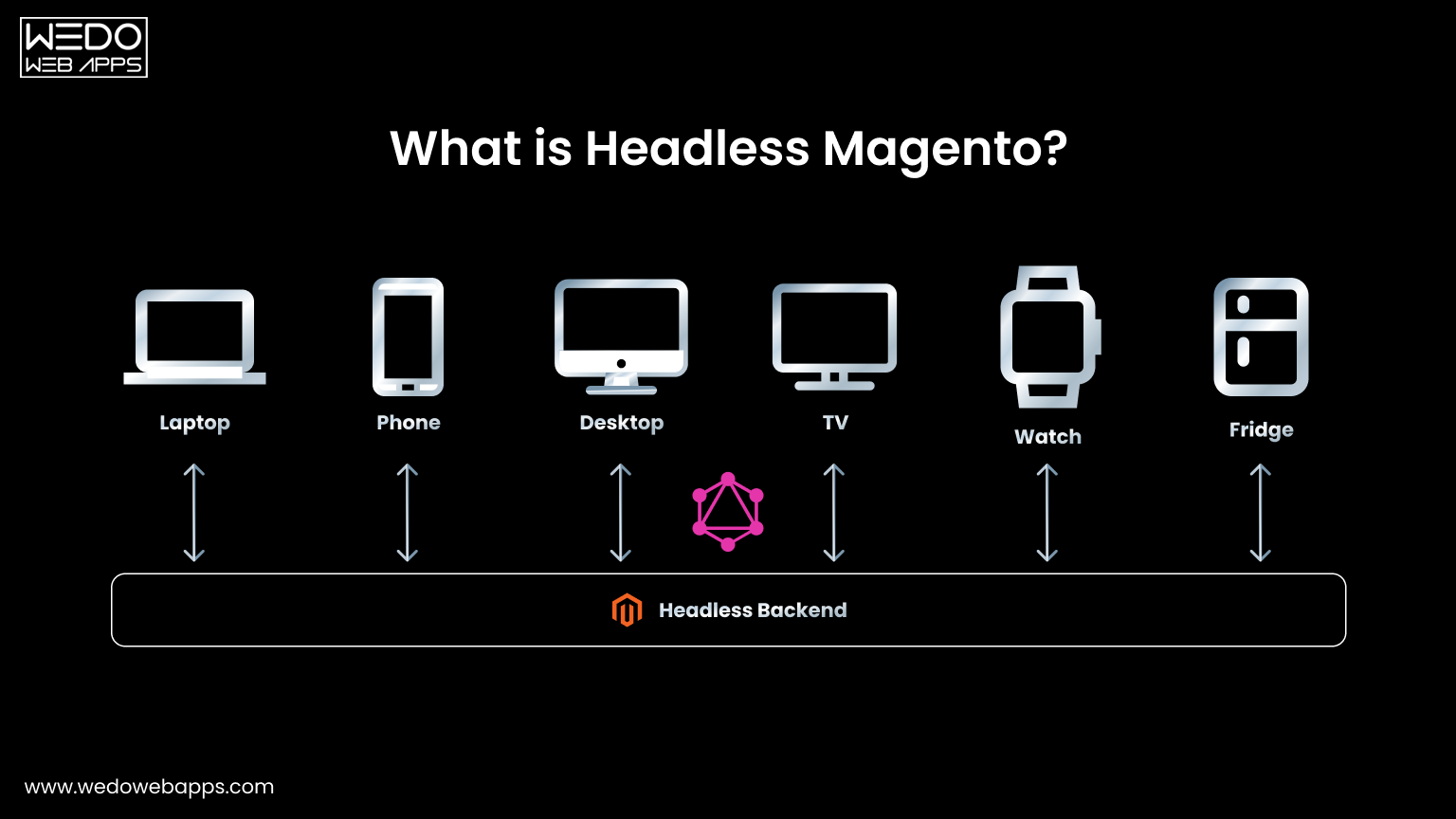
Headless Magento refers to a decoupled ecommerce architecture where Magento functions purely as the backend commerce engine, while the customer-facing frontend is built and managed independently. Instead of relying on Magento’s traditional theme-based rendering, the frontend communicates with Magento through APIs to access commerce data and functionality.

In this model, Magento continues to handle core ecommerce responsibilities, while the presentation layer is free to evolve using modern frontend technologies.

At a high level, headless Magento involves:

  • Magento manages backend commerce logic such as products, pricing, inventory, checkout, and orders
  • APIs act as the communication layer between Magento and external frontends
  • One or more frontend applications are responsible for rendering the user experience

This separation allows ecommerce teams to treat the frontend as a flexible experience layer rather than a tightly coupled extension of the commerce platform.

Key characteristics of headless Magento include:

  • A clear separation between commerce logic and presentation
  • API-first access to Magento’s core capabilities
  • Independence between frontend development cycles and backend updates

By decoupling these layers, headless Magento enables a more modular approach to ecommerce architecture, one that prioritizes adaptability, performance, and multi-channel readiness over traditional storefront constraints.

How Headless Magento Works

In a headless setup, Magento operates as a centralized commerce backend that exposes its functionality through APIs. The frontend, whether a website, mobile app, or other digital interface, consumes these APIs to retrieve data and execute commerce actions without being tightly bound to Magento’s presentation layer.

Rather than rendering pages server-side using Magento themes, the frontend becomes an independent application responsible for user experience, while Magento focuses solely on commerce operations.

From an architectural perspective, headless Magento works as follows:

  • Magento manages core commerce functions such as product catalogs, customer data, pricing rules, promotions, checkout, and order processing
  • APIs serve as the interface through which frontend applications interact with Magento
  • Frontend frameworks handle layout, navigation, interactivity, and experience logic

This decoupling allows each layer to evolve independently, reducing constraints imposed by traditional, tightly coupled storefront architectures.

Common architectural patterns in headless Magento include:

  • A single frontend consuming Magento APIs for a web storefront
  • Multiple frontends (web, mobile, in-store systems) sharing the same Magento backend
  • Integration with external content management or experience platforms alongside Magento

By separating experience delivery from commerce execution, headless Magento enables greater architectural flexibility while preserving Magento’s role as a robust ecommerce engine.

Key Benefits of Headless Magento eCommerce

Benefits of Headless Magento eCommerce

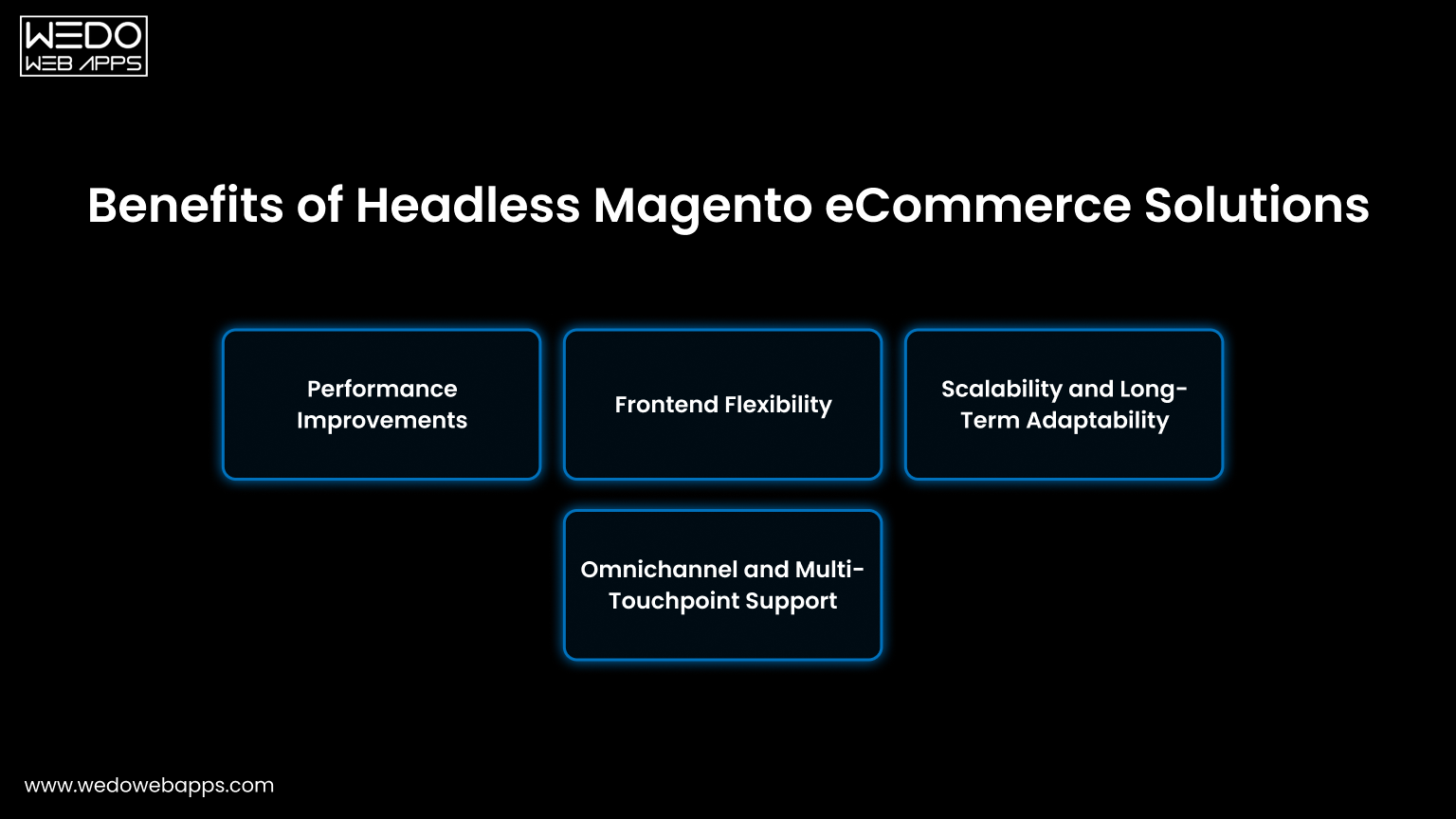
The primary advantage of headless Magento lies in architectural freedom. By decoupling the frontend from the backend, businesses gain greater control over performance, experience design, and scalability while continuing to use Magento as a stable commerce engine.

Below are the key benefits of Magento eStore that drive adoption across modern ecommerce environments.

Performance Improvements

Frontend performance is one of the most cited reasons for moving to headless Magento. Decoupling removes frontend rendering limitations commonly associated with traditional theme-based storefronts.

  • Faster page load times through lightweight frontend frameworks
  • Improved potential for Core Web Vitals optimization
  • Reduced dependency on backend processes for frontend performance

This makes headless Magento particularly attractive for performance-sensitive ecommerce use cases.

Frontend Flexibility

Headless architecture allows frontend teams to work independently from Magento’s backend constraints, enabling faster experimentation and experience iteration.

  • Freedom to use modern JavaScript frameworks
  • Independent frontend release cycles
  • Easier customization of user interfaces and interactions

As a result, the frontend becomes an adaptable experience layer rather than a fixed extension of the commerce platform.

Scalability and Long-Term Adaptability

In a headless Magento setup, frontend and backend components can scale independently based on demand and usage patterns.

  • Backend commerce logic remains stable as traffic grows
  • Frontend applications can be optimized or replaced without reworking core commerce systems
  • Architecture supports long-term evolution without full platform reimplementation

This separation supports sustainable scaling as business requirements change.

Omnichannel and Multi-Touchpoint Support

Headless Magento enables consistent commerce functionality across multiple customer touchpoints.

  • Web storefronts, mobile apps, and emerging digital channels can share the same backend
  • Centralized commerce logic ensures data consistency
  • New channels can be added without disrupting existing experiences

This makes headless Magento well-suited for businesses pursuing omnichannel or experience-led ecommerce strategies.

Headless Magento consultation

Headless Magento vs Traditional Magento

Headless Magento vs Traditional Magento Architecture


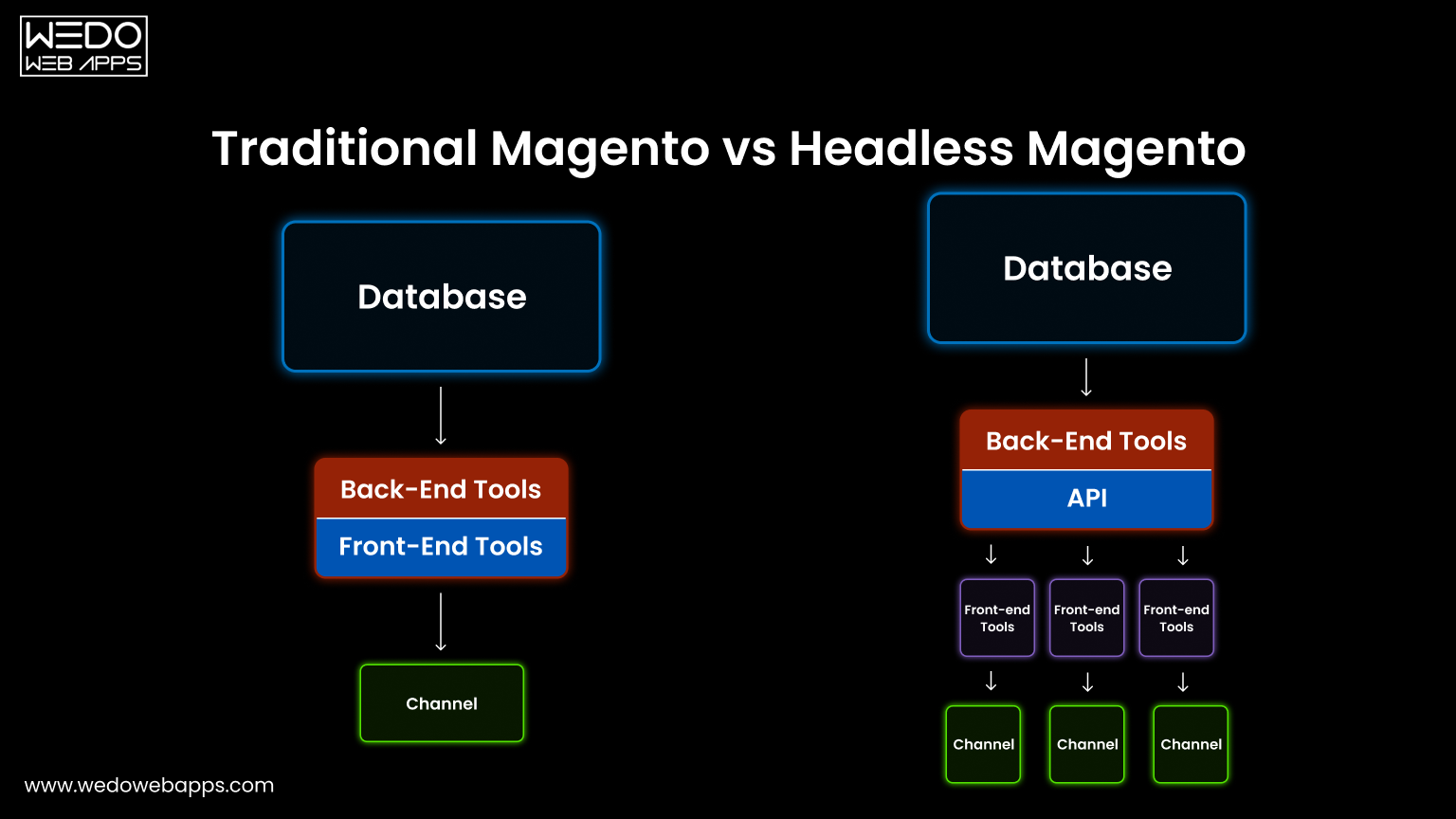
Choosing between headless Magento and traditional Magento largely comes down to architectural priorities. While both approaches use Magento as the core commerce platform, they differ significantly in how frontend experiences are built, delivered, and maintained.

Traditional Magento follows a tightly coupled model where the frontend and backend are part of the same system. Headless Magento, by contrast, separates these layers to allow independent development and scaling.

Key architectural differences include:

  • Frontend coupling
    • Traditional Magento relies on theme-based rendering
    • Headless Magento uses independent frontends consuming APIs
  • Development flexibility
    • Traditional setups follow Magento’s frontend constraints
    • Headless setups allow greater freedom in frontend technologies
  • Performance optimization
    • Traditional Magento performance is influenced by backend processes
    • Headless Magento enables frontend-focused performance tuning
  • Multi-channel readiness
    • Traditional Magento is primarily web-centric
    • Headless Magento supports multiple touchpoints from a single backend

While headless Magento introduces more flexibility, traditional Magento remains a viable option for many businesses.

Traditional Magento may be better suited when:

  • A standard web storefront meets current experience requirements
  • Time-to-market is a higher priority than architectural flexibility
  • Frontend complexity is relatively low

Headless Magento becomes more relevant as experience complexity, performance expectations, and channel diversity increase. Understanding these trade-offs is essential before evaluating headless architecture as a long-term ecommerce strategy.

expert advice on Headless Magento

Headless Magento and PWA Studio

Headless Magento with PWA Studio

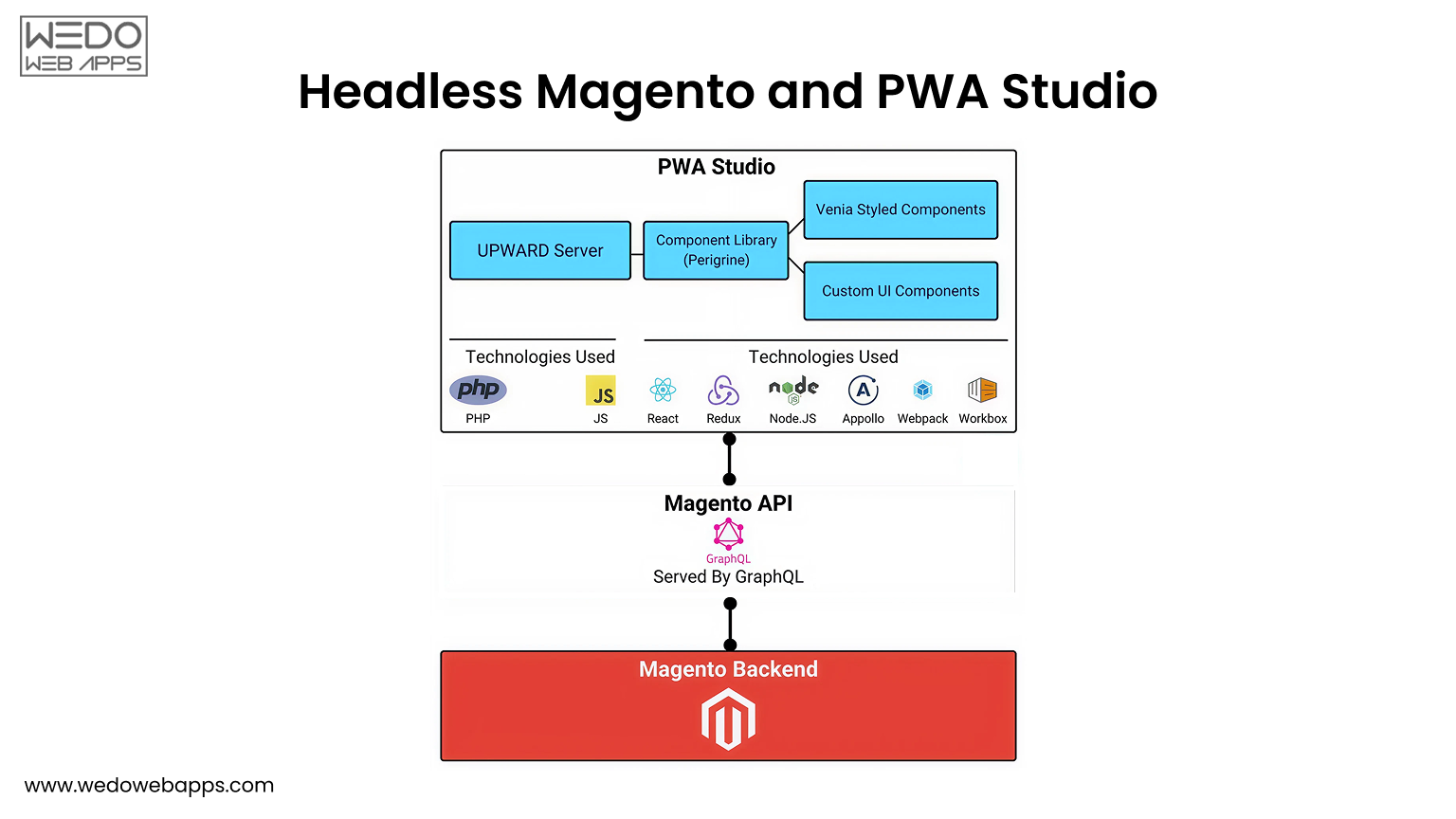
PWA Studio is Magento’s reference framework for building progressive web applications in a headless context. It demonstrates how Magento can function as a backend commerce engine while a modern frontend handles experience delivery through APIs.

Rather than being a requirement for headless Magento, PWA Studio represents one of several possible approaches to frontend development within a decoupled architecture.

In the context of headless Magento, PWA Studio:

  • Acts as a frontend framework designed specifically for Magento’s API layer
  • Illustrates how a PWA can consume Magento Commerce data and functionality
  • Supports app-like experiences such as fast navigation and offline-friendly behavior

It is commonly evaluated by teams looking to adopt a headless approach while remaining closely aligned with Magento’s ecosystem.

However, headless Magento is not limited to PWA Studio.

Depending on architectural goals, teams may choose alternative frontend frameworks or custom experience layers that better align with performance, design, or channel-specific requirements.

Key considerations when evaluating PWA Studio include:

  • Alignment with Magento’s API structure
  • Suitability for the desired frontend experience
  • Flexibility compared to fully custom headless frontends

Understanding the role of PWA Studio helps clarify how Magento supports headless commerce, while reinforcing that frontend choices remain independent in a truly decoupled architecture.

Common Use Cases for Headless Magento

Headless Magento is typically adopted when experience complexity or scalability requirements exceed what traditional storefront architectures can comfortably support. Rather than being a default choice, it is often applied to specific ecommerce scenarios where decoupling delivers measurable architectural benefits.

Common use cases for headless Magento include:

  • High-traffic ecommerce stores: Stores with significant traffic volumes often benefit from decoupled frontends that can be optimized independently for speed and stability.
  • Experience-driven or content-heavy brands: Brands that prioritize customized user journeys, dynamic content, or frequent frontend updates gain flexibility through a headless approach.
  • Multi-channel commerce environments: Businesses operating across web, mobile apps, in-store systems, or emerging touchpoints can centralize commerce logic while delivering tailored experiences per channel.
  • Enterprise or rapidly scaling operations: Larger organizations often adopt headless Magento to support long-term scalability and evolving digital requirements without reworking core commerce systems.

These use cases highlight where headless Magento adds strategic value, particularly in environments where frontend agility and architectural adaptability are critical.

Challenges and Limitations of Headless Magento

While headless Magento offers architectural flexibility, it also introduces additional complexity that is not suitable for every ecommerce business. Understanding these limitations is essential when evaluating headless architecture as a long-term strategy rather than a short-term trend.

Some of the key challenges associated with headless Magento include:

  • Increased architectural complexity: Decoupling the frontend and backend adds more moving parts, which can increase the overall complexity of the system.
  • Higher development and maintenance effort: Managing independent frontend and backend codebases often requires broader technical expertise and ongoing coordination.
  • Greater reliance on frontend performance optimization: Since the frontend is fully responsible for rendering and experience delivery, performance outcomes depend heavily on frontend architecture and execution.
  • Not ideal for simpler ecommerce requirements: For businesses with straightforward storefront needs, the added flexibility of headless Magento may not justify the overhead.

These limitations do not diminish the value of headless Magento but highlight the importance of aligning architectural decisions with business maturity, technical readiness, and long-term goals. If you are also facing challenges during Magento development, hire Magento expert developers for an amazing online presence.

When Headless Magento Makes Sense

Headless Magento is most effective when adopted as a strategic architectural decision rather than a reactive upgrade. Its value depends on an organization’s technical maturity, experience goals, and long-term ecommerce roadmap.

Headless Magento typically makes sense when:

  • Experience requirements extend beyond a standard storefront: Businesses seeking highly customized, interactive, or rapidly evolving user experiences benefit from frontend independence.
  • Multiple digital touchpoints need to share commerce logic: A decoupled backend allows consistent pricing, inventory, and checkout processes across channels.
  • Performance optimization is a critical priority: Teams focused on frontend performance metrics may require the flexibility that headless architecture provides.
  • Internal teams can support architectural complexity: Successful headless implementations depend on the ability to manage and maintain separate frontend and backend systems.

Conversely, headless Magento may introduce unnecessary overhead if experience needs are limited or if architectural simplicity is a higher priority. Evaluating readiness is as important as understanding potential benefits.

headless Magento fits your business

The Future of Headless Ecommerce with Magento

Headless commerce continues to gain relevance as ecommerce platforms evolve toward API-first and composable architectures. Rather than being a short-term trend, headless Magento reflects a broader shift in how digital commerce systems are designed and extended over time.

As customer expectations grow and digital touchpoints multiply, commerce platforms are increasingly expected to integrate seamlessly with content systems, experience platforms, and external services. Headless architecture supports this direction by allowing Magento to function as a specialized commerce engine within a larger, modular ecosystem.

Key factors shaping the future of headless Magento include:

  • Continued adoption of API-driven commerce models
  • Growing emphasis on composability and modular system design
  • Increased separation of experience layers from core commerce logic

Within this context, headless Magento remains relevant not because of frontend trends, but because it enables long-term architectural adaptability in complex ecommerce environments.

Closing Perspective

Headless Magento represents a strategic approach to ecommerce architecture rather than a universal replacement for traditional storefront models. By decoupling the frontend from the backend, it offers greater flexibility, performance potential, and multi-channel readiness for businesses with advanced experience requirements.

However, its value depends on alignment with business goals, technical capabilities, and long-term digital strategy. Evaluated thoughtfully, headless Magento can play a key role in modern ecommerce architecture, supporting scalable, experience-driven commerce without locking organizations into rigid presentation layers.

For teams exploring broader Magento ecommerce architecture and advanced ecommerce development approaches, headless models provide a framework for building adaptable, future-ready digital commerce systems.

Start Your Headless Magento Project

A Step-By-Step Guide To Creating Price Rules For Magento 2 Catalogs

Are you looking for ways to increase sales and customer loyalty in your Magento 2 online store?

Catalog price rules can revolutionize your e-commerce business. 

By offering targeted discounts on specific products or categories, you can make sure your customers buy more and return for more. 

This article helps you understand how to create a catalog price rule in Magento 2, including setting up promotions, defining customer groups, and creating special pricing. 

With this guide, you will learn how to master dynamic pricing with Magento 2 – regardless of your experience level.

What Is the Cart Price Rule?

Cart price rule

The Cart Price Rule is a special rule you define in your store’s configuration that allows your customers to purchase a particular product at a discounted price based on certain conditions you set in your store. Anyone can create this rule without being an extreme couponer. 

Store admins can use Magento configurations to create a coupon code, which customers must enter into the Apply Discount box during checkout. Then, on the Order Review, you can check the coupon value.

With the help of this feature, you can attract customers, increase sales, and create targeted marketing campaigns to increase sales. In addition, you can customize Cart Price Rules in several ways, such as percentage discounts, fixed amounts discounts, free shipping, and more.

Steps to Create Cart Price Rule In Magento 2

With a Cart Price Rule in Magento 2, you can attract more customers and boost your store’s revenue. You can follow this step-by-step guide to create one for your store.

Step 1: Create a New Rule

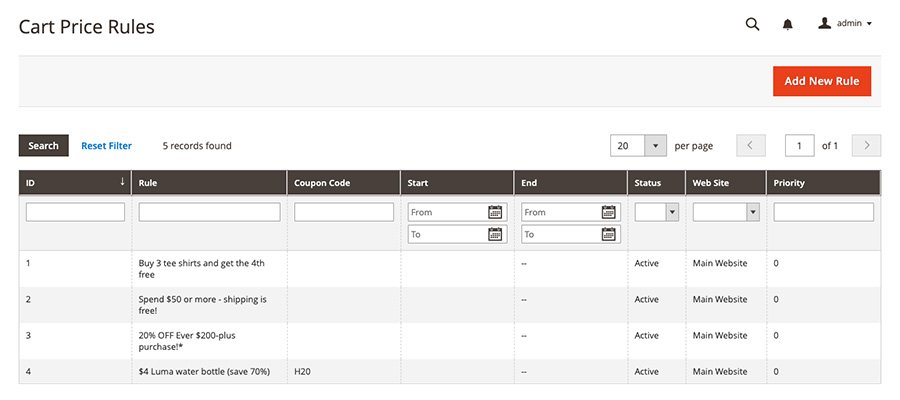
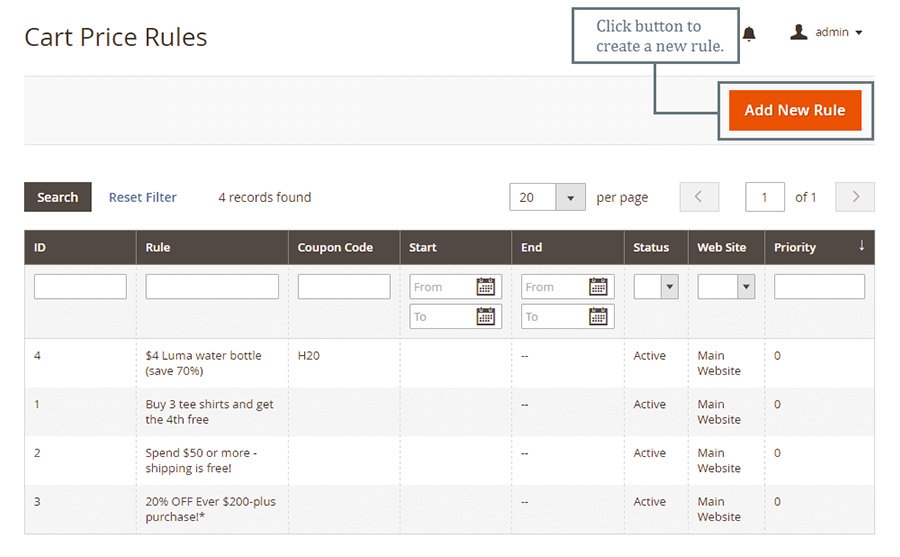
You can find the Cart Price Rule under Marketing > Promotions in the Admin Panel.

Catalog price rule


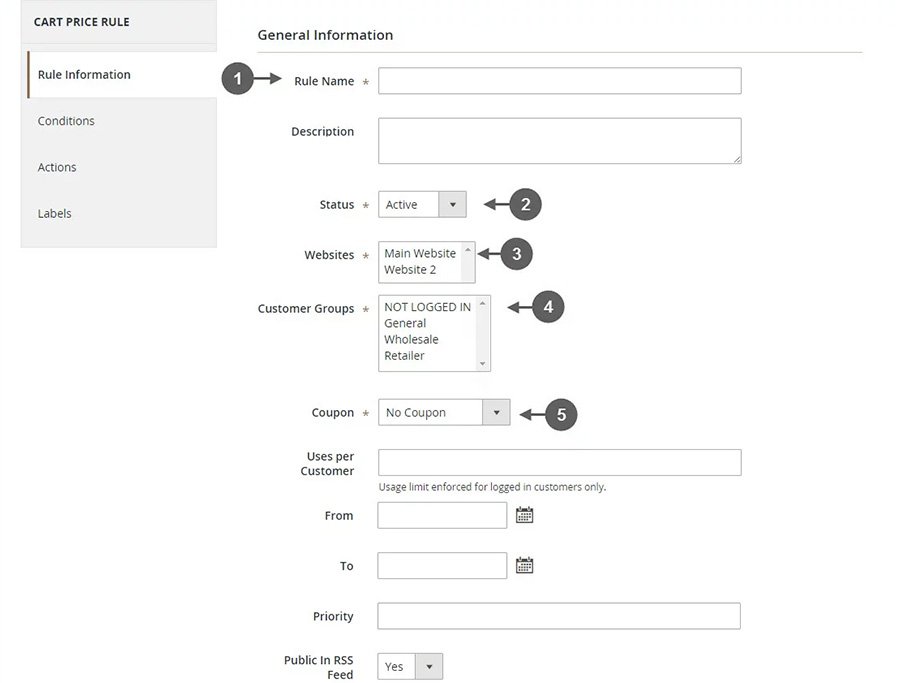
You can add a new rule by clicking on the Add Rule button and filling in four tabs: Rule Information, Conditions, Actions, and Labels.

New cart price

  • Put a name for your rule in the General Information section, and if necessary, write some descriptions.
  • Make the rule Enable when Status is Active.
  • Make sure the rule is assigned to the Website and Customer groups.
  • The promotion is not available for guests that belong to the NOT LOGGED IN group or customers that do not log in to their accounts when placing an order.
  • Select the Specific Coupon option on the Coupon field to enable the rule along with the coupon.
    • Use the Coupon Code when completing the checkout process. After saving the rule, enable the Use Auto Generation checkbox to publish multiple coupon codes.
  • In the Uses per Coupon and User per Customer fields, limit the number of times a coupon is valid. If there is no limitation, leave them empty.
    • The number of uses per coupon is determined by the number of times the coupon code is used.
    • In Uses per Customers, the number of times the same customer uses a coupon code is set.

Step 2: Set the Conditions

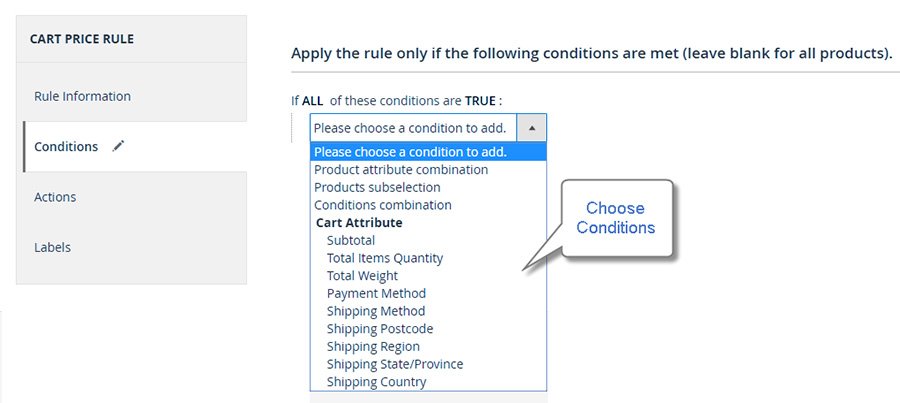
There is a statement in the Conditions tab entitled “If ALL of these conditions are TRUE.”

You can edit the statement by clicking the bold links “All” and “TRUE”.

  • You can choose from ALL or ANY options by clicking the ALL link.
  • You can choose TRUE or FALSE when you click the TRUE link.

If you want to apply to all products, leave the conditions blank Or to remove a statement, simply click the Delete button.

Set the conditions

Step 3: Set the Actions

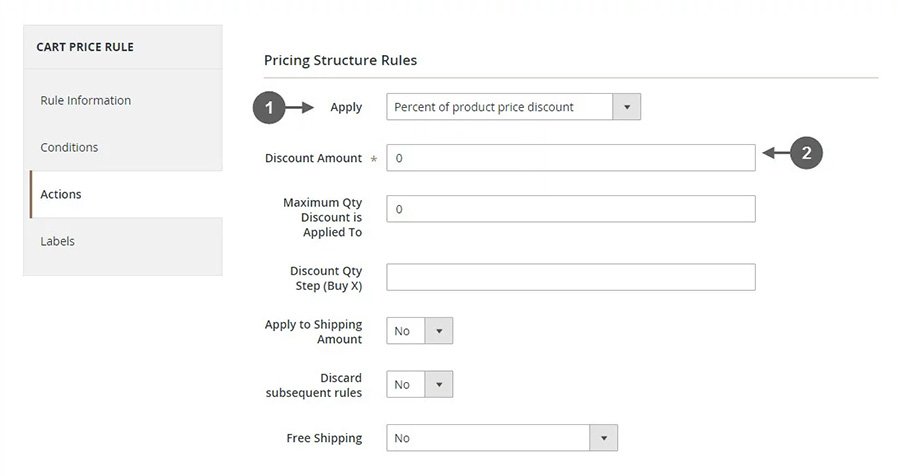
A Cart Price Rule applies to all actions you specify here when all conditions are met.

Set the actions

To change the catalog price rule, click the Action tab on the left panel. In the Apply field, you can select any one of the following options:

  • Percent of product price discount
  • Fixed amount discount
  • Fixed amount discount for whole cart
  • Buy X get Y free

Make sure you only enter numbers for the Discount Amount.

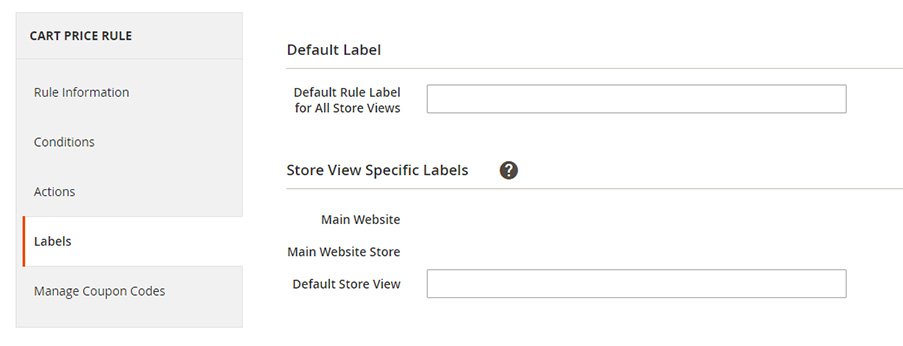
Step 4: Set the Labels

Click on the Labels tab. 

Enter the text in the Default Rule Label for All Store Views section of the Default Label section. 

Set the labels for each store view under Store View Specific Labels.

Set the labels

Step 5: Apply the Rule

Save Rule to finish. That’s it. You have successfully added a cart price rule for your product. Now you understand how to create a Magento 2 Cart Price Rule; you can use it to offer discounts and promotions. 

However, the Cart Price Rule is one of many types of pricing rules you can use in Magento 2. We’ll explore another price rule in the next section: Magento Catalog Price Rule

What Is Magento Catalog Price Rule?

Using Magento Catalog Price Rules, you can assign discounts to products in the catalog based on customer groups, product attributes, and other criteria.

Whenever a product falls under the catalog prices rule, the discount will be applied directly to the product and instantly appear in the catalog.

As a result, customers see discounts when browsing through your store without using coupon codes. In turn, this encourages them to purchase more.

So, What do you need to do to set them up? The answer is

Create Catalog Price Rules In Magento 2

One effective way to optimize your Magento 2 online store sales and revenue is by creating catalog price rules. The following guide explains how to create Magento 2 catalog price rules step-by-step.

Catalog price rule

Step 1: Add A New Rule name

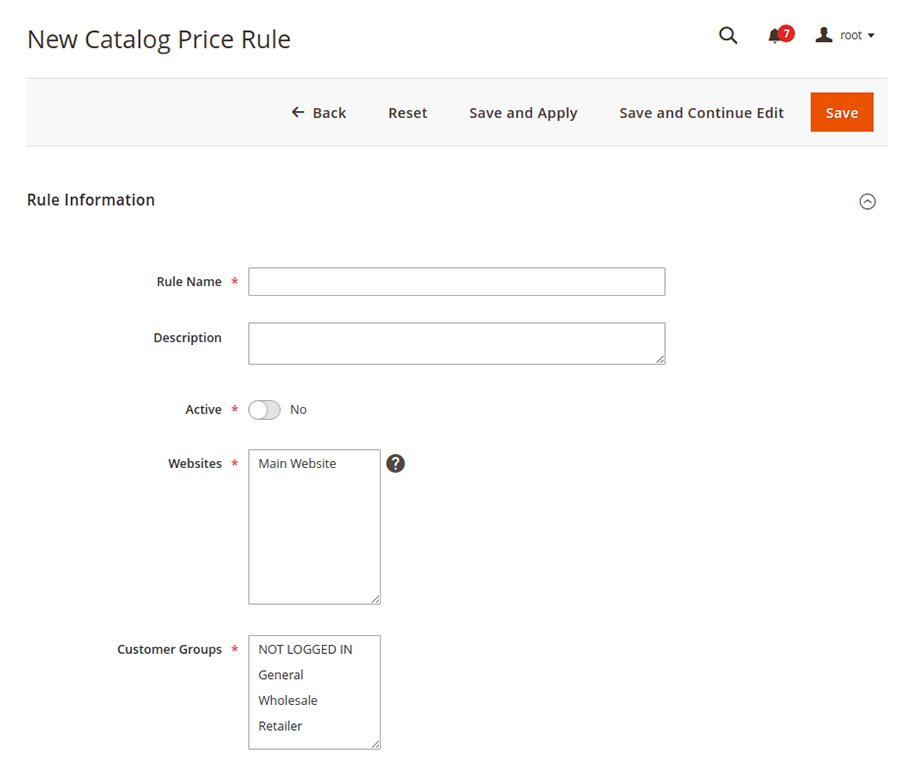
  • Login to Magento Admin Panel, navigate to Marketing > Promotions > Catalog Price Rule and add a new rule.

New catalog price rules

Expand and complete the Rule Information section

Rule Information

  1. Enter the Rule Name and Description, then select Yes to activate it.
  2. Select the price rule that will get applied to the Websites catalog.
  3. Specify the Customer Groups for which this rule should get created.Rule information

Choose the Date From and To, as well as the time frame during which you would like the catalog price rule to be enabled and Prioritize rules.

Note: Prioritizing is crucial Whenever a product meets the same criteria as one or more Magento Catalog price rules, the system applies the rule with the highest priority.

Conditions

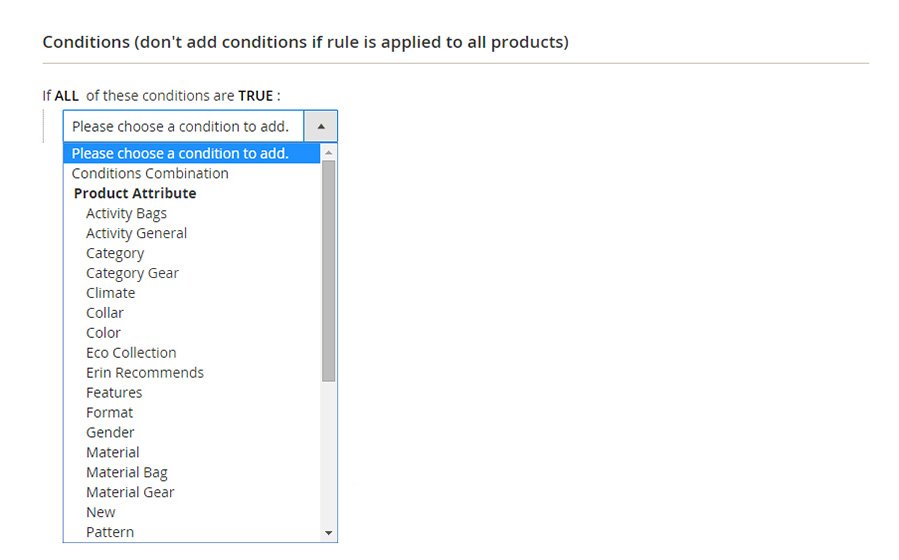
Step 2: Define The Conditions

You will define the conditions in this section based on the attributes of the products to be used in the rule. Leave the conditions blank if you are not going to apply the rule to all product attributes.

Following these guidelines will help you expand the Conditions section:

Select Condition

Choose the condition under which the rule applies to all products. As a default, the first condition states: All of the conditions are TRUE.

Choose any of the following:

  1. Click ALL and select ALL or ANY.
  2. Click TRUE and select TRUE or FALSE.
  3. The condition can be left unchanged if you want to apply it to all products.
Add Conditions

 To add a new item, click Add(+) icon and select:

  • Conditions Combination
  • Product Attribute

Once you have completed all conditions, repeat the process.

Note: Click on the Delete (Delete icon) if you want to delete a particular condition statement portion.

Step 3: Define The Actions

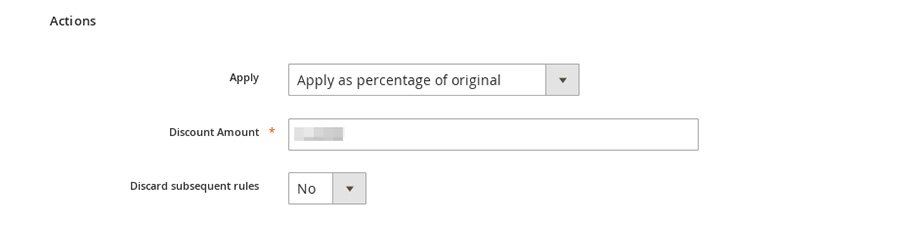
Define the actions

Here, you define actions that apply to the products based on the above conditions.

1: The first step is to expand the Action and select the method for applying the discount. Choose from the following options:

  • Apply as a percentage of the original
  • Apply as a fixed amount
  • Adjust final price to this percentage
  • Adjust final price to discount value

2: Discount Amount: Select the Discount Amount from the drop-down menu. According to your chosen method, the discount amount will be calculated in either percentage or currency.

3: Discard subsequent rules: If there are any subsequent rules, select Yes.

To further enhance your store’s profitability, explore how our tailored Magento pricing strategies can meet all your e-commerce needs.

Step 4: Save And Test The Rule

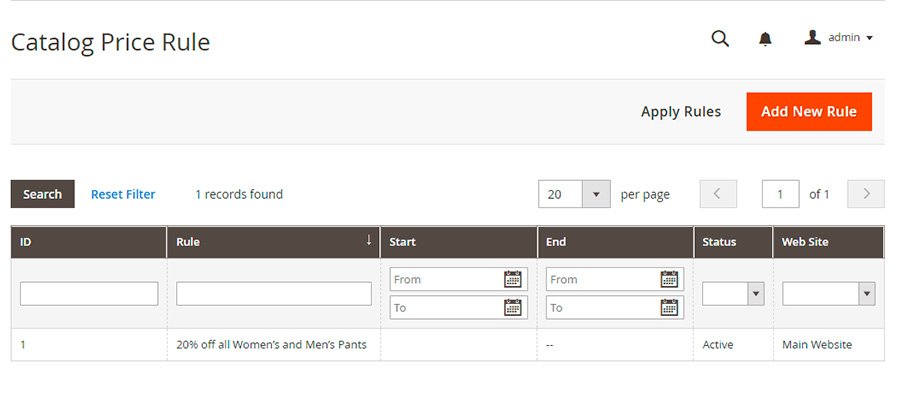
Save the changes at the top of the page to complete the process. This will redirect you to the Catalog Price Rule page. Then click the Apply Rules button.

Field Descriptions

Rule Information

  • Rule name (Required): This is for internal reference only.
  • Description: Describe how the rule is used and its purpose.
  • Websites (Required): List of websites where this rule can be applied.
  • Customer Groups (Required): Lists the customer groups affected by the rule.
  • Priority: A number indicating the relative importance of this rule. The highest priority is 1.
  • Status (Required):  Indicates whether the rule is currently active. Options: Yes / No
  • From: The date on which the price rule takes effect If left blank, the rule takes effect immediately.
  • To: specify when the price rule will end. If left blank, the price rule will continue indefinitely.

Conditions

It specifies when a catalog price rule goes into effect and the conditions that must be met. If left blank, the catalog price rule applies to all products.

Magento development services

Actions

  • Apply determines how the purchase is calculated. Options:
    • Apply as percentage of original – Decreases price by a percentage.
    • Apply as fixed amount – Subtracts a fixed amount from the regular price.
    • Adjust final price to this percentage – Reduces the final price by a percentage.
    • Adjust final price to discount value – Determines the final price based on a fixed, discounted amount.

Note: The regular price refers to the base product price without any advanced pricing (specials, tiers, or group discounts). The final price is the discounted price displayed in your shopping cart.

  • Discount Amount (Required) – This is the amount of the discount.
  • Discard Subsequent Rules – Determines whether this purchase is eligible for additional rules. Select Yes to prevent multiple discounts from being applied to the same order. Options: Yes / No

The Difference Between Catalog Price and Cart Price Rule

The Catalog Price Rules and Cart Price Rules might create confusion as they both serve the same purpose, namely to manage and manage discounts on your store. However, you can still distinguish them based on the following characteristics:

A catalog price rule is a special discount applied in a catalog so customers can see it while surfing the website. If conditions are met, discounts will be applied automatically without needing a coupon code. 

Looking to make the switch? Learn how Squarespace to Magento migration can give you greater control over pricing and enhance your e-commerce capabilities.

The product attributes determine a product’s price so that the after-discount price will be displayed on the checkout page and in the cart. As a result, customers cannot see the discount amount in these steps.

Meanwhile, Cart Price Rules are applied to the shopping cart based on shopping cart attributes so that customers can only see the sale when they are at the checkout stage.

The Cart Price Rules can get adapted with a coupon. Shoppers can apply coupons to online stores, or else discounts are automatically applied. This type allows the discount amount to be seen in the cart and during checkout.

Magento development services

You can also use the cart price rule for shipping fees, which is not allowed with catalog price rules.

Understanding the differences between these two concepts will help you create one that is appropriate for your store.

Read More: 18 Best Magento Migration Companies All Over The World

Conclusion

You can boost your online store’s sales and customer loyalty with catalog price rules in Magento 2. You can encourage customers to purchase more and return for future deals with targeted discounts on specific products. You can also streamline your sales and marketing efforts by implementing catalog price rules, which can help you better manage your pricing and promotions.

You can differentiate your store from competitors by mastering Magento 2’s catalog price rules, which will drive more sales and keep your customers coming back for more. In the rapidly evolving world of e-commerce, catalog price rules can help businesses of all sizes achieve their sales and marketing goals. To fully leverage your pricing strategies, consider our comprehensive Magento development services that can enhance every aspect of your e-commerce site.

How To Ruin Your SEO When Migrating to Magento 2

Magento 2, pays greater interest in designing and upholding the best SEO practices for your website. However, it is quite obvious that the businesses may get  a hit on their website traffic due to SEO loss while migrating from Magento to Magento 2.

There are several reasons for the SEO loss during the change. Here, we will try to about the important parameters that usually get affected the most and its solutions to get the best results.

What Happens To SEO In The Migration Process?

Over time, your website has gained organic visibility and equity, which has helped you rank for keywords and searches that potential customers and clients use to find your website. 

What search engines know about your website and the metrics they use to give you rankings change when you change your URLs, content, and website. Therefore, any website migration aims to minimize traffic losses to the greatest extent possible; implementing a comprehensive SEO migration prevents losses.

Common Mistakes That Leads To Ruining of SEO + Ways To Fix Them 

1.  Content Deletion Because No One Reads It Anymore

Do you want to read a fun stat about your traffic? Microsoft’s study reveals that the average human attention span has shrunk from 12 seconds in 2000 to 8 seconds in 2018. 

Therefore, more engaging content is required to encourage visitors to remain on your website for longer. Videos or high-quality visuals that can be zoomed in to see the product in detail are great ways to engage customers and show off the effects.

Reducing the amount of text on the website is usually logical because of changes in customer behavior. However, search engines still place a high value on original content when determining the search engine results pages rankings (SERPs). 

Therefore, keep the fundamentals in mind when planning to migrate your website to Magento 2.

Ways To Fix This Problem

The most secure strategy for avoiding search engine rankings drops is to: either completely migrate the content or spend some time analyzing what, from an SEO standpoint, is worse to migrate and what can be left out because it will only help a little.

SEO professionals frequently place the text directly above the footer to ensure the store is manageable with descriptions. Search engines still read it, but it does not prevent website visitors from purchasing the product.

2. Don’t Have A Clear Go-live Procedure

301 mapping is something you should care about. 404 errors are your biggest enemy! If it is not done correctly, it will affect all traffic channels, including email, paid, organic, social, and referral.

If you changed your old website’s URL to 

https://www.example.com/my-amazing-product 

from https://www.example.com/my-product

People who click on the old URL in search results, bookmarks, emails, Facebook posts, blog posts, etc., will open a page with the error 404 (Not Found), which can be dangerous! 

Ways To Fix This Problem

You should move the URLs of pages that do well so that you don’t need 301 redirects in the first place.

Map the critical URLs, such as CMS, categories, and products, if URLs are changing. From an SEO point of view, with valuable backlinks and quality traffic, you can keep the score intact.

3. Launch The Website Without 301 Mapping.

Unfortunately, there is no hard and fast rule to direct the same SEO techniques for all. Although most SEO practices apply to almost every eCommerce store, specific settings may cause more harm than good in some instances.

For instance, if you use Google to search for the robots.txt file for Magento 2 and blindly copy any robots.txt file that comes up, you risk hurting your SEO by blocking URLs that shouldn’t be stopped. That may save some money on the crawl, but it will lower rankings overall.

Ways To Fix This Problem

Based on the particulars of your store, developer requirements should be crystal clear. Make your configurable products, like smartphones with different memory, indexable with additional on-page optimization if they have variants that can rank independently and attract visitors with high shopping intent. 

Keep such pages out of the index to avoid spending crawl budgets on low-quality URLs if there are no searches for your product variants, such as people not looking for specific shoe sizes.

Before going live, any setup should be tested for quality and, ideally, cross-checked after.

Ensure a seamless Magento 2 migration with the guidance of a trusted digital marketing company USA, protecting your SEO throughout the process.

4. Don’t Go Live Without Proper Data Tracking

Do you know that roughly 90% of the setups for Google Analytics are somehow broken?

The decisions made during the planning phase can be validated, and, if necessary, improvements can be planned by properly tracking eCommerce data and traffic.

Ways To Fix This Problem

Similar to SEO, Analytics should have its own set of requirements.

  • Use QnA for Test and live environments
  • Check with Google Search Console (or, in some cases, Bing or/and Yandex webmaster)
  • Keeping SEO Until The Last Minute

Keeping SEO for the last minute can ruin the SEO for your firm. So often, clients involve their contracted SEO firms to support the project’s migration. But it must be remembered that the indulgence of the SEO agencies varies significantly from firm to firm.

Unfortunately, the agency may only be contacted during the project. Therefore, an agency’s post-migration audit of the new website may be the only deliverable. In such a scenario, the Live website might have serious SEO errors for some time due to this delay in checking it not checking at all. 

migrating to Magento 2

5. Not Involving SEO professionals before migrating to Magento 2:

  • Most technical SEO best practices in Magento 2 can be implemented with extensions. However, if requested too late, optimization of page speed—for instance—may impact the project’s timeline. Additionally, no one enjoys missing deadlines.
  • Due to SEO, you might have to redo some functionality on some custom projects. For instance, if you want the URL structure to match the more complex structure of your existing site, remodeling everything before go-live may require additional resources.
  • Suppose SEO is not included in the project’s scope, but your Magento store relies on organic traffic. In that case, you may experience a significant drop in traffic after the store is launched.

Ways to Fix This Problem 

  • Goals! 

Set predetermined goals and stride towards achieving them. There are many scenarios in setting goals for SEO, but having a clear plan will make it easier to put tasks in order, help you save money, and help you get the results you want.

Include the SEO team in preparing detailed requirements for SEO implementation at the start of the project based on benchmarking the current website, such as migrating URL structure for specific pages or the entire website, so that the development team is aware of what you want from SEO from the start.

  • Convene on a Q&A procedure for implementing changes that developers, your in-house SEO team, or a third-party SEO company will carry out.
  • Before going live, conduct SEO technical audits to ensure all significant bugs have been found and fixed. 
  • Prepare a concise task list for developers to follow during go-live.
  • Organic traffic KPIs should be closely monitored for at least a few weeks after go-live.

How to Migrate to Magento 2 Without Harming Your SEO Performance and Results?

When migrating to Magento 2, you need to follow the following steps with respect to SEO:

  • Crawl the current site.
  • Keep track of your targets.
  • Create a URL map.
  • Check that titles, meta descriptions, and HTML markup are preserved.
  • Test the new version on a test server
  • Select an appropriate migration date.
  • Prepare to update the DNS settings of your website.
  • Launch
  • Explore the new website.
  • Find and fix content that is missing or duplicated.
  • Look for chains of redirects.
  • Make sure that Google Search Console and Analytics are used.
  • In Analytics, mark the date.
  • Send sitemaps in.
  • Keep an eye on your work.
  • Audit the site.
  • Refresh your platforms.
  • Request backlink updates from publishers.

1. Crawl The Current Site 

Before migration, crawl the current location. The URLs and markup on your website are retrieved by search engine crawlers, who “see” this information in the same way that Google would.

When you crawl, you get a list to look at in case something gets lost in translation and a starting point for your URL mapping (more on that later). Then, you can crawl your website by using a tool from a third party like Screaming Frog.

2. Keep Track Of Your Targets

During a site migration, analytics data may be lost in some instances. However, because historical benchmarks can be valuable, it is best to keep them.

Also, look over your analytics and ensure you know how visitors currently move around the site and which pages are most valuable to you. Your decisions regarding the website redesign and site architecture can benefit from this context.

3. Create A URL Map

You will need to implement redirects to direct Google and your website visitors from your previous URLs to your new ones if you are making significant changes to the URLs on your website.

From a usability standpoint, you shouldn’t give users a 404 status code error if a page no longer exists. Instead, they should be directed to the page that has replaced the previous page.

Your SEO could improve significantly if you use correct redirects. They inform visitors of your website and search engines that a page has changed, whether it has been removed or no longer exists. Additionally, they tell search engines which new pages have replaced older ones.

If there aren’t “perfect” replacements for every piece of content, don’t worry. Instead, please make every effort to direct your users in their intended direction.

Look for patterns in your URLs that can be redirected in groups or sections to save time if you have a lot of pages. Manual mapping is probably only an option if you have a few pages.

It is necessary to migrate any redirects that already exist. Make sure your URLs are mapped before testing redirects to ensure that you have backups in case you lose them, and try to keep as many existing redirects as possible to reduce workload.

4. Check To See That Titles, Meta Descriptions, And HTML Markup Are Preserved

Keep in mind that website migrations aid in the organization of websites. As a result, pages should be consistent and include the same catalog data as before.

Titles, meta descriptions, and HTML markup can be permanently changed, but you should still ensure that each page has the correct information.

5. Test The New Version On A Test Server

You will not completely understand the functionality and implementation of the new website if you only look at mockups or test them locally. Therefore, test drive it online before the official migration to ensure a smooth transition.

6. Select An Appropriate Migration Date

No matter what, glitches will occur, but you can minimize them by avoiding peak times. Like if your traffic is high during the day, plan the migration in the night. 

7. Migration Day Prepare To Update The DNS Settings Of Your Website

“Pointing” to the new location of your website will be a part of the process if you move it to a different server. Work with your web/IT team or both new and old hosting providers.

8. Launch

Establish your forwarding redirects, depublish them, and put them into action.

The website might be temporarily unavailable if DNS changes were involved. The migration should be nearly instantaneous if you are not switching platforms or servers.

9. Explore The New Website

You can conduct a crawl to determine whether the new site has been migrated in the manner you anticipated. A few things to look for include proper crawl ability and indexability.

10. Find And Fix Content That Is Missing Or Duplicated

Check the search engine crawlers report to see if there are any unusual findings, such as duplicate content, 404 errors, or broken links. You should also look around the new website for problems.

Magento to Magento services

11. Look For Chains Of Redirects

You now have a lot of new redirects as a result of the migration of your website. Chains could be formed if redirects were already in place. Fix Them. Fixing should be operational on the same day to prevent reporting or data gaps.

12. In Analytics, Mark The Date

You can make “Annotations” of significant dates or events with Google Analytics. Unless you choose a new Analytics setup, this can help you contextualize the data and measure performance before and after the migration.

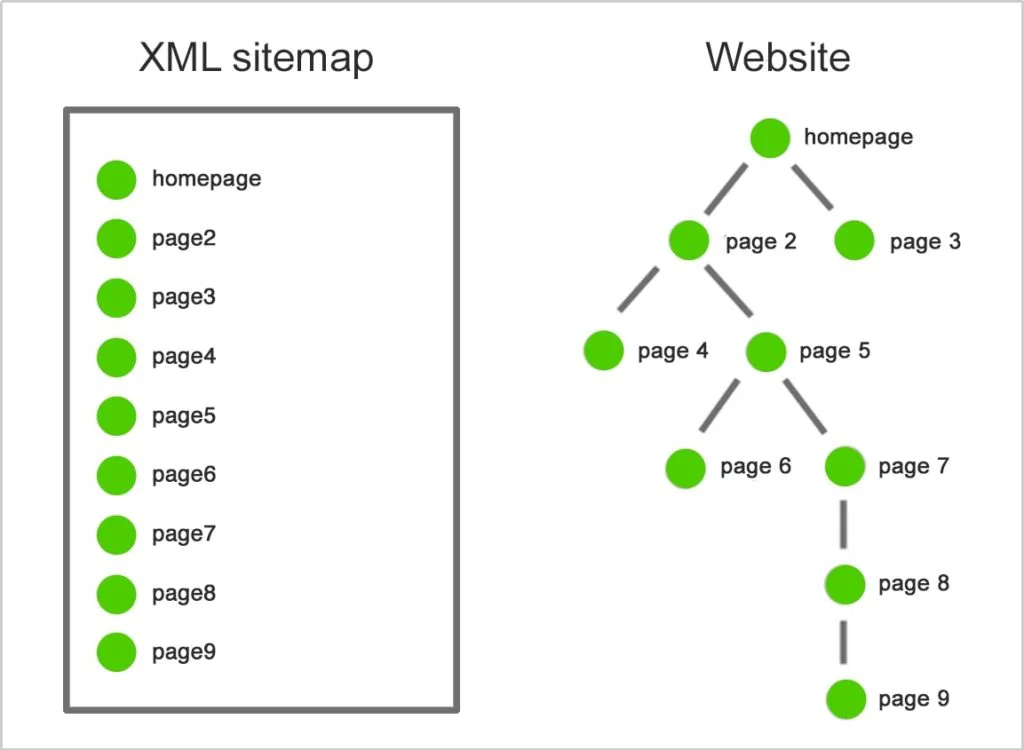
13. Send Sitemaps In

Ensure your XML sitemap does not contain any errors once everything is up and running. After that, you can invite Google to crawl the new implementation by submitting the sitemap through Google Search Console.

14. After The Migration, Keep An Eye On Your Work

Even though there may be brief drops in traffic following a migration, you should still monitor your analytics to ensure that nothing significant was missed that could affect performance.

15. Audit The Site

Third-party tools may occasionally uncover issues that you were unaware of. 

16. Refresh Your Platforms

Make sure to add new inbound links whenever you have ads running on other platforms that may be using outdated URLs.

17. Request Backlink Updates From Publishers

You will still receive traffic and authority from your backlinks if your redirects are implemented correctly. However, using the most recent URLs is still recommended. With this in mind, let the publishers of your most valuable links know about the switch.

Conclusion 

SEO for Magento 2 necessitates SEO expertise and a large number of settings. In addition, it takes time to improve the ranking significantly, but the corresponding increase in sales makes an effort well worth it. 

As a result, to fully optimize your website for search engine optimization (SEO), you should look for a third-party tool like the Magento 2 SEO extension. Also, these above-mentioned tips can make your website more SEO-friendly than ever!

An In-Depth Magento 2 Migration Guide For 2026: Build an effective E-Commerce Store

Introduction

Magento officially ended support for Magento 1 in 2020, leaving many Magento store owners at a crossroads.

Due to complications involved in the migration process, most vendors have not yet migrated to Magento 2. If you are one of them, you are in the right place.

Let us convince you that Magento 2 is worth giving a shot, all thanks to the incredible features that are totally missing from version 1.

You won’t regret the migration, we promise.

So, we won’t take much of your time. Here we present the most comprehensive guide (literally) to help you understand the Magento data Migration tool and enable migration to Magento 2 smoothly to build a successful e-commerce platform with the help of Magento development services.

This Magento 2 migration guide will brief you on two things:

  • Data Migration steps
  • Magento database migration tool

And if you are too afraid, too busy to migrate it yourself, don’t worry. Hire a Magento migration company to do it for you.

So, let’s begin.

What Is Magento 2?

Magento, at the start of its journey, met with resistance from vendors. And why not? Migrating large stores to new platforms can bring unnecessary issues.

However, Magento 2’s extremely powerful features cannot be sidelined. It’s not just a march for something new, as Magento 2 definitely provides superior features.

The Rise of Magento 2 Can Be Due To Various Factors.

  • Extraordinary Architecture
  • Full Page Caching
  • Enhanced SEO
  • Multilingual Support
  • Payment Gateways
  • Exceptional Enterprise Features

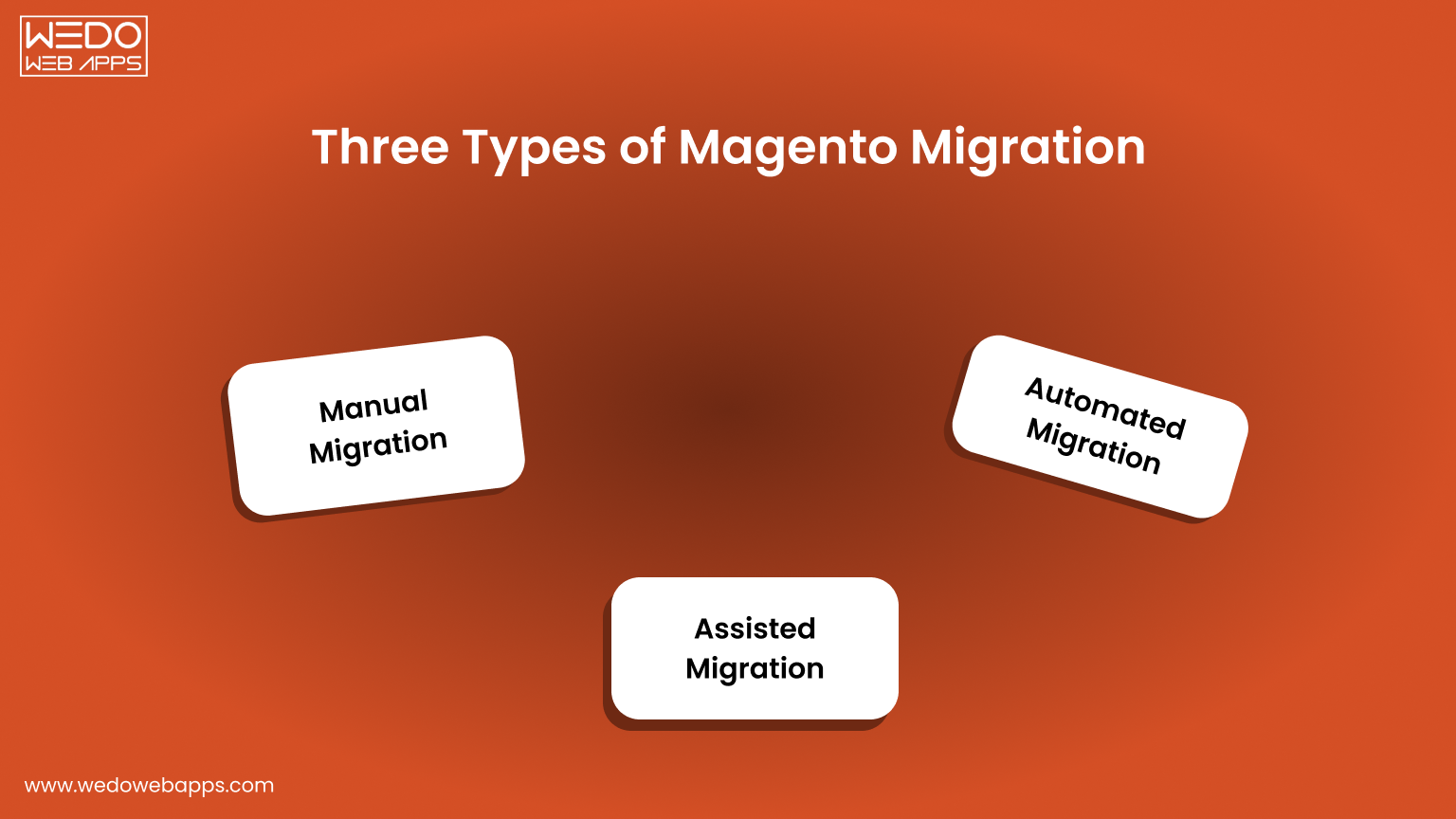
Three Types of Magento Migration: Which One Is Better For You?

Three Types of Magento Migration

Method #1: Manual Migration

Manual Magento Migration is the process of manually transferring data, configuration, and customization from a Magento 1 installation to a Magento 2 installation. There are usually several steps involved in this process, such as:

  • Data Backup
  • Media file and Data Transfer
  • Theme and Extension Migration
  • Customization and Configuration Migration
  • Testing and Debugging

Manual Magento Migration can be a time-consuming and complex process, but it can be a cost-effective solution for businesses with limited budgets or custom requirements.

However, it is recommended to seek assistance from a professional Magento developer to ensure that the migration is done correctly and to minimize potential risks in building an E-commerce platform.

Method #2: Assisted Migration

Assisted Magento Migration is a process of migrating from Magento 1 to Magento 2 with the assistance of a professional migration service provider.

Assisted Magento Migration provides a more streamlined and efficient process than manual migration, as the migration service provider takes care of all the technical aspects of the migration, freeing up the business to focus on more pressing matters.

Additionally, assisted migration can reduce the risk of data loss or other migration-related issues. However, choosing a reputable and experienced migration service provider is important to ensure a successful migration.

Method #3: Automated Migration

Automated Magento Migration is a process of migrating from Magento 1 to Magento 2 using an automated Magento migration tool and software. This type of migration typically involves the following steps:

Automated Magento Migration is the most efficient and quickest way to migrate from Magento 1 to Magento 2, as the automated Magento data migration tool handles most of the technical aspects of the migration, freeing up the business to focus on other important tasks.

However, choosing a reliable and tested automated Magento migration tool is important to ensure a successful migration and minimize the risk of data loss or other migration-related issues.

Get your Magento migration plan in 48 hours

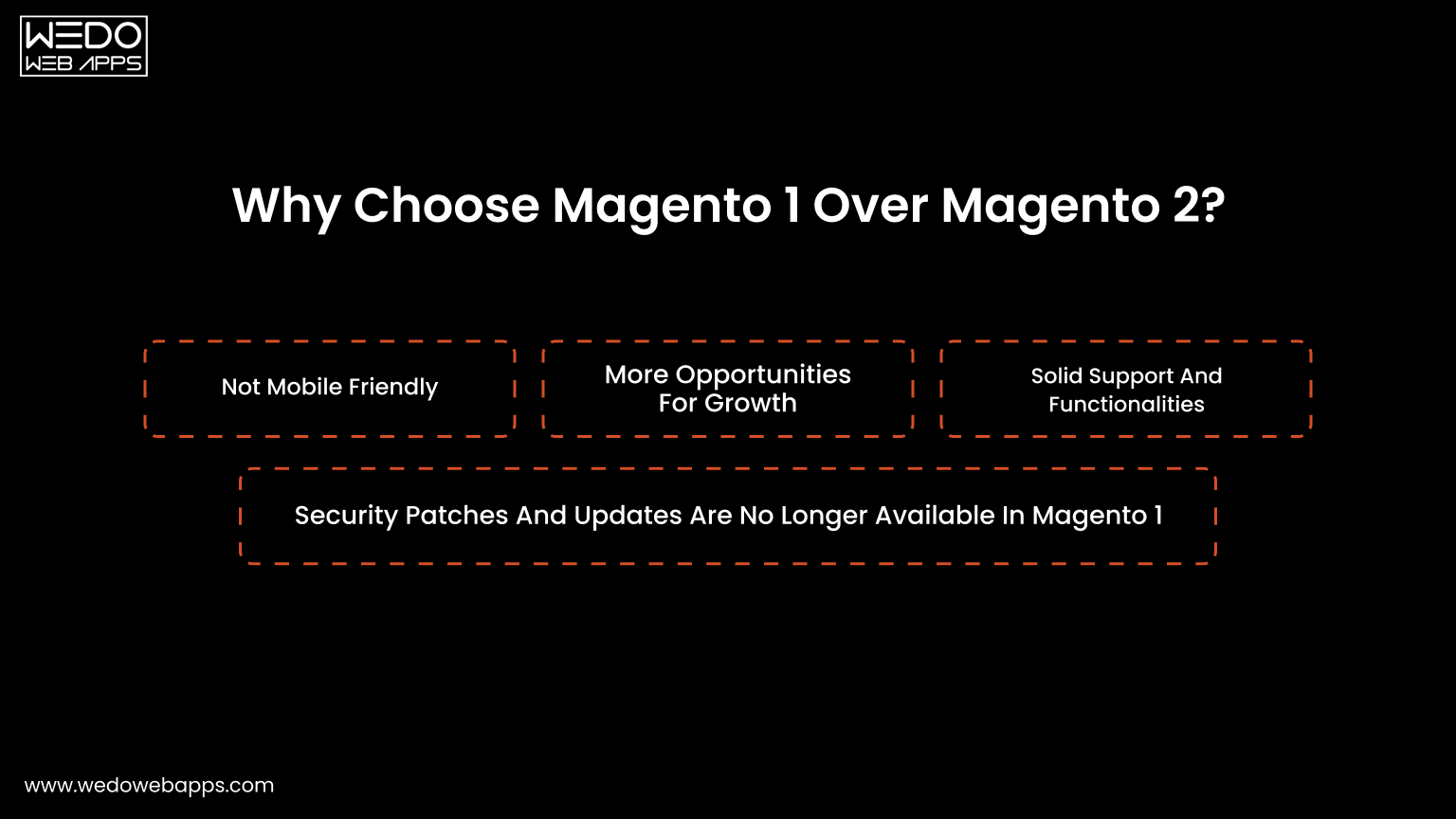
Why Choose Magento 1 Over Magento 2?

Why Choose Magento 1 Over Magento 2

Reason #1: Not Mobile Friendly

Migrating to Magento 2 can improve the mobile-friendliness of your website or E-commerce platform for several reasons:

  • Responsive Design: Magento 2 has a responsive design framework, which automatically adjusts the layout and display of the website to fit different screen sizes and devices.
  • Mobile-Optimized Checkout: Magento 2 has a mobile-optimized checkout process that is faster, simpler, and more convenient for customers to use on mobile devices.
  • Enhanced User Experience: Magento 2 has improved navigation and mobile-friendly interface design to provide a better user experience on mobile devices.
  • Advanced Mobile Features: Magento 2 includes features like touch-friendly product sliders, swipe-to-delete in shopping carts, and mobile-specific promotions and discounts, which enhance the mobile shopping experience for customers.

Overall, migrating to Magento 2 can help you deliver your customers a better and more mobile-friendly eCommerce experience.

Reason #2: More Opportunities For Growth

Migrating data to Magento 2 can provide growth opportunities for your business in several ways:

  • Improved Scalability: Magento 2 is designed to support high-traffic websites, making it easier for businesses to handle increased customer traffic and growth.
  • Advanced Marketing and Sales Tools: Magento 2 offers a range of tools to help businesses increase sales and customer engagement, such as customer segmentation, dynamic product bundles, automated email marketing campaigns, and Magento catalog price rules that streamline promotional strategy.
  • Improved Search Engine Optimization (SEO): Magento 2 includes built-in SEO tools, such as rich snippets and improved URL structure, which can help improve search engine rankings and visibility, leading to more organic traffic and sales.
  • Access to the Latest Technology: Magento 2 is designed to work with the latest technologies, including PHP 7 and HTML5, which can help improve website performance and provide new opportunities for innovation and growth.

Reason #3: Solid Support And Functionalities

Migrating to Magento 2 can address the issue of no support and missing functionality in Magento 1 in several ways:

  • Technical Support: Magento 1 has reached end-of-life and is no longer receiving technical support from Magento. Magento 2, on the other hand, continues to receive regular security updates and technical support from Magento.
  • New Features and Functionalities: Magento 2 includes exceptional enterprise features and functionalities that are not available in Magento 1, such as improved checkout process, enhanced reporting and analytics, and better customer engagement tools.

By migrating to Magento 2, you can take advantage of these benefits and ensure that your E-commerce store and website continue to be supported and functional, providing a better experience for your customers and helping your business grow.

Reason #4: Security Patches And Updates Are No Longer Available In Magento 1

Migrating to Magento 2 is a good solution for security patches and updates no longer available in Magento 1.

  • Ongoing Support: Magento 1 has reached end-of-life and is no longer receiving technical support or security updates from Magento. Magento 2, on the other hand, continues to receive regular security updates and technical Multilingual Support.
  • Improved Security Features: Magento 2 includes enhanced security features, such as protection against cross-site scripting (XSS) and cross-site request forgery (CSRF) attacks, making it a more secure platform for your eCommerce website.
  • Compliance with Security Standards: Magento 2 is built to comply with current security standards and best practices, helping to protect your website from potential security threats.

By migrating to Magento 2, you can ensure that your website continues to be secure and protected from potential security threats, providing a better experience for your customers and helping your business grow.

Magento 2 has additional website categories with improved usage coverage. It consists of 13 other categories aside from lifestyle, home & garden, e-commerce & shopping, computers, and electronics & technology.

Magento 1 vs Magento 2 Market Share by Category
Category Magento 1 Market Share Magento 2 Market Share
Lifestyle 3,166 websites 5,232 websites
Home & Garden 2,024 websites 3,926 websites
E-commerce & Shopping 2,444 websites 3,220 websites
Sports 1,250 websites 1,911 websites
Gambling 78 websites 62 websites

How to Avoid Migration Failure: Risks & Solutions

How to Avoid Migration Failure

Ignoring Magento 2 migration puts your store at serious risk. And below are the comprehensive breakdowns of every major risk, its business impact, and exactly how to avoid it.

Magento Migration Risks, Business Impact, and Solutions
Risk Business Impact Solution
PCI Compliance Fines up to $100,000/month; loss of payment gateways. Migrate to Magento 2 for ongoing PCI DSS compliance.
Scalability Site crashes under traffic, limiting growth potential. Use Magento 2 layered architecture and MySQL clustering.
Performance & Speed High bounce rates; lost sales due to slow load times. Deploy Varnish Cache and CDN alongside migration.
Incompatible Integrations Payment, delivery, and CMS tools stop working. Audit all extensions and map to Magento 2 Marketplace equivalents.
Lost Conversions Magento 1 converts at 1.1% vs Magento 2 at approx. 2%. Prioritise UX and mobile optimisation in migration plans.

Risk 1. PCI Compliance Violations

Every business accepting card payments must comply with the Payment Card Industry Data Security Standard (PCI DSS). With Magneto 1 now end-of-life and receiving no security patches, maintaining PCI compliance becomes increasingly difficult and costly.

Penalty structure for non-compliance:

Penalties for PCI Non-Compliance Based on Duration
Duration for Non-Compliance Small Business Penalty Large Business Penalty
1–3 months $5,000/month $10,000/month
4–6 months $25,000/month $50,000/month
7+ months $50,000/month $100,000/month

How Magneto 2 solves this:

  • Regular security patches and updates from Adobe/Magento.
  • Built-in protection against XSS and CSRF attacks.
  • Compliance with current PCI DSS security standards.
  • Ongoing technical support ensures vulnerabilities are patched promptly.

Risk 2. Scalability Issues

Magento 1 was designed for static, low-traffic stores. As your business grows, more products, more customers, and more orders cannot be kept on Magento 1. It lacks the infrastructure needed for a modern and high-volume eCommerce store.

Magento 2 scalability advantages:

  • 50% more scalability than Magento 1.
  • Support multiple master databases and manage database assignments.
  • MySQL cluster support for high availability.
  • Can process over 10 million page views per hour.
  • Independent scaling of components: clients, products, databases, etc.
  • Handles 135,000 more orders per hour than Magento 1.

Risk 3. Performance and Speed

Slow page load times directly damage sales. Most of the studies show that even a 1 second of delay reduces the conversion by 7%. Magento 1’s monolithic architecture makes meaningful performance improvements extremely limited.

Magento 2 performance improvements at a glance:

Magento 1 Magento 2
  • Limited full-page caching.
  • No native Varnish integration.
  • Slower backend operations.
  • Lower order throughput.
  • No Redis support.
  • Built-in Full Page Cache (FPC).
  • Native Varnish HTTP accelerator support.
  • Optimized backend, shorter load times.
  • 135,000 more orders per hour.
  • Redis for database object caching.

Recommended performance setup post-migration:

  • Implement Varnish as your HTTP accelerator.
  • Pair Varnish with a CDN for global image and asset delivery.
  • Use Redis to cache database objects for dynamic content.

Risk 4. Incompatible Integrations

A typical Magento store relies on at least 10 third-party integrations. As Magento 1 approaches complete obsolescence, vendors are progressively discontinuing their Magento 1-compatible versions. Once they do, your store loses critical functionality.

Common integrations at risk:

  • Payment gateways (Stripe, PayPal, Braintree, etc.)
  • Shipping and delivery providers (FedEx, UPS, DHL)
  • Content Management Systems
  • Search tools and product filters
  • CRM and ERP integrations
  • Marketing automation platforms

Action plan to avoid integration loss:

  1. Audit all current extensions and integrations before migration.
  2. Check the Magento Commerce Marketplace for Magento 2 equivalents.
  3. Identify gaps where third-party replacements or custom builds are needed.
  4. Drop unnecessary extensions to reduce migration cost and improve performance.

Risk 5. Lost Conversions

Conversion rate is directly tied to platform capability. Magento 1 stores are falling behind as competitors on Magento 2 offer faster, more intuitive, and more mobile-friendly shopping experiences.

Conversion Rate Comparison Across Platforms
Platform Average Conversion Rate Revenue Impact
Magento 1 1.1% Significantly below the eCommerce industry average.
Magento 2 2% Up to 2× increase in online revenue reported post-migration.
eCommerce Average (2024) 3.65% Industry benchmark.

What drives the Magento 2 conversion improvements:

  • One-page, mobile-optimised checkout reduces cart abandonment.
  • Faster page speeds keep shoppers engaged.
  • Advanced product search and filtering improve product discovery.
  • Customer segmentation enables personalized promotions.

Avoid costly Magento migration mistakes

How Long Does Magento 1 to Magento 2 Migration Take?

Magento 2 migration is considered to be one of the most complicated processes when it comes to web development. This is because several people are involved: a project manager, a designer, a developer, and a quality assurance engineer.

In the process, a few patterns are explained in this detailed checklist.

It explains what stages it includes and how to handle every milestone in the migration from Magento 1 to Magento 2.

The question is, how long does it take to migrate from Magento 1 to Magento 2? Several factors will influence the duration:

  • Number of third-party extensions.
  • Specifications for the design and theme.
  • A new additional feature.
  • Amount of views on a store.

Duration Estimates For Magento Migration

  • The Planning Stage: 40-60 hours
  • Putting together a CJM: 30-40 hours
  • UX and UI (mobile/tablet/desktop design): 120-250 hours
  • Post-release work, data migration, and frontend and backend work: 640-800 hours (which is 4-5 months)
  • Grand Total: Approximately 830-1150 hours (which is 4-7 months)

Migration components

Migrating Magento 2 involves the following components: data, extensions, and custom code, as well as themes and customizations.

Data

For migrating products, customers, orders, store configurations, promotions, and more to Magento 2, several Magento migration tools are available to perform Data Migration. You will also receive a guide on how to use the tool and best practices for migrating data.

Extensions And Custom Code

Major companies have worked hard with the development community to make Magento 2 extensions compatible with Magento.

Now, there are several Commerce Marketplaces ready to offer the latest versions of your favourite extensions for download or purchase.

Themes And Customizations

As a result of Magento 2, merchants can create innovative shopping experiences and scale to new levels using new approaches and technologies.

It will be necessary for developers to make adjustments to their themes and customizations to take advantage of these advancements.

Documentation is also available online for designing Magento 2 themes, layouts, and customizations.

Tips For A Successful Magento 2 Migration

You need to keep a few things in mind as you plan your Magento 2 migration.

Audit The Site For Errors

The first step is to review your data and look for any errors or discrepancies. You should especially take this step when migrating from an older version of Magento, as data can sometimes become corrupted over time. Ensure you know the data you need to migrate and how Magento 2 will handle it.

Decide The Tools

The next step is to decide what tool you will use to migrate your data. Different options exist with various advantages and disadvantages. Consider your needs before choosing one.

Proper Software Configuration

A successful migration also depends on hardware and software configuration. Ensure your server meets Magento 2’s minimum requirements and has a backup plan if something goes wrong.

Work with an experienced partner

Migrating your store yourself can be disastrous. Instead, consider working with a Magento development partner who has experience migrating to Magento 2. In addition to helping you plan and execute your migration, they will ensure everything goes smoothly.

Test, test, test

Ensure you thoroughly test your new Magento 2 store before it goes live to ensure everything is working properly. Ensure all products, orders, customer accounts, etc., are correctly migrated over.

Follow these tips to ensure a successful migration from Magento to Magento. With the right tools and careful planning, you can make the migration process as seamless as possible.

Process Of Migrating From Magento 1 To Magento 2 (From The Developer’s Perspective)

Migrating from Magento 1 to Magento 2 involves upgrading a merchant’s existing e-commerce platform.

A seamless transition requires careful planning, testing, and execution from a development perspective to ensure minimal disruption to online store operations. Here is a step-by-step process for Magento 1 to Magento 2 Migration.

Step 1. Preparation Works

To begin the Magento 1.9 to 2.0 migration, the development team must ensure that all the necessary software and setups are in place. The software requirements will vary depending on the version of Magento used.

Magento System Requirements
Version Requirements
Magento 2.3.x
  • Minimum PHP version: 7.3.x
  • MySQL 5.7 or MariaDB 10.2
  • Required PHP extensions: bc-math, ctype, curl, dom, gd, hash, iconv, intl, json, libxml, mbstring, OpenSSL, PDO/MySQL, SimpleXML, soap, spl, xsl, and zip
Magento 2.4.x
  • Minimum PHP version: 7.4.x
  • MySQL 5.7.9 or 8.0, or MariaDB 10.2 or 10.4
  • Required PHP extensions: bc-math, ctype, curl, dom, gd, hash, iconv, intl, json, libxml, mbstring, OpenSSL, PDO/MySQL, SimpleXML, soap, spl, xsl, and zip
  • Elasticsearch 7.9.x (required for advanced search)

In terms of hardware, it is recommended that you have at least 2 GB of RAM. Otherwise, the code will not be able to be compiled. A combination of SSD technology with 24 GB+ will further enhance the store’s performance.

You must install the latest version of Magento, which is currently 2.4.2, to migrate to Magento 2. You can download the Open Source edition from the official website or GitHub.

Step 2. Configuring the Magento Data Migration Tool

The standard Magento 1 to Magento 2 data migration tool is recommended for moving your store.

To move and merge data correctly from the source platform, you will need to write custom logic. You will also need to change the code to transfer any custom data. Magento 2 doesn’t include these tables or columns.

You can follow this short Magento 2 data migration tool tutorial to get started with the Magento composer https library.

Here is the code for installing the Magento database migration tool:

root# composer require magento/data-migration-tool:2.4.2
./composer.json has been updated
Loading composer repositories with package information
Updating dependencies (including require-dev)
Package operations: 1 install, 0 updates, 0 removals
– Installing magento/data-migration-tool (2.4.2): Downloading (100%)
Writing lock file
Generating autoload files

Change the data migration tool for Magento 2 in the corresponding directory in the Magento 2 root folder. Then, copy the configuration file for your Magento 1 version.”

vendor/magento/data-migration-tool/etc/opensource-to-opensource/1.9.x

Step 3. Settings Migration Configuration

After migrating the data, the next step is to migrate the settings. Do the following in the Magento 2 root folder:

php bin/magento migrate:settings vendor/magento/data-migration-tool/etc/opensource-to-opensource/1.9.x/config.xml

https://www.wedowebapps.com/magento-1-to-2-migration-downtime/

As a result, we got:


[2021-02-17 18:22:22][INFO][mode: settings][stage: integrity check][step: Settings Step]: started

100% [============================] Remaining Time: < 1 sec

[2021-02-17 18:22:22][INFO][mode: settings][stage: integrity check][step: Stores Step]: started

100% [============================] Remaining Time: < 1 sec

[2021-02-17 18:22:22][INFO][mode: settings][stage: data migration][step: Settings Step]: started

100% [============================] Remaining Time: < 1 sec

[2021-02-17 18:22:24][INFO][mode: settings][stage: data migration][step: Stores Step]: started

100% [============================] Remaining Time: < 1 sec

[2021-02-17 18:22:24][INFO][mode: settings][stage: volume check][step: Stores Step]: started

100% [============================] Remaining Time: < 1 sec

[2021-02-17 18:22:24][INFO][mode: settings][stage: volume check][step: Stores Step]: Migration completed

The example above was relatively simple.

If your case requires more in-depth configuration than just installing the stock, please change the configuration file.

(vendor/magento/data-migration-tool/etc/opensource-to-opensource/1.9.x/config.xml) as shown below.

Make sure that the settings.xml code is copied from the XML file before you make edits.

<settings_map_file>etc/opensource-to-opensource/settings.xml.dist></settings_map_file>

Step 4. Customize Magento 2 functionality.

Custom functionality for a new Magento 2 store takes a good part of the time. Hiring experienced Magento developers at this stage is essential. You can minimize the risk of running into bugs caused by ham-handed “specialists” work.

There is a lot of manual work involved with Magento 2.x, but you can migrate some custom code from Magento 1.x to Magento 2.x.

The Magento Code Migration Toolkit provides scripts to convert custom M1 code into M2 by moving the following aspects of code to Magento 2’s structure and format:

  • Layout XML files;
  • Config XML files;
  • PHP files;
  • Module directory structure.

It is important to note that some generated files still need to be manually edited.

Step 5. Identify and create replacement modules for the existing modules

If you migrate from a completely different platform, you may have to make a few compromises to find the same functionality.

Your existing custom functionality has three main alternatives you can choose from.

  • The Magento Marketplace contains both versions of Magento 1 extensions and Magento 2 extensions. However, the functionality may differ.
  • Previously exclusive extensions that are now available through third parties.
  • Customizations that require a complete rebuild for Magento 2.

Rank all the customizations in order of priority before you migrate from Magento 1 to Magento 2. Make a list of all the extensions you have before you upgrade.

When migrating from one platform to another, try dropping as many unnecessary extensions as possible. This can reduce migration costs and improve performance in the future.

Step 6. Configure the Servers

When migrating from Magento 1.x to Magento 2, the server configuration is essential to the development phase.

In addition, Magento’s second version is considered slower than its predecessor, so full page caching tools play a vital role in keeping the website running smoothly.

Therefore, Varnish, an HTTP accelerator, helps the user to see the page almost instantly, optimizing Magento performance and enhancing your store’s speed. Additionally, it creates an extra layer between the web server and the user.

As a result of caching images, Varnish can help improve Magento 2 performance even further when combined with a CDN. In addition, Redis can cache database objects for dynamic database-driven websites.

Step 7. Magento 1 to Magento 2 Data Migration Steps

You will migrate five core data categories. The time required for each depends heavily on the level of customisation in your store.

Estimated Magento Data Migration Time by Category
Data Category Estimated Time Key Considerations
Customer Data 1–8 hours Custom fields and attributes increase complexity significantly.
Product Data 1–8 hours Product attributes, images, and configurable product rules.
Orders Data 1–8 hours Order history, statuses, and related invoices and shipments.
Store Settings 1–8 hours Tax rules, shipping, currencies, and store configuration.
Third-Party Extensions Data 1–8 hours Must be verified individually; not covered by the default migration tool.

Important notes before starting data migration:

  • Creating your Magento access keys before starting migration will prompt for them.
  • A standard account table migration takes approximately 1 hour.
  • Heavily customised data can take up to 8 hours per entity.
  • Total estimated data migration time: 20-40 hours.
  • Custom attributes must be migrated manually, which cannot be transferred automatically.

Order Import specifics:

  • Order data includes order history, invoices, shipments, and credit memos.
  • Ensure order IDs and customer associations are preserved during migration.
  • Run a post-migration data audit to verify order counts match between M1 and M2.
  • Use the Delta Migration feature to sync any new orders placed during the migration window.

Step 8. Make Tweaks

It is important to remember that the store launch is not the end of development. You’ll often have to log time to make tweaks, fix bugs, and develop new features as requested by stakeholders. You should also plan for feedback and technical emergencies.

Talk to Our Specialists

The Risks of Ignoring Magento 2 Migration

Let’s take a closer look at what Magento 1 stores can expect if they don’t migrate to Magento 2. When you don’t migrate to Magento 2, your online store becomes vulnerable to security threats and is at a disadvantage in terms of functionality and innovation.

Risk #1: PCI Compliance

what is PCI Compliance

Businesses must comply with the Payment Card Industry Data Security Standard (PCI) to protect their online stores’ security.

Each merchant should review its PCI compliance at least once a year. On average, these tests are conducted every three months.

By not following the rules, you will be subject to severe penalties and unable to use the most popular payment gateways.

Typically, small businesses face a $5,000 monthly penalty, and large corporations face a $10,000 monthly penalty if they fail to address security issues within 1–3 months.

A fine of $25,000 per month will be imposed on small businesses for violating the legislation for 4–6 months, while a penalty of $50,000 per month will be charged to large eCommerce businesses.

Companies that ignore the regulations for more than seven months will be charged $50,000 for small businesses and $100,000 for big companies.

Risk #2: Scalability Issues

Scalability is an essential factor to consider when choosing an eCommerce business. As the number of customers, orders, and products on your website grows, you may need to scale it.

Unfortunately, Magento 1 cannot do this because it is already outdated and lacks specific capabilities.

While Magento 2 was developed specifically to meet the needs of dynamic businesses, Magento 1 was designed to meet the needs of static companies.

In a short period, you can scale from hundreds to thousands of products using layered architecture, multiple database masters, and MySQL cluster support.

The scalability of Magento 2 is 50% better than that of Magento 1. Several master databases can be added, and slave databases can be assigned to them. It can process over 10 million views per hour.

As a result of the extraordinary architecture, different components can be scaled independently, including clients, products, databases, etc.

Risk #3: Performance and Speed

Slow loading speed and long page load times are among the significant drawbacks of Magento 1. This was Magento’s primary motivation for building an entirely new platform that comes ready to use.

Magento 2 provides unmatched performance and pace, which is impossible with Magento 1.

With the most recent version of the platform, response times have been improved, loading times have been shortened, and backend operations have been simplified.

As Magento 2 can handle 135,000 more orders per hour than Magento 1, it is an excellent choice for even the most prominent businesses.

Risk #4: Incompatible Integrations

This platform is highly adaptable and heavily relies on third-party integrations.

For example, a simple store usually has at least ten integrations. This includes:

  • Payment Gateways
  • Delivery Options
  • A Content Management System
  • A Search Tool, etc.

These integrations would likely disappear if Magento 1 stopped working altogether.

As time goes on, more and more businesses will cease to offer Magento 1-based solutions. It’s the same with add-ons and extensions.

Your Magento 1 store will be outdated in no time. You must provide your users with an excellent data migration service experience, as your competitors do on M2, to keep your company afloat.

Therefore, Magento 2 migration is one of the most suitable options for your business, and you should consider doing it.

Risk #5: Lost Conversions

Consider upgrading your company’s conversion platform if you feel your company is not converting customers enough. That’s what Magento 2 can help you do.

Studies have shown that Magento 1 conversion rates average 1.1%, while eCommerce conversion rates averaged 3.65% in 2022. Additionally, Magento 2 has more benefits than Magento 1. Magento 2 has a conversion rate of about 2%.

According to Magento 2, users’ online revenue increases by x2 after migrating to Magento 2. Migration can boost many metrics, such as website speed, business performance, conversions, and competitiveness.

Post Magento Migration Checklist: Top Things To Check Post Migration

Infographic & Checklist
Infographic:

Design link:


View Design

Post Magento Migration Checklist

  1. Audit the current state of your website
  2. Examine the data catalog to determine if any data is missing
  3. Organize the indexing better
  4. Check the tags
  5. Audit XML sitemap
  6. Structured data markup implementation
  7. Check your 301 redirects
  8. Test
  9. After launch

Congrats on a successful Magento migration!

But…

The journey doesn’t end here.

Start it off right with this comprehensive post-Magento migration checklist, which covers all the critical aspects of a successful launch.

Post Magento Migration Checklist
# Checklist Item Priority Recommended Tool
1 Audit Current Website State Critical Google Analytics + Google Search Console
2 Verify Data Catalog Integrity Critical Magento Admin Product Grid
3 Review Indexing Structure High Screaming Frog / Sitebulb
4 Check Canonical, ALT, & hreflang tags High SEO Browser Extension
5 Audit XML Sitemap High Google Search Console
6 Implement Structured Data Markup Medium Google Rich Results Test
7 Verify 301 Redirects Critical .htaccess / Magento URL Rewrites
8 Thorough QA Testing Critical Staging Environment + QA Team
9 After-Launch Verification Critical Google Search Console + Google Analytics

#1. Current State Of Your Website

Of course, it is necessary to use enhanced SEO tools to assess the web page’s performance. Tools such as Google Analytics and Google Search Console, as well as a Crawling tool, will allow you to measure your business’s success regarding Google searches.

These tools show the website’s tags, revenue, conversion rate, and other information about its search engine optimization (SEO).

To ensure that your website performs better after migration, you should carefully and objectively estimate its current state.

#2. Data Catalog

The first thing you should do before migrating your data is to review your data catalog so that the meta descriptions, meta titles, and page descriptions you will migrate are well-prepared and well-fitting.

Next, ensure images are properly migrated with products, and check the process of image migrations. Often, pictures disappear during migrations.

You should also double-check the product data in the system, as it might be broken or incomplete.

#3. Indexing Structure

Indexing Structure Ecommerce

A database with many filters requires a careful review of the indexing structure. In most cases, you’ll want to avoid indexing many pages.

When you wish to block crawlers and not let them onto the page, you need to use the “no index, no follow” directive.

As a result, when you have too many pages, you must choose which ones are worth spending crawling budgets on them and which ones are not worth spending crawling budgets on.

#4. Check Tags

Check Tags in website

If you don’t use canonical tags on your website, Google might not recognize your pages correctly.

Thus, the tags for the website need to have real canonicals, and the images need to have ALT tags.

Also, make sure you implement hreflang tags if you have a multistore to ensure that the correct version of your store is displayed to the right customers.

All these measures will help your store achieve good search engine rankings. Just remember that they should all be in line with your SEM strategy.

#5. XML Sitemap

Check XML Sitemap

As part of the process, reviewing your XML sitemap is also very advantageous to ensure that all pages have been adequately prepared and customized. This customization can often require some attention from the developers, but it is well worth it when done correctly, as it simplifies access to your store.

#6. Structured Data Markup Implementation

Magento 2 has both good news and bad news. First, Magento 2 comes with a product structure out of the box.

Second, you need to prepare microdata and be prepared for additional customizations.

Finally, by putting in the proper metadata and rich snippets, you will be able to increase your chances of Google ranking your pages higher.

#7. 301 Redirects

Check 301 Redirects

The 301 redirect process is crucial to avoid losing non-working links and ensure customers are redirected to a better website.

It is possible to migrate 301 redirects through the Magento admin or the .htaccess file, but the number of redirects should not exceed a certain threshold.

In addition, many redirects will likely need to be rewritten during the migration process, so be careful when migrating your site and checking your redirects.

#8. Test

You should pay attention to intensive testing! Remember that when you don’t do intense testing, it is easy to miss the issues that might drive away your customers.

Further, you should perform a quality analysis of the store’s website so that you can evaluate and improve the speed and performance of the website.

#9. After-Launch

After launching a migrated Magento store, the robots.txt file and the new website console must be uploaded to Google Search Console. Once you have done these, you need to check your tracking.

If it doesn’t work, you won’t receive data about your performance. As a final step, check all the indexed pages, keywords, traffic, and reports. If you follow all the steps, you’re much more likely to succeed in your migration.

Start Your Project Today

Conclusion

Migrating from Magento 1 to Magento 2 is not just an option; it has become a necessity with growing market demand. With support ended, staying on Magento 1 increases security risks, limits performance, and affects growth.

Magento 2 offers better speed, improved checkout, and stronger scalability. These changes directly impact on user experience and conversions.

The migration process does require planning, the right data migration tool, and proper testing. For complex stores, working with an experienced Magento developer can reduce risks and save time.

If you are planning the move, start with a clear audit and timeline. A well-executed Magento 2 data migration sets the foundation for a stable and high-performing eCommerce platform.

We hope this guide helps you with your Magento migration. If you are looking for Magento migration services, drop us a message. At WEDOWEBAPPS, our Magento team is here to help you migrate your store seamlessly without a hitch.

An Ultimate Guide On How To Estimate and Optimize The Real Costs of Magento 2 Migration

Wait, are you a store owner who want’s to migrate to Magento 2 and take your eCommerce business to next level digitally? You must read the entire article because we will sort the most sensitive matter called ‘Pricing, or Cost to migrate to magento for ecommerce. As store owners, the most challenging part of running a business is a well-versed understanding of places where investment is worthwhile, meaning you’ve made the most out of your budget. When it comes to IT expenses, a lack of knowledge and understanding eventually leads to ‘not making enough out of the cost price.’ In this guide, we shall run through the pricing of Magento migration checklist service to Magento 1 and Magento 2, everything that needs to be highlighted and all crucial explanations about where the money is worth spending! We’ll reveal pricing priorities and break down the standard pricing of Magento 1 and Magento 2 migration. Let’s dive in!

Magento 2 Server Migration Service: A Brief Guide 

As stated above, many business owners have considered the shift to Magento 2 from Magento 1 insignificant. However, that is shady. In a survey conducted in 2021. It has been revealed that out of 195425 live Magento stores, only 87012 Magento stores have upgraded to Magento 2.  Magento 2 server migration might not have been well-reciprocated by merchants and traders, but the migration initiative stands important. Many E-Commerce platforms like Tile Giant, Land Rover, and Pino’s have undergone the Magento 2 migration process, understanding that this one step could entirely change the business’s fate. Have you thought about securing your e-commerce store from hacks and thefts, improved interfaces that win the audience’s interest, powerful security, and more? Well, if you are thinking, you must have migrated or planned migration to Magento 2. Let’s see the future of your eCommerce store on Magento 2 in the sub-topics below. 

Why Migrate to Magento 2? 

Talking to magento store owners has led us to understand why owners agree to migrate to Magento 2 but never really do it! As per our conclusions, there are three major reasons behind this:

  • They fear the change and want to stick to what it is
  • The Magento Development Cost Scares Them or Magento Migration Cost Scares Them
  • They have yet not understood the significance of doing it right away

Whether you have a Magento 1 store or not, here are a few reasons why you should be deliberate in migrating it to Magento 2:

  • Security

Magento 2 is a secured and encrypted platform where the security of your store remains end-locked. Moreover, security patches on Magento 2 haven’t been updated since the summer of 2020. Thus, before you fall prey to hacks, penalties, and fines, migrate to Magento 2.

  • Updates and Customizations

Magento 2 takes timely updates without you having to indulge and do it manually. Magento 1 has stopped taking automatic updates, which means that you will be stuck with the old version. Additionally, you might have to spend on customization and features.

  • Features That Are Better Than Ever

Not migrating to Magento 2 is letting you be unaware of features that are better than before. They include SEO tweaks, better checkouts, mobile optimization abilities and others. Be as quick as possible and run through the exciting features.

What Is the Cost of Migration from Magento 1 to Magento 2

The Magento 2 Migration cost varies on numerable factors, including:

  • Complexity and Size of the Magento Store
  • Customer Density and Number of Products
  • Custom features and functions as per individual needs

Below is a list of factors that might considerably affect the total cost of Magento 2 migration.

  • Magento Licence Fee

There’s a subsequent cost for a Magento licence for commercial sites. This might start from $22,000 annually. Additionally, you get cloud hosting (as Magento Cloud Commerce). The cloud-based hosting will enable you to host your Magento store. It is the Enterprise edition hosted version. The licensing charge ranges from $40,000 annually to $190000 a year as per the total number of users.

  • Cost for Optimal Data Import

Correct data importing is crucial to ensuring a smoother Magento migration process. One can do it manually or take the help of a migrating tool. In manual execution, you might be expected to pay $200 an hour for data entry. When taking the assistance of a tool, the Magento migration cost depends on the kind of tool used.

  • Cost For Extension

In case you are using any third-party extension on the current site, you must also carve the budget for the cost of all such extensions on the Magento 2 platform. It would start with mapping extensions in Magento 2 and changing the existing extensions to new ones.  It might be the case that you haven’t received any extension on the current purchase, so you would have to get it constructed from the beginning. The third-party Magento 1 extensions can be taken to a new platform to make it sound more convenient. However, the time and cost would depend on the extensions’ complications. 

  • Cost for Theme Building

Magento 2 has its new architecture for the theme. This means that the old themes would not do for the newer version. So, there needs to be a separate budget carved for new theme construction on Magneto by your partner agency. The cost would depend on the theme’s complexity.

  • Customization

In case your site has some custom code, the Magento 2 migration cost would require to get factored as well. The price range for customizations can range from $0-$10,000.

  • Agency Partnership

Now, if you have no team to migrate to Magento 2, you would require a Magento Migration company to partner with. In this scenario, the cost would vary as per the scope of work and the kind of agency you choose.

How To Optimize The Magento 2 Migration Cost?

1. Data Migration

In data migration, essential information, such as customer accounts, product details, orders, store configurations, custom functions etc., is migrated. Hiring a Magento 2 development company is the most effective solution if you have yet to gain experience with data migration projects. There are two main ways in which these Magento development companies charge for magneto migration service. 

  • The first method is when data migration companies charge based on the data transfer volume. This is the best method for startups and small businesses.
  • Secondly, Magento agencies offer data migration services at a fixed price regardless of the data’s size. Magento 1 to Magento 2 data migration costs start at $500. Further, the cost varies based on the quantity of data that needs to be transferred.

2. Choose Magento Data Migration Tool kit

With Magento Migration Toolkit, you can automate the migration process to reduce migration costs, resources, and time required for a Magento 2 migration. The toolkit eliminates manual data entry, reduces errors, and streamlines the process.  Further, the toolkit includes detailed documentation, step-by-step instructions, and technical support from skilled magento 2 developers to help you migrate successfully. This results in businesses saving time, reducing costs, and simplifying migrations.

3. Cost of 3rd Party Modules

If you’re currently using third-party extensions for an eCommerce magneto store, you’ll need to budget for their cost in Magento 2. You’ll also need to map these extensions in Magento 2 and change your old extensions with new ones.  During the migration from Magento 1 to Magento 2, it is essential to estimate the cost that will need to be spent accurately. As a rule, the price of a Magento migration can range from $5,000 to $30,000 or more, depending on the existing system’s size and complexity, the amount of customization required, the migration process, and the cost of third-party modules. When it comes to third-party modules, you should carefully evaluate which are necessary and choose free or open-source alternatives whenever possible.

4. Magento Migration Company Charges

You may need to partner with a Magento migration company if you need more internal resources to migrate to Magento 2. Your migration costs will vary depending on the scope of the work and who you hire. Magento’s migration projects can cost anywhere from $5,000 to $50,000. Several factors can affect migration charges, including the size and complexity of the project, the degree of expertise and experience of the migration agency, and the scope of work included in the contract. Agencies generally provide two models: Dedicated and Regular Model We recommend choosing a dedicated model, where your project will be assigned a dedicated Magento 2 developer. Working with dedicated Magento 2 developers will reduce the time needed to complete the migration, allowing your business to grow and expand faster.  When making a decision, you should carefully evaluate the agency’s reputation and experience, as well as its proposed budget and plan. It is also advisable to compare multiple offer prices and values.

5. Cost of Theme Design

Magento 2’s new theme architecture makes your old themes incompatible, so you need to consider the cost of theme design when migrating to the latest version. The cost of rebuilding your themes with a Magento partner agency depends on the complexity of the design.  Due to the different coding and frontend templates between Magento 1 and Magento 2, it is difficult to migrate the theme of Magento 1 to Magento 2, which may take time and be costly. Magento 2 offers you the option of purchasing themes directly from its store, saving you time and effort. Depending on its complexity and features, customising a Magento 2 theme can cost between $5,000 and $25,000. In addition, Magento offers ready-made themes for $500 to $3,000 in its store.

Mistakes To Avoid In Magento 2 Migration Process

There are several common mistakes businesses make during the Magento 2 migration process. Avoiding these mistakes can help ensure a smooth and successful migration.  Let’s take a look at the pitfalls to avoid during your Magento 2 migration journey and get ready to smoothly start migrating magento for ecommerce store. 

1. Not Consulting A Professional Magento Migration Company

Migration is more complex than it sounds, and doing it with the help of a Magento migration agency can prove costly in the long run. Through this service, you will receive expert support and guidance to ensure a smooth and successful migration without hiring a team of magento 2 developers or spending time on it.  Even though you may be a Magento 2 developer, you may need to gain migration experience. You may have yet to witness all the issues that come up during migration. The process of migrating the store is more complex since you need to take care of SEO, migrating data, extension compatibility, and many more things as well. In other words, if you choose the right Magento 2 migration company, they will handle the details and provide you with a store running the latest version of Magento 2. Magento 2 Migration company service evaluates your current system, including data, configuration, and extensions, to know what needs to be migrated. As a result, it can help you save time, reduce costs, and ensure a smooth migration to Magento 2.

2. Not Checking Compatibility Of Extensions, Themes And Modules

Before migrating from Magento 1 to Magento 2, most software companies do not check the compatibility of extensions, themes, and modules. As a result, migrating components without ensuring their compatibility may hamper the migration process. To ensure a smooth migration process, companies must identify the extensions used in Magento 1 and determine whether these extensions are necessary for the new online store.

3. Not Considering Internal Workflow Changes

Businesses typically focus on how users view and interact with their websites after migration rather than how employees perform their duties.  Understanding how the new platform will affect the internal workflow of the Sales, Marketing, Account/Finance, Order fulfillment, and Customer service departments is essential. There should be a plan for how each department will work with Magento 2. 

4. Neglecting SEO Equity

If a webshop migrates to Magento 2 or another platform, search engine traffic, SERP rankings, and conversions may decrease. A professional magento 2 development company with knowledge of data migration and SEO can help prevent such damage. The best way to prevent SEO sinking is to migrate at a time when the store is least busy, implement 301 redirects whenever changing URLs, transfer only necessary extensions, keep your website performing well, verify search console suggestions from Google and Bing, ensure links are not broken, audit webshop carts, inquiry forms, and other interactive elements during migration, etc.

5. Not Leveraging The Ready-Made Themes

Magento development The market is full of excellent themes! However, do you think that a ready-made theme may not be adequate? Using ready-made themes for Magento 2 migrations can reduce the migration cost. Ready-made themes provide an easy-to-use, cost-effective solution.  Creating a custom theme requires a lot of time and resources, but pre-designed themes don’t need much.  In addition, ready-made themes offer a wide range of features and functionalities, including mobile optimization and responsive design, to help enhance your online store and improve customer experience.  You can find pre-made Magento 2 themes on sites like Magento Market Place themes , ThemeForest Magento eCommerce themes and CreativeMarket Magento website templates. From furniture, clothes, and electronics, to other types of e-commerce stores, all ready-made themes are available on this site. Magento website develoment

Key Takeaways 

With careful planning and preparation, it is possible to minimize the costs and maximize the benefits of a Magento 2 migration. The actual magento migration cost of your store depends on theme design, data migration, third-party modules, and Magento partner agencies.  Moreover, it is critical to avoid common mistakes, such as underestimating the project’s complexity, failing to account for unexpected expenses, and underestimating the cost of customizing and maintaining your store. Hire Magento 2 Developers From WEDOWEBAPPS LLC, a leading leading Magento development company, to start your migration at affordable prices. 

Hand-picked List Of Best Magento Migration Services in the USA

Are you planning to move to Magento 2 and execute the Magento migration process? Well, you need Magento 2 development services on whom you can rely on. Magento offers a feature-rich e-commerce platform, and has been widely adopted by numerous businesses globally that’s why the need for magento migration experts is thriving.

Magento 2 Migration Services USA – Why Go For Them?

As per the sources, Magento is one of the leading eCommerce platforms in the world with 2,50,000 merchants and powers around 28% of the websites on the internet. As ecommerce store grow in volume, they may need a more flexible platform that can accommodate their evolving needs. And choosing the right Magento 1 to Magento 2 migration issues and magento 2 migration service along with hiring Magento certified developers is essential for businesses looking to take advantage of the platform’s capabilities. So in such cases, the Magento Migration Process becomes imperative. However, Magento Migration can be a complex and challenging task. Nevertheless, with the right Magento 2 upgrade service provider, it can become a seamless and hassle free experience. In this blog, we have meticulously selected the best Magento 2 Migration service providers in the USA to assist you in making an informed decision. Whether you’re looking to move to a new hosting environment or switch to an alternative e-commerce platform, these are Magento 2 migration services company poss the knowledge and experience to help you with the transition.  Our selection criteria are based on their reputation, customer satisfaction, and the quality of their work. Thus, let us delve into the list of the most exceptional Magento 2 Migration service providers in the USA and also 3d Cart to Magento 2 migration.

Best Magento Migration Services USA 

1. WeDoWebApps Development Company

WEDOWEBAPPS LLC

WeDoWebApps LLC in the USA was founded by Mr. Pratik Patel, Founder and Managing Director, and Mr. Milan Soni, CEO, with the sole goal of giving clients cutting-edge IT solutions.  WeDoWebApps LLC is a provider of Magento Ecommerc Develpment services, Website Development Services and Mobile App Development Services with 500+ successful projects and 100+ satisfied clients. WeDoWebApps, a Magento development business with years of experience, offers exceptional Magento development services supported by Magento experts. 

Magento Migration Services Offered By WeDOWEBAPPS

  • Magento 1 to Magento 2 Migration
  • Zen Cart to Magento 2 Migration
  • Volusion to Magento 2 Migration
  • 3dcart To Magento 2 Migration
  • Salesforce Commerce Cloud to Magento 2 Migration
  • BigCommerce To Magento 2 Migration
  • Squarespace To Magento 2 Migration
  • WooCommerce to Magento 2 Migration
  • Prestashop to Magento 2 Migration
  • Migrating from Shopware to Magento 2
  • Migration from Amazon Webstore to Magento 2
  • Migrating Shopify Plus to Magento 2
  • MIVA to Magento 2

Why Hire WeDoWebApps LLC for Magento Migration Services? 

Hire Magento 2 developers from WeDoWebApps because they are active in the Magento industry and have helped companies all around the globe. As one of the most well-known firms in the region, they have experience in devising a customized development plan for each consumer. This professional agency offers bespoke Magento web development, Magento theme development, and Magento extension development. In fact, they specialize in using most ideal features of Magento Commerce.  As a result, the company develops feature-rich Magento solutions for B2B and B2C enterprises based on extensive research to fit your specific needs.

Service Locations Of WEDOWEBAPPS

  • WeDOWebAPPS Magento Services in California

WEDOWEBAPPS offers excellent services in California, including magento migration, web development, mobile application development, custom development, Magento, and WordPress.

Why Hire WEDOWEB APPS For Getting Magento Migration Services in California?

We are a top-rated Magento development company achieving the ideal combination of pricing and quality. Our development team has extensive experience designing eCommerce platforms and can tailor a solution to your specific business requirements.  They provide numerous benefits, such as 

  • Improved performance
  • Increased security
  • Simple checkout process
  • Customization options. 

WEDOWEBAPPS’s dedicated Magento developers will assist you in completing the Magento 2 Migration process smoothly, without data loss, and with maximum security! The firm guarantees to assist you with Magento Migration in the most efficient manner possible.

WeDOWebAPPS Magento Services in New York

At WeDOWebAPPS, we offer top-rated Magento migration services to businesses looking to enhance their online stores. Our development team has extensive experience designing eCommerce platforms and can tailor a solution to your business requirements. Why Choose WeDOWebAPPS for Magento Migration Services in New York? Our team specializes in custom solutions for challenges in the Magento ecosystem. We can promptly resolve difficulties and expand business opportunities related to migration. We provide a range of migration-related tasks, including customization and integration.  WeDoWebApps helps you with:

  • Enhance your store’s performance
  • Help secure your store and protect it from potential threats
  • Streamline your checkout process for a better user experience. 
  • A range of customization options to make your store unique and tailored to your brand.

We have an outstanding track record in the industry, making us a reliable partner for your e-commerce development needs. Our services can help increase your revenue and reduce unnecessary overheads, providing you with the high-quality services required to succeed online. If you’re looking to migrate your online store to Magento, consult WeDOWebAPPS today for a smooth and secure migration process.

WeDOWebAPPS Magento Services in Los Angeles

At WeDOWebAPPS, we offer excellent Magento migration services to help businesses seamlessly transfer to Magento and create great digital experiences for their customers. Our team has extensive experience in designing eCommerce platforms and can provide custom solutions for your specific business requirements. Why Choose WeDOWebAPPS for Magento Migration Services in Los Angeles? Our team has a proven track record in the industry, and we pride ourselves on being a reliable partner for your e-commerce development needs.   They provide numerous benefits, such as 

  • Improved User Experience
  • Enhanced SEO
  • Mobile Responsiveness
  • Scalability

We offer a diversified team that works remotely across multiple time zones, providing a unique and unorthodox work atmosphere that empowers our team to deliver high-quality services. Our operational success management approach is an integral element of who we are. This fundamental, iterative strategy drives all of our procedures and activities, including success management teams and success path mapping for our partners.

2. React Native Development Company

React Native Development Company

React Native Development Company is an experienced software development firm that provides Magento 2 migration services, Magento ecommerce development services, and mobile app development solutions to businesses worldwide. They have a team of experienced Magento migration experts and developers who use the latest coding methodologies.  Their end-to-end solutions use rapid and agile coding methodologies, high-quality serverless computing, and contemporary software development methodologies, ensuring the maximum potential for your eCommerce business. With a focus on delivering exceptional customer service and quality work, React Native Development Company is a reliable and experienced partner for any Magento development project.

While exploring the best Magento migration services in the USA, don’t overlook our tips on resolving HTML conversion conflicts to ensure a seamless migration.

Why Hire React Native Development Company?

React Native Development Company is the ideal partner for migrating your eCommerce store to Magento 2 or other platforms. Their team of experienced Magento migration experts and developers provides seamless migration and end-to-end solutions that ensure maximum potential for your eCommerce business.  They use rapid and agile coding methodologies, high-quality serverless computing, and contemporary software development methodologies to deliver quality work on time and within budget.  With a focus on delivering exceptional customer service and quality work, React Native Development Company is a reliable and experienced partner for any Magento development project. 

3. Endertech, Los Angeles – CA

Endertech LLC is a multinational group of technologists based in Los Angeles, providing a wide range of services that cater to the evolving needs of businesses worldwide. From its Establishment, the company’s mission is to assist individuals and technology professionals alike in leveraging the power of the latest web technologies.  With years of experience in web design, web development, digital marketing, software development, cloud hosting, and e-commerce, Endertech LLC has a proven track record of delivering exceptional results for their clients.  Their team of expert Magento developers ensures that your e-commerce store is migrated seamlessly to the Magento platform, maximizing front-end features and functionality while guaranteeing a smooth and efficient process. 

Why Hire Endertech LLC for Your Magento Website Migration Needs? 

If you are looking for a reliable and experienced company to migrate your traditional website to Magento, look no further than Endertech LLC. With their team of expert Magento developers, they provide the best Magento migration solutions that maximize front-end features and functionality.  As a popular California-based Magento migration company, Endertech LLC has extensive experience in Magento 2 migration, ensuring a smooth transition to this powerful e-commerce platform. They work closely with their clients to ensure that the migration process is seamless and efficient, resulting in a successful e-commerce store that drives business growth. While considering the best Magento migration services in the USA, also find out about getting Joomla development services to expand your web development toolkit.

4. Blacksmith Agency New York NY

The Blacksmith Agency is a Phoenix-based boutique web design and development firm specializing in providing merchants with unique eCommerce solutions. They offer a range of Magento development services tailored to the needs of businesses of all sizes, with experienced Magento developers who create and optimize online stores.  In addition to development services, Blacksmith Agency also provides third-party application integration, website design, and performance optimization. As a well-known corporation, they stand for excellent work, ethics, integrity, and high-quality results. Magento Migration

Why Hire Blacksmith Agency? 

Blacksmith Agency is a top-rated Magento development firm that provides scalable development, top migration solutions, and attractive, award-winning designs for ecommerce businesses.  They have a team of expert Magento developers who ensure their clients receive high-quality results and a great return on investment. With their comprehensive range of services and reputation for excellence, Blacksmith Agency is an excellent choice for all your Magento requirements.

5. P2H INC – San Francisco

Founded in 2005, P2H Inc is a leading web development, design, and Magento migration services provider. The company boasts a team of over 400 skilled professionals with expertise in various sectors such as mobile development, UI/UX design, and more. They are renowned for their ability to launch sites with minimal or no downtime, which sets them apart from their competitors.  P2H Inc’s reputation in the industry is excellent, and they consistently provide unique ideas, effective communication, and top-notch deployment procedures. By hiring P2H Inc for your Magento migration needs, you can be confident that your site will be up and running quickly and efficiently.

Why Hire P2H INC? 

P2H Inc is recognized for its efficient Magento migration services with minimal downtime. The team stands out by delivering innovative ideas and keeping clients informed with excellent communication. They possess an exceptional reputation for their top-notch deployment procedures, providing a smooth transition for your website. P2H Inc’s extensive knowledge and expertise in website and mobile development, and UI/UX design.  It ensures that your Magento site will be up and running quickly, with maximum front-end features and functionality. Trust P2H Inc to provide you with quality migration solutions that cater to your unique business requirements.

6. Comrade Digital Marketing Agency – Chicago

Comrade is a good choice for a Magento development firm to assist you with your next project.  Comrade Digital Marketing Agency, a top-rated Magento development firm located in Chicago, is an excellent choice for your next project. They specialize in Magento 2 migration and have a team of skilled Magento specialists who can assist you in achieving a quick and seamless migration.  In addition, their experts can assist in taking your ecommerce store to new heights and surpassing the competition. Comrade has several years of industry expertise, having worked with some of the world’s leading businesses, and has a solid reputation as a top Magento development agency.

Why Hire Comrade Digital Marketing Agency? 

With several years of industry expertise, they’ve worked with some of the world’s leading businesses and have a solid reputation as a top Magento development agency.  Their deployment procedure is smooth and efficient, and they provide excellent post-deployment assistance to guarantee the success of your project.  Furthermore, Comrade is one of the greatest Top Magento Migration companies based on good customer reviews and comments. So, their Magento website development services will surely increase your client base and earnings.

7. Power Sync – Round Rock Texas

PowerSync is a reputable e-commerce development company founded in 2011 and based in Round Rock, Texas. Their team of experts specializes in various services, including e-commerce, web development, IT-managed services, and UX/UI design. With a focus on helping businesses transform into best-in-class service organizations, PowerSync offers custom solutions for challenges in the Magento ecosystem. If you want to migrate your online store to Magento, PowerSync is the right company. Their platform experts can help you promptly resolve difficulties, increase efficiency, reduce expenses, and expand business opportunities. They can assist you with customization, integration, or any other migration-related tasks. PowerSync has an outstanding track record in the industry, making them a reliable partner for your e-commerce development needs. Their services can help increase your revenue and reduce unnecessary overhead, providing you with the high-quality services required to succeed in the online business world.

Why Hire Power Sync? 

When it comes to Magento migration, PowerSync stands out from the crowd by being a platform expert who assists merchants and integrators alike in promptly resolving difficulties, increasing efficiency, lowering expenses, and expanding business opportunities. They have a proven track record of delivering successful migration projects that exceed client expectations.  Whether you need modification, integration, or any other Magento migration service, PowerSync is a trustworthy organization that can supply you with the high-quality services you require to be successful in the internet business. Companies looking for migration services can consult them immediately to increase their revenue and decrease unneeded overhead.

How Do I Choose The Best Magento Migration Service For My Business In USA?

Best Magento Migration Service Magento is a powerful platform, viability by offering its users a number of capabilities. It fortifies the eCommerce website from the ground up. The Magento team is constantly working to improve existing functionality and user assistance. If you do not want this to occur, upgrade your Magento site.  There are numerous Magento developers available, so pick one of the finest Magento migration service providers. As a result, selecting a professional Magento development firm is essential to the growth of your online store/business. When selecting a Magento development business, consider the following characteristics:

1. Hire Someone With A Good Reputation And Experience

First and foremost, be certain that the provider is well-versed in the Magento platform. This ensures that they can correctly use its features and capabilities to design a website that matches your requirements. A competent Magento development firm would have a team of professionals who are well-versed in all elements of the Magento platform. They will be capable of providing you with personalized solutions that are geared to your exact requirements. You should also ensure that the organization has a track record of achievement. Request references from previous clients and inquire about the types of achievements they were able to attain.  These are two critical components of any professional website, and you should make sure that the company you hire is knowledgeable in both.  By keeping these factors in mind, you can be confident that you will discover a web development service to assist you in creating a powerful online presence.

Minimize disruptions during your upgrade by learning how to effectively manage Magento migration downtime for a seamless transition.

2. Make Sure You Hire A Company That Offers Both Pre- And Post-Migration Support

Magento is a rapidly evolving platform, so proper planning is required before beginning the move. As a result, before hiring an agency to convert your shop to Magento 2, make sure that the firm offers before and post-migration support to make the transition process go as smoothly as possible. Pre-migration assistance simply determines whether you’ll need to purchase and install new extensions rather than the ones you’re currently using. Whereas, post-migration support services will assist you in resolving any problems that may occur after you open your Magento or ecommerce store.

3. Hire only Certified Magento Migration Experts With Experience

Another factor to consider when picking a Magento migration service agency is whether the agency employs Certified Magento developers. Magento website development This is primarily because Certified Magento developers can assure you that they have an up-to-date understanding of the platform and can quickly conduct the migration procedure on your ecommerce store. Aside from that, choosing an Agency with Certified Magento developers may also help you scale your existing shop in a way that will enhance your total conversion rate. Another key consideration is that the agency you intend to engage has qualified Magento experts with hands-on Migration expertise. So, before they get on your Magento Migration Project, make sure you request portfolios and review the agency’s previous Migration work.

4. Consider The Timeline Of Migration

Migrating your store to Magento is a time-consuming procedure. It may take many weeks to successfully transfer your store and ensure that everything works properly. As a result, knowing the timetable for your Magento migration is critical so that you can plan ahead and perform it correctly. Even if technical challenges arise, your chosen agency will be able to quickly address and resolve them if a proper schedule is established before beginning the conversion process.

5. Hire an Agency That Helps You Plan The Budget

Magento 2 development services Before you begin, you must create a budget for the Magento migration project.  It is advisable to look into the migration experience of the prospective Magento developer. Since the cost breakdown for the migration procedure must be analyzed. The Magento specialists you’re dealing with should be able to answer your budget questions. Don’t focus on lowering migration costs because this could harm your website in the long term. So now you know the traits to look for while hunting the ideal Magento migration company for your business.

Conclusion

“Successful migrations are about more than just moving data from one platform to another. It’s about preserving the business’s soul and culture.” – Jeff Bezos, Amazon CEO. In conclusion, it’s essential to have a reliable and efficient Magento migration service when upgrading your current platform. The Hand-picked List of Best Magento 2 Migration Services in the USA presents an overview of some of the top providers in the country.  By carefully considering the services, location, and expertise of these providers, businesses can make informed decisions and ensure a successful and seamless migration.  Remember, Magento migration is a complex process that requires a lot of planning, preparation, and technical knowledge. With the help of a trusted service provider, businesses can minimize the risks and enjoy the benefits of Magento’s powerful e-commerce platform.

18 Best Magento Migration Companies All Over The World

Are you looking for the best Magento companies for your online store? 

Then you have reached the right page. 

Here, you will find brief information on some of the best Magento companies that will help you grow your e-commerce stores

The write-up below will also teach you to select the best Magento website development company by considering a few points. 

So, stick till the end and give it a thorough read, to know everything necessary.

As per the statistics, Magento took over 1.2% of the CMS market. But do you know how Magento migration services can be beneficial for you? 

The current platform will be SEO-friendly, highly customized, easy to integrate, and scalable. 

This Magento platform will have a better customer experience, faster loading, advanced reporting, and flexible content management compared to the existing platform.

You can hire a web design company to seek help with designing an eCommerce store on Magento. 

So, if you are looking forward to growing your online store, this write-up can help you choose the best eCommerce development company; you can find the list for the same.

1) WEDOWEBAPPS LLC

WEDOWEBAPPS LLC

In the list of best Magento migration services  companies, web apps are at the top of all. However, we know, as per the statistics, that Magento manages over $155 billion in transactions each year. Hence, the company believes in delivering creative Magento migration services at every step, which makes them better than others. 

In addition, the company’s name defines the essential role played by the company and its professionals. Talented developers, an efficient migration process, and established techniques are the three main pillars of WeDoWebApps LLC.

It is the top Magento 2 development company that offers mobile app development service and E-commerce platform development.

Besides Magento Website Development WEDOWEBAPPS LLC can also help you with: 

  • Project planning
  • Strategy and Analysis
  • UI/UX
  • Quality assurance
  • Launch, Maintenance, and Support.
  • WooCommerce to Magento 2 data migration.
  • Opencart to Magento 2 data migration
  • Zen Cart to Magento 2 data migration
  • Cubecart to Magento 2 data migration
  • VirtueMart to Magento 2 data migration
  • Prestashop to Magento 2 data migration

WeDoWebApps has offices in countries like the USA, IND, UK, CAD, and AUS. The number of customers and their projects has increased as they offer on-time delivery and quality services. As a result, the company has 100+ happy clients and 500+ worthwhile undertaking projects.

The company has received accolades for its excellent Magento migration services, a few of which are mentioned here. Top mobile app development company, best web developers in Hollywood, top app development company, verified business firm, top e-commerce development company, reliable company, we deliver on the Clutch and many more.

So, suppose you are looking for a service in any mobile app development, website development for your online store, website design services, or Magento migration and Magento Cloud Hosting; you need WEDOWEBAPPS.

In that case, you can connect with the best Magento migration company, which uses an effective data migration tool.

2) React Native Development Company

React Native Development Company

React Native Development Company is also regarded as RNDC, in short, by many of its clients. The company is believed to be one of the best Magento migration companies that offer excellent Magento platform; do you know why? 

It is because RNDC redefines work, and others follow them. If you want to scale your business, you can seek help from the company in developing leading-edge mobile application solutions.

The company is not only known as the top mobile app development company for building iOS, Android, and web apps. But this company is famous for its consistency and high-quality service delivery to its clients. A customer can brief their idea, and the professionals at React Native Development Company will stick by their side from ideation to launch.

RNDC can also help you with: 

  •  Prototyping and Wireframing
  • UI development
  • MVP development
  • full cycle app development
  • REST API development
  • REST API integration
  • Support and maintenance
  • Payment gateway integration.

Do you want to experience the latest collaborative, time-tested, collected, and agile technology? If yes, this company can let you weave your dream into reality. 

However, it’s never too late if you also want to turn your ideas into practice through an eCommerce store; you can connect with the company and enjoy seeking beneficial services from them.

3) Absolute web services

Absolute web services

Are you willing to build your Magento ecosystem? If yes, then Absolute web is at your service. This creative marketing and digital commerce agency started nearly when the internet began. 

Since 1999, till date, the company has been serving high-quality Magento stores services to its customers. In these 23 years, the Absolute web has helped several companies by building them as a business, brands, and cutting-edge solutions.

It is a digital marketing company that truly believes in branding your company and services, but do you know how we do that? Professionals at Absolute web make a brand strategy that includes services like package design, logo creation, and more. Along with a brand strategy, the company also helps build user experience design by offering services such as building and designing websites.

Absolute Web Can Also Help You With: 

  • Custom development
  • Integrations
  • Digital marketing
  • Content production 

Under these categories, one can enjoy building a scalable brand and front-end development on Shopify, Magento, WooCommerce, BigCommerce, and custom.

You can also enjoy a tailored approach at Absolute web services because the company knows one thing won’t fit all.

4) Zfort Group

Zfort Group

Nowadays, Magento has become one of the top e-commerce platforms. As per the statistics, it took over almost 2.32% of the entire market share among the other e-commerce platforms. Therefore, Zfort Group offers Magento migration services that create innovative software. 

It is a unique software used to solve real business problems, so who wants to seek help? Most of you might face problems managing your business at different steps. But Zfort group can use its ecommerce system developers who use unique ways of dealing with and solving your ecommerce business problems.

The top mobile app development company was founded in 2000 and has done 1500+ projects in 16 industries for 250+ US clients. So whether it’s an established business or a startup, both can seek services and enjoy various facilities offered by the company.

Zfort Group Can Also Help You With: 

  • digital transformation
  • mobile app development
  • web development
  • IT consulting
  • web designing
  • custom development. 

The company is known for building solid custom software products, and the best thing is that everything you get is under your budget. So you can trust the company as they deliver high-quality work on time.

Zfort group has received numerous awards, such as IT Outsourcing, 2017, Most Innovative Business Solutions Software Development Firm 2018, Company of the Year, Top Blockchain Companies 2019, 2021 B2B Leaders in the Artificial Intelligence Space, and many others.

5) VAIMO

VAIMO

Are you looking for ecommerce development company who will assist you in running your ecommerce store effortlessly? VAIMO is a full-service omnichannel partner. They can let you achieve success in ecommerce business through customer experience, digital enablement, managed services, and solution development. 

The company’s purpose is to let you take your ecommerce store to a new height by appropriately using all the data. VAIMO has a mission to help online store retailers, manufacturers, and brands worldwide. They help them store data correctly to handle all the transactions and company dealings of their online stores. 

The digital marketing company has a team of nearly 500 professionals based across North America, APAC, and EMEA. The company has delivered over 400+ projects by offering a wide range of services. 

VAIMO Can also help you with:

  • e-commerce strategy
  • e-commerce analytics
  • e-commerce design
  • customer experience optimization
  • e-commerce development
  • CMS development
  • production information management
  • e-commerce security
  • service level management
  • DevOps cloud, and others.

VAIMO is trusted by reputed customers like JDE, HH, eLOn, BAUHAUS, Heineken, and WEG. If you also want to be a part of a successful journey, you can seek services at this Magento platform. They follow a straightforward migration process for easy migration Magento 1 to Magento 2 using an effective data migration tool to allow you to gather customer data in the Magento store. 

6) ATWIX

ATWIX

ATWIX is your full-service Magento agency that delivers end-to-end implementations, award-winning digital transformations, performance improvements, design and development, ongoing maintenance, and Support. In the Magento community, ATWIX is considered one of the highly certified and longest-serving members. 

This magento 2 development  company is considered the Magento master as from 2018 to 2021, the professionals at the company offered a maximum number of high-quality services to the Magento platform

ATWIX is such an e-commerce platform that is continuously pursuing the latest certifications. With a great experience of nearly 11 years, the company can serve you with almost everything related to Adobe commerce.

ATWIX along with Migration process can also help you with other Magento services such as :

    • Magento website development
    • Magento 2 ERP integration
  • Magento 2 migration services
  • Rapid deployment packages
  • Magento’s performance audit
  • World-class Magento design
  • Magento support
  • Magento’s maintenance, and others by experienced Magento experts.

Not only this, but the company can also help you in building Magento stores with unmatched Magento expertise, great e-commerce design and user experience, and much more than this. ATWIX works in an organized way by discovering, designing, developing, providing a demo, and then deploying.

7) Fisheye Media Ltd

Fisheye Media Ltd

In recent times, the demand for an online store is constantly increasing. As per the statistics, e-commerce sales account for around $3.53 trillion. Fisheye is an adobe commerce and Magento specialist who believes in staying ahead and going beyond by simplifying the Magento data migration process. 

This e-commerce store development agency is based in the United Kingdom and has a highly professional team who performs an effortless data migration process. 

So, if you are looking for a company that offers Magento migration services, then contact Fisheye. 

The agency has strong partners like Commercetools, Adobe commerce, Marketo, Spryker, PimCore, Alumio, Akeneo, and others. Fisheye offers a wide range of design, strategy, and technology services. 

It is an e-commerce platform serving its clients since 2009 with a team of nearly 320 e-commerce system developers. Fisheye was honored with the Magento rising star award, the Magento innovation and B2B award, and others.

FishEye Can Also Help You With Other Magento 2 services, including:

  • Magento Support
  • Build Commerce Strategy
  • Design And Ux
  • Paid Search
  • Magento Seo
  • Social Advertising
  • Magento Technical Audits
  • Magento Security
  • Magento Hosting

If you want to make your online store business successful, then you can trust the Magento migration experts at the company and seek data migration services from them.

8) IWD Agency

IWD Agency

Do you want to connect with e-commerce experts? If yes, what can be a better option than reaching out to the professionals at the IWD agency? The company aims to take your business to the next level with its high-quality services. So, if you are searching for a company that offers, magento website development and Magento 2 migration services, then IWD can be your best option. 

IWD mainly focuses on developing, supporting, and designing e-commerce websites. The company’s mission is to create customized e-commerce solutions to support its clients’ goals. The experts can help you in running your online store without much hassle. You can also handle all your data seamlessly. 

This agency offers several services that can help you in growing your business. When you visit the company’s website, the service section is divided into three major categories: development, marketing, and platform. 

Apart From Magento Migration Services, IWD Agency Also Help You With E-commerce

  • UX/UI improvements
  • Email
  • SEO/content
  • Backlinking
  • PPC/Google Ads
  • SMS, Magento
  • Shopify, BigCommerce, and WooCommerce

If you are looking for similar services for your business, without any second thought, you can choose IWD and enjoy the development of your business.

9) Rave digital

Rave digital

The rising demand for digital marketing forced every sector into the digitization world. According to the statistics, the global market growth of online marketing is expected to reach $786.2 billion by 2026

So, if you are thinking of accelerating the growth of your online stores, then reach out to a digital marketing company. 

Rave Digital is a digital marketing company that is also a top-rated Magento (adobe commerce) agency that offers Magento 2 migration services. 

The company’s primary concern is to value the quality of services that they provide to its clients. Because of this reason, it has hired and made a team of experienced Magento experts.

Here, customers can seek end-to-end IT solutions for non-profit, government, and corporate sectors. The company handled a few projects: America’s test kitchen, Highlights for children, WAI Global, National Oak, Topps-India, and Topps-USA.

Some of the recognition and achievements of Rave digital are Most innovative extension developer 2016, Top quality extension developer 2017, Marketplace innovator 2019, Top 10 Magento certified developers, Top Salesforce consultants, and many others. 

This company started its journey in 2008, and its headquarter is in the United States, but it also has additional global locations in the UK, India, and Belarus. The Rave digital professionals believe in timely delivery, high-quality service, greater scalability, zero downtime, accountability, customer support, and productivity.

Key achievements of the company are it has 200+ Magento stores, 250k Magento marketplace extension downloads, 60k clients worldwide, 25+ certified Magento specialists, and 10+ years of software and technology experience.

10) Lounge Lizard

Lounge Lizard

Do you know when the lounge Lizard started its journey? The company came into the business industry in 1998, and it is an award-winning company with offices in NYC, Washington DC, Long Island, Miami, Nashville, and Charleston. The company believes equity and equality are not political issues, but human issues.

Now you might be thinking about how to seek help from the Lounge lizard. The company helps in branding, development, digital marketing, design, Magento website development and SEO. 

With Lounge Lizard, you can also opt for other services such as: 

  • Brand Storytelling, Voice Copywriting
  • Slogan, Collateral Design
  • Custom Web And Mobile Applications
  • Custom Functionality, Marketing Automation
  • Influencer Marketing, User Experience
  • Website Design, SEO Audits
  • SEO URL, Paid Search, And Others

Notable clients include Agility, REUTERS, and PRI. In addition, at Lounge lizard, you can also seek the best Magento services. Additionally, you can take their help if you think of Magento 2 migration to boost the growth of the online stores. 

11) GOMAGE

GOMAGE

It is a Magento agency, commonly known as an e-commerce development agency. Do you know what your Magento site needs? 

For example, it might need guaranteed results with realistic timeframes, new features, data security at reasonable hourly rates, and no fluff in communication. For all this, GOMAGE is available that will transform your site.

The company is the number 1 Magento stores development agency with nearly 98 e-commerce experts and has completed 1025 Magento platform projects. 

Do you want to know what services are provided by the company? 

You can opt for 

  • PWA Development
  • Speed Optimization
  • Integrations, 
  • Web Design
  • Migrations, And Magento Support.

GOMAGE is certified by adobe commerce, adobe certified master, adobe certified expert, and others. Some of the company’s partners are PAY ONE, SAMSUNG, Algolia, Digital Ocean, and MAGEFAN.

So, if you are looking for a better platform, you can choose this company as it has numerous happy clients.

12) SmartSites

SmartSites

If you are searching for a company that offers Magento 2 migration services, you can contact SmartSites at your convenience. 

SmartSites is a leading digital marketing agency that has launched 900+ websites and has generated $100M+ in client revenue.

 So, isn’t the data quite exciting? Yes, the company has a team of experienced professionals who offer services like web design, PPC advertising, Organic SEO, email marketing, and social media.

At Smart Sites, you can enjoy custom website design services from experts. The Magento 2 development company is one of the top-rated website design agencies. It has ranked as the number 1 website design agency by G 2 and the best-rated web design company by BestFirms.

Some of the company’s works include Allied glass and mirror, AirTech, AirDuctBrothers, Agile data sites, Agape health and wellness, AGA truck parts, A&A thermal spray, Anexio, Berman and Bishop, and Cut sheet labels, Everything Koi.

The company has been the IMA winner in 2019, NJBIZ Top 250; featured in Bloomberg Businessweek, Forbes, business insider, CBS, CIO, Patch, Daily Herald, FOX, and Inc. It is also a Hubspot certified gold partner, Magento-certified developer, GSA-approved professional schedule, and entrepreneur-best company.

So, do you want to choose such a reputed platform? If yes, you can visit their site and seek more information.

13) Magento IT Solutions

Magento IT Solutions

This >platform believes in empowering digital commerce transformation, so do you want to be a part of it? If yes, then here’s what you need to know about it.

What kind of services do you need? At Magento IT Solutions, the experts will let you drive success through managed services, solution development, customer experience, and growth acceleration. 

It is a web design company that can help you with innovative design, integration, development, consulting, and discovery. 

The company can also let you evolve with Support and migration as well. 

Apart from Magento Migration process, you can also avail services like: 

  • Paid Marketing
  • Content Marketing
  • Email Marketing, And CRO.

The company works with technologies like Kotlin, Flutter, AWS, Node.js, ReactJS, Vue.js, Express.js, MySQL, MongoDB, Laravel, and Swift

People worldwide trust the experienced professionals in the company as they recommend and propose the most aligned platform for your business as per your business’s objectives and visions.

Key reasons to choose Magento IT solutions are that it has an experience of more than ten years, offers services at a reasonable price, has developed 250+ stores, has a certified and strong team, and has an agile method approach.

14) Staylime

Staylime

It is an e-commerce development company with a mission to help e-commerce evolve by delivering appealing, efficient, and intelligent solutions.

Staylime is a platform that offers various Magento migration services, and some of them are mentioned here. SEO, maintenance and Support, integration, theme development, Magento 2 migration services, extension development, Magento consulting, Magento development, and UI/UX design.

Magento and Adobe vendors trust Staylime for eCommerce store development because of its high-quality service on time. Some of the pride projects of the company are Magento theme design & development for Egaming, Migration and bespoke Magento 2 theme development for Mageworx, Magento theme design for Full Race WooCommerce and many more. 

Highly experienced Magento developers provide all these services who believe in deploying the latest version of Magento with minimal downtime. However, they also provide a better platform to their customers to offer excellent support services. 

The company’s website guides you with Magento 2 migration services with a brief regarding migration services. Not only this, but you can also seek information about creating a Magento migration plan and other such details. If you are willing to seek services from migration experts, you can get started at this company.

15) Wiserbrand

Wiserbrand

Now businesses understand the importance of online marketing. So, as per the statistics, 63% of companies have enhanced their budgets for online marketing in the previous year. So, do you want your e-commerce platform to touch the height of growth? If yes, then Migrate to Magento 2 today. 

If yes, then you need to get Magento services for your business. It can boost the productivity of your existing platform as it offers great services compared to other platforms. 

You might be unaware of the several advantages of Magento, but here you will learn about the same. 

Magento can benefit you in performance and cost, SEO and marketing functionalities, and third-party integration. 

So, it would help if you are looking for a top mobile app development company that offers a faster migration process with minimal downtime.

The wiser brand can help you by providing various Magento e-commerce development services. Some of them are building and supporting your online business, developing a new storefront, Magento 2 migration, getting an extension developed, and providing a skilled team of developers.

The company also provides custom Magento development services such as 

  • Multistore development
  • Theme Development
  • Migration, store development
  • Magento enterprise, Support
  • integration, optimization, and web design

At Wiserbrand, experts use technologies like Magento, Redis, MySQL, PHP, docker, git, Knockout, React, and less. As a result, customers can expect spare time and money, obtain access to experts, and concentrate on their organization from this Magento 2 development company.

16) WebMeridian

WebMeridian

Are you looking for a full-service Magento development company? If yes, then WebMeridian can be one of the best options. What do you usually expect from a Magento agency? 

Tech expertise, communication, and business knowledge, right? You can get all of these services at WebMeridian.

This company implements e-commerce solutions using Shopware, Shopify, Magento, and other software frameworks. The company values openness to innovations, transparency and competence, responsibility for results, a customer-focused approach, and sustainable working practices.

Now you might be thinking about the services that this company offers. Here you can seek services like 

  • Custom Magento development
  • Magento’s migration service
  • Magento 2 theme development
  • Support and maintenance
  • Magento’s integration services and hiring Magento 2 developer 

You can also opt for e-commerce consulting, e-commerce website design, e-commerce website development, WooCommerce development services, Shopify development, Shopware development, and many more.

If you are looking forward to an online presence, staff augmentation, or any tailored solutions, the company can even provide you with that.

17) Inchoo

Inchoo

Are you in need of unique flavours of Magento 2? If yes, Inchoo, a leading e-commerce agency, will provide you with the best services. Some of the company’s key features are certified, recognized, transparent, dynamic, and experienced. 

But how much experience does this company hold? Inchoo has been in the field for the last 14 years, and with this experience, it understands what’s better for your business.

Inchoo offers a wide range of Magento services, so let us know about the same. The most basic one that it starts with is Magento development and consulting. Do you want to migrate toward an updated Magento version? If yes, then the Magento migration experts will help you with the same.

In the last decade, we have served nearly 150 clients and helped them with approximately 500 Magento projects. 

These projects were related to Magento development, Magento design, Magento automotive, Magento 2 migration, and others. So even if your Magento store is slow or facing issues with the theme, Inchoo can help you with Magento audits.

The company offers services such as: 

  • Magento technical audit, 
  • Magento SEO audit, 
  • E-commerce UX audit, 
  • PPC audit, and Google Analytics audit

Other than these, you can also seek services for Magento marketing. Under this category, the company can serve you with Magento SEO optimization, Magento PPC management, Magento-enhanced e-commerce, and Google shopping ads.

18) Interact One, Inc.

Interact One, Inc.

InteractOne was established in 1998 to help you build, maintain, and offer great e-commerce experiences. If you want your business to compete and grow online, then you can prefer this company. 

The company is certified with Magento-1 Certified Solution Specialist, Magento-1 Certified Professional Front End Developer, Magento-1 Certified Professional Developer, Magento-1 Certified Professional Developer Plus, Magento-2 Certified Solution Specialist.

The different kinds of services offered at the company are :

  • SEO
  • Organic Research,
  • Paid Research, 
  • Email Marketing, 
  • Content Creation, And 
  • Analytics Reporting

The platforms and solutions of the company are Magento, BigCommerce, Shopify, WordPress, Automotive fitment, Epicor Adobe connector, Migrations, Maintenance, and Support.

Some of the great works done by the company’s support services are MARCphillips, Island Inn, WATSON’s, Nutraceutical, PUTCO, LANCER, Shoe Sensation, SAM VILLA, MEDELITA, and many others. 

If you also want to seek the best services from experts, improve your SEO rankings, and let your e-commerce business grow, then you can connect with InteractOne.

Read more: Magento Web Development Company

How to Select the Best Magento Website Development Company for You?

In today’s technological era, Magento companies are of great help. As per the statistics, around 100,000 online stores are running on Magento 2. 

So make sure to choose the best Magento company that offers Magento migration services including data migration, improved SEO rankings, post-migration support, custom functionality, security patches, new and fresh design, free consultation, and advanced features. 

After that, no one can ever stop you from growing your online store.

At the best Magento company, you can find Magento migration experts and other professionals who have great communication skills and use data migration tools for your company’s growth. 

Here, you will find a piece of brief information about how to choose the best Magento company.

#1. Go Through The Website Of the eCommerce Development Company

The first and most important thing you must do while choosing the best Magento company is to go through the company’s website. It is an essential thing that every e-commerce business owner would be aware of.

The company’s website can provide detailed information about the company, its services, exact cost, the technology and tools they use, the team of experts, and much more. 

A company’s website holds almost the information you are looking for, so whenever you choose the best company or compare the Magento companies, you can visit the website and gather all the information about the same.

#2. View The Feedback Of Magento Website Development Company From Previous Customers

You can judge a company’s reality based on the feedback of previous customers. No one can be as transparent as a customer seeking services from a particular Magento company.

Whenever you choose a Magento company to seek any services, whether it is Magento development, Magento support, SEO rankings, integration, or any other, you must check the feedback of the previous customers.

#3. Interact Directly With The Migration Services Solution Provider

Do you know what plays the most crucial role in choosing the right and best Magento migration services? It is great communication and interaction, which is very important. 

Now you might be thinking, why is communication important in choosing a company? 

The reason is –

Interacting with the solution provider can tell you much more about the company.

No matter how much information you have gathered from the company’s website or people around you. The solution provider themselves can only offer a piece of detailed information about the company and its services.

When you contact the solution provider, you can discuss your ideas, plans, and how everything will take place. 

A direct interaction lets you make a better conversation with all kinds of clarity, because of which you can analyze the provider and decide whether to choose them.

Best Magento Companies

#4. Get An Interview Set Up And Check the Information Transparency

As per the experience of several e-commerce businesses, an interview set-up can be beneficial in checking the information transparency of the Magento agency.

An interview can gather information through an individual’s body language, communication tone, etc. 

When someone communicates one to one, then you can figure out whether the company is providing transparency in their information or not. So being transparent with the data, services, and other stuff is quite important.

If the company is not transparent, you must understand that there’s something wrong with it. So, be careful about every little detail during the interview. The best Magento companies are usually found to be transparent in the interview.

#5. See Price Divisions For Magento Platform

Every e-commerce business has a particular budget that they can invest in seeking different services. So, when you opt for Magento services, you must make a budget for the same, as this will let you choose the best and pocket-friendly company.

The price of different companies might differ depending on various factors such as the kind of service, location, company’s value, etc. 

The price may vary if you seek Magento migration services, post-migration Support, support services, new and fresh design, customer experience, mobile-friendly services, or any other.

So, if you want to choose the best and most affordable Magento company, you can opt for WeDoWebApps or React Native Development Company.

#6. Review Past Projects of eCommerce Store

Do you know past company projects can give you an idea about their working style, process, and standard? 

You must prefer reviewing past projects of a Magento agency, as this will help you make a more robust decision.

When you review a company’s project, you can understand its work and explain what you are looking for. Then, if the working style matches you and the solution provider, you can fix the deal with the best Magento agency.

If you are confused about selecting the best Magento company, consider the above points. Going through the company’s website, viewing the feedback from previous customers, and interacting directly with the solution provider, 

You must also organize an interview set up and check information transparency. Make sure to see the price divisions and review past projects that can let you choose the best agency for any Magento services.

Conclusion

Above in the write-up, you can find detailed information on the best Magento migration companies. All of these companies hold a great experience and market reputation. In addition, they offer a wide range of services that can let your e-commerce business grow.

Whether it’s SEO rankings, improvement in your data, Magento migration, customer experience, fresh design, or any other service, the experienced Magento experts at these companies will help you with the same. 

In addition, these experts use mobile-friendly and advanced features that can let you switch from an older version to a newer one with zero downtime.

These companies can help you have an online platform with amazing features featuring the latest version, data security, and Magento 2 migration services with the help of certified Magento developers and data migration tools.

Ecommerce Developers

You can also find brief information about selecting the best Magento company for you, as one needs to consider a few basic things.
Such considerations are going through the website, checking the reviews, interviewing to check transparency, comparing the price, and reviewing the last projects. Then, you can choose the best Magento company for your e-commerce business.